
1. Introduction
Thank you for purchasing the ODK 120cm Computer Desk. This desk is designed to provide a practical and organized workspace for various activities, including office work, studying, and gaming. It features a spacious desktop, an ergonomic monitor stand, a convenient keyboard slider, and two fabric drawers for efficient storage. Please read this manual carefully before assembly and use to ensure proper setup and long-term enjoyment of your new desk.

Figure 1.1: The ODK 120cm Computer Desk in a typical setup, showcasing its multi-functional design with dual monitors, a keyboard, mouse, and various desk accessories.
2. Product Features
- Spacious 3-Tier Design: Offers ample surface area for multiple monitors, laptops, and other equipment, enhancing work efficiency.
- Ergonomic Monitor Stand: Positioned approximately 11.2 cm above the main desktop, this stand helps maintain correct posture, reducing strain on the neck and shoulders. It also creates additional storage space underneath.
- Smooth Keyboard Slider: A dedicated pull-out tray for your keyboard and mouse, designed for comfortable typing and gaming. It includes a rear baffle to prevent items from falling and allows for neat cable routing. The height from the floor to the slider is approximately 67 cm.
- Two Fabric Storage Drawers: Two durable fabric drawers are included, capable of holding A4-sized files and various small items. These drawers resist deformation even when storing heavier objects, helping to keep your desk tidy and organized.
- Durable Construction: Built with a high-strength and durable steel frame, ensuring stability and a solid user experience.
- Cable Management Grommet: Integrated into the desktop for organized cable routing.
- Adjustable Feet: Equipped with adjustable foot pads to ensure stability on uneven floors and protect your flooring.

Figure 2.1: Overview of the desk's storage and organizational features, highlighting the monitor stand, keyboard tray, and two fabric drawers.

Figure 2.2: An illustration detailing the ergonomic design and key dimensions of the desk, including the monitor stand height and legroom.
3. Specifications
| Attribute | Detail |
|---|---|
| Brand | ODK |
| Model | 120*48*78.7cm |
| Overall Dimensions (W x D x H) | 120 cm x 48 cm x 89.9 cm |
| Desktop Height (from floor) | 78.7 cm |
| Monitor Stand Height (above desktop) | 11.2 cm |
| Keyboard Slider Height (from floor) | Approx. 67 cm |
| Color | Vintage Brown |
| Material | Engineered Wood, Steel Frame |
| Number of Drawers | 2 (Fabric) |
| Product Weight | 14.9 kg |
| Package Weight | 16.7 kg |
| Package Dimensions | 133 x 58 x 8.5 cm |
| Assembly Required | Yes (Wrench included) |
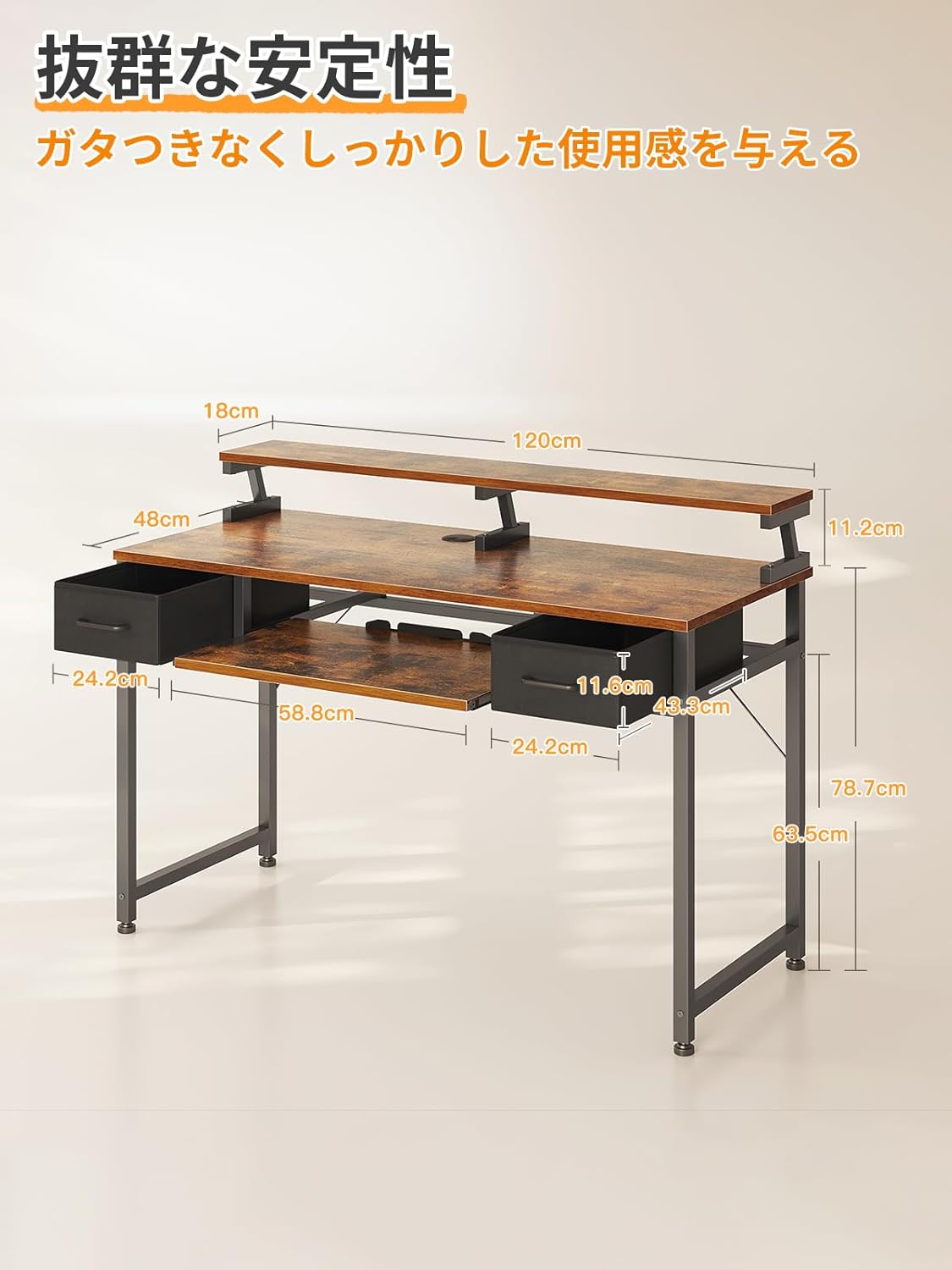
Figure 3.1: Comprehensive dimensional drawing of the ODK computer desk, indicating all major measurements for planning your space.
4. Setup and Assembly
This desk requires assembly. A detailed Japanese instruction manual and the necessary wrench are included in the package. Please follow the steps below for a smooth assembly process.
4.1. Before You Begin
- Check Package Contents: Verify all parts and hardware listed in the included instruction manual are present.
- Clear Workspace: Ensure you have a clean, spacious area for assembly to prevent damage to parts or your floor.
- Tools: The necessary wrench is provided. No additional tools are required.
4.2. Assembly Steps (General Guidance)
- Assemble the Frame: Attach the steel frame components according to the diagrams in the manual. Ensure all screws are finger-tightened initially.
- Attach Desktop Panels: Secure the main desktop and the monitor stand panel to the assembled frame.
- Install Keyboard Slider Rails: Mount the rails for the keyboard slider to the underside of the main desktop.
- Insert Keyboard Slider: Slide the keyboard tray onto its rails.
- Assemble and Insert Drawers: Assemble the fabric drawers and place them into their designated slots.
- Final Tightening: Once all components are in place, systematically tighten all screws with the provided wrench. Do not overtighten.
- Adjust Feet: Adjust the leveling feet at the bottom of the desk legs to ensure the desk is stable and level on your floor.
For detailed, step-by-step instructions and diagrams, please refer to the assembly manual included in your product packaging.
5. Operating Instructions
The ODK computer desk is designed for versatile use. Here are some guidelines for optimal operation:
5.1. Workspace Organization
- Monitor Placement: Utilize the elevated monitor stand for your display(s) to achieve an ergonomic viewing height. This helps reduce neck and eye strain.
- Keyboard and Mouse: Use the pull-out keyboard slider for your keyboard and mouse. This frees up main desktop space and allows for a more comfortable arm position.
- Storage Drawers: Store documents, office supplies, or personal items in the two fabric drawers to keep your main desktop clear and organized.
- Cable Management: Route power and data cables through the integrated cable grommet on the desktop to maintain a tidy appearance and prevent tangles.

Figure 5.1: The ODK desk demonstrating its adaptability for both a gaming setup with a large curved monitor and a professional office workspace with dual flat monitors.
5.2. Ergonomic Use
Proper posture is crucial for comfort and health during extended periods of desk use. The monitor stand is designed to help you achieve this.
- Monitor Height: Adjust your monitor(s) so the top of the screen is at or slightly below eye level. The monitor stand helps achieve this.
- Keyboard Position: Keep your keyboard and mouse close to your body on the slider, allowing your elbows to remain at a 90-degree angle.
- Chair Adjustment: Use an adjustable office chair to support your back and ensure your feet are flat on the floor or a footrest.

Figure 5.2: An illustration demonstrating the ideal ergonomic sitting posture at the desk, emphasizing monitor height and keyboard placement to reduce strain.
6. Maintenance
Regular maintenance will help preserve the appearance and functionality of your ODK computer desk.
- Cleaning: Wipe surfaces with a soft, damp cloth. Avoid harsh chemicals or abrasive cleaners, which can damage the finish.
- Spills: Immediately wipe up any spills to prevent staining or damage to the wood surface.
- Hardware Check: Periodically check all screws and fasteners to ensure they are tight. Retighten if necessary, but do not overtighten.
- Drawer Care: The fabric drawers can be spot cleaned with a mild detergent if needed. Ensure they are completely dry before placing items back inside.
- Avoid Excessive Weight: Do not place excessively heavy items on the keyboard slider or drawers to prevent damage or deformation.
7. Troubleshooting
If you encounter any issues with your ODK computer desk, please refer to the following common troubleshooting tips:
7.1. Desk is Wobbly
- Check Leveling Feet: Ensure all adjustable feet at the bottom of the desk legs are properly adjusted to compensate for uneven flooring.
- Tighten Screws: Verify that all assembly screws are securely tightened. Loose connections can cause instability.

Figure 7.1: An adjustable foot, used to stabilize the desk on uneven surfaces.
7.2. Keyboard Slider Not Moving Smoothly
- Check for Obstructions: Ensure there are no objects blocking the slider rails.
- Clean Rails: Dust or debris in the rails can impede movement. Clean the rails with a dry cloth.
- Lubrication: If necessary, apply a small amount of silicone-based lubricant to the slider mechanisms.
7.3. Drawers Not Fitting Properly
- Reassemble Drawers: Ensure the fabric drawers are assembled correctly and their bases are fully inserted.
- Check Desk Frame: Verify that the desk frame itself is assembled squarely and not warped, which could affect drawer fit.
8. Warranty and Support
ODK is committed to providing high-quality products. If you experience any initial defects with your purchased product, please do not hesitate to contact us. Our customer support team will assist you with any issues or questions you may have.
For support, please contact the seller directly through your purchase platform or visit the official ODK brand store for more information:


