Important Safety Information
Please read and understand all safety instructions before installing or operating this product. Failure to follow these instructions may result in electric shock, fire, or other hazards.
- Ensure the power supply is disconnected before installation or maintenance.
- This product is designed for outdoor use and is rated IP65/IP67 for weather resistance. However, avoid submerging the lights in water.
- Operate only with a 120 Volt AC power supply. The total wattage for this 50FT string light is 72 Watts.
- Do not attempt to repair or modify the product. Contact qualified personnel for service.
- Keep away from flammable materials.
Package Contents
Verify that all components are present before beginning installation:
- 1 x 50FT Smart RGBIC Permanent Outdoor String Light (Model: SL50-36/RGB/AG)
- Mounting Screws and Anchors
- 3M VHB Adhesive Pads (pre-attached to light pods)
- Power Adapter and Controller

Image: Package contents including the 50FT string light, power adapter, controller, and mounting hardware.
Setup and Installation
1. Planning Your Installation
Before installation, plan the layout of your lights. The 50-foot string light is designed to be installed under eaves or along other outdoor surfaces. Ensure the power outlet is within reach of the power adapter cable.

Image: Lights installed discreetly under the eaves of a house, showing the "Hidden within the Eaves" concept.
2. Mounting the Lights
The lights can be mounted using either the pre-attached 3M VHB adhesive or screws for a more permanent fixture.
- Surface Preparation: Clean the mounting surface thoroughly with a cloth or tissue to ensure it is free of dust, dirt, and moisture. This is crucial for optimal adhesive performance.
- Placement: Install the string lights approximately 1.91 to 3.94 inches away from the wall surface to allow for optimal light dispersion.
- Adhesive Installation:
- Tear off the VHB adhesive backing from the back of each light pod.
- Press each light pod firmly against the prepared surface for at least 5 seconds to ensure a strong bond.
- Screw Installation: For added security or on surfaces where adhesive may not hold, use the provided screws. Each light pod has a built-in hole for screw mounting.
- Attach 4 screw clips to each string light to keep them secure.
- Drill pilot holes if necessary and secure the light pods using the provided screws and anchors.

Image: Detailed installation steps showing surface cleaning, adhesive removal, firm pressing, and screw attachment.
3. Connecting Multiple Strands (Optional)
If you wish to extend your lighting display, additional 16-foot extension strands (sold separately) can be connected. Ensure the total length does not exceed the maximum recommended for your power supply.
- Connect two string lights via the waterproof connectors.
- Firmly screw the cap of the last string light section to ensure a secure, weatherproof seal.
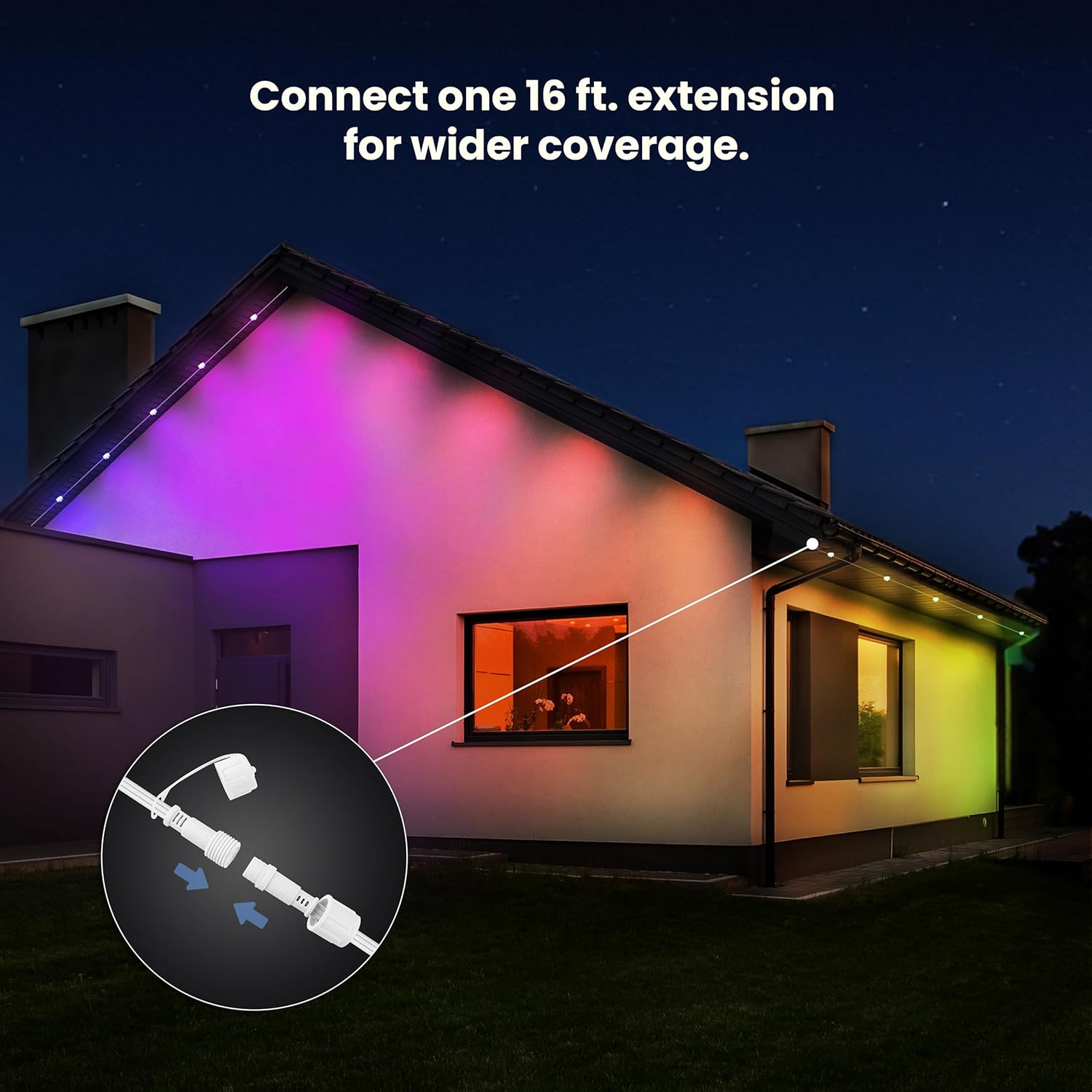
Image: Illustration demonstrating the connection of an extension light strand to the main unit.
4. Power Connection
Plug the power adapter into a standard 120V outdoor-rated electrical outlet. Ensure the connection is secure and protected from moisture.
Operating Instructions
1. Initial Power On
Once connected to power, the lights will illuminate in a default mode. You can use the physical switch on the power cord for basic On/Off control.
2. Feit Electric App Setup
To unlock the full range of features, download the Feit Electric app on your smartphone or tablet.
- Download the "Feit Electric" app from your device's app store.
- Create an account or log in.
- Ensure your smartphone is connected to a 2.4GHz Wi-Fi network. The lights only support 2.4GHz Wi-Fi.
- Follow the in-app instructions to add your new string lights. This typically involves putting the lights into pairing mode (refer to app for specific steps).

Image: The Feit Electric app interface showing color selection and light control options.
3. App Features
- Color Control: Select from millions of colors using the RGBIC technology.
- Preset Scenes: Choose from 8 built-in scenes or over 75 additional scenes available in the app for various occasions and moods.
- Customization: Control individual light pods or group specific areas of your lighting display for unique patterns and sequences. Note: Individual light control may operate in groups of three LEDs.
- Scheduling: Set schedules for your lights to turn On/Off automatically at specific times or days.
- Countdown Timer: Utilize the countdown timer feature for temporary lighting effects.

Image: The Feit Electric app showing options for scheduling and setting a countdown timer for the lights.

Image: The Feit Electric app displaying options to group and control different sections of the permanent lights.
4. Voice Control Integration
The Feit Electric Smart RGBIC Permanent Outdoor String Lights are compatible with Amazon Alexa and Google Assistant.
- Ensure your lights are successfully paired with the Feit Electric app.
- Open your Alexa or Google Home app.
- Follow the instructions within the voice assistant app to link your Feit Electric account.
- Once linked, you can use voice commands such as:
- "Alexa, turn on outdoor lights."
- "Hey Google, set outdoor lights to red."
- "Alexa, dim outdoor lights to 50%."

Image: An Amazon Echo Dot, illustrating the product's compatibility with Alexa and Google Assistant for voice control.
Maintenance
- Cleaning: Periodically wipe the light pods and wiring with a soft, damp cloth to remove dirt and debris. Ensure the power is disconnected before cleaning.
- Weather Resistance: The lights are IP65/IP67 rated for outdoor use, designed to withstand rain and various weather conditions. Regularly inspect connections for any signs of wear or damage to maintain weatherproofing.
- Lifespan: These LED lights have an estimated lifespan of 25,000 hours, requiring minimal replacement.

Image: A house facade lit with vibrant colors from the permanent outdoor lights, demonstrating their aesthetic appeal and year-round use.
Troubleshooting
| Problem | Possible Cause | Solution |
|---|---|---|
| Lights do not turn on. | No power, loose connection, or faulty outlet. | Check power outlet, ensure all connections are secure. Verify the power switch on the cord is ON. |
| Cannot connect to Wi-Fi. | Incorrect Wi-Fi band (not 2.4GHz), incorrect password, or too far from router. | Ensure your router is broadcasting a 2.4GHz network. Move closer to the router during setup. Double-check Wi-Fi password. Restart the lights and try pairing again. |
| Lights lose settings after power outage. | Temporary memory loss due to power interruption. | Reconnect to the Feit Electric app and reapply desired settings. |
| Individual light control is not precise (e.g., colors apply in groups). | Product design limitation. | This model controls lights in groups, typically three LEDs at a time, rather than individually. Adjust expectations for granular control. |
| Voice control not working. | Not linked to Alexa/Google Assistant, or incorrect commands. | Verify the Feit Electric account is linked in your Alexa/Google Home app. Use correct voice commands. |
Specifications

Image: A graphic displaying key specifications of the permanent light system.
| Feature | Detail |
|---|---|
| Model Number | SL50-36/RGB/AG |
| Length | 50 Feet |
| Light Pods Per String | 12 (3 strings included, 36 light pods total) |
| Wattage | 72W |
| Voltage | 120 Volts |
| Wiring Color | White |
| Color Options | Millions of Colors (RGBIC) + 8 Built-in Scenes |
| Control Method | Feit Electric App, Voice Control (Alexa, Google Assistant) |
| Wi-Fi Compatibility | 2.4GHz Wi-Fi networks only |
| Water Resistance Rating | IP65/IP67 Outdoor Rated |
| Max Connectable Sets | 3 Sets (up to 150 Feet total) |
| UPC | 017801729177 |
Warranty and Support
This Feit Electric product comes with a 2-year warranty from the date of purchase. This warranty covers defects in materials and workmanship under normal use.
For technical support, warranty claims, or further assistance, please visit the official Feit Electric website or contact their customer service department. Contact information can typically be found on the product packaging or the manufacturer's website.
Please retain your proof of purchase for warranty purposes.


