
Introduction
Thank you for choosing the JUMMICO Height-Adjustable Electric Standing Desk. This manual provides essential information for the safe and efficient assembly, operation, and maintenance of your new desk. Designed for versatility and comfort, this desk features electric height adjustment, integrated wireless charging, and a convenient power outlet with USB ports to enhance your workspace. Please read this manual thoroughly before beginning assembly or operation to ensure proper use and longevity of your product.
Safety Information
- Ensure all power connections are secure and meet local electrical standards.
- Do not overload the desk beyond its specified weight capacity.
- Keep the desk and its electrical components dry. Avoid spills and moisture.
- During height adjustment, ensure there are no obstructions above or below the desk to prevent collisions.
- Activate the child lock feature to prevent unintended operation, especially in households with children or pets.
- Do not attempt to disassemble or repair the motor or control system yourself. Contact qualified service personnel for assistance.
Package Contents
Please verify that all components are present and undamaged before beginning assembly. If any parts are missing or damaged, please contact customer support.
- Desk Frame (Legs and Crossbar)
- Tabletop (Multi-part, typically 3-4 sections depending on size)
- Control Panel with Digital Display
- Wireless Charging Module
- Built-in Power Strip with 3 Euro Sockets and 2 USB Ports
- Power Cable
- 1 Foldable Iron Cable Box
- 2 Hooks (for headphones/bags)
- 4 Adjustable Feet
- Assembly Hardware (screws, bolts, tools)
- Illustrated Instruction Manual
Setup and Assembly
Assembly of the JUMMICO desk is designed to be straightforward with clear instructions and pre-drilled holes. It is recommended to have a second person assist with certain steps, especially when handling the tabletop.
- Unpack and Identify Parts: Carefully remove all components from the packaging. Lay them out on a clean, soft surface to prevent scratches. Refer to the included parts list to ensure everything is present.
- Assemble the Desk Frame: Attach the legs to the crossbar according to the illustrated instructions. Ensure all screws are tightened securely.
- Attach the Tabletop: Position the multi-part tabletop onto the assembled frame. Align the pre-drilled holes and secure the tabletop sections to the frame using the provided screws. Ensure the tabletop is flush and stable.
- Install Control Panel and Power Strip: Mount the control panel and the integrated power strip into their designated slots on the tabletop. Connect the necessary cables from the control panel and power strip to the desk's motor and power supply unit.
- Install Cable Management and Accessories: Assemble and attach the foldable iron cable box underneath the desk. Install the two hooks on the sides of the desk as desired. Attach the adjustable feet to the bottom of the desk legs.
- Connect to Power: Once fully assembled, connect the desk's main power cable to a suitable wall outlet.

Figure 1: Fully assembled JUMMICO Electric Standing Desk with accessories.

Figure 2: Visual guide for desk assembly steps.

Figure 3: Integrated cable management tray for organized wiring.
Operating Instructions
Your JUMMICO electric standing desk is equipped with an intuitive control panel for easy height adjustment and other smart features.
Height Adjustment
- Up/Down Buttons: Use the up (▲) and down (▼) arrows on the control panel to manually adjust the desk height. The digital display will show the current height.
- Memory Presets: The desk features 2 height memory presets. To save a height, adjust the desk to your desired position, then press the 'M' button followed by the desired preset number (e.g., '1' or '2'). To recall a saved height, simply press the corresponding preset number button.

Figure 4: Illustration of the desk's height adjustment range (72cm to 118cm).
Smart Features
- Anti-Collision System: The sensitive anti-collision system detects reactive forces and automatically stops movement to prevent impacts with objects or people.
- Child Lock: Activate the child lock feature from the control panel to disable height adjustment and prevent accidental changes. Refer to the control panel diagram for the specific button.
- Sitting Reminder Alarm: The control panel includes an alarm clock feature to remind you to change your working position (e.g., from sitting to standing) at set intervals.

Figure 5: Multifunctional intelligent controller with buttons for height adjustment, memory presets, sitting reminder, and child lock.
Integrated Charging and Power
- Wireless Charging: Place your compatible mobile phone on the designated wireless charging pad on the desk surface for convenient charging.
- Built-in Power Strip: Utilize the integrated power strip with 3 Euro power connections and 2 USB ports to power and charge your devices such as laptops, tablets, and smartphones.

Figure 6: Wireless charging pad integrated into the desk surface.
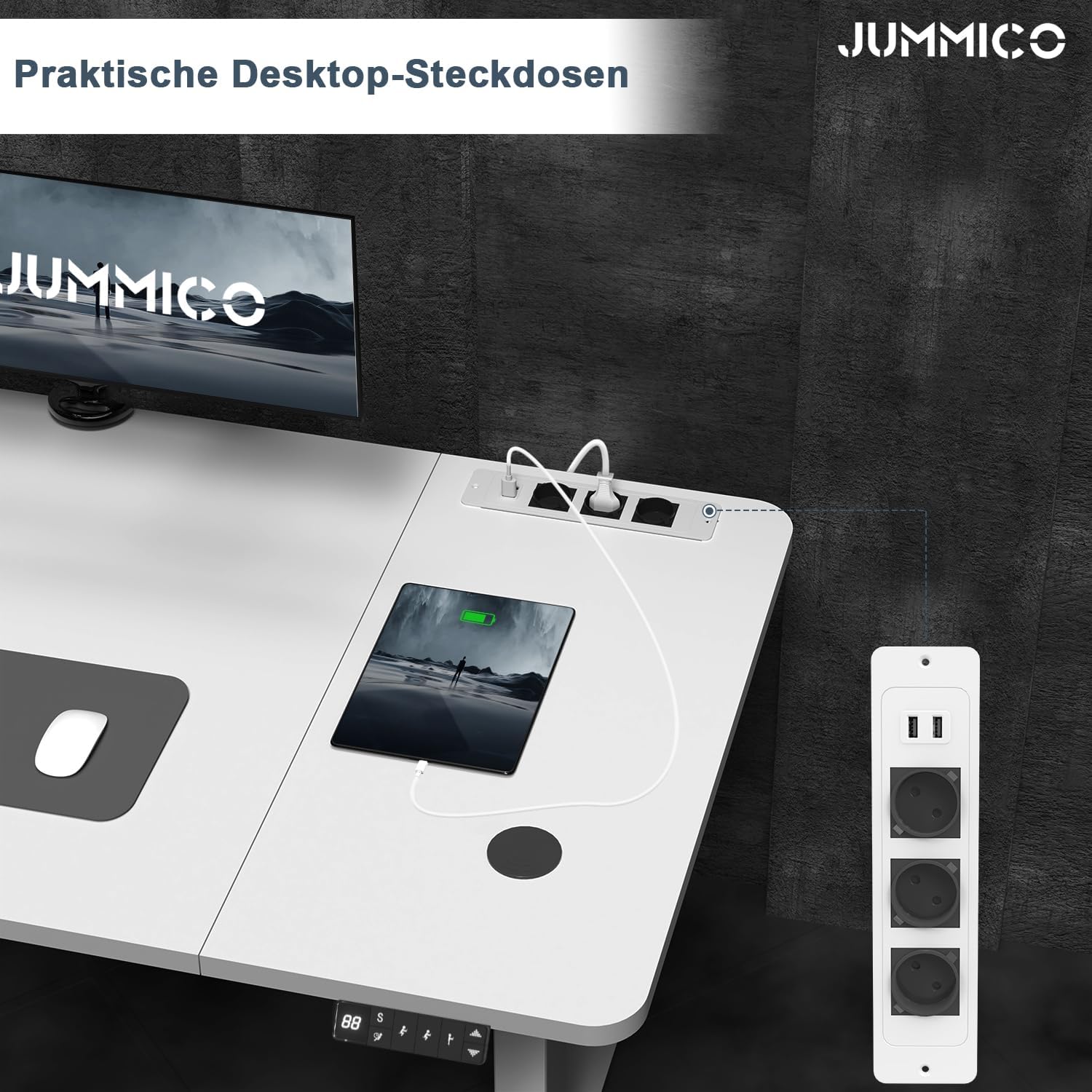
Figure 7: Convenient desktop power sockets with Euro and USB ports.
Maintenance
Regular maintenance ensures the longevity and optimal performance of your JUMMICO desk.
- Cleaning: Wipe the desk surface and frame with a soft, damp cloth. Avoid abrasive cleaners or harsh chemicals that could damage the finish.
- Cable Management: Periodically check and organize cables to prevent tangles and ensure smooth operation of the height adjustment mechanism.
- Screw Tightness: Occasionally check all screws and bolts to ensure they remain tight, especially after initial assembly and use.
- Motor Care: Keep the motor and moving parts free from dust and debris. Do not lubricate the motor or internal mechanisms unless specifically instructed by JUMMICO support.
Troubleshooting
If you encounter any issues with your JUMMICO desk, refer to the following common problems and solutions:
| Problem | Possible Cause | Solution |
|---|---|---|
| Desk does not move or only one leg moves. | Power supply issue, loose cable connection, motor malfunction, or imbalance. | Check if the power cable is securely plugged into both the desk and the wall outlet. Ensure all motor cables are properly connected. Try resetting the desk (refer to specific reset instructions in the full manual if available, or unplug for 30 seconds and replug). If only one leg moves, check for obstructions or damage to that leg's mechanism. |
| Desk stops moving unexpectedly. | Anti-collision system activated, overload, or overheating. | Check for any obstructions around the desk. Reduce the weight on the desk if it exceeds the maximum load capacity. Allow the desk to cool down if it has been used continuously for an extended period. |
| Control panel display shows an error code. | Specific system error. | Note the error code and refer to the detailed troubleshooting section in the complete product manual or contact JUMMICO customer support with the code. |
| Wireless charging not working. | Phone not compatible, misaligned, or power issue. | Ensure your device supports wireless charging. Reposition the device on the charging pad. Check if the desk is powered on. |
Specifications
| Feature | Detail |
|---|---|
| Brand | JUMMICO |
| Model Number | 0134 |
| Color | White |
| Product Dimensions (L x W x Min H) | 140 x 70 x 72 cm (for 140x70cm variant) |
| Adjustable Height Range | 72 cm to 118 cm |
| Material | Alloy Steel (Frame), Multi-part Tabletop |
| Item Weight | 30 Kilograms |
| Max Load Capacity | 70 KG |
| Special Features | Electric Height Adjustment, Wireless Charging, 3 Euro Sockets, 2 USB Ports, Anti-Collision System, Child Lock, 2 Memory Presets, Sitting Reminder Alarm |

Figure 8: Desk stability features and 70KG load capacity.
Warranty and Support
JUMMICO is committed to providing high-quality products and customer satisfaction. While specific warranty details are not provided in this document, please retain your proof of purchase for any warranty claims.
For technical assistance, troubleshooting beyond this guide, or to inquire about replacement parts, please contact JUMMICO customer support through the retailer's platform or the official JUMMICO website. Our team is available to assist you with any questions or concerns regarding your electric standing desk.
For more information, you may visit the JUMMICO Brand Store.


