Introduction
Thank you for choosing the GOWENIC 5.3 Earbuds. This manual provides essential information for setting up, operating, and maintaining your new earbuds. Please read it carefully before use to ensure optimal performance and longevity of your device.
These earbuds feature advanced Bluetooth 5.3 technology for stable connectivity, an IPX5 waterproof rating, a comfortable ear clip design, and directional sound technology for a clear audio experience.
Package Contents
Please check the package for the following items:
- 2 x Clip On BT Earbuds
- 1 x Charging Case
- 1 x Charging Cable
- 1 x Instruction Manual (this document)
Specifications
| Brand | GOWENIC |
| Model | 5.3 Earbuds |
| Material | PC, ABS |
| Wireless Communication Technology | Bluetooth 5.3 |
| Earbud Battery Capacity | 50mAh (each earbud) |
| Charging Case Battery Capacity | 400mAh |
| Operating Voltage | 3-4.2V |
| Waterproof Rating | IPX5 |
| Form Factor | Ear Clip, Open Ear |
Setup
1. Charging the Earbuds and Charging Case
Before first use, fully charge the earbuds and the charging case. Place the earbuds into the charging case. Connect the charging cable to the charging case and a USB power source.
The charging indicators (if present, not specified in detail) will show the charging status. Once fully charged, disconnect the cable.
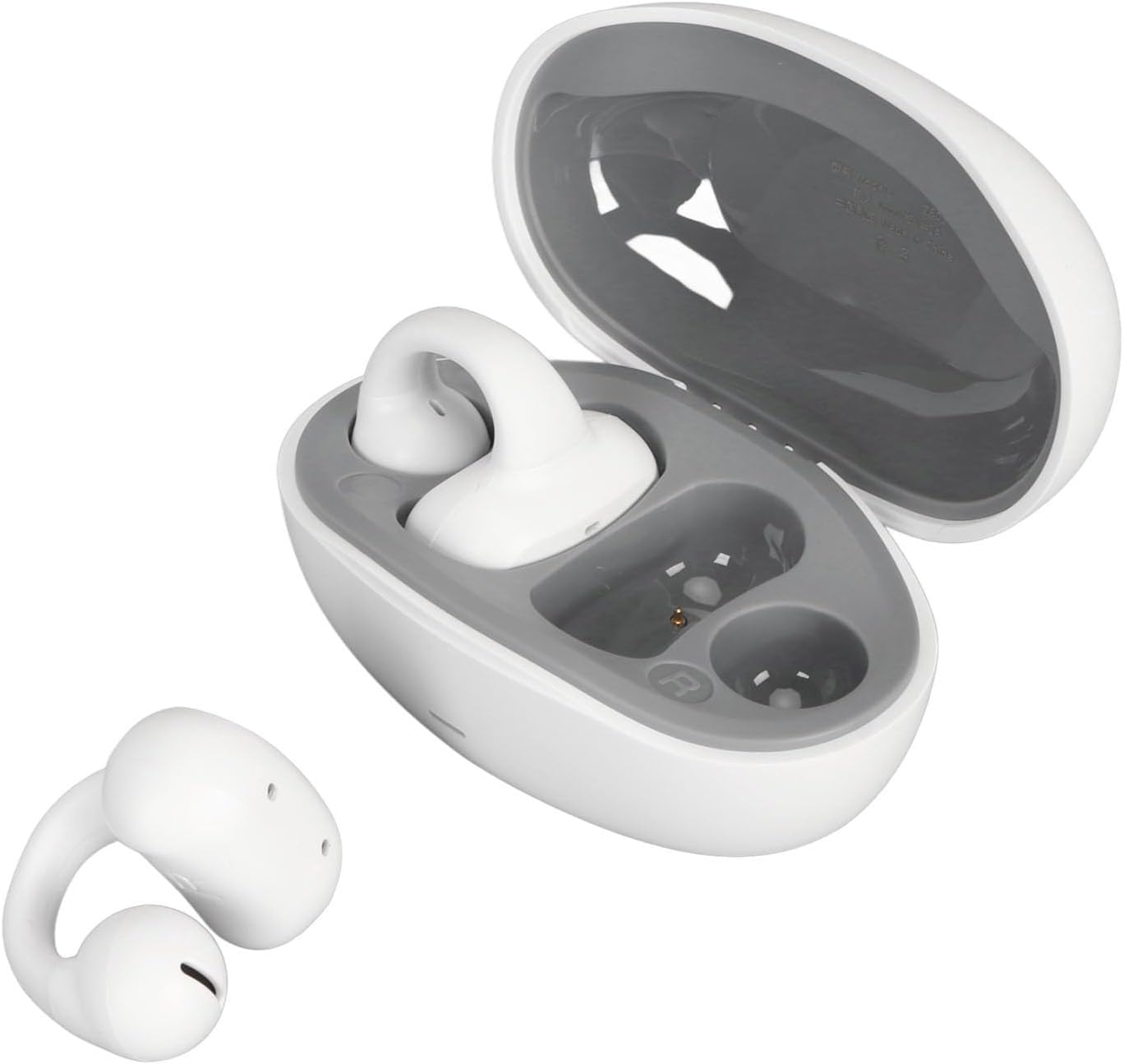
Image: GOWENIC 5.3 Earbuds shown with their charging case open, illustrating how the earbuds fit inside for charging.
2. Pairing with Your Device
- Power On: Open the charging case. The earbuds will automatically power on and enter pairing mode.
- Activate Bluetooth: On your smartphone or other device, enable Bluetooth.
- Select Device: Look for "GOWENIC 5.3 Earbuds" (or similar name) in the list of available Bluetooth devices and select it to connect.
- Confirmation: Once connected, you will hear an audio prompt, and the earbuds' indicator lights (if present) will change.

Image: A close-up of hands placing the GOWENIC 5.3 Earbuds into their charging case, demonstrating the quick connect feature upon removal.
Quick Connect Feature: The earbuds automatically power on and pair when taken out of the case. They will automatically shut down and disconnect when placed back into the case and the lid is closed.
3. Wearing the Earbuds
The GOWENIC 5.3 Earbuds feature an ear clip design. Gently clip each earbud onto your ear, ensuring a comfortable and secure fit. The open-ear design allows you to remain aware of your surroundings.

Image: A rear view of the GOWENIC 5.3 Earbuds, highlighting their compact design, with a blurred image of a person running in the background, suggesting suitability for active use.
Operating Instructions
Basic Functions
- Power On: Open the charging case, or press and hold the touch control area on both earbuds for 3 seconds.
- Power Off: Place earbuds back into the charging case and close the lid, or press and hold the touch control area on both earbuds for 5 seconds.
- Play/Pause: Tap the touch control area on either earbud once.
- Next Track: Double-tap the touch control area on the right earbud.
- Previous Track: Double-tap the touch control area on the left earbud.
- Answer/End Call: Tap the touch control area on either earbud once during an incoming call or active call.
- Reject Call: Press and hold the touch control area on either earbud for 2 seconds during an incoming call.
- Voice Assistant: Triple-tap the touch control area on either earbud.
Note: Specific touch control functions may vary slightly. Refer to the quick start guide included in your package for detailed diagrams if available.
Directional Sound Technology
The GOWENIC 5.3 Earbuds utilize adaptive directional sound with a +25° integrated sound beam propagation angle. This technology efficiently directs sound to your ear canal, minimizing sound leakage and providing a clear, immersive audio experience while keeping your ears open to ambient sounds.

Image: A front view of one GOWENIC 5.3 Earbud, showcasing its design and the speaker grille for directional sound.
Maintenance
Cleaning
- Use a soft, dry, lint-free cloth to clean the earbuds and charging case.
- Do not use abrasive cleaners, solvents, or aerosol sprays.
- Avoid getting moisture in any openings.
Storage
When not in use, store the earbuds in their charging case to protect them from dust and damage. Store in a cool, dry place away from extreme temperatures.
Water Resistance (IPX5)
The earbuds are rated IPX5 waterproof, meaning they are resistant to splashes and sweat. They are suitable for sports and outdoor activities. However, they are not designed for submersion in water. Do not expose them to running water or wear them while swimming or showering.
Troubleshooting
| Problem | Solution |
|---|---|
| Earbuds won't turn on. | Ensure the earbuds and charging case are fully charged. Place earbuds in the case and close the lid, then open again. |
| Earbuds won't pair with device. |
|
| No sound or low volume. |
|
| Intermittent connection. |
|
Warranty and Support
GOWENIC products are designed and manufactured to the highest quality standards. For warranty information and customer support, please refer to the warranty card included in your package or visit the official GOWENIC website. Please retain your proof of purchase for any warranty claims.
For further assistance, you may contact GOWENIC customer service through their official channels.
Note: Specific warranty terms and conditions may vary by region.


