
1. Introduction
Thank you for choosing the VGR V-965 Hair Clipper. This professional cordless hair clipper is designed for precise and efficient grooming. Featuring stainless steel blades, an LED display, and convenient USB recharging, it offers a superior cutting experience. Please read this manual thoroughly before use to ensure safe operation and optimal performance.
2. Safety Instructions
WARNING: To reduce the risk of electric shock, injury, or fire, always follow these basic safety precautions:
- Do not use this appliance near water (e.g., in a bathtub, shower, or near a sink).
- Keep the appliance out of reach of children.
- Exercise caution when using the clipper near sensitive areas such as eyes and ears.
- Do not use the clipper on wet or damaged skin.
- Ensure the appliance is fully dry before charging or use.
- Only use the provided charging cable and adapter.
- Do not disassemble or attempt to repair the appliance yourself. Contact qualified service personnel.
3. Package Contents
Verify that all items are present in the package:
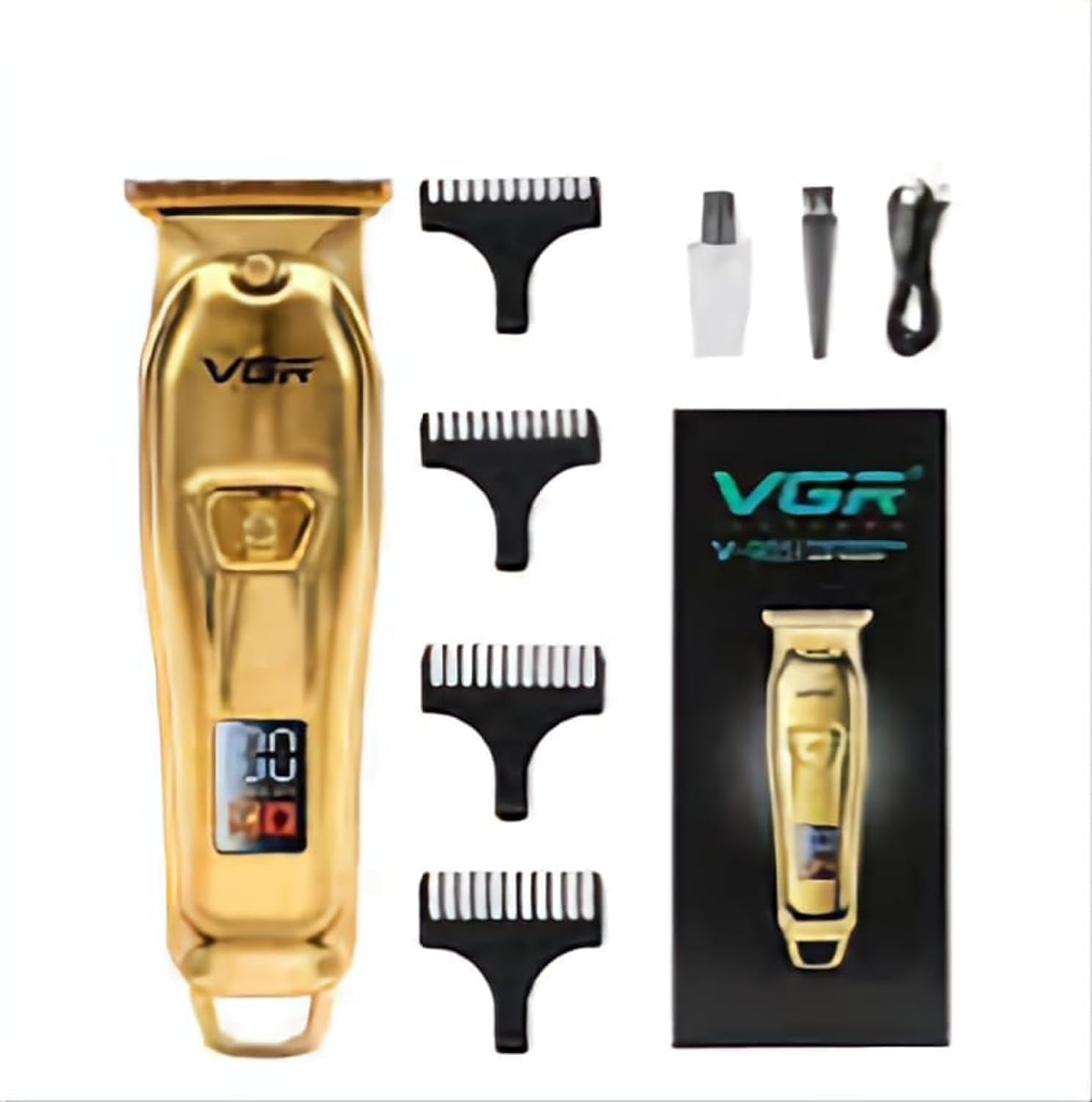
- VGR V-965 Hair Clipper
- USB Charging Cable
- Cleaning Brush
- Lubricating Oil
- Guide Combs (various sizes)
- User Manual


4. Product Overview
The VGR V-965 features a durable design with high-quality components for a precise cut.
Key Features:
- Stainless Steel Blades: Precision-ground, self-sharpening blades for smooth cutting.
- Cordless Operation: Powered by a 600mAh Lithium-ion battery for maximum flexibility.
- LED Display: Shows battery status and other relevant information.
- USB Rechargeable: Convenient charging via any USB port.
- Ergonomic Design: Comfortable to hold and easy to maneuver.
Components:
- Cutter Head (Stainless Steel Blades)
- On/Off Switch
- LED Display
- Charging Port (USB)


5. Setup and Charging
Initial Setup:
- Unpack all components and ensure nothing is missing or damaged.
- Before first use, fully charge the clipper.
Charging the Clipper:
- Connect the USB charging cable to the charging port on the clipper.
- Plug the other end of the USB cable into a USB power adapter (not included) or a computer USB port.
- The LED display will indicate the charging status.
- A full charge takes approximately 1.5 hours.
- Once fully charged, the clipper provides approximately 100 minutes of cordless operation.
- Disconnect the clipper from the charger once charging is complete.
6. Operating Instructions
Attaching Guide Combs:
- Ensure the clipper is turned off.
- Select the desired guide comb size.
- Align the comb with the clipper head and push it firmly until it clicks into place.
- To remove, gently pull the comb away from the clipper head.
Trimming Hair:
- Ensure hair is clean and dry for best results.
- Press the On/Off switch to turn on the clipper. The LED display will illuminate.
- Start trimming from a longer setting if you are unsure of the desired length.
- Move the clipper against the direction of hair growth, using smooth, even strokes.
- For detailing or dry shaving without a comb, use the bare blade carefully.
- After use, press the On/Off switch to turn off the clipper.

7. Maintenance
Cleaning the Blades:
- Turn off the clipper and disconnect it from any power source.
- Remove any attached guide comb.
- Use the cleaning brush to remove loose hairs from the blades and the clipper body.
- For a more thorough clean, the blade head can be carefully detached (refer to specific instructions if provided with the product for blade removal).
Oiling the Blades:
- After cleaning, apply a few drops of the provided lubricating oil to the blades.
- Turn on the clipper for a few seconds to allow the oil to distribute evenly.
- Wipe off any excess oil with a soft cloth. Regular oiling ensures optimal cutting performance and extends blade life.
Storage:
- Store the clipper in a cool, dry place, away from direct sunlight and moisture.
- Keep the protective cap on the blades when not in use.
8. Troubleshooting
| Problem | Possible Cause | Solution |
|---|---|---|
| Clipper does not turn on. | Battery is depleted. | Charge the clipper fully. |
| Poor cutting performance. | Blades are dirty or not oiled. | Clean and oil the blades as per maintenance instructions. |
| Clipper pulls hair. | Blades are dull or clogged. | Clean and oil blades. If problem persists, blades may need replacement (contact support). |
| Clipper gets hot. | Extended use or lack of lubrication. | Allow clipper to cool down. Ensure blades are clean and oiled. |
If you encounter issues not listed here, please contact VGR customer support.
9. Specifications
- Model: V-965
- Brand: VGR
- Power Source: Battery Operated (600mAh Lithium-ion)
- Charging Time: Approximately 1.5 hours
- Operating Time: Approximately 100 minutes
- Blade Material: Stainless Steel
- Body Material: Acrylonitrile Butadiene Styrene (ABS)
- Special Features: Self-sharpening blades, USB rechargeable, LED display
- Recommended Uses: Body, Dry Shaving
- Target Audience: Men
- Color: Gold
- Dimensions: 18.4 x 8.2 x 5.7 cm
- Weight: 320 grams
10. Warranty and Support
For warranty information, product support, or service inquiries, please refer to the warranty card included in your package or visit the official VGR website. Please have your model number (V-965) and purchase details ready when contacting support.
Manufacturer: VGR


