
1. Introduction
The JBL COL800WH is an elegant 32-inch (800 mm) slim column loudspeaker designed to provide wide horizontal and narrow vertical sound coverage. It features a built-in 10° down-tilt for optimal coverage, allowing for flush wall installation. Its compact design integrates seamlessly into various architectural settings, making it suitable for conference rooms, lecture halls, retail spaces, and other applications requiring high performance and discreet aesthetics.
2. Package Contents
Verify that all components are present in the package:
- JBL Professional COL800WH Slim Column Speaker (1 unit)
- L-brackets (2 units) for horizontal or vertical mounting
- Low-profile swivel (pan) / tilt wall bracket (1 unit)
- Terminal input cover (1 unit)
3. Setup and Installation
3.1 Speaker Placement
The COL800WH is designed for wall mounting. Its slim profile and built-in 10° down-tilt allow for effective sound projection even when mounted flat against a wall. Consider the listening area to optimize placement for desired coverage.
3.2 Mounting Options
Two types of brackets are included for versatile installation:
- L-brackets: These can be installed on the top and bottom panels for horizontal pan aiming, or on the left and right side panels for vertical orientation. Both configurations allow for close-to-the-wall installation.
- Low-profile swivel (pan) / tilt wall bracket: This bracket allows for an additional 10° of down-tilt adjustment, supplementing the speaker's inherent 10° down-tilt.
Important: Ensure the mounting surface can support the speaker's weight (approximately 13.97 pounds or 6.34 kg) and that appropriate fasteners are used. Consult a qualified installer if unsure.
3.3 Wiring and Connections
The COL800WH offers flexible connectivity:
- 70V/100V Distributed Systems: Utilize the built-in 60-watt multi-tap transformer for connection to 70V or 100V constant voltage speaker lines. Select the appropriate tap setting based on system requirements.
- 8-ohm Direct Operation: For direct low-impedance applications, switch the speaker to 8-ohm mode. This is suitable for home audio or commercial installations where a direct connection to an amplifier is preferred.
After connecting the speaker wires, secure the included terminal input cover to protect the connections from dust and water ingress.

Figure 1: Front view of the JBL Professional COL800WH Slim Column Speaker.
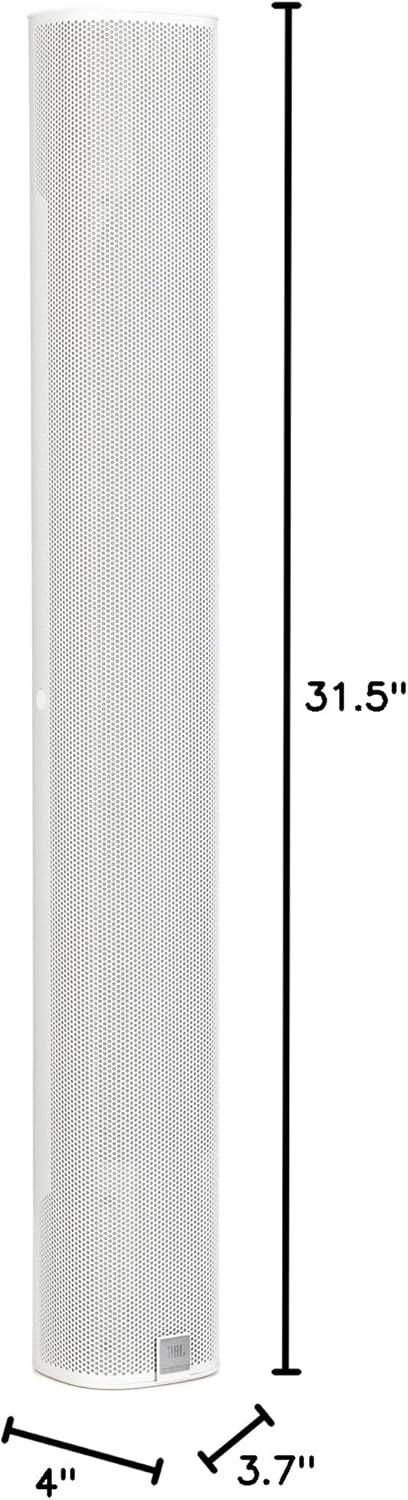
Figure 2: Dimensions of the JBL Professional COL800WH Slim Column Speaker (31.5" H x 4" W x 3.7" D).
4. Operation
4.1 Powering On/Off
The speaker does not have a dedicated power switch. It receives power directly from the connected amplifier or audio system. Ensure the amplifier is powered on for the speaker to function.
4.2 Audio Playback
Once connected to an appropriate audio source and amplifier, the COL800WH will reproduce audio. Adjust volume and equalization settings on your amplifier or audio processor for optimal sound quality. The speaker is designed for a frequency range of 85 Hz to 20 kHz, delivering clear sound for both music and speech.
4.3 Sound Dispersion
The speaker provides a wide 160° horizontal coverage and a focused 60° vertical coverage. This design ensures excellent sound dispersion throughout the listening area, minimizing dead spots and providing consistent audio quality.
4.4 Compatible Devices
The COL800WH can be connected to various audio sources, including smartphones, tablets, MP3 players, desktops, televisions, projectors, and laptops, via a compatible amplifier or audio system.
5. Maintenance
The JBL COL800WH is designed for durability and minimal maintenance. It has an IP54 rating (per IEC60529), indicating protection against dust ingress and splashing water from any direction. The drivers are water-treated, and the grille features a water-backing for enhanced protection.
- Cleaning: Use a soft, dry cloth to wipe the speaker cabinet. For stubborn dirt, a slightly damp cloth can be used, followed by a dry cloth. Avoid abrasive cleaners or solvents.
- Inspection: Periodically check mounting hardware and cable connections to ensure they are secure.
6. Troubleshooting
If you encounter issues with your JBL COL800WH speaker, refer to the following common troubleshooting steps:
- No Sound:
- Ensure the amplifier or audio source is powered on and functioning correctly.
- Verify all audio cables are securely connected to both the speaker and the amplifier.
- Check the volume levels on your amplifier and audio source.
- Confirm the speaker's impedance setting (70V/100V or 8-ohm) matches your amplifier's output.
- Distorted Sound:
- Reduce the volume level on your amplifier or audio source.
- Check for damaged cables or loose connections.
- Ensure the amplifier is not overdriven or clipping.
- Intermittent Sound:
- Inspect all cable connections for looseness or damage.
- Ensure the power supply to the amplifier is stable.
If the issue persists after performing these checks, contact JBL Professional customer support for further assistance.
7. Specifications
| Feature | Specification |
|---|---|
| Model | COL800WH |
| Speaker Type | Column |
| Color | White |
| Product Dimensions (D x W x H) | 3.7" x 4" x 31.5" (93 mm x 102 mm x 800 mm) |
| Item Weight | 13.97 pounds (6.34 kg) |
| Woofer Size | Four 5-inch x 2.25-inch (125 x 55 mm) racetrack woofers |
| Tweeter Size | Two 0.8-inch (20 mm) tweeters |
| Frequency Range | 85 Hz – 20 kHz |
| Power Handling (Continuous Pink Noise) | 150W (600W peak, 2 hrs) |
| Peak SPL | 116 dB (110 dB continuous) |
| Horizontal Coverage | 160° |
| Vertical Coverage | 60° (with built-in 10° down-tilt) |
| Transformer Taps | 60W (70V/100V multi-tap) |
| Nominal Impedance | 8 ohms (direct mode) |
| Mounting Type | Wall Mount |
| IP Rating | IP54 (per IEC60529) |
| Manufacturer | JBL Professional |
| UPC | 691991039294 |
8. Warranty Information
The JBL Professional COL800WH speaker comes with a Limited Warranty. Specific terms and duration may vary by region and retailer. Please retain your proof of purchase for warranty claims. For detailed warranty information, refer to the official JBL Professional website or contact your local distributor.
9. Support
For technical support, service, or additional product information, please visit the official JBL Professional website or contact their customer service department. You can find contact details and support resources on the JBL Professional website: www.jblpro.com
