
1. Introduction
Thank you for choosing the Geek AiroCook Helix 12 Litres Air Fryer Oven. This versatile 8-in-1 digital touch oven is designed to simplify your cooking experience, offering functions such as air frying, baking, rotisserie, grilling, toasting, broiling, dehydrating, and keeping food warm. With its 12-litre capacity and 1700W power, it is suitable for preparing a variety of meals. This manual provides essential information for safe operation, maintenance, and optimal use of your appliance.
2. Important Safety Instructions
Please read all instructions carefully before using the appliance to prevent personal injury or property damage. Keep this manual for future reference.
- Do not immerse the appliance, cord, or plug in water or other liquids.
- This appliance is not intended for use by persons (including children) with reduced physical, sensory, or mental capabilities, or lack of experience and knowledge, unless they have been given supervision or instruction concerning use of the appliance by a person responsible for their safety.
- Close supervision is necessary when any appliance is used by or near children.
- Unplug from outlet when not in use and before cleaning. Allow to cool before putting on or taking off parts.
- Do not operate any appliance with a damaged cord or plug, or after the appliance malfunctions or has been damaged in any manner.
- Do not use attachments not recommended by the appliance manufacturer, as this may cause injuries.
- Do not use outdoors.
- Do not let the cord hang over the edge of a table or counter, or touch hot surfaces.
- Do not place on or near a hot gas or electric burner, or in a heated oven.
- Extreme caution must be used when moving an appliance containing hot oil or other hot liquids.
- Always attach plug to appliance first, then plug cord into the wall outlet. To disconnect, turn any control to 'off', then remove plug from wall outlet.
- Do not use appliance for other than intended use.
- Ensure adequate ventilation around the appliance during operation. Do not block any air vents.
- Always use oven mitts when handling hot accessories or food from the oven.
3. Product Overview
Key Features
- 8-in-1 Versatility: Functions as an Air Fryer, Griller, Convection Oven, Pizza Maker, Toaster, Broiler, Dehydrator, and Food Warmer.
- Large Capacity: 12 Litres, suitable for family-sized meals.
- Powerful Performance: 1700W for efficient cooking.
- Digital Touch Control: User-friendly LED touch screen with 12 preset menus.
- SHA Technology: 360° Swirl Hot Air circulation ensures even and crispy cooking.
- Durable Construction: Stainless steel interior for long-lasting, rust-free performance.
- Rotisserie Function: Integrated function for roasting whole chicken, fish, or prawns.
Components and Accessories
The Geek AiroCook Helix comes with a range of accessories to enhance your cooking versatility:
- Baking Tray
- Oven Rack
- Rotating Basket
- Rotisserie Rod
- Fetch Rack
- Frying Basket
- Crisp Tray
- Silicon Mitts
- Recipe Book
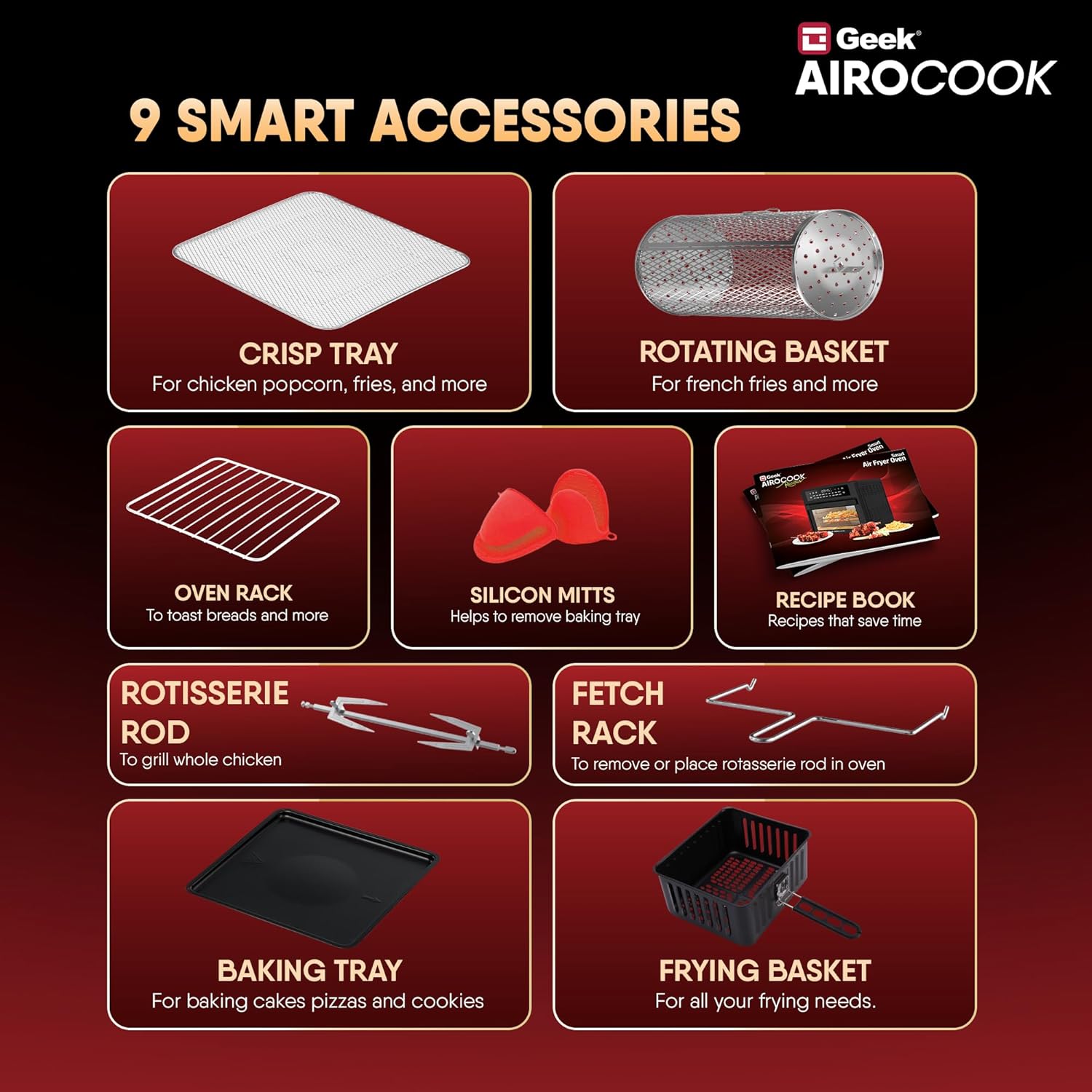
Figure 1: Included Accessories for the Geek AiroCook Helix.

Figure 2: Smart Touch Control Panel.
4. Setup
Before first use, ensure the appliance is placed on a stable, heat-resistant surface with adequate clearance from walls and other appliances. Remove all packaging materials and stickers. Clean all accessories and the interior of the oven with a damp cloth and mild detergent, then dry thoroughly. Ensure the crumb tray is properly inserted at the bottom of the oven.
5. Operating Instructions
Power On/Off
Plug the appliance into a grounded electrical outlet. Press the Power Button (usually indicated by a universal power symbol) on the control panel to turn the oven on or off.
Selecting Functions (Preset Menus)
The Geek AiroCook Helix features 12 preset menus for common dishes. To select a function:
- Ensure the oven is powered on.
- Browse through the menu options on the LED touch screen.
- Select your desired preset (e.g., Fries, Pizza, Chicken) by tapping its icon. The default time and temperature for that preset will be displayed.
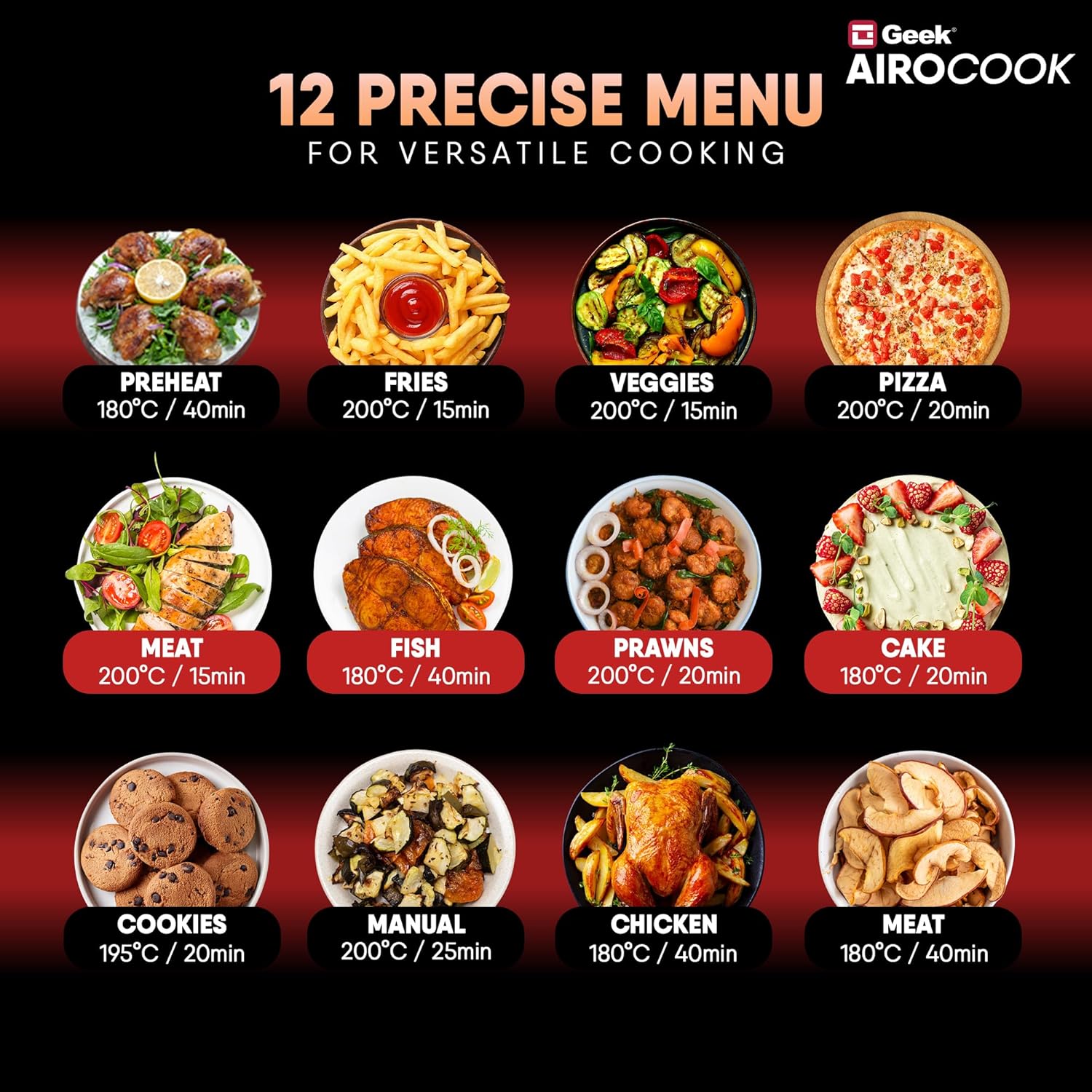
Figure 3: 12 Precise Menu Options.
Adjusting Time and Temperature
After selecting a preset or choosing the 'Manual' option, you can fine-tune the cooking time and temperature:
- Tap the Timer/Temp button (often indicated by a clock or thermometer icon).
- Use the + and - buttons to increase or decrease the temperature (up to 200°C) or cooking time (up to 60 minutes).
- Confirm your selection by pressing the Play/Pause button or waiting a few seconds for the setting to lock in.
Pause/Play Function
During cooking, you can pause the process to check food or add ingredients:
- Press the Play/Pause button to temporarily stop cooking.
- Press it again to resume cooking.
Setting the Delay Timer
To set a delayed start for your cooking:
- Select your desired cooking function, time, and temperature.
- Press the Clock icon (often with an arrow or 'delay' symbol).
- Use the + and - buttons to set the desired delay time.
- Press the Play/Pause button to activate the delay timer. The oven will start cooking after the set delay time.
Internal Light
To monitor your food without opening the oven door, press the Light Button (indicated by a light bulb icon) to turn the internal light on or off.
6. Cooking Guide
The Geek AiroCook Helix offers various cooking methods. Refer to the included recipe book or the Geek Recipe App for specific recipes and detailed instructions.
- Air Frying: Ideal for achieving crispy textures on foods like fries, chicken wings, and vegetables with significantly less oil.
- Baking: Use the baking tray for cakes, cookies, muffins, and other baked goods.
- Rotisserie: The rotisserie function is perfect for evenly roasting a whole chicken, fish, or other large cuts of meat. Ensure the food is securely fastened to the rotisserie rod.
- Grilling/Broiling: For searing meats, fish, or browning the top of dishes.
- Toasting: Quickly toast bread, bagels, or other items using the oven rack.
- Dehydrating: Use the dehydrate function to preserve fruits, vegetables, and herbs by removing moisture at low temperatures.
- Keep Warm: Maintain the temperature of cooked food until ready to serve.

Figure 4: Rotisserie function in action.
7. Cleaning and Maintenance
Regular cleaning ensures optimal performance and extends the lifespan of your appliance.
- Always unplug the oven and allow it to cool completely before cleaning.
- Wipe the exterior with a damp cloth. Do not use abrasive cleaners.
- Clean the interior with a soft, damp cloth and mild soap. For stubborn stains, use a non-abrasive sponge.
- All accessories (baking tray, oven rack, baskets, rods) should be washed with warm, soapy water and a non-abrasive sponge. Rinse thoroughly and dry completely before storing or re-using.
- The crumb tray should be emptied and cleaned after each use to prevent grease buildup.
- The appliance is not dishwasher safe.
8. Troubleshooting
If you encounter issues with your Geek AiroCook Helix, refer to the following common problems and solutions:
| Problem | Possible Cause | Solution |
|---|---|---|
| Appliance does not turn on. | Not plugged in; power outlet malfunction; power button not pressed. | Ensure the power cord is securely plugged in. Check if the outlet is working. Press the Power Button. |
| Food is not cooking evenly. | Overcrowding; incorrect temperature/time; food not rotated. | Do not overcrowd the oven. Adjust temperature and time as needed. Rotate or shake food halfway through cooking. |
| White smoke coming from the oven. | Grease buildup; fatty food. | Clean the oven and accessories thoroughly. For fatty foods, drain excess oil from the crumb tray during cooking. |
| Rotisserie function not working. | Rotisserie rod not properly installed; food too heavy. | Ensure the rotisserie rod is correctly inserted into the drive socket. Do not exceed the maximum weight capacity for rotisserie. |
If the problem persists, please contact customer support.
9. Specifications
| Specification | Detail |
|---|---|
| Brand | Geek |
| Model Name | AiroCook Helix |
| Item Model Number | KDF-705D |
| Capacity | 12 Litres |
| Output Wattage | 1700 Watts |
| Voltage | 220 Volts |
| Control Method | Touch |
| Min Temperature Setting | 50 Degrees Celsius |
| Max Temperature Setting | 200 Degrees Celsius |
| Product Dimensions | 39.5D x 37.5W x 43.5H Centimeters |
| Colour | Grey |
| Material | Stainless Steel |
| Air Frying Technology | True |
| Has Nonstick Coating | No |
| Is Dishwasher Safe | No |
| Item Weight | 10 Kilograms |
| Included Components | 1x Air Fryer Oven |
10. Warranty and Support
Your Geek AiroCook Helix comes with a standard 1-year warranty. Geek provides free doorstep service covering 28+ States, 440+ Cities, and 19000+ Pin-codes. For any product-related queries or to request a free post-purchase virtual demo, please reach out to our customer support team.


