
1. Introduction
Thank you for purchasing the Nakamichi Portable Bluetooth Speaker with FM Radio. This manual provides essential information for the safe and efficient operation of your device. Please read it thoroughly before use and retain it for future reference.
2. Package Contents
Please check the package for the following items:
- Nakamichi Portable Bluetooth Speaker (NM-C3)
- USB Charging Cable
- User Manual
- Wired Headset Microphone (if included with your model)
3. Product Overview
3.1 Front Panel and Controls

Image: Front view of the Nakamichi Portable Bluetooth Speaker. The display shows '2021' and below it are five circular buttons: Microphone, Previous, Play/Pause, Next, and Mode.
The front panel features a digital display and control buttons:
- Display: Shows current mode, track number, FM frequency, or time.
- Microphone Button: Activates or deactivates the microphone function.
- Previous Button (<): Short press for previous track/station; long press to decrease volume.
- Play/Pause Button (>||): Plays or pauses audio; in FM mode, long press to auto-scan.
- Next Button (>): Short press for next track/station; long press to increase volume.
- Mode Button (M): Switches between Bluetooth, FM Radio, AUX, USB, and MicroSD modes.
3.2 Side Panel and Ports
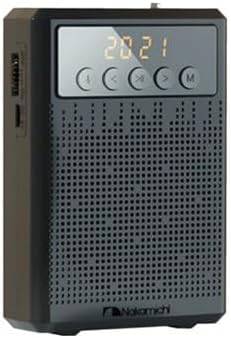
Image: Angled view of the Nakamichi Portable Bluetooth Speaker, showing the side panel with various input ports and a power switch.

Image: Exploded diagram of the speaker, detailing the internal layout and external port connections including USB, MicroSD, AUX, and Microphone inputs.
The side panel provides access to various connectivity options:
- USB Port: For playing audio from a USB flash drive.
- MicroSD Card Slot: For playing audio from a MicroSD card.
- AUX Input: For connecting external audio devices via a 3.5mm audio cable.
- Microphone Input: For connecting the wired headset microphone.
- Charging Port: Micro USB port for charging the speaker's internal battery.
- Power Switch: Toggles the speaker ON/OFF.
4. Setup
4.1 Charging the Speaker
- Connect the supplied USB charging cable to the speaker's charging port.
- Connect the other end of the USB cable to a USB power adapter (not included) or a computer's USB port.
- The charging indicator light will illuminate during charging and turn off when fully charged.
- A full charge typically takes 2-3 hours.
4.2 Powering On/Off
- To power on, slide the Power Switch to the 'ON' position. The display will light up.
- To power off, slide the Power Switch to the 'OFF' position. The display will turn off.
5. Operating Instructions
5.1 Bluetooth Mode
- Power on the speaker. It will automatically enter Bluetooth pairing mode, indicated by a flashing Bluetooth icon on the display.
- On your mobile device, enable Bluetooth and search for available devices.
- Select "Nakamichi NM-C3" from the list of devices.
- Once paired, the speaker will emit a confirmation tone, and the Bluetooth icon will stop flashing.
- You can now play audio from your device through the speaker. Use the Play/Pause, Previous, and Next buttons on the speaker to control playback.
5.2 FM Radio Mode
- Press the Mode (M) button repeatedly until "FM" appears on the display.
- Long press the Play/Pause button to initiate an automatic station scan. The speaker will scan and save all available FM stations.
- Once scanning is complete, use the Previous (<) and Next (>) buttons to navigate through the saved stations.
- For manual tuning, short press the Previous (<) or Next (>) buttons to fine-tune the frequency.
5.3 AUX Mode
- Connect one end of a 3.5mm audio cable (not included) to the AUX input port on the speaker.
- Connect the other end of the cable to the audio output of your external device (e.g., MP3 player, computer).
- Press the Mode (M) button until "AUX" appears on the display.
- Control playback and volume directly from your external device.
5.4 USB / MicroSD Card Playback
- Insert a USB flash drive into the USB port or a MicroSD card into the MicroSD card slot.
- The speaker will automatically detect the storage device and begin playing audio files. If not, press the Mode (M) button to select the correct mode (USB or TF/SD).
- Use the Play/Pause, Previous (<), and Next (>) buttons to control playback.
5.5 Microphone Function
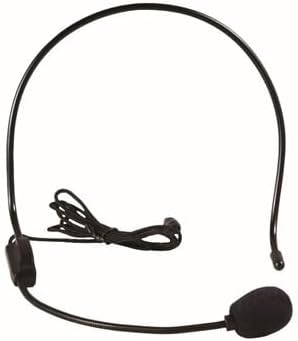
Image: A wired headset microphone with a flexible boom, designed for hands-free use.
- Connect the wired headset microphone to the dedicated Microphone Input port on the speaker.
- Press the Microphone Button on the front panel to activate the microphone function.
- Speak into the microphone. Your voice will be amplified through the speaker.
- Press the Microphone Button again to deactivate the function.
6. Maintenance
- Cleaning: Use a soft, dry cloth to clean the speaker's exterior. Do not use abrasive cleaners or solvents.
- Storage: Store the speaker in a cool, dry place away from direct sunlight and extreme temperatures.
- Battery Care: To prolong battery life, fully charge the speaker before first use and at least once every three months if not used regularly. Avoid fully discharging the battery frequently.
- Water Resistance: This speaker is not waterproof. Avoid exposure to water or moisture.
7. Troubleshooting
| Problem | Possible Cause | Solution |
|---|---|---|
| Speaker does not power on. | Battery is depleted. | Charge the speaker for at least 30 minutes. |
| No sound from speaker. | Volume is too low; incorrect mode selected; device not connected. | Increase volume; press Mode button to select correct input; ensure Bluetooth device is paired or AUX cable is connected. |
| Bluetooth pairing fails. | Speaker is not in pairing mode; device is too far; interference. | Ensure speaker is in Bluetooth mode and flashing; move device closer; restart both speaker and device. |
| FM radio reception is poor. | Weak signal; environmental interference. | Relocate the speaker; extend the antenna (if applicable). |
8. Specifications
| Feature | Detail |
|---|---|
| Brand | Nakamichi |
| Model | NM-C3 |
| Connectivity Technology | Bluetooth |
| Tuner Technology | FM |
| Radio Bands Supported | FM |
| Power Source | Battery Powered |
| Special Feature | Auto EQ |
| Recommended Uses | For Music Players |
| Item Weight | 1 pounds |
| Package Dimensions | 3 x 3 x 3 inches |
| UPC | 840735108035 |
| ASIN | B0CJL6B3TP |
| Date First Available | September 21, 2023 |
9. Warranty and Support
Nakamichi products are designed for reliability and performance. For specific warranty information, please refer to the warranty card included with your product or visit the official Nakamichi website. If you encounter any issues or require technical assistance, please contact Nakamichi customer support through their official channels.


