
Lnrueg B5303
Lnrueg B5303 10.26-Inch Car MP5 Player User Manual
Model: B5303
Introduction
This manual provides detailed instructions for the installation, operation, and maintenance of your Lnrueg B5303 10.26-Inch High-Definition IPS Car MP5 Player. With its advanced features like Bluetooth 5.0, Android AUTO, and Apple CarPlay compatibility, this device is designed to enhance your in-car entertainment and navigation experience. Please read this manual thoroughly before using the product to ensure proper functionality and safety.
What's in the Box
Upon unboxing, please verify that all the following components are included:
- Main Unit x1
- User Manual x1
- Cigarette Lighter Power Cable with USB Port x1
- Installation Brackets x2
- Rear-View Video Cable x1

Figure 1: Contents of the B5303 package, including the main unit, power cable, brackets, and manual.
Setup and Installation
The B5303 is designed for versatile installation in various car models. Follow these steps for proper setup.
1. Mounting the Device
The device comes with two types of installation brackets to provide flexible mounting options and adjustable space. The bracket allows for 270° rotation and a 90° flip to adjust the screen angle for optimal viewing.

Figure 2: Illustration of the two types of adjustable brackets, highlighting features like free spin, scalable length, 270° rotation, and 90° screen flip.
Choose a suitable location on your dashboard that does not obstruct your view or interfere with vehicle controls. Securely attach the chosen bracket to the dashboard, then mount the main unit onto the bracket.

Figure 3: Example of the B5303 unit installed on a car dashboard, showing its integration into the vehicle's interior.
2. Power Connection
Connect the provided cigarette lighter power cable to the power input port on the B5303 unit and then plug the other end into your vehicle's 12V cigarette lighter socket. The power cable also includes a USB port for additional connectivity.
3. Rear-View Camera Connection (Optional)
If you are installing an optional rear-view camera, connect its video cable to the designated rear-view video input port on the B5303 unit. Ensure the camera is properly powered and wired to trigger when the vehicle is in reverse gear.
Operating Instructions
1. Initial Power On and User Interface
Once powered, the device will boot up and display the main menu on its 10.26-inch High-Definition IPS screen. The intuitive interface allows access to various functions such as Radio, PhoneLink, BT Music, and other applications.

Figure 4: Overview of the main user interface with icons for Phone, Music, Maps, Messages, Now Playing, Car, Podcasts, Audiobooks, Calendar, and Settings.

Figure 5: The 10.26-inch HD IPS screen, highlighting its high resolution (1600x600) and clarity for media playback.
2. Bluetooth Connectivity
The B5303 features Bluetooth 5.0 for stable and fast wireless connections. To pair your smartphone:
- Navigate to the "BT Music" or "PhoneLink" section on the device.
- Enable Bluetooth on your smartphone and search for available devices.
- Select "B5303" (or similar device name) from the list on your phone to pair.
- Confirm the pairing code if prompted.
Once paired, you can stream audio, make hands-free calls, and utilize other Bluetooth-enabled features.
3. Android AUTO / Apple CarPlay
The B5303 supports both Android AUTO and Apple CarPlay, offering seamless integration with your smartphone for navigation, music, messages, and more. Connectivity can be established via wireless or wired connections.

Figure 6: The Apple CarPlay interface on the B5303, demonstrating its ability to mirror iPhone functions for a safer driving experience. Supports both wireless and wired connections.
- Wireless Connection: Ensure your phone's Wi-Fi and Bluetooth are enabled. Follow the on-screen prompts on the B5303 to connect wirelessly.
- Wired Connection: Connect your smartphone to the USB port on the B5303 using a compatible USB cable.
Once connected, the CarPlay or Android AUTO interface will appear on the screen, allowing you to control compatible apps directly from the B5303 display.
4. Multimedia Playback
The B5303 supports a wide array of media formats and can play content from TF cards (microSD) or U disks (USB flash drives). It features a built-in 1W speaker for audio output.

Figure 7: The multimedia player interface, demonstrating music playback and indicating support for TF cards and U disks, along with the built-in 1W speaker.
- Insert your TF card into the designated slot or your U disk into the USB port.
- Navigate to the "Multimedia Player" or "Music/Video" section on the device.
- Browse and select your desired media files for playback.
5. Reversing Camera Function
When a compatible rear-view camera is connected, the B5303 will automatically switch to the camera's view when the vehicle's reverse gear is engaged, providing a clear image to assist with parking and maneuvering.
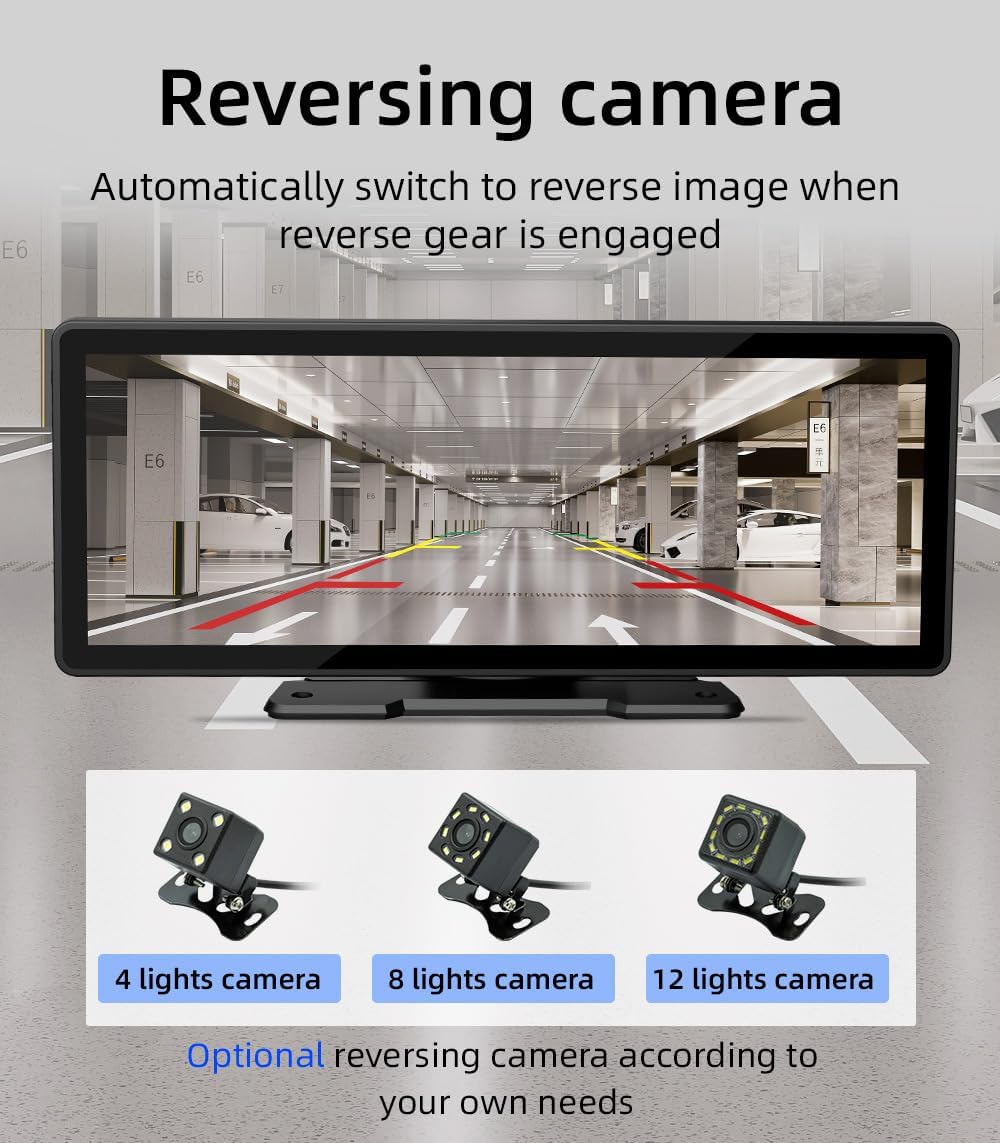
Figure 8: Display of the reversing camera view on the B5303 screen, showing parking guidelines and the surrounding environment. Optional camera types (4, 8, 12 lights) are also shown.
Maintenance
To ensure the longevity and optimal performance of your B5303 Car MP5 Player, follow these maintenance guidelines:
- Cleaning: Use a soft, dry cloth to clean the screen and exterior of the device. For stubborn smudges, slightly dampen the cloth with water or a screen-safe cleaner. Avoid abrasive materials or harsh chemicals.
- Temperature: Do not expose the device to extreme temperatures (very hot or very cold) for extended periods, as this can affect its electronic components and screen.
- Moisture: Keep the device dry. Avoid exposing it to water or excessive humidity.
- Power Off: When not in use for extended periods, it is advisable to disconnect the power cable from the cigarette lighter socket.
Troubleshooting
If you encounter issues with your B5303, refer to the following common problems and solutions:
| Problem | Possible Cause | Solution |
|---|---|---|
| Device does not power on. | No power supply; loose connection; blown fuse in vehicle. | Check if the cigarette lighter socket has power. Ensure the power cable is securely connected. Check vehicle's fuse box. |
| No sound from speakers. | Volume too low; mute function active; incorrect audio output settings. | Increase volume. Check if device is muted. Verify audio output settings. |
| Bluetooth connection unstable. | Interference; device too far; phone Bluetooth issue. | Ensure no strong interference sources nearby. Keep phone close to the device. Restart phone's Bluetooth. |
| CarPlay/Android AUTO not connecting. | Incorrect connection method; phone settings; incompatible cable (for wired). | Ensure Wi-Fi/Bluetooth is on for wireless. Use a high-quality USB cable for wired. Check phone's CarPlay/Android AUTO settings. |
| Rear-view camera not displaying. | Camera not connected; power issue with camera; incorrect wiring. | Verify camera cable connection to B5303. Ensure camera receives power when in reverse. Check wiring to reverse light trigger. |
If the problem persists after trying these solutions, please contact customer support.
Specifications
Detailed technical specifications for the Lnrueg B5303 Car MP5 Player:
| Feature | Detail |
|---|---|
| Model Number | B5303 |
| Display Size | 10.26-inch |
| Display Type | High-Definition IPS |
| Connectivity Technology | Bluetooth 5.0, Dual-band WiFi |
| Compatibility | Android AUTO, Apple CarPlay |
| Supported Media | TF Card, U Disk (USB Flash Drive) |
| Audio Output Mode | Surround |
| Built-in Speaker | 1W |
| Rear-View Camera Support | Yes |
| Item Weight | 2.16 pounds |
| Product Dimensions | 1"D x 10.26"W x 10.26"H |
| Color | Black |
| Manufacturer | Lnrueg |
| Date First Available | September 20, 2023 |
Note: Specifications are subject to change without prior notice for product improvement.
Warranty and Support
Lnrueg products are manufactured to high quality standards. For information regarding warranty coverage, please refer to the warranty card included with your product or visit the official Lnrueg website.
For technical support, troubleshooting assistance, or inquiries about replacement parts, please contact Lnrueg customer service through the following channels:
- Online Support: Visit the Lnrueg official website for FAQs and support resources.
- Email Support: Refer to your product packaging or the official website for customer service email address.
Please have your product model number (B5303) and purchase information ready when contacting support.
Ask a question about this manual
Ask about setup, troubleshooting, compatibility, parts, safety, or missing instructions. Manuals+ will review the question and use this page’s manual context to help answer it.