1. Introduction
The Nikon Z f is a full-frame mirrorless camera designed to inspire creativity with its blend of retro aesthetics and cutting-edge technology. Featuring a 24.5MP BSI full-frame sensor and the powerful EXPEED 7 processing engine, it delivers stunning image quality and robust performance for both stills and video. This manual provides essential information for setting up, operating, maintaining, and troubleshooting your Nikon Z f camera.

Figure 1.1: Nikon Z f Camera with NIKKOR Z 40mm f/2 (SE) Lens
2. Setup
2.1 Unboxing and Initial Inspection
Upon receiving your Nikon Z f, carefully unbox all components and inspect for any signs of damage. The package should include the camera body, NIKKOR Z 40mm f/2 (SE) lens, EN-EL15c rechargeable Li-ion battery, Nikon camera strap, and a USB Type-C charging and transfer cable.

Figure 2.1: What's Included in the Box
2.2 Charging the Battery
Insert the EN-EL15c battery into the camera. Connect the camera to a power source using the supplied USB Type-C cable. The charging indicator will illuminate during charging and turn off when complete. Ensure the battery is fully charged before first use.
2.3 Attaching the Lens
Align the mounting mark on the NIKKOR Z lens with the mounting mark on the camera body. Rotate the lens clockwise until it clicks into place. To remove, press the lens release button and rotate counter-clockwise.
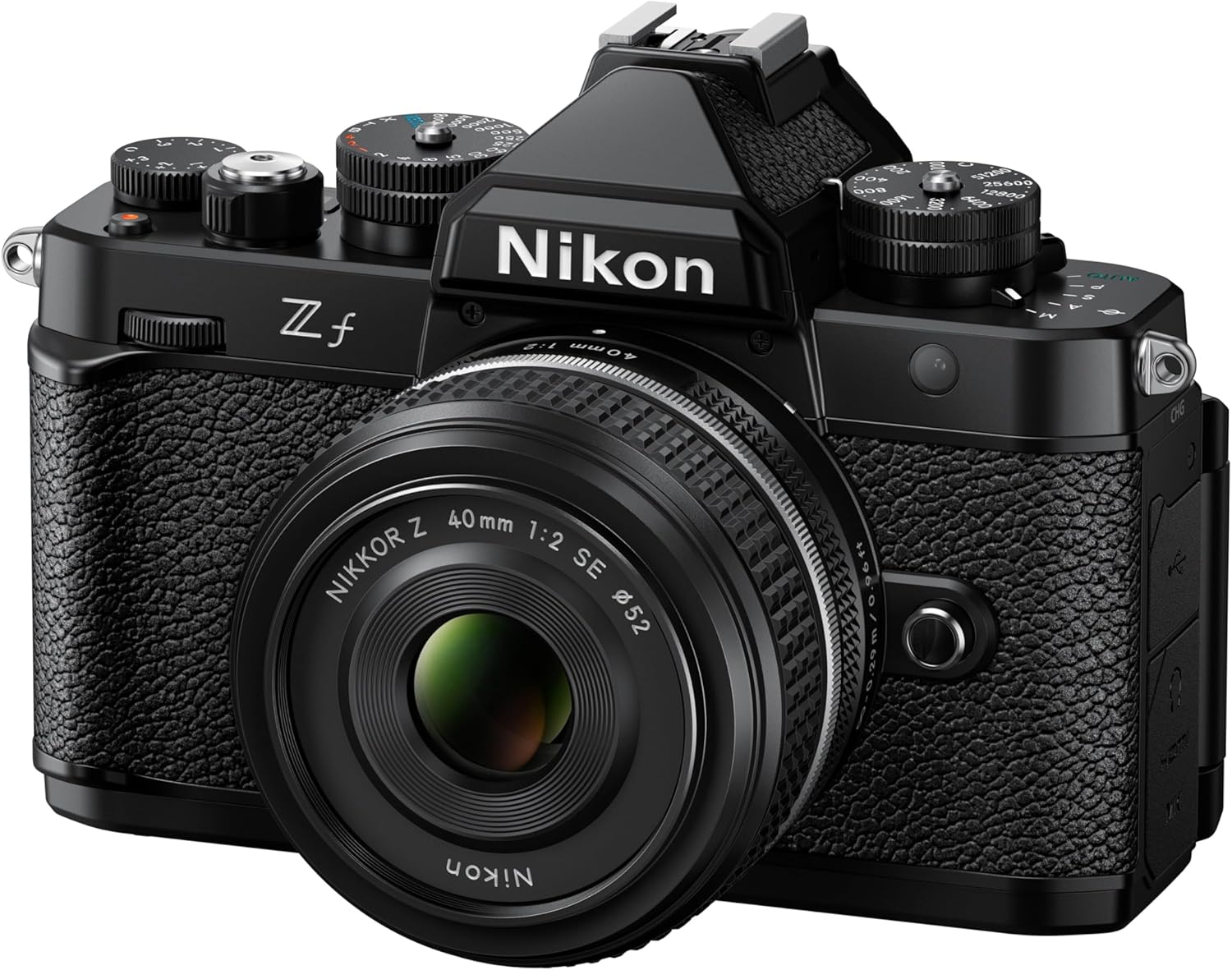
Figure 2.2: Front View of Nikon Z f with Lens
3. Operating the Camera
3.1 Basic Controls and Dials
The Nikon Z f features intuitive tactile dials for shutter speed, ISO, and exposure compensation, providing a classic shooting experience. The vari-angle touchscreen LCD offers flexible viewing and control options.

Figure 3.1: Top Dials for Manual Control
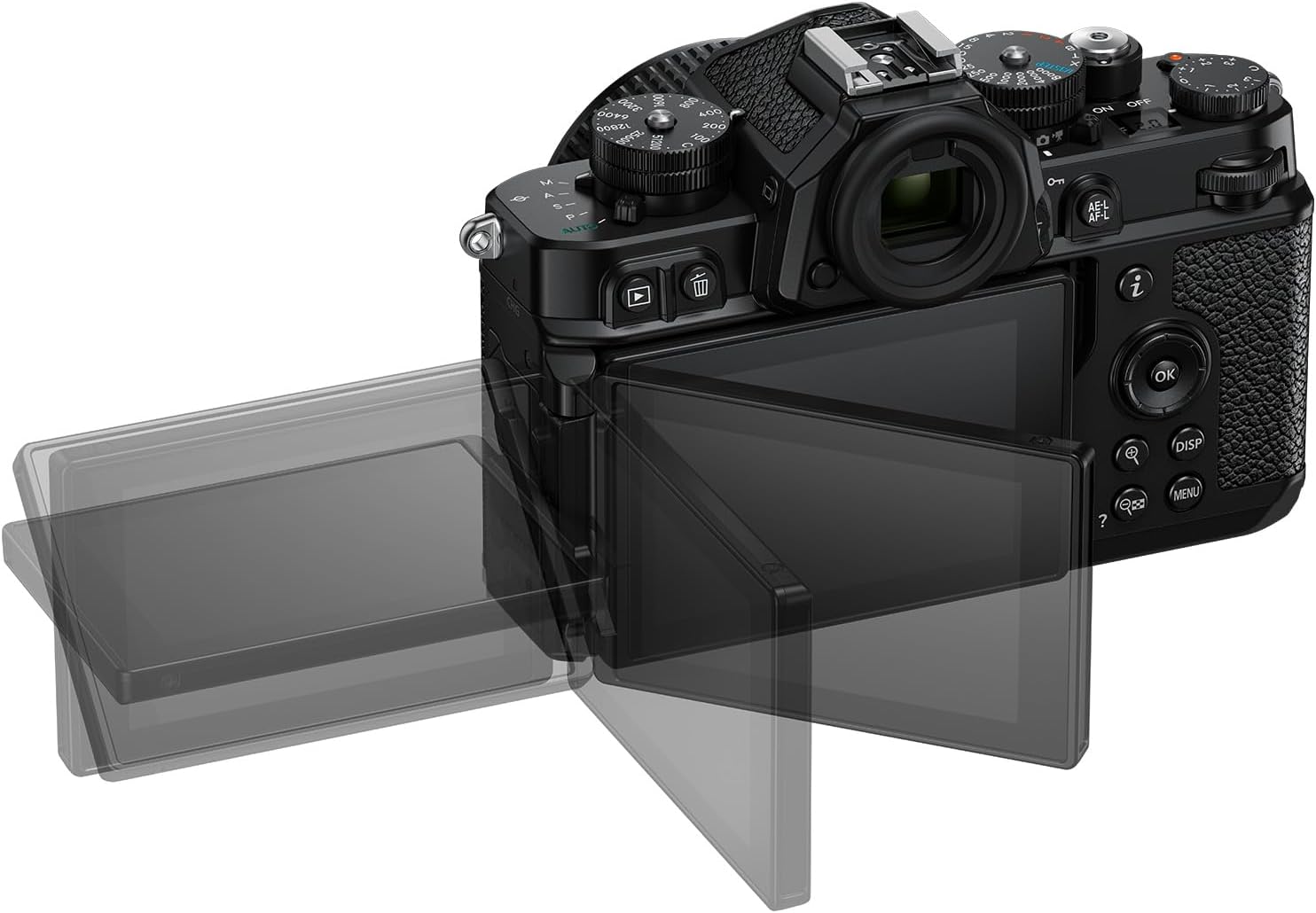
Figure 3.2: Vari-Angle Touchscreen Display
3.2 Autofocus and Subject Recognition
The Z f's advanced autofocus system, powered by Deep Learning technology, recognizes nine different subjects for precise focus and tracking. This includes enhanced low-light capabilities, allowing for sharp images even in challenging lighting conditions.

Figure 3.3: Intelligent Autofocus with Subject Recognition

Figure 3.4: Exceptional Low-Light Performance
Focus Point VR Technology
The Nikon Z f features Focus Point VR, which compensates for blur near the focus point of the frame, ensuring sharper subjects even in compositions where they are positioned at the edges. This is an advancement over conventional VR which primarily minimizes blur near the center.
Video 3.1: Technology Video - Focus Point VR. This video demonstrates how Focus Point VR minimizes blur specifically around the selected focus point, enhancing sharpness for subjects positioned anywhere in the frame.
3.3 Still Photography Features
The Z f supports various still photography modes including Auto, Programmed auto, Shutter-priority auto, Aperture-priority auto, and Manual. It also introduces Pixel Shift shooting technology, allowing you to create ultra-high-resolution 96MP stills by combining multiple shots, reducing noise and improving color reproduction.
Black & White Modes
For enthusiasts of monochrome photography, the Z f offers a dedicated Black & White photo position on the shooting mode selector. Additionally, two new Picture Controls, 'Flat Monochrome' and 'Deep Tone Monochrome', provide enhanced creative control over your black and white images.
3.4 Video Recording
The Nikon Z f is a capable video camera, offering 4K/30p video oversampled from 6K, and up to 4K UHD/60p recording. It supports internal 10-bit H.265 in SDR, HLG, and N-Log formats, providing flexibility for color grading. The in-body 5-axis image stabilization ensures smooth footage even when shooting handheld.

Figure 3.5: Flexible Video Recording Capabilities
Official Product Videos
Video 3.2: Meet the New Nikon Z f Camera! This video provides an overview of the Nikon Z f's key features and design, highlighting its blend of classic aesthetics and modern performance.
Video 3.3: Behind the Scenes with Troy Scat and the Nikon Z f. This video showcases the Nikon Z f in a professional art studio setting, demonstrating its capabilities for capturing creative video content.
Video 3.4: Behind the Scenes for the Nikon Z F - Imagine Light differently! This video explores the camera's performance in low-light and creative lighting scenarios, emphasizing its ability to capture stunning visuals.
Video 3.5: Troy Scat Artist (Video taken with Nikon Z F). This video features an artist using the Nikon Z f to capture their creative process, showcasing the camera's video quality and ease of use in a dynamic environment.
3.5 Connectivity
The Nikon Z f offers seamless connectivity options including Wi-Fi and Bluetooth. Utilize the SnapBridge app to easily transfer photos to your smartphone or tablet, and download Picture Controls from Nikon Imaging Cloud to expand your creative possibilities.

Figure 3.6: Seamless Photo Transfer with SnapBridge App
4. Maintenance
Proper maintenance ensures the longevity and optimal performance of your Nikon Z f camera.
4.1 Cleaning
- Camera Body: Use a soft, lint-free cloth to wipe the camera body. For stubborn dirt, slightly dampen the cloth with water or a specialized camera cleaner.
- Lens: Use a lens brush or blower to remove dust. For smudges, use a lens cleaning solution and a microfiber cloth, wiping gently in a circular motion from the center outwards.
- Sensor: The Z f has a sensor-shift image stabilization system, but care is advised when changing lenses to avoid introducing dust or contaminants. For sensor cleaning, it is recommended to use a professional service or a dedicated sensor cleaning kit with extreme caution.
- LCD Screen: Use a soft, dry microfiber cloth. Avoid harsh chemicals.
4.2 Storage
When not in use, store the camera in a cool, dry place away from direct sunlight and extreme temperatures. Use lens caps and body caps to protect the sensor and lens elements. If storing for extended periods, remove the battery.
5. Troubleshooting
This section addresses common issues you might encounter with your Nikon Z f camera.
5.1 Common Issues and Solutions
- Camera Not Turning On: Ensure the battery is fully charged and correctly inserted. Try a different charged battery if available.
- Images Appear Blurry: Check your focus mode and ensure the lens is clean. Verify shutter speed is appropriate for the lighting conditions and subject movement. Utilize the in-body VR for handheld shooting.
- Autofocus Not Working: Ensure sufficient light for the AF system. Check if the AF/MF switch on the lens or camera is set correctly.
- Wi-Fi/Bluetooth Connectivity Issues: Ensure the SnapBridge app is updated and the camera's Wi-Fi/Bluetooth settings are enabled. Try restarting both the camera and your smart device.
- Bright Pixels on Sensor: If you notice bright pixels, perform a pixel mapping function through the camera's setup menu. This can often resolve such issues.
If issues persist, refer to the detailed troubleshooting section in the full user manual available on the Nikon support website or contact Nikon customer support.
6. Specifications
| Feature | Detail |
|---|
| Model Name | Z f FX-format Mirrorless Camera Body w/ NIKKOR Z 40mm f/2 (SE) |
| Photo Sensor Resolution | 24.5 MP |
| Photo Sensor Size | Full Frame (35mm) |
| Image Stabilization | Sensor-shift (8-stops VR) |
| Video Resolution | 2160p (4K UHD) |
| Maximum ISO | 204800 (Expanded) |
| Display Type | 3.2 Inches Vari-angle Touchscreen LCD |
| Connectivity | Bluetooth, Wi-Fi, HDMI |
| Item Weight | 1.98 Pounds |
| Included Lens | NIKKOR Z 40mm f/2 (SE) |
7. Warranty and Support
7.1 Warranty Information
The Nikon Z f camera comes with a 1-year limited manufacturer warranty. Please retain your proof of purchase for warranty claims.
7.2 Customer Support
For additional support, detailed user manuals, software downloads, and service information, please visit the official Nikon website or contact their customer service.
Visit the Nikon Store on Amazon for more products and information.


