Introduction
The NEEWER LS-39 Spotlight Snoot is a versatile light modifier designed for photography and filmmaking. It allows for precise control over light output, enabling dramatic spotlight effects, creative patterns, and color adjustments. This manual provides detailed instructions for the proper setup, operation, and maintenance of your LS-39 Spotlight Snoot.
Package Contents
Before proceeding, please ensure all items are present in the package:
- 1 x Spotlight Snoot
- 1 x Carrying Bag
- 1 x Gobo Holder
- 1 x Color Gel Holder
- 5 x Color Gels (Yellow, Red, Orange, Blue, Green)
- 16 x Metal Gobos

Setup Instructions
- Attaching the Snoot to a Light:
The LS-39 Spotlight Snoot features a Bowens mount for compatibility with various LED continuous lights up to 300W. Align the snoot's Bowens mount with the light's mount and twist clockwise until it locks securely. Ensure the light's COB diffuser is removed if present, for proper attachment.

Image: A close-up view of the Bowens mount connection, showing how the LS-39 snoot attaches to a compatible LED light. The blue outline highlights the connection point. Compatible lights include NEEWER CB200, CB200B, CB300, CB300B, FS150, FS150B, FS230, and others like Godox VL150, VL150II, VL300, SL60W, SL60IID, SL100, SL150II, SL150III, Amaran 100x, 150C, Aputure 200d.
- Inserting Gobos:
Select one of the 16 metal gobos. Place the chosen gobo into the gobo holder. Slide the gobo holder into the designated slot on the snoot. These gobos project various shapes and textures onto your subject or background.

Image: A hand inserting a metal gobo into the gobo holder, which then slides into the snoot. The image also displays the variety of 16 metal gobos included. Caution: Gobos have sharp edges. Handle with care to prevent injury.
- Adding Color Gels:
Choose one of the 5 color gels (yellow, red, orange, blue, green). Place the color gel into the color gel holder. Insert the color gel holder into its slot on the snoot to modify the light's color for artistic effects.

Image: A hand installing a color gel into the snoot, demonstrating how to change the light's color. The five included color gels are shown below.
Operating Instructions
- Adjusting Focus:
The 20° projection lens allows for adjustable focus. To adjust the sharpness of the projected light beam, twist the focus knob and slide the lens barrel. This enables you to achieve either sharp-edged or soft-edged lighting effects.
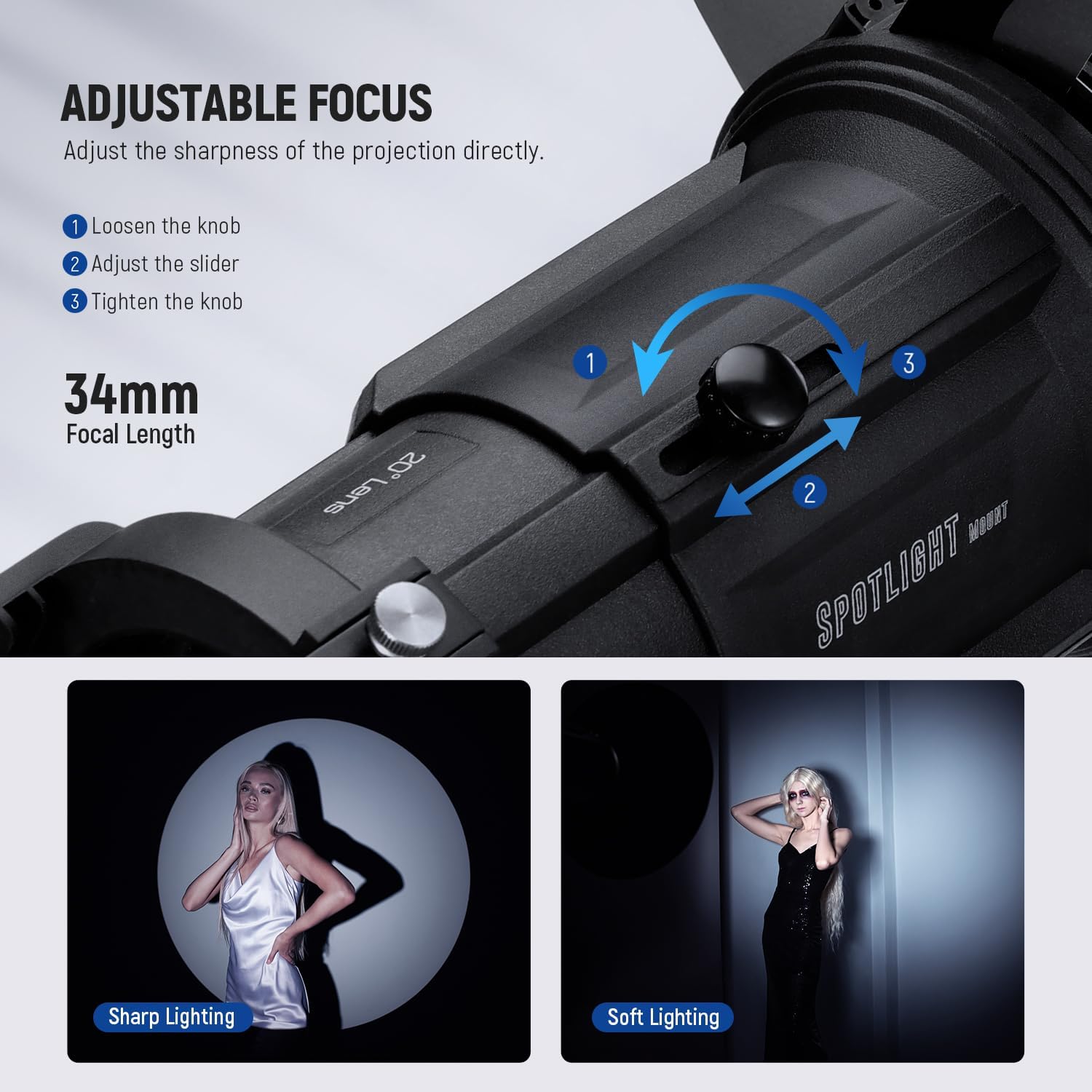
Image: A close-up of the snoot showing the focus knob and lens barrel, with arrows indicating the adjustment direction. Examples of sharp and soft lighting are displayed. - Changing Light Shape:
The built-in four-way light baffles allow for flexible adjustment of the light shape, supporting straight, triangular, square, and rectangular patterns. A separate geometry effect modifier (sold separately) can also be used for additional shapes.

Image: The snoot projecting a shaped light beam onto a model, illustrating the ability to change the light's geometry using the built-in baffles. - Brightness Enhancement:
The 20° optical lens significantly boosts illumination. For example, when used with a NEEWER CB200 light, it can increase brightness by approximately 4.7 times compared to the bare light at 1 meter, providing 26900 Lux at 1m versus 5660 Lux.

Image: A visual comparison showing the increased illuminance (Lux) when using the LS-39 conical snoot with a CB200 light versus the bare light.
Maintenance
- Cleaning the Lens:
Use a soft, lint-free cloth and a specialized lens cleaning solution to gently clean the optical lens. Avoid abrasive materials or harsh chemicals that could damage the coating.
- Gobo and Gel Care:
Store gobos and color gels in their protective sleeves or the provided carrying bag to prevent scratches and damage. Clean them with a soft, dry cloth if necessary.
- General Cleaning:
Wipe the exterior of the snoot with a dry or slightly damp cloth. Do not immerse the unit in water.
- Heat Management:
Prolonged use with high-output lights may cause the metal surface of the snoot to become hot. Exercise caution and avoid direct contact with hot surfaces to prevent burns.
Troubleshooting
| Problem | Possible Cause | Solution |
|---|---|---|
| Light beam is blurry or unfocused. | Focus knob not adjusted correctly. | Twist the focus knob and slide the lens barrel until the desired sharpness is achieved. |
| Gobo projection is not clear or distorted. | Gobo not seated properly in the holder; lens may be dirty. | Ensure the gobo is correctly inserted. Clean the lens if smudges or dust are visible. |
| Snoot does not attach securely to the light. | Incorrect alignment; light's COB diffuser not removed. | Verify proper alignment of the Bowens mount. Remove any diffusers on the light that might obstruct the connection. |
| Light output is lower than expected. | Incompatible light source; lens or gobos are dirty. | Ensure the light source is compatible and within the recommended wattage (up to 300W). Clean the lens and gobos. |
Specifications
- Model: LS-39
- Material: Aluminum Alloy, Optical Glass
- Compatibility: Bowens Mount LED video lights with 300W output or below
- Dimensions: 4.3"L x 12.8"W x 7.7"H (110 x 325 x 195mm)
- Front Lens Diameter: φ81mm
- Weight: 4.6lb / 2.1kg
- Projection Lens: 20°
- Gobos: 16 Metal Pattern Gobos
- Color Gels: 5 (Yellow, Red, Orange, Blue, Green)
Warranty and Support
For warranty information and customer support, please refer to the official NEEWER website or contact your local distributor. Keep your purchase receipt for warranty claims.
Online Support: www.neewer.com/support
Product Videos
NEEWER Spotlight Snoot Overview
This video provides a general overview of the NEEWER Spotlight Snoot, demonstrating its features and how it can be used to create various lighting effects. It showcases the product's versatility in a studio setting.
NEEWER Spotlight Snoot with Projection Lens Demonstration
This video focuses on the projection lens feature of the NEEWER Spotlight Snoot, illustrating how to achieve precise light shaping and focusing. It highlights the impact of the projection lens on creative lighting setups.


