
ZIPRO 5941659
ZIPRO Adult Magnetic Fitness Bike User Manual
Model: 5941659
Introduction
Thank you for choosing the ZIPRO Adult Magnetic Fitness Bike. This manual provides essential information for the safe assembly, operation, and maintenance of your new fitness equipment. Please read this manual thoroughly before first use and keep it for future reference.

Figure 1: ZIPRO Adult Magnetic Fitness Bike
Safety Information
Your safety is paramount. Adhere to the following guidelines:
- Consult a physician before starting any exercise program.
- Ensure all parts are securely fastened before each use.
- Keep children and pets away from the equipment during operation.
- Place the bike on a flat, stable surface.
- Do not exceed the maximum user weight of 110 kg (242 lbs).
- Stop exercising immediately if you feel faint, dizzy, or experience pain.
- Wear appropriate exercise attire and footwear.
Package Contents
Verify that all components are present before assembly:
- Main Frame (1)
- Handlebar Assembly with Console (1)
- Seat Post and Saddle (1)
- Pedals (Left & Right)
- Front and Rear Stabilizers (2)
- Hardware Kit (Bolts, Washers, Nuts, Tools)
- Water Bottle Holder (1)
- User Manual (This document)
Assembly Instructions
Follow these steps for proper assembly:
- Attach Stabilizers: Secure the front and rear stabilizers to the main frame using the provided bolts and nuts. Ensure they are firmly tightened for stability.
- Install Pedals: Identify the Left (L) and Right (R) pedals. The left pedal screws counter-clockwise, and the right pedal screws clockwise. Thread them carefully into the crank arms and tighten securely.

Figure 2: Securely attach pedals.
- Mount Seat Post and Saddle: Insert the seat post into the main frame. Adjust the height to your preference and secure it with the locking knob. Attach the saddle to the seat post.

Figure 3: Adjusting seat height for comfort.
- Attach Handlebar Assembly: Connect the handlebar assembly to the main frame. Ensure all cables are properly routed and not pinched. Secure with the designated bolts.
- Install Water Bottle Holder: Attach the water bottle holder to the designated location on the main frame.
Setup
Before your first workout, ensure the bike is set up correctly for your body:
- Seat Height: Adjust the seat height so that your leg is almost fully extended at the bottom of the pedal stroke, with a slight bend in the knee.
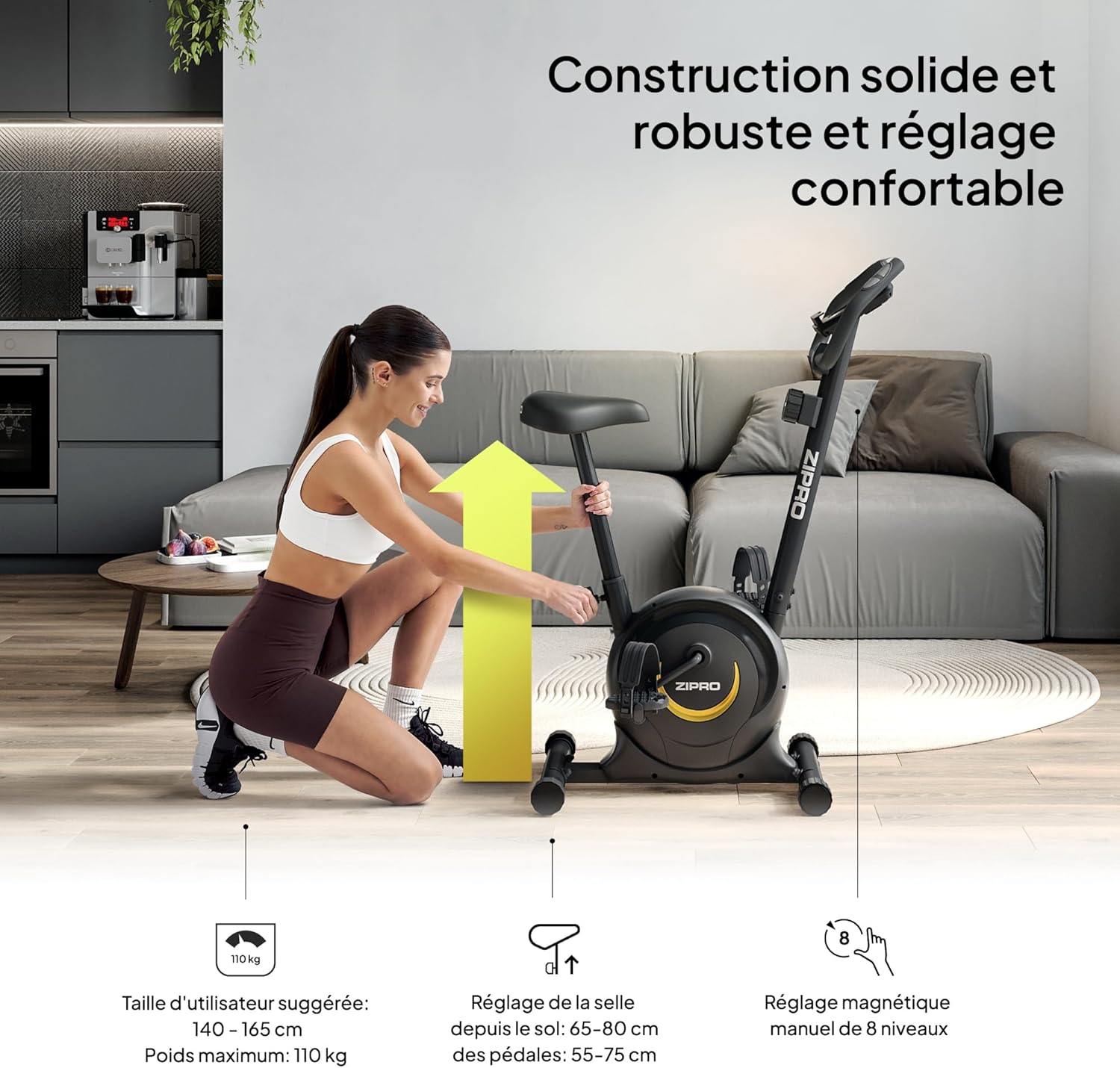
Figure 4: Proper seat height ensures comfort and efficiency.
- Handlebar Position: The handlebars can be adjusted for height to provide a comfortable riding posture. Ensure you can reach them without straining.
- Resistance Level: The magnetic resistance system offers 8 levels. Start with a lower level (1-2) and gradually increase as your fitness improves. The resistance knob is located below the console.

Figure 5: Adjusting the 8-level magnetic resistance.
Operating Instructions
Your fitness bike features an intuitive console to track your workout data:
Console Functions:

Figure 6: Console display showing Time, Speed, Calories, Pulse, and Distance.
- MODE Button: Press to cycle through display functions: Time, Speed, Distance, Calories, Pulse, and Odometer (ODO). Hold to reset values.
- SET Button: Used to set target values for Time, Distance, or Calories.
- RESET Button: Press to clear current workout data.
- SCAN Function: Automatically cycles through all display functions every few seconds.
- Pulse Sensors: Grip the metal plates on the handlebars to measure your heart rate. Your pulse will be displayed on the console.
Starting a Workout:
- Sit on the saddle and place your feet securely in the pedal straps.
- Adjust the resistance to your desired level using the tension control knob.
- Begin pedaling. The console will automatically activate and start tracking your workout.
- Use the MODE button to view different metrics or the SCAN function for automatic cycling.
- To measure pulse, firmly grip the pulse sensors on the handlebars.

Figure 7: Integrated mobile device holder for convenience.
Maintenance
Regular maintenance ensures the longevity and safe operation of your fitness bike:
- Cleaning: Wipe down the bike with a damp cloth after each use to remove sweat and dust. Do not use abrasive cleaners.
- Inspections: Periodically check all bolts, nuts, and moving parts for tightness. Tighten any loose components.
- Lubrication: The magnetic resistance system is generally maintenance-free. However, if you notice any squeaking from moving parts, apply a small amount of silicone-based lubricant.
- Storage: Store the bike in a dry, cool place away from direct sunlight and extreme temperatures. The integrated transport wheels allow for easy relocation.

Figure 8: Transport wheels for easy movement and storage.
Troubleshooting
| Problem | Possible Cause | Solution |
|---|---|---|
| Console not displaying data. | Batteries are dead or incorrectly installed. Loose connection. | Replace batteries (2x AAA). Check all cable connections to the console. |
| Squeaking or grinding noise. | Loose bolts. Parts need lubrication. | Tighten all visible bolts. Apply silicone lubricant to moving joints if necessary. |
| Resistance not changing. | Resistance cable disconnected or damaged. | Check the connection of the resistance cable to the knob and the main unit. Contact support if damaged. |
| Unstable during use. | Bike not on a level surface. Stabilizer caps not adjusted. | Ensure the bike is on a flat surface. Adjust the leveling caps on the stabilizers until stable. |
Specifications
| Feature | Detail |
|---|---|
| Brand | ZIPRO |
| Model Name | zipro (Model Number: 5941659) |
| Resistance Mechanism | Magnetic |
| Number of Resistance Levels | 8 |
| Maximum Weight Recommendation | 110 kg (242 lbs) |
| Product Dimensions (D x W x H) | 35.04" x 17.32" x 43.31" (89cm D x 44cm W x 110cm H) |
| Item Weight | 16.5 kg (36.3 lbs) |
| Material | Carbon Steel |
| Power Source | Battery Powered (for console) |
| Recommended Use | Indoor |
| Special Features | Distance Travelled Monitor |
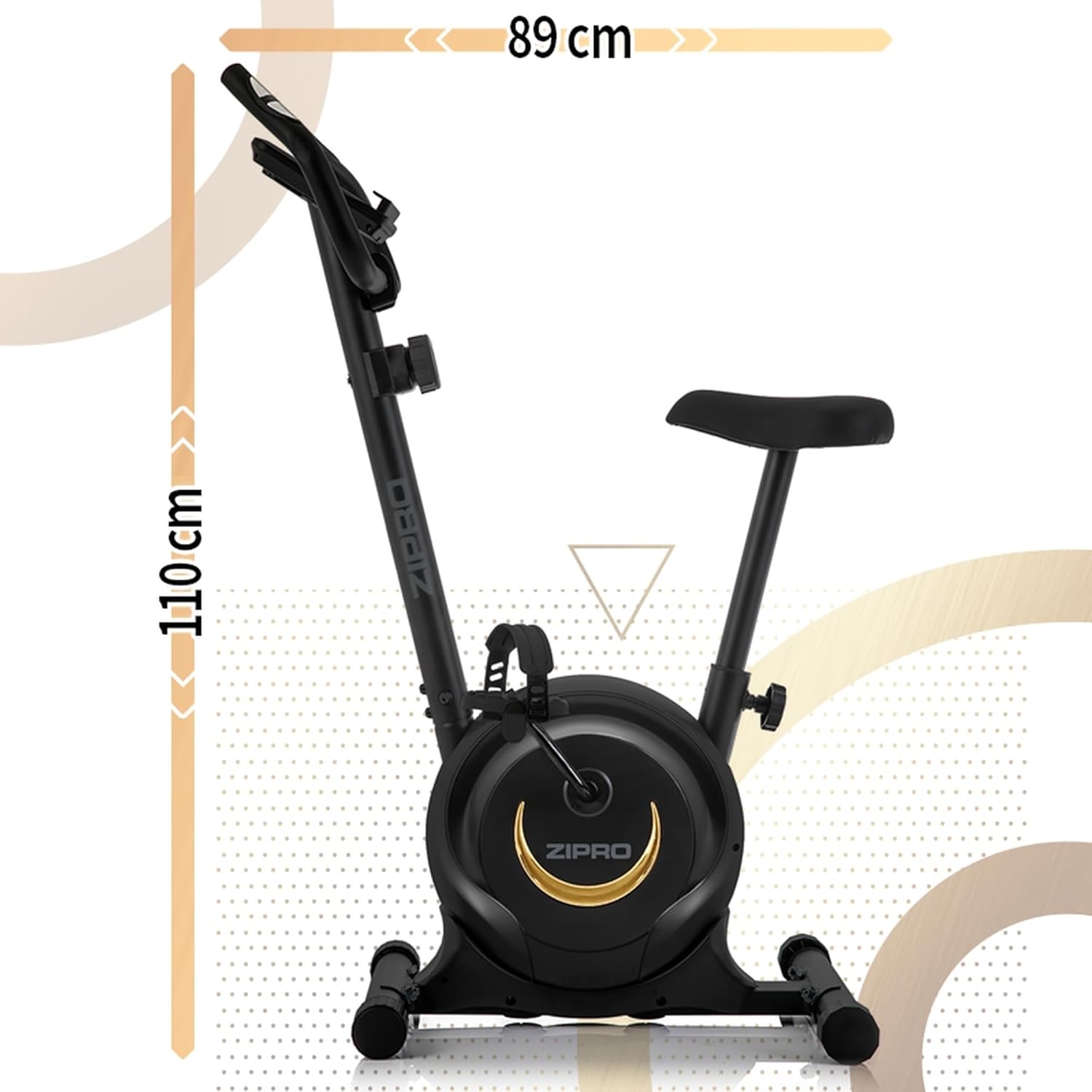
Figure 9: Product dimensions for space planning.
Warranty and Support
For warranty information, technical support, or to order replacement parts, please refer to the warranty card included with your product or visit the official ZIPRO website. Keep your purchase receipt as proof of purchase.
Related documents5941659


Ask a question about this manual
Ask about setup, troubleshooting, compatibility, parts, safety, or missing instructions. Manuals+ will review the question and use this page’s manual context to help answer it.