
Baseus P40112602111-04
Baseus Brilliance Series Magnetic Keyboard Case
Model: P40112602111-04
1. Introduction
Thank you for choosing the Baseus Brilliance Series Magnetic Keyboard Case. This manual provides essential information for the proper setup, operation, and maintenance of your new keyboard case, designed to enhance your iPad Pro 12.9″ (2018-2022) experience. This accessory transforms your tablet into a versatile workstation, offering protection, functionality, and a comfortable typing experience.

Figure 1.1: Baseus Brilliance Series Magnetic Keyboard Case with iPad Pro.
2. Package Contents
Please verify that all items are present in the package:
- Baseus Brilliance Series Magnetic Keyboard Case (x1)
- Exquisite Sticker (x1)
- Warranty Card (x1)
- Type-C Charging Cable (x1)
3. Product Overview
The Baseus Brilliance Series Magnetic Keyboard Case is designed for seamless integration with your iPad Pro, offering a blend of protection and productivity features.

Figure 3.1: Key features of the keyboard case, including its ultra-thin profile, comfortable scissor mechanism keys, powerful magnetic support, and 150-hour battery life.
Key Features:
- Ultra-Thin Design: At 5.8mm, it maintains the sleek profile of your iPad Pro.
- Scissor Mechanism Keys: Provides a comfortable and responsive typing experience.
- Magnetic Attachment: Securely holds your iPad Pro in place.
- Non-Slip Cradle: Ensures stability during use.
- Floating Cantilever Stand: Offers versatile viewing angles.
- Long Battery Life: Up to 150 hours of continuous use.
- Bluetooth 5.3 Connectivity: For stable and efficient wireless connection.
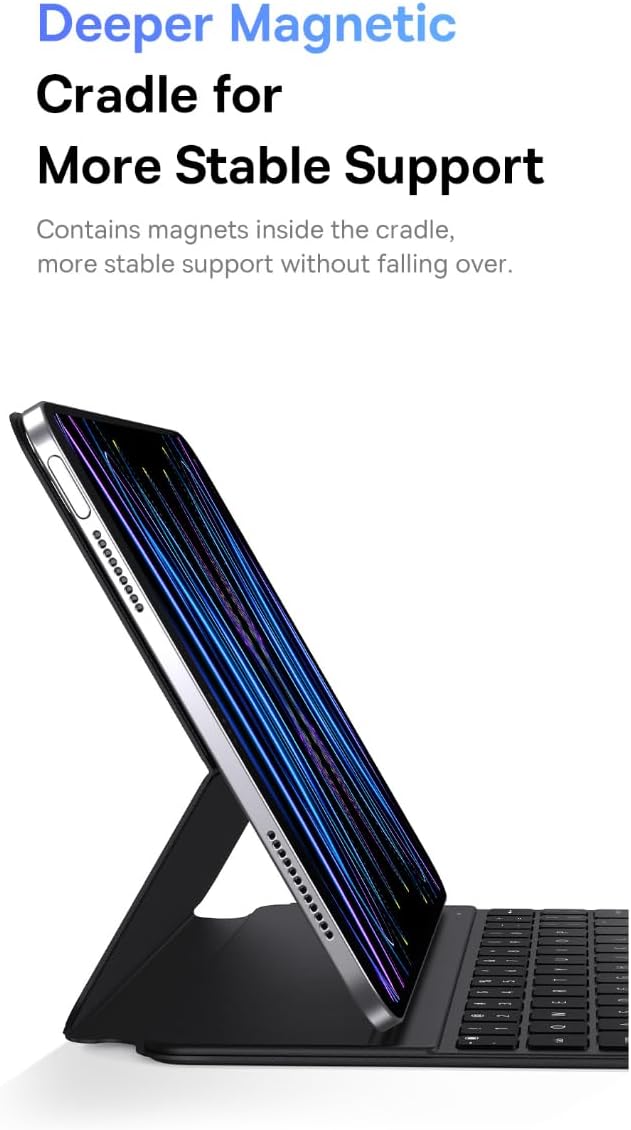
Figure 3.2: The deeper magnetic cradle ensures stable support for the iPad.
4. Setup
4.1 Charging the Keyboard
Before first use, fully charge the keyboard case. Use the provided Type-C cable to connect the keyboard to a power source. The charging indicator light will show the charging status.
- Charging Time: Approximately 2 hours for a full charge.
4.2 Attaching Your iPad
- Open the keyboard case.
- Align your iPad Pro 12.9″ with the magnetic cradle. The magnets will automatically secure the iPad in place.
- Adjust the floating cantilever stand to your desired viewing angle.
4.3 Bluetooth Pairing
To connect the keyboard to your iPad via Bluetooth:
- Ensure the keyboard is charged and powered on.
- On your iPad, go to Settings > Bluetooth and turn Bluetooth on.
- The iPad will search for nearby Bluetooth devices. Select the Baseus keyboard from the list of available devices.
- Follow any on-screen prompts to complete the pairing process. Once paired, the keyboard will automatically connect to your iPad when both are powered on and within range (approx. 10m).

Figure 4.1: The keyboard case features upgraded Bluetooth 5.3 technology for stable, long-distance transmission.
5. Operating Instructions
5.1 Typing
The keyboard features a scissor mechanism for comfortable and responsive typing. Simply place your iPad in the magnetic cradle and begin typing as you would on a traditional laptop keyboard.

Figure 5.1: The dull-polished keycaps provide a better grip for a smooth and comfortable typing experience.
5.2 Adjusting Viewing Angles
The floating cantilever stand allows for multiple viewing angles. Gently adjust the iPad's position within the magnetic cradle to find the most comfortable angle for typing, drawing, or media consumption.
5.3 Power Management
The keyboard case offers an impressive 150 hours of continuous use on a single charge. To conserve battery life, the keyboard will automatically enter sleep mode after a period of inactivity. Press any key to wake it up.
6. Maintenance
To ensure the longevity and optimal performance of your keyboard case, follow these maintenance guidelines:
- Cleaning: Use a soft, dry, lint-free cloth to wipe the exterior of the case. For stubborn marks on the PU leather, a slightly damp cloth can be used, followed by immediate drying. Avoid harsh chemicals or abrasive cleaners.
- Storage: When not in use, store the keyboard case in a cool, dry place away from direct sunlight and extreme temperatures.
- Protection: While the case offers comprehensive protection, avoid dropping it or exposing it to excessive force.
7. Troubleshooting
If you encounter any issues with your Baseus Brilliance Series Magnetic Keyboard Case, please refer to the following common solutions:
| Problem | Possible Cause | Solution |
|---|---|---|
| Keyboard not connecting via Bluetooth. | Keyboard battery low; Bluetooth off on iPad; not paired correctly; out of range. | Charge the keyboard. Ensure Bluetooth is enabled on your iPad. Re-pair the keyboard by forgetting the device on your iPad and repeating the pairing steps. Ensure the keyboard is within 10m of the iPad. |
| Keys are unresponsive. | Keyboard battery low; connection issue. | Charge the keyboard. Check Bluetooth connection. If the issue persists, restart both the iPad and the keyboard. |
| iPad not stable in the case. | iPad not correctly seated in the magnetic cradle. | Ensure the iPad is fully aligned and seated within the magnetic cradle. The magnets should provide a firm hold. |
| Keyboard not turning on. | Battery depleted. | Connect the keyboard to a power source using the Type-C cable and allow it to charge for at least 15 minutes before attempting to turn it on again. |
8. Specifications
Detailed specifications for the Baseus Brilliance Series Magnetic Keyboard Case:

Figure 8.1: Comprehensive specifications for the keyboard case.
| Feature | Detail |
|---|---|
| Brand | Baseus |
| Model | P40112602111-04 |
| Compatible Devices | iPad Pro 12.9″ (2018-2022), Pad (2019/2020/2021) 10.2″, Pad 10 (2022) 10.9″, Pad Air4/Air5 10.9″, Pad Pro (2018/2020/2021/2022) 11″, Pad mini 6 8.3″ |
| Connectivity Technology | Bluetooth 5.3 |
| Bluetooth Connection Distance | Approx. 10m |
| Keyboard Description | Standalone |
| Material Type | PU leather + plastic |
| Item Weight | 519 g |
| Special Features | Ultra-Thin Design, Scissor Mechanism, Magnetic Cradle, Floating Cantilever Stand |
| Power Source | Battery Powered |
| Battery Capacity | 300mAh |
| Charge Time | Approx. 2 hours |
| Continuous Use Time | Approx. 150 hours |
| Accessories Included | Type-C Cable |
9. Warranty & Support
This product comes with a warranty card included in the package. Please refer to the warranty card for specific terms and conditions regarding warranty coverage. For technical support or further inquiries, please contact Baseus customer service through the official Baseus website or your point of purchase.
Related documentsP40112602111-04

Ask a question about this manual
Ask about setup, troubleshooting, compatibility, parts, safety, or missing instructions. Manuals+ will review the question and use this page’s manual context to help answer it.