
1. Introduction
This manual provides essential information for the proper installation, operation, and maintenance of your EchoMaster FCTP-MB1903 Blind Spot Mirror Camera Kit. Please read this manual thoroughly before attempting any installation or operation to ensure correct usage and to prevent damage to the product or vehicle. This kit is designed specifically for 2019 and newer Mercedes-Benz Sprinter vehicles equipped with a factory 7-inch or 10.25-inch display radio.
2. Product Overview
2.1 Key Features
- Factory-matched side mirror caps for seamless integration.
- Camera activation synchronized with left and right turn signals.
- Capability to integrate additional cameras into the system.
- Optimized viewing angle of 80 degrees for enhanced blind spot visibility.
- Weatherproof rated cameras (IP67) for durability in various conditions.
- Low light sensitivity of 0.1 Lux.
- Automatic reverse camera activation when reverse gear is engaged (if installed).
- Speed-controlled front camera activation (if installed).
2.2 Package Contents
Verify that all components listed below are present in your package:
- Two (2) factory matching mirror caps.
- Two (2) weatherproof rated cameras (IP67).
- Two (2) camera extension harnesses.
- One (1) intelligent 4-camera integration module.
- One (1) warranty card.
- One (1) detailed installation manual.
2.3 Product Components Visuals
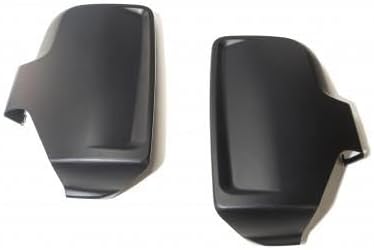

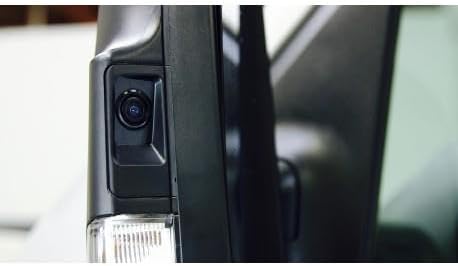
3. Safety Information
- Professional Installation Recommended: Due to the complexity of vehicle electrical systems and the precise nature of camera calibration, professional installation by a qualified technician is strongly recommended.
- Disconnect Power: Always disconnect the vehicle's battery before beginning any electrical installation to prevent short circuits or damage.
- Wiring: Ensure all wiring is routed safely, away from moving parts, heat sources, and sharp edges. Use appropriate connectors and insulation.
- Testing: After installation, thoroughly test all functions of the camera system and vehicle systems to ensure proper operation before driving.
- Driving Responsibility: This camera system is an aid for safe driving and does not replace the driver's responsibility to check mirrors, blind spots, and surroundings manually. Always drive cautiously and be aware of your environment.
- Environmental Conditions: While cameras are weatherproof, extreme conditions (heavy rain, snow, fog) may temporarily impair visibility. Clean camera lenses regularly.
4. Setup and Installation
The EchoMaster FCTP-MB1903 kit is designed for integration with 2019+ Mercedes-Benz Sprinter vehicles that have a factory 7-inch or 10.25-inch display radio. Detailed, step-by-step installation instructions are provided in the dedicated Installation Manual included with your kit. Please refer to that document for comprehensive guidance.
4.1 Key Installation Considerations
- Vehicle Compatibility: Confirm your Mercedes Sprinter is a 2019 model year or newer and has the specified factory display radio.
- Mirror Cap Replacement: The installation involves replacing the factory side mirror caps with the new camera-integrated caps.
- Wiring Connections: The camera extension harnesses connect the cameras to the intelligent 4-camera integration module. The module then interfaces with the vehicle's existing display system.
- Module Placement: Securely mount the integration module in a dry, accessible location within the vehicle cabin, away from heat and moisture.
- Testing: After all connections are made, perform a thorough test of the system as outlined in the Installation Manual to ensure all cameras activate correctly with turn signals, reverse gear, and any optional front camera inputs.
5. Operating Instructions
Once installed, the EchoMaster FCTP-MB1903 system operates largely automatically, integrating seamlessly with your vehicle's existing controls.
5.1 Turn Signal Activated Cameras
- When the left turn signal is activated, the display will automatically switch to show the view from the left blind spot camera.
- When the right turn signal is activated, the display will automatically switch to show the view from the right blind spot camera.
- The camera view will typically remain active for a short period after the turn signal is disengaged, or until the vehicle speed exceeds a certain threshold, depending on system configuration.
5.2 Reverse Gear Activation
- If a reverse camera is installed and connected to the integration module, engaging reverse gear will automatically trigger the display to show the rear camera view.
5.3 Optional Front Camera Activation
- If an optional front camera is installed, its activation may be speed-controlled, meaning it could activate automatically at low speeds (e.g., for parking maneuvers) and deactivate above a certain speed. Refer to the Installation Manual for specific details on front camera operation if applicable.
6. Maintenance
To ensure optimal performance and longevity of your EchoMaster FCTP-MB1903 Blind Spot Mirror Camera Kit, follow these simple maintenance guidelines:
- Camera Lens Cleaning: Regularly inspect and clean the camera lenses on the mirror caps. Use a soft, damp cloth and mild soap solution if necessary. Avoid abrasive cleaners or materials that could scratch the lens.
- Wiring Inspection: Periodically check visible wiring for any signs of wear, fraying, or damage. Ensure all connections remain secure.
- Mirror Cap Condition: Inspect the mirror caps for any physical damage. While durable, impacts can affect camera alignment or housing integrity.
- Software Updates: If available, consult the EchoMaster website or your installer for any potential firmware updates for the integration module.
7. Troubleshooting
If you encounter issues with your camera system, refer to the following common problems and solutions:
| Problem | Possible Cause | Solution |
|---|---|---|
| No camera image on display. | Loose wiring connection; power issue; incorrect module settings; faulty camera. | Check all wiring connections to the module and cameras. Verify power supply to the module. Consult the Installation Manual for module settings. If problem persists, contact customer support. |
| Image is distorted or flickering. | Poor connection; electrical interference; damaged cable. | Ensure all video cables are securely connected. Check for sources of electrical interference. Inspect cables for damage. |
| Camera does not activate with turn signal. | Incorrect turn signal input wiring; module configuration issue. | Verify turn signal input connections to the integration module as per the Installation Manual. Check module settings. |
| Camera view is blurry or unclear. | Dirty lens; condensation; damaged lens. | Clean the camera lens with a soft, damp cloth. Allow time for condensation to clear. If lens is damaged, contact customer support. |
For issues not covered here, or if troubleshooting steps do not resolve the problem, please contact EchoMaster customer support or your professional installer.
8. Specifications
| Feature | Specification |
|---|---|
| Model Number | FCTP-MB1903 |
| Compatible Vehicles | 2019+ Mercedes-Benz Sprinter with factory 7" or 10.25" display radio |
| Camera Viewing Angle | 80 Degrees (Real Angle of View) |
| Camera Weatherproof Rating | IP67 |
| Low Light Sensitivity | 0.1 Lux |
| Optical Sensor Technology | CMOS |
| Optical Sensor Size | 1/3 inch |
| Lens Type | Wide Angle, Fixed |
| Connector Type | RCA |
| Product Dimensions | 15 x 8 x 8 inches (Packaging/Kit) |
| Item Weight | 4 pounds |
| Color | Black |
| Manufacturer | EchoMaster |
9. Warranty Information
Your EchoMaster FCTP-MB1903 Blind Spot Mirror Camera Kit is covered by a limited warranty. Please refer to the Warranty Card included in your package for specific terms, conditions, and duration of the warranty. This card contains important details regarding warranty registration, coverage, and how to make a claim.
Keep your proof of purchase and the warranty card in a safe place. Any unauthorized modification or improper installation may void the warranty.
10. Customer Support
For technical assistance, installation questions, or warranty inquiries, please contact EchoMaster customer support. You can typically find contact information on the EchoMaster website or on the warranty card provided with your product.
When contacting support, please have your product model number (FCTP-MB1903) and proof of purchase readily available to expedite assistance.
