
Introduction
Thank you for choosing TECKNET 231 LED Solar Motion Lights. This manual provides essential information for the proper installation, operation, and maintenance of your solar lights. Please read these instructions carefully before use to ensure optimal performance and longevity of the product.
Product Features
- High-Efficiency Solar Panel: Converts sunlight into electricity with a 25% conversion rate, providing 10-12 hours of illumination after a full day's charge.
- Enhanced Brightness: Equipped with 231 LED beads and a reflective light structure for brighter, three-sided lighting.
- Three Lighting Modes: Offers versatile lighting options to suit different needs.
- Advanced PIR Motion Sensor: Detects movement from 10-17 feet at a 120° angle.
- Wide Lighting Angle: Provides a 300° lighting angle, covering an area of approximately 376 square feet.
- Durable and Weatherproof: IP65 rated for water, frost, and heat resistance, suitable for various outdoor conditions.
- Multiple Installation Options: Designed for easy installation using screws, double-sided tape, or rope hanging.
Package Contents
The package includes:
- TECKNET 231 LED Solar Motion Lights (4 units)
- Mounting Screws and Wall Plugs
- User Manual
Setup and Installation
Initial Charging
Before first use, ensure the protective film is removed from the solar panel. Place the solar lights in direct, unobstructed sunlight for more than 6 hours to allow for a full initial charge. This ensures optimal battery performance.
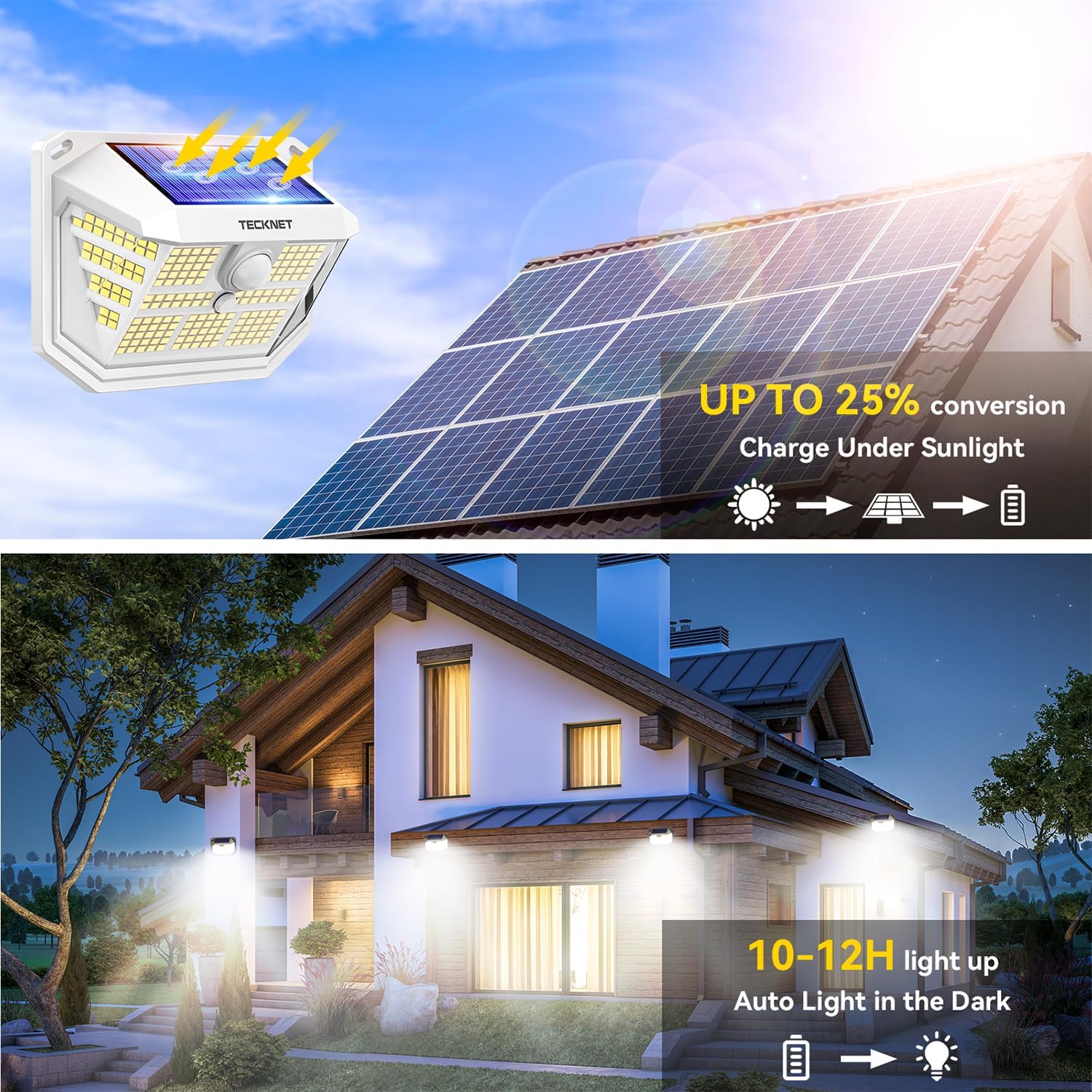
Image: The solar light unit with its solar panel facing upwards, absorbing sunlight. Below, a house exterior is illuminated by multiple installed solar lights at night, demonstrating 10-12 hours of light after charging.
Choosing an Installation Location
Select a location that receives ample direct sunlight throughout the day to maximize charging efficiency. The light should be mounted at a height that allows the motion sensor to cover the desired area effectively.
Installation Methods
The TECKNET solar lights offer multiple installation options:
- Screw Mounting: This is the recommended method for secure installation. Use the provided screws and wall plugs to firmly attach the light to a wall or fence.
- Double-sided Adhesive: For lighter applications or temporary placement, double-sided tape can be used. Ensure the surface is clean and dry before application.
- Rope Hanging: The lights can also be hung using a rope through designated points, suitable for fences or other structures.

Image: A diagram illustrating three methods to install the solar light: 1) Screw Mounting with a screwdriver, 2) Double-sided Adhesive on a window, and 3) Rope Hanging on a wooden fence. Product dimensions are also shown.
Operating Instructions
The TECKNET solar motion lights feature three distinct lighting modes, selectable via a button on the unit. The advanced PIR motion sensor detects movement within 10-17 feet and a 120° angle, activating the light according to the chosen mode.
Lighting Modes
- Mode 1 (Constant Brightness Mode): The light remains at medium brightness continuously for approximately 8 hours after dark. This mode is activated by pressing the button once.
- Mode 2 (Low Light Sensor Mode): The light stays at a low brightness when no motion is detected. Upon detecting motion, it switches to full power for 25-30 seconds, then returns to low brightness. This mode is activated by pressing the button twice.
- Mode 3 (Sensor Mode - Recommended): The light remains off when no motion is detected. When motion is sensed, the light turns on at full power for 25-30 seconds, then turns off. This mode is activated by pressing the button three times.
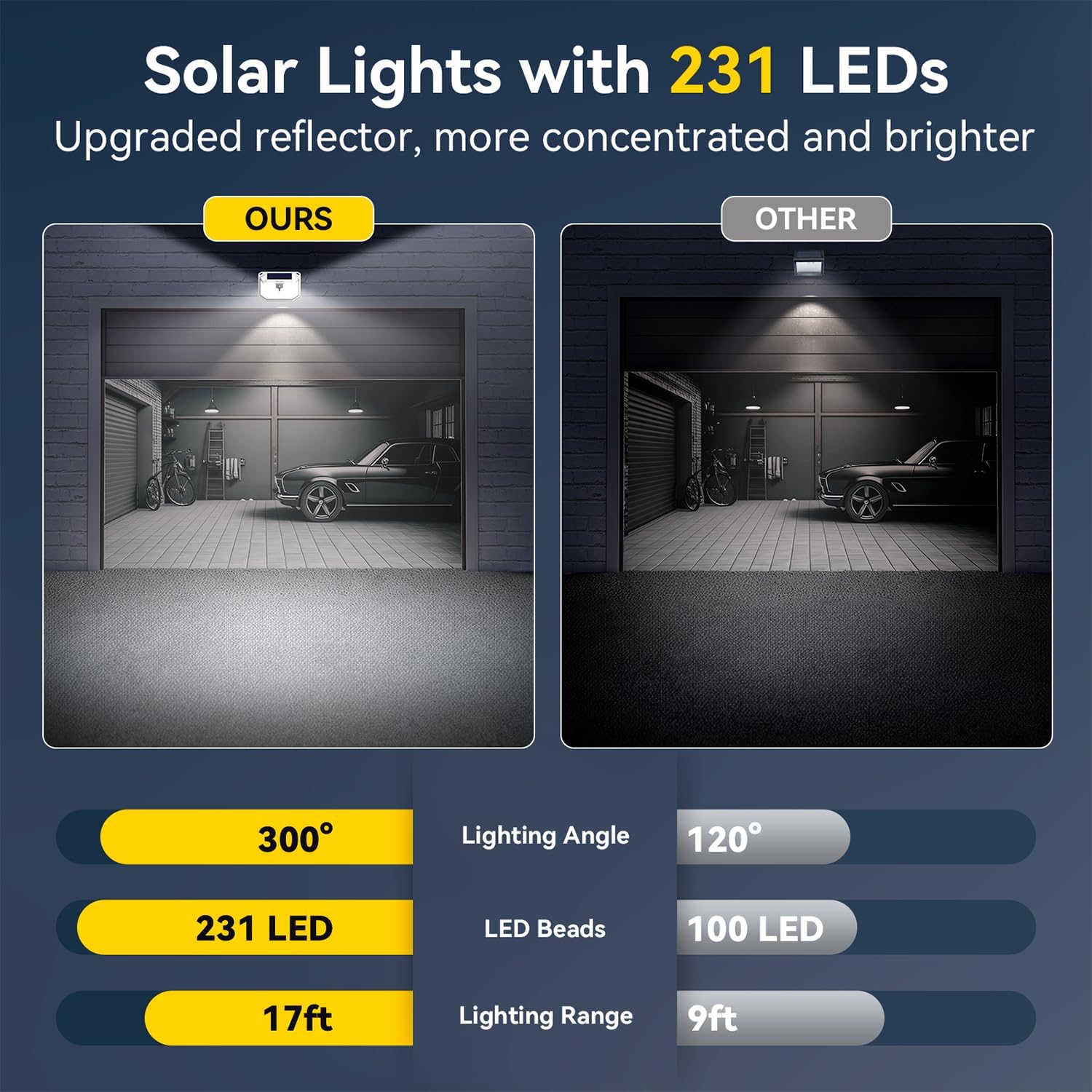
Image: A visual representation of the three operating modes. Mode 1 shows the light permanently on. Mode 2 shows the light dim, then brightens with motion. Mode 3 shows the light off, then brightens with motion for a duration.
Wide Coverage
The 300° wide lighting angle ensures extensive coverage, illuminating up to 376 square feet, making it ideal for yards, decks, and pathways.

Image: An overhead view illustrating the 300° wide lighting angle and the 120° PIR motion detection range (10-17 feet) of the solar light, covering an area of 376 square feet.
Maintenance
To ensure continuous optimal performance of your solar lights, regular maintenance is recommended:
- Clean Solar Panel: Periodically wipe the solar panel with a soft, damp cloth to remove dust, dirt, or debris that may accumulate and hinder charging efficiency.
- Clear Obstructions: Ensure no trees, bushes, or other objects are blocking direct sunlight from reaching the solar panel.
- Check Mounting: Periodically check that the lights are securely mounted and have not become loose due to weather conditions.
Troubleshooting
If your TECKNET solar motion light is not functioning as expected, consider the following:
- Light Not Turning On:
- Ensure the light has been charged in direct sunlight for at least 6 hours.
- Verify that the solar panel is clean and free from obstructions.
- Check if the light is in the correct operating mode (Mode 1, 2, or 3).
- Short Illumination Time:
- The solar panel may not be receiving enough direct sunlight during the day. Relocate the light to a sunnier spot.
- Extreme cold weather can affect battery performance.
- Motion Sensor Not Responding:
- Ensure the sensor is clean and unobstructed.
- Verify that the light is in Mode 2 or Mode 3, which utilize the motion sensor.
- Test the detection range by walking within 10-17 feet of the sensor.
If issues persist after following these steps, please contact customer support for assistance.
Specifications
| Brand | TECKNET |
| Model Name | TK-SL001 |
| Light Source Type | LED |
| Number of Light Sources | 231 |
| Brightness | 800 Lumens |
| Light Color | Cool White |
| Power Source | Solar Powered |
| Special Feature | Energy Efficient, Motion Sensor |
| Motion Sensor Detection Range | 10-17 ft (3-5 m) |
| Motion Sensor Angle | 120° |
| Lighting Angle | 300° |
| Water Resistance Level | IP65 |
| Material | Acrylonitrile Butadiene Styrene (ABS) |
| Product Dimensions | 6"L x 5"W x 3"H (approx.) |
| Item Weight | 1.7 pounds |
| Installation Type | Wall Mount |

Image: The solar light mounted on a wall, with icons indicating IP65 waterproof, frost-resistant, and heat-resistant features, set against backgrounds of rain, snow, and sun.
Warranty and Support
TECKNET stands behind the quality of its products. If your solar lights fail to function post-charge or you encounter any issues, please contact TECKNET customer support for assistance. We are committed to providing swift replacements for defective units.
For further support or inquiries, please refer to the contact information provided with your purchase or visit the official TECKNET website.


