
Richmat HJH55
Richmat HJH55 Wireless Remote Control User Manual
Model: HJH55
Introduction
This manual provides essential information for the setup, operation, and maintenance of your Richmat HJH55 Wireless Remote Control for adjustable bed bases. This remote is designed for compatibility with various adjustable bed brands, including MLILY, MATTRESS FIRM, CLASSIC BRANDS, and INNOVA. Please ensure your control box is compatible with this remote (Remote #1) before proceeding. This remote requires pairing with your bed base's control box and does not include the control box device itself.
Setup
1. Battery Installation
The Richmat HJH55 remote requires two (2) AAA batteries (not included). To install:
- Locate the battery compartment on the back of the remote control.
- Slide the battery cover open.
- Insert two AAA batteries, ensuring correct polarity (+ and -).
- Close the battery cover securely.
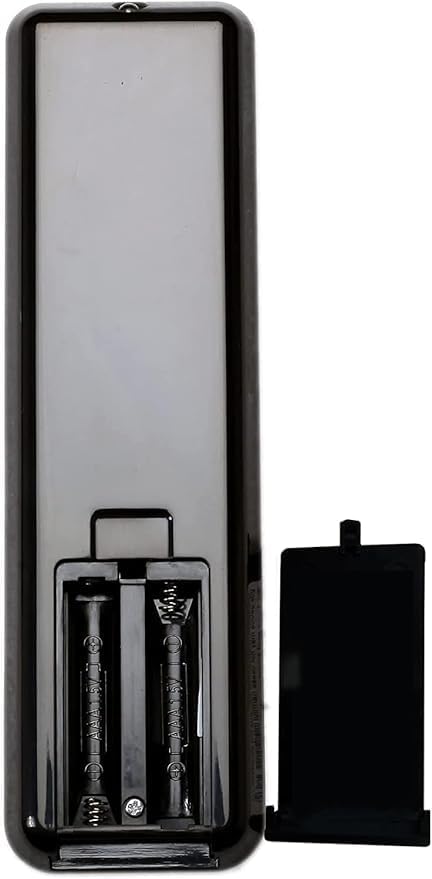
Figure 1: Battery compartment on the back of the remote.
2. Power Adapter and Control Box Connection
Ensure your adjustable bed base's power adapter is securely plugged into a working electrical outlet. Then, connect the power adapter's cable lock to the control box cable.
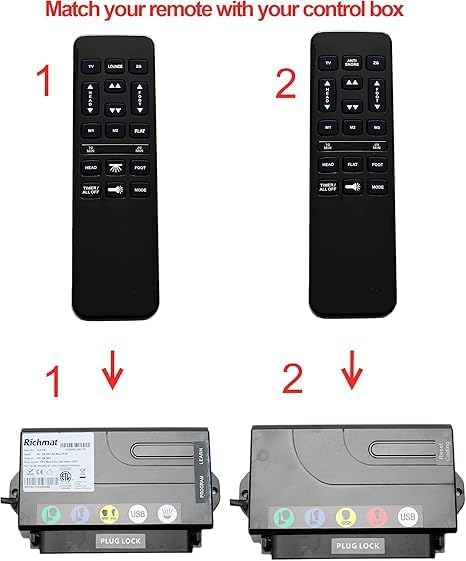
Figure 2: Ensure your remote matches the correct control box for compatibility.
Operating Instructions
Pairing the Remote Control
The remote control does not come pre-paired and must be synced with your bed base's control box. Follow these steps:
- Ensure the bed base's power adapter is plugged in.
- Locate the small "Learn" button on the side of your bed base's control box.
- Press and hold the "Learn" button on the control box.
- While holding the "Learn" button, simultaneously press and hold the Head Up (▲) and Foot Up (▲) arrows on your Richmat HJH55 remote control.
- Continue holding all three buttons until you hear a beep from the control box. This indicates successful pairing.
- Release all buttons.
After successful pairing, test the remote's functions to ensure proper operation.
Remote Control Functions
The Richmat HJH55 remote features various buttons for adjusting your bed base:
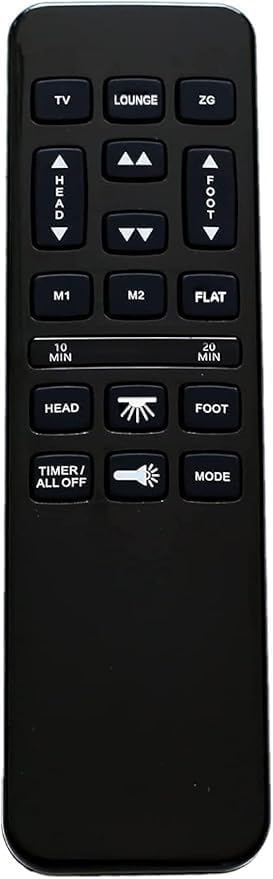
Figure 3: Richmat HJH55 Remote Control Layout.
- TV / LOUNGE / ZG: Pre-set positions for common comfort settings.
- Head Up (▲) / Head Down (▼): Adjusts the head section of the bed.
- Foot Up (▲) / Foot Down (▼): Adjusts the foot section of the bed.
- M1 / M2: Memory buttons to save and recall your favorite positions.
- FLAT: Returns the bed to a flat position.
- 10 MIN / 20 MIN: Timer functions (specific operation may vary by bed base model).
- HEAD / FOOT (Massage): Activates massage functions for head or foot sections.
- Light Bulb Icon: Controls under-bed lighting (if available).
- TIMER / ALL OFF: Turns off all active functions or sets a timer.
- MODE: Cycles through massage modes or other settings.
For a visual guide on pairing, please refer to the tutorial video below:
Video 1: EASY Tutorial Video - Pairing your Richmat HJH55 remote + HJC18 control box. This video demonstrates the step-by-step process of connecting the power adapter, locating the cable lock, and successfully pairing the Richmat HJH55 remote with the HJC18 control box by pressing the 'Learn' button and the Head Up/Foot Up arrows simultaneously.
Maintenance
Battery Replacement
If the remote control's performance degrades or it stops responding, replace the AAA batteries. Follow the battery installation steps outlined in the Setup section.
Cleaning
To clean the remote control, use a soft, dry cloth. Do not use liquid cleaners or abrasive materials, as they may damage the remote's surface or internal components.
Troubleshooting
| Problem | Possible Cause | Solution |
|---|---|---|
| Remote not responding after pairing attempt. | Incorrect pairing procedure, low batteries, or incompatibility with control box. |
|
| Bed base not moving. | Power adapter unplugged, remote not paired, or motor issue. |
|
Specifications
- Model: HJH55
- Brand: Richmat (Generic listed as manufacturer)
- Compatibility: Designed for Richmat adjustable bed bases, compatible with many brands using this remote type (e.g., MLILY, MATTRESS FIRM, CLASSIC BRANDS, INNOVA).
- Power Source: 2 x AAA Batteries (not included)
- Color: Black
- Special Feature: Backlit buttons
- Max Number of Supported Devices: 1
- ASIN: B0DLQ7H74V
- Date First Available: November 1, 2024
Warranty and Support
Specific warranty information for the Richmat HJH55 remote control is not provided in this manual. Please refer to the original purchase documentation or contact the seller, Miramonte Home, for details regarding warranty coverage and customer support.
For further assistance or technical support, it is recommended to contact the manufacturer of your adjustable bed base or the seller directly.
Related documentsHJH55


Ask a question about this manual
Ask about setup, troubleshooting, compatibility, parts, safety, or missing instructions. Manuals+ will review the question and use this page’s manual context to help answer it.