
Introduction
This manual provides essential information for the proper use and care of your Apple iPhone 15 FineWoven Case with MagSafe. This case is designed to protect your iPhone 15 while offering a soft, suedelike feel and seamless MagSafe compatibility.
The FineWoven material is crafted from 68 percent post-consumer recycled content, reflecting a commitment to environmental considerations. It is engineered to fit snugly over your iPhone 15 without adding unnecessary bulk.
Setup: Case Installation
To install the FineWoven Case on your iPhone 15, follow these steps:
- Ensure your iPhone 15 is clean and free of dust or debris.
- Hold the iPhone with the screen facing up.
- Align the top edge of your iPhone with the top edge of the case.
- Gently push the iPhone into the case, starting from the top, ensuring the buttons align with the case's button covers.
- Press firmly around the edges until the iPhone is fully seated and the case snaps securely into place.

Image: The FineWoven case securely fitted onto an iPhone 15, displaying the phone's interface and the case's slim profile.
To remove the case, gently peel back one of the bottom corners, then carefully work your way around the edges until the iPhone can be lifted out.
Operating: MagSafe Functionality
The FineWoven Case features built-in magnets that are designed to align perfectly with your iPhone 15, enabling seamless use of MagSafe accessories.
- MagSafe Charging: To charge your iPhone wirelessly, simply place your iPhone (with the case on) onto a MagSafe charger. The magnets will automatically align for optimal charging.
- Qi-Certified Charging: The case is also compatible with standard Qi-certified wireless chargers. Place your iPhone (with the case on) onto a Qi charger.
- MagSafe Accessories: Other MagSafe accessories, such as wallets or mounts, will securely attach to the back of the case.
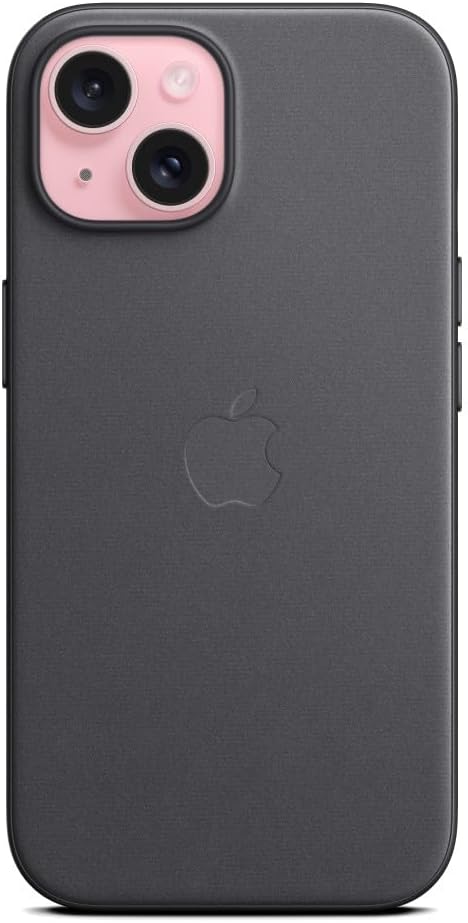
Image: Rear view of the FineWoven case, highlighting the integrated MagSafe magnet array (invisible under the material) and the Apple logo.
Maintenance and Care
To maintain the appearance and longevity of your FineWoven Case, consider the following:
- Cleaning: For general cleaning, wipe the case with a soft, damp, lint-free cloth. Avoid harsh chemicals or abrasive materials.
- Material Wear: The FineWoven material may show wear over time as the fibers get compressed with normal use. Some minor scratches may diminish over time.
- MagSafe Imprints: Interaction with MagSafe accessories may leave slight imprints on the FineWoven material. This is a normal characteristic of the material.
- Protection: While designed for protection against scratches and drops, extreme impacts should still be avoided.
Troubleshooting
If you encounter any issues with your FineWoven Case, review the following common points:
- Case Fit: If the case does not fit snugly, ensure it is correctly aligned and fully snapped into place around all edges of the iPhone.
- MagSafe Alignment: If MagSafe accessories are not attaching correctly, ensure there is no obstruction between the accessory and the case, and that the accessory is genuinely MagSafe compatible.
- Material Appearance: Normal use may result in minor wear or imprints. If significant wear or damage occurs, consider replacing the case. For users concerned about material wear or imprints, alternative cases such as silicone or clear cases may be more suitable.
Specifications
| Product Name | Apple iPhone 15 FineWoven Case with MagSafe |
| Model Number | MT393ZM/A |
| Compatible Devices | iPhone 15 |
| Material | Polyester (68% post-consumer recycled content) |
| Color | Black |
| Dimensions | 7.18 x 3.54 x 0.69 inches |
| Item Weight | 2.82 ounces |
| Manufacturer | Apple |
Warranty and Support
For warranty information and technical support, please refer to the official Apple website or contact Apple Support directly. Keep your proof of purchase for warranty claims.
Additional resources and support can be found at www.apple.com/support.