
1. Important Safety Information
Please read all instructions carefully before assembling and using the GYMAX Magnetic Stationary Exercise Bike. Retain this manual for future reference.
- Maximum User Weight: Do not exceed 242 pounds (110 kg).
- Recommended User Height: Suitable for users between 5.1 ft and 6.1 ft (155 cm - 185 cm).
- Ensure all bolts and nuts are securely tightened before each use.
- Place the exercise bike on a flat, stable surface. Use a mat underneath to protect flooring and reduce noise.
- Keep children and pets away from the exercise bike during operation.
- Consult a physician before starting any new exercise program.
- Stop exercising immediately if you feel faint, dizzy, or experience pain.
2. Setup and Assembly
The GYMAX Magnetic Stationary Exercise Bike is designed for straightforward assembly. Follow these steps to set up your bike.

Image: Overview of the GYMAX Magnetic Stationary Exercise Bike, highlighting its adjustable seat and handlebar, and overall design.
2.1 Unpacking
- Carefully remove all components from the packaging.
- Check the parts list against the contents to ensure all items are present.
2.2 Assembly Steps
While specific steps are detailed in the included assembly guide, general assembly involves:
- Attaching the front and rear stabilizers to the main frame.
- Mounting the pedals to the crank arms. Ensure pedals are tightened correctly (left pedal counter-clockwise, right pedal clockwise).
- Installing the seat post and seat.
- Installing the handlebar post and handlebar.
- Connecting the LCD monitor cables and mounting the monitor.
Refer to the detailed assembly diagram provided in the separate assembly sheet for precise instructions and hardware identification.
3. Operating Instructions
3.1 Adjusting Seat and Handlebar
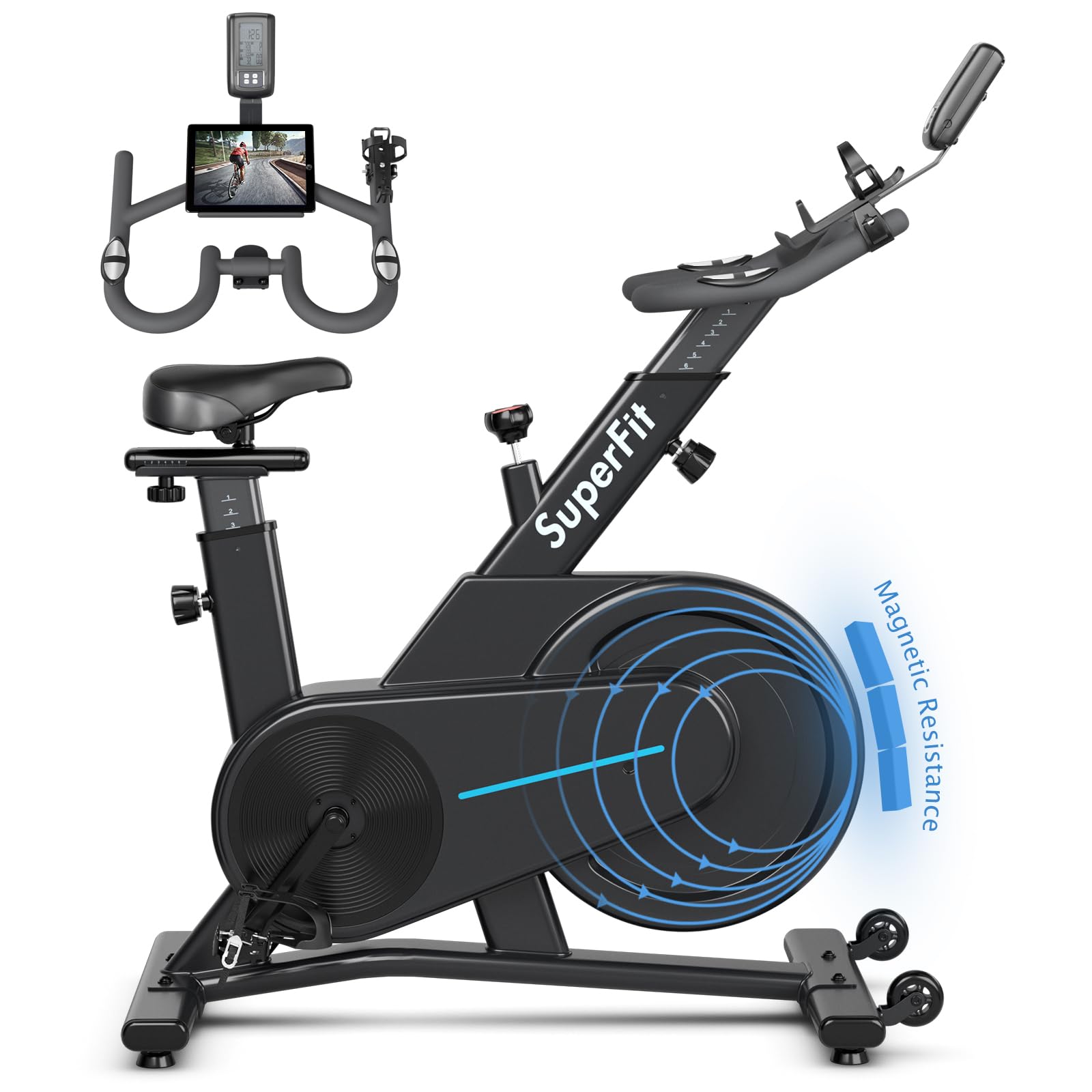
Image: Detailed view of the adjustable seat and handlebar, illustrating the range of adjustments for user height and comfort.
The seat and handlebar are fully adjustable to accommodate various user heights (recommended 5.1-6.1 ft). Use the marked scales for quick and precise adjustments.
- Seat Height: Loosen the adjustment knob below the seat post, slide the seat to the desired height, and re-tighten the knob securely.
- Seat Forward/Backward: Loosen the knob under the seat, slide the seat horizontally, and re-tighten.
- Handlebar Height: Loosen the adjustment knob on the handlebar post, raise or lower the handlebar, and re-tighten.
- Pedals: The cage pedals are adjustable to fit different shoe sizes. Secure your feet firmly before starting your workout.
3.2 Magnetic Resistance System

Image: Illustration of the magnetic resistance system, showing the adjustment knob and the silent, stable, and smooth belt drive mechanism.
The exercise bike features a magnetic resistance system with a silent belt drive, providing a smooth and stable riding experience. Unlike friction resistance, it operates quietly and avoids wear.
- Adjusting Resistance: Rotate the knob located on the main frame to increase or decrease the magnetic resistance. Turn clockwise for more resistance, counter-clockwise for less.
- Emergency Stop: Press down firmly on the resistance knob to engage the emergency brake, stopping the belt immediately.
3.3 LCD Monitor and Modes

Image: The LCD monitor interface, showing various tracked metrics and explaining the Set and Recovery modes.
The control panel includes an LCD display that automatically turns on/off and tracks your workout data.
- Tracked Data: Speed, Time, Distance, Calories, and Heart Rate.
- Set Mode: Allows you to set target values for time, calories, distance, or heart rate for your workout.
- Recovery Mode: Calculates your recovery heart rate and provides a judgment result. This mode can only be used immediately after an alarm sounds, and if a heart rate target was set and reached in Set Mode.
3.4 Racing Handlebar with Tablet Holder and Heart Rate Sensor

Image: The racing-style handlebar, featuring a large tablet holder for entertainment and dual heart rate sensors for monitoring.
The racing handlebar is equipped with dual heart rate sensors and a large tablet holder.
- Tablet Holder: Securely place your tablet or smartphone to enjoy music or exercise videos during your workout.
- Heart Rate Sensors: Grip the sensors on the handlebar to monitor your heart rate, displayed on the LCD monitor.
- The handlebar design supports various riding positions, simulating fast rides, soothing rides, and hill climbing.
3.5 Additional Features
- iPad Mount & Cup Holder: Conveniently located for your devices and hydration.
- Ergonomic Race Seat: Designed for comfort and breathability during extended workouts.
- 360° All-Around Protective Cover: Enhances safety, especially in homes with children and pets.
- Dual Wheels for Easy Movement: Tilt and roll the bike for convenient relocation.
- Non-Slip & Adjustable Foot Pads: Provide stability and protect your floor.

Image: Features such as the protective cover, adjustable cage pedals, non-slip foot pads, and dual transport wheels for enhanced safety and convenience.

Image: A user on the exercise bike, demonstrating the stable triangular structure of the heavy-duty steel frame.
4. Maintenance
Regular maintenance ensures the longevity and safe operation of your GYMAX Exercise Bike.
- Cleaning: Wipe down the bike with a damp cloth after each use to remove sweat and dust. Avoid abrasive cleaners.
- Check Connections: Periodically inspect all bolts, nuts, and moving parts to ensure they are secure. Tighten any loose components.
- Lubrication: The magnetic belt drive system is generally maintenance-free. Do not lubricate the belt or flywheel unless specifically instructed by customer support.
- Storage: Store the bike in a dry, cool place away from direct sunlight and extreme temperatures.
5. Troubleshooting
If you encounter issues with your exercise bike, refer to the following common solutions:
- Noise during operation:
- Ensure all bolts and connections are tight.
- Check for any foreign objects near the flywheel or belt.
- Verify the bike is on a level surface.
- Inaccurate LCD monitor readings:
- Check the battery in the LCD monitor and replace if necessary.
- Ensure all sensor cables are securely connected.
- Resistance not changing:
- Ensure the resistance knob is properly engaged and turning freely.
- Inspect the magnetic mechanism for any obstructions.
If problems persist, please contact GYMAX customer support.
6. Specifications
| Feature | Detail |
|---|---|
| Product Dimensions (D x W x H) | 57D x 159W x 130H Centimetres (22.4D x 62.6W x 51.2H Inches) |
| Item Weight | 39.92 kg (88 Pounds) |
| Maximum Weight Recommendation | 242 Pounds (110 kg) |
| Frame Material | Heavy-Duty Steel |
| Resistance Mechanism | Magnetic |
| Number of Resistance Levels | 16 |
| Drive System | Belt |
| Special Features | Adjustable Seat, Speed Monitor, iPad & Cup Holder |
| Colour | Black |
| Power Source (for monitor) | Battery Powered |
| Recommended Use | Indoor |
| Minimum User Height | 80 Centimeters (31.5 Inches) |
| Maximum User Height | 51 Inches (129.5 Centimeters) |
7. Warranty and Support
Warranty: The GYMAX Magnetic Stationary Exercise Bike comes with a 90-day warranty from the date of purchase.
Customer Support: For any questions, concerns, or warranty claims, please contact GYMAX customer service. Refer to your purchase documentation for specific contact details or visit the official GYMAX website.
Manufacturer Contact Information: GYMAX


