
erjigo VXS Pro
KZ VXS Pro True Wireless Earbuds Instruction Manual
Model: VXS Pro
Brand: erjigo
Product Overview
The KZ VXS Pro True Wireless Earbuds offer a high-fidelity audio experience with advanced features. Equipped with a Qualcomm Bluetooth 5.3 chip, these earbuds provide stable connectivity, superior sound quality, and extended battery life. Designed for both casual listening and high-performance gaming, the VXS Pro earbuds integrate cutting-edge technology for an immersive audio journey.


Getting Started
Charging the Earbuds and Case
Before first use, fully charge the KZ VXS Pro earbuds and their charging case. Connect the provided TYPE-C charging cable to the charging port on the case and a power source. The indicator lights on the case will show charging status.
Pairing with Your Device
- Ensure the earbuds are in the charging case and the case has power.
- Open the charging case. The earbuds will automatically enter pairing mode.
- On your device (smartphone, tablet, computer), enable Bluetooth.
- Search for "KZ VXS Pro" in the list of available Bluetooth devices.
- Select "KZ VXS Pro" to connect. Once connected, a voice prompt will confirm successful pairing.
- If pairing fails, place the earbuds back in the case, close the lid, wait a few seconds, and repeat the steps.
Operation
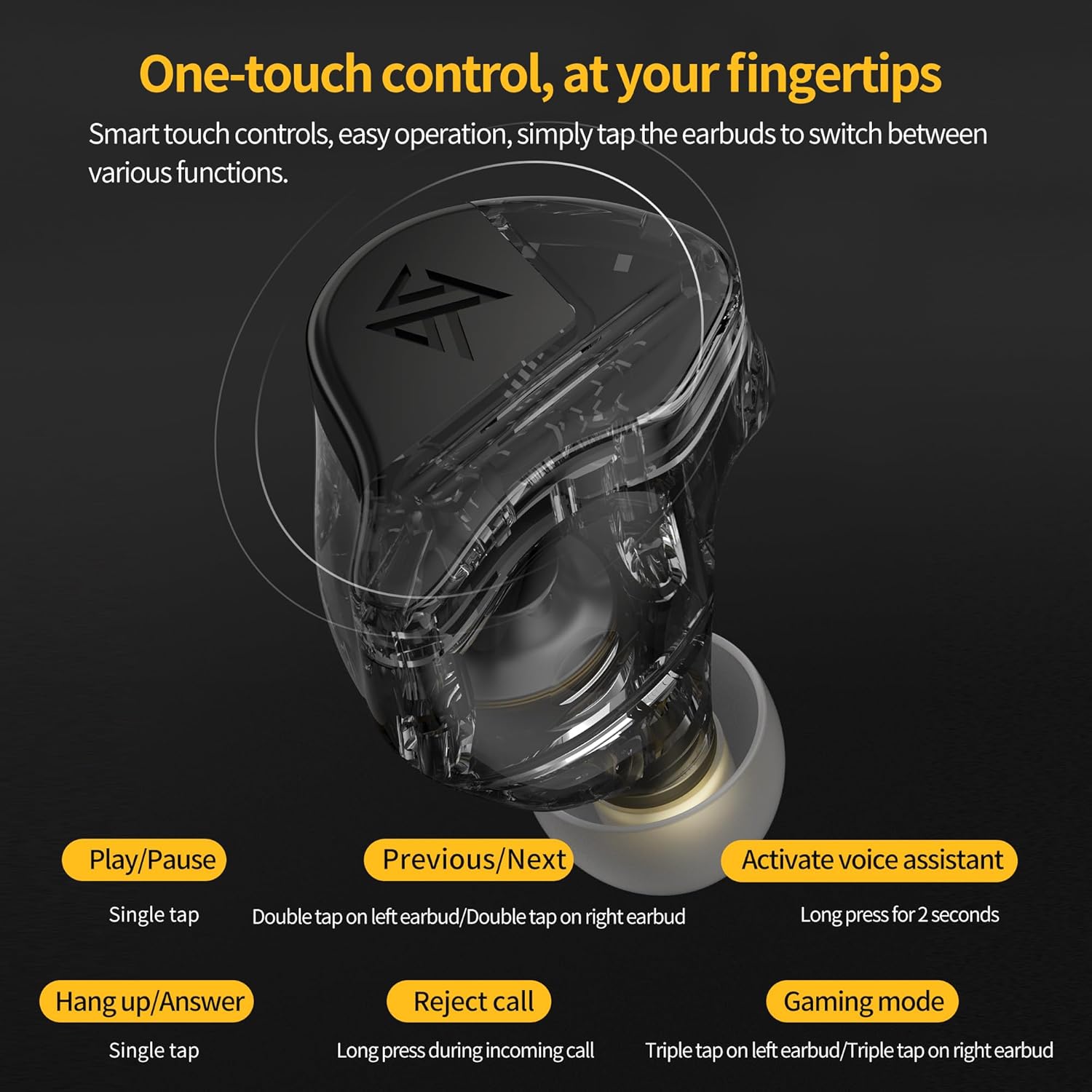
Touch Controls
The KZ VXS Pro earbuds feature intuitive touch controls on each earbud. Refer to the table below for common functions:
| Action | Function |
|---|---|
| Single Tap (Left/Right) | Play/Pause music, Answer/Hang up call |
| Double Tap (Left Earbud) | Previous Track |
| Double Tap (Right Earbud) | Next Track |
| Long Press (2 seconds) | Activate Voice Assistant |
| Long Press (incoming call) | Reject Call |
| Triple Tap (Left/Right Earbud) | Toggle High-Performance Gaming Mode |
High-Performance Gaming Mode
For an ultra-low latency experience (58ms), triple-tap either the left or right earbud to activate the High-Performance Gaming Mode. This mode is ideal for gaming and video playback where audio-visual synchronization is critical. Note that enabling this mode may increase power consumption.
Maintenance and Care
Cleaning
Regularly clean your earbuds and charging case with a soft, dry, lint-free cloth. Do not use harsh chemicals or abrasive materials. Ensure the charging contacts on both the earbuds and the case are clean and free of debris.
Storage
When not in use, store the earbuds in their charging case to protect them and ensure they remain charged. Avoid exposing the earbuds to extreme temperatures, humidity, or direct sunlight.
Battery Life
The earbuds provide approximately 8 hours of playback on a single charge, with the charging case extending total battery life to over 30 hours. For optimal battery longevity, avoid fully discharging the earbuds frequently.
Troubleshooting
Earbuds Not Pairing
- Ensure both earbuds are charged.
- Place earbuds back in the case, close the lid, wait 5 seconds, then open to re-enter pairing mode.
- Turn off and on Bluetooth on your device.
- Forget "KZ VXS Pro" from your device's Bluetooth list and attempt to pair again.
No Sound from One Earbud
- Check if the earbud is properly seated in the charging case and charging.
- Ensure both earbuds are connected to your device.
- Try resetting the earbuds (refer to the pairing section for re-pairing steps).
Poor Sound Quality
- Ensure the earbuds are fully charged.
- Check for obstructions in the earbud nozzles and clean if necessary.
- Ensure the earbuds are within the Bluetooth range (approx. 15 meters) of your device.
- Try different ear tips to ensure a proper seal in your ear canal.
Specifications
| Feature | Detail |
|---|---|
| Headphones Jack | No Jack |
| Model Name | VXS Pro |
| Connectivity Technology | Wireless |
| Wireless Communication Technology | Bluetooth |
| Age Range (Description) | aldult |
| Material | Composite |
| Charging Time | 8 Hours |
| Compatible Devices | Bluetooth devices |
| Control Type | Media Control |
| Cable Feature | Without Cable |
| Water Resistance Level | Waterproof |
| Frequency Range | 20 Hz - 20,000 Hz |
| Unit Count | 2.0 Count |
| Control Method | Touch |
| Number of Items | 1 |
| Battery Life | 8 Hours |
| Audio Driver Type | Dynamic Driver |
| Bluetooth Range | 15 Meters |
| Bluetooth Version | 5.3 |
| Carrying Case Battery Average Life | 30 Hours |
| Audio Latency | 58 Milliseconds |
| Audio Driver Size | 10 Millimeters |
| Earpiece Shape | Rounded tips |
| Color | Black |
| Ear Placement | In Ear |
| Form Factor | In Ear |
| Noise Control | Passive Noise Cancellation |
Warranty and Support
For warranty information and technical support, please refer to the contact details provided with your product packaging or visit the official erjigo website. Keep your proof of purchase for warranty claims.
Ask a question about this manual
Ask about setup, troubleshooting, compatibility, parts, safety, or missing instructions. Manuals+ will review the question and use this page’s manual context to help answer it.