
Kogan MX10 Pro
Kogan MX10 Pro Cordless Stick Vacuum Cleaner User Manual
Model: KAVACSTM10P
Introduction
Thank you for purchasing the Kogan MX10 Pro Cordless Stick Vacuum Cleaner. This manual provides important information regarding the safe operation, maintenance, and troubleshooting of your new appliance. Please read this manual thoroughly before use and retain it for future reference.
The Kogan MX10 Pro is designed for efficient cleaning of various surfaces, featuring powerful suction, a brushless motor, and a HEPA filtration system for a cleaner home environment.
Safety Instructions
To reduce the risk of fire, electric shock, or injury, always observe basic safety precautions when using an electrical appliance.
- Read all instructions before using the appliance.
- Do not use outdoors or on wet surfaces.
- Do not allow to be used as a toy. Close attention is necessary when used by or near children.
- Use only as described in this manual. Use only manufacturer's recommended attachments.
- Do not use with damaged cord or plug. If appliance is not working as it should, has been dropped, damaged, left outdoors, or dropped into water, return it to a service center.
- Do not pull or carry by cord, use cord as a handle, close a door on cord, or pull cord around sharp edges or corners. Do not run appliance over cord. Keep cord away from heated surfaces.
- Do not unplug by pulling on cord. To unplug, grasp the plug, not the cord.
- Do not handle plug or appliance with wet hands.
- Do not put any object into openings. Do not use with any opening blocked; keep free of dust, lint, hair, and anything that may reduce airflow.
- Keep hair, loose clothing, fingers, and all parts of body away from openings and moving parts.
- Do not pick up anything that is burning or smoking, such as cigarettes, matches, or hot ashes.
- Do not use to pick up flammable or combustible liquids, such as gasoline, or use in areas where they may be present.
- Use extra care when cleaning on stairs.
- Do not use without dust cup and/or filters in place.
- Prevent unintentional starting. Ensure the switch is in the off-position before connecting to battery pack, picking up or carrying the appliance.
- Recharge only with the charger specified by the manufacturer. A charger that is suitable for one type of battery pack may create a risk of fire when used with another battery pack.
- Under abusive conditions, liquid may be ejected from the battery; avoid contact. If contact accidentally occurs, flush with water. If liquid contacts eyes, additionally seek medical help. Liquid ejected from the battery may cause irritation or burns.
Product Overview & Components
Familiarize yourself with the parts of your Kogan MX10 Pro Cordless Stick Vacuum Cleaner.

Figure 1: Fully assembled Kogan MX10 Pro Cordless Stick Vacuum Cleaner, showing the main unit, extension wand, and motorized brush head.

Figure 2: Kogan MX10 Pro with icons indicating 25000Pa suction power, up to 45 minutes battery life, dust detection & adaptive suction, motorized roller brush, and touchscreen display.
Package Contents:
- Main Vacuum Unit (with dust bin and motor)
- Extension Wand
- Motorized Brush Head
- Detachable Li-ion Battery (2000mAh)
- Power Adapter/Charger
- Wall-Mounted Dock
- Crevice Tool
- 2-in-1 Brush Tool
- User Manual
Setup
Assembly:
- Insert the extension wand into the main vacuum unit until it clicks securely into place.
- Attach the motorized brush head to the other end of the extension wand, ensuring it clicks securely.
- Insert the detachable Li-ion battery into the battery slot on the main unit until it locks.
Charging the Battery:
- Connect the power adapter to the charging port on the battery or the wall-mounted dock.
- Plug the adapter into a power outlet. The LCD touchscreen will display the charging status.
- For first use, fully charge the battery (approximately 4-5 hours).
Wall-Mounted Dock Installation:
- Choose a suitable location near a power outlet for convenient storage and charging.
- Mark the drilling points for the dock on the wall.
- Drill holes and insert wall plugs (if necessary).
- Secure the wall-mounted dock using screws.
- Place the vacuum cleaner onto the dock for storage and charging.
Operating Instructions
Powering On/Off:
- Press the power button on the handle to turn the vacuum cleaner on.
- Press the power button again to turn it off.
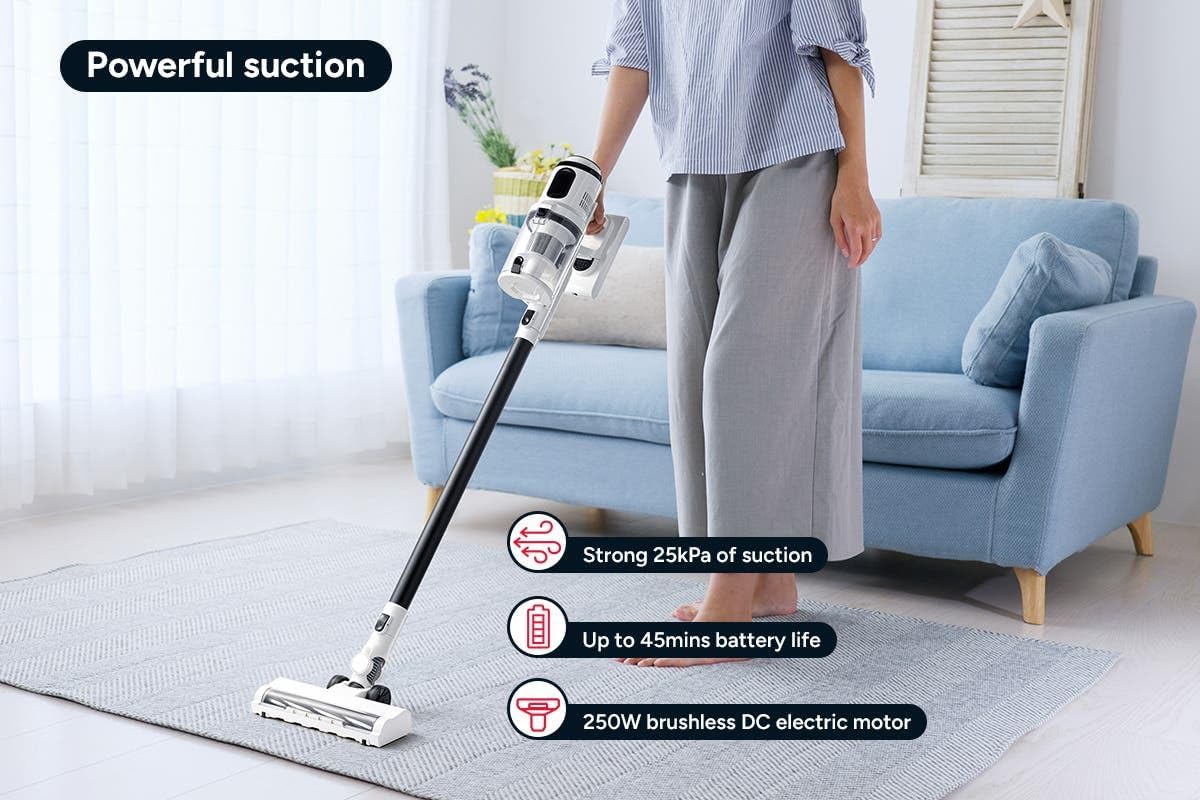
Figure 3: The Kogan MX10 Pro in use, highlighting its powerful 25kPa suction, long battery life, and efficient 250W brushless motor.
Suction Modes & LCD Touchscreen:

Figure 4: The LCD touchscreen provides real-time information on battery level, suction mode, and other operational indicators.
- The LCD touchscreen displays battery status, current suction level, and other relevant information.
- Tap the mode button on the touchscreen to switch between different suction modes (e.g., Eco, Standard, Max).
- The vacuum features dust detection, which automatically adjusts suction power based on the amount of dirt detected.

Figure 5: The brush head detecting dust on a hard floor, demonstrating the automatic suction adjustment feature.
Using Attachments:
- Motorized Brush Head: Ideal for carpets and hard floors, providing powerful agitation to lift dirt.
- Crevice Tool: Perfect for narrow gaps, corners, and hard-to-reach areas.
- 2-in-1 Brush Tool: Use the brush for dusting delicate surfaces or slide the brush back for upholstery and larger debris.
- To change attachments, press the release button on the current attachment and pull it off. Then, push the desired attachment onto the main unit or extension wand until it clicks.
Maintenance
Regular maintenance ensures optimal performance and extends the lifespan of your vacuum cleaner.
Emptying the Dust Bin:
- It is recommended to empty the dust bin after each use or when the MAX fill line is reached.
- Hold the main unit over a rubbish bin.
- Press the dust bin release button to open the bottom flap and allow debris to fall out.
- The ejection mechanism ensures dirt and dust are removed in a singular motion.

Figure 6: Demonstrating the easy bin emptying process by pressing the release button to open the dust bin flap.
Cleaning Filters:
The Kogan MX10 Pro features a cyclone filter system and a washable HEPA filter to ensure maximum performance and trap fine dust and allergens.

Figure 7: The HEPA filter captures up to 99.97% of fine dust and allergens.
- Twist and pull to remove the filter assembly from the dust bin.
- Separate the HEPA filter and the metal mesh filter.
- Rinse the HEPA filter and metal mesh filter under cold running water.
- Allow all filter components to air dry completely for at least 24 hours before reassembling and placing back into the vacuum. Important: Ensure all parts are completely dry before reinstallation to prevent damage.
Cleaning the Brush Head:
- Periodically check the brush head for tangled hair or debris.
- To remove the brush roll, locate the release tab on the side of the brush head and open it.
- Carefully pull out the brush roll.
- Use scissors or a cleaning tool to cut and remove any tangled hair or fibers.
- Slide the brush roll back into place and secure the release tab.
Troubleshooting
| Problem | Possible Cause | Solution |
|---|---|---|
| Vacuum not turning on | Battery not charged; Battery not properly installed; Power button not pressed correctly. | Charge the battery fully; Ensure battery is securely clicked into place; Press the power button firmly. |
| Low suction power | Dust bin full; Filters clogged; Blockage in nozzle, wand, or hose; Brush roll tangled. | Empty the dust bin; Clean or replace filters; Check for and remove any blockages; Clean the brush roll. |
| Brush roll not spinning | Brush roll tangled with hair/debris; Brush roll not properly installed; Obstruction in brush head. | Clean the brush roll; Reinstall brush roll correctly; Remove any obstructions. |
| Battery not charging | Charger not properly connected; Power outlet not working; Damaged charger or battery. | Ensure charger is securely plugged into battery/dock and outlet; Test outlet with another device; Contact Kogan support if charger or battery is damaged. |
Specifications
| Feature | Detail |
|---|---|
| Brand | Kogan |
| Model | MX10 Pro (KAVACSTM10P) |
| Suction Power | 25kPa |
| Motor | 250W Brushless Motor |
| Battery | 2000mAh Detachable Li-ion |
| Noise Level | 80 dB |
| Filter Type | HEPA (Washable) |
| Special Features | Lightweight, Cordless, LCD Touchscreen, Dust Detection, Cyclone Filter System |
| Item Weight | 3.47 kg |
| Recommended Surface | Hard Floor, Carpet |
Warranty & Support
For warranty information, technical support, or any inquiries regarding your Kogan MX10 Pro Cordless Stick Vacuum Cleaner, please visit the official Kogan website or contact Kogan customer support directly.
You can find more information and contact details on the Kogan store page: Kogan Official Store
Related documentsMX10 Pro


Ask a question about this manual
Ask about setup, troubleshooting, compatibility, parts, safety, or missing instructions. Manuals+ will review the question and use this page’s manual context to help answer it.