SOMMER TorMinal Y3800V000 Programming Device User Manual
Model: Y3800V000
1. Introduction
The SOMMER TorMinal Y3800V000 is a dedicated programming device designed for SOMMER automation control units. It provides a convenient interface for reading, modifying, and managing the preset parameters of compatible SOMMER systems. Additionally, it allows for the activation and deactivation of special functions, enhancing the customization and functionality of your automation setup.
This manual provides detailed instructions on how to effectively use your TorMinal device to configure and maintain your SOMMER automation systems.
2. Compatible Systems
The TorMinal Y3800V000 is compatible with the following SOMMER automation control units:
- duo vision
- duo rapido+
- twist 200 E/EL
- twist 350
- twist XL
- STArter+
- RUNner+
- RDC Vision
3. Device Overview
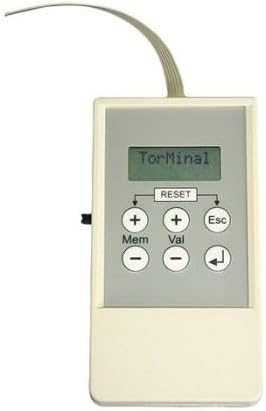
Figure 1: SOMMER TorMinal Y3800V000 Programming Device.
Description: This image displays the SOMMER TorMinal Y3800V000 programming device. It is a rectangular, off-white handheld unit featuring a grey control panel. The panel includes a small LCD screen that currently shows the text 'TorMinal'. Below the screen, there are six circular buttons arranged in two rows of three. The top row consists of two '+' buttons (one labeled 'Mem' for Memory, the other 'Val' for Value) and an 'Esc' (Escape) button. The bottom row contains two '-' buttons and a 'Return' arrow button. A 'RESET' button is positioned centrally above the '+' buttons. A thin, grey ribbon cable extends from the top edge of the device, presumably for connection to a control unit.
3.1. Controls and Display
- LCD Display: Shows menu options, parameters, and status messages.
- '+' (Mem) Button: Used to increment values or navigate through memory settings.
- '-' Button: Used to decrement values or navigate through settings.
- '+' (Val) Button: Used to confirm selections or enter values.
- 'Esc' Button: Used to exit menus or cancel operations.
- 'Return' Arrow Button: Used to go back to the previous menu level.
- 'RESET' Button: Used to reset the device or specific parameters (use with caution).
4. Setup
4.1. Connecting the Device
- Ensure the SOMMER automation control unit is powered off before connecting the TorMinal device.
- Locate the programming port on your SOMMER control unit. Refer to your control unit's manual for its exact location.
- Carefully connect the ribbon cable from the TorMinal Y3800V000 to the programming port. Ensure the connection is secure and correctly oriented.
- Once connected, power on the SOMMER automation control unit. The TorMinal device should power on automatically and display the initial menu.
4.2. Initial Power-On
Upon successful connection and power-on, the TorMinal display will show the main menu or a welcome screen. Use the navigation buttons to proceed.
5. Operating Instructions
5.1. Navigating Menus
- Use the '+' (Mem) and '-' buttons to scroll through menu options.
- Press the '+' (Val) button to select a highlighted menu option or confirm a setting.
- Press the 'Esc' button to cancel an operation or return to the previous menu without saving changes.
- Press the 'Return' arrow button to go back to the previous menu level.
5.2. Reading Parameters
- From the main menu, navigate to the "Read Parameters" or similar option.
- Select the desired parameter group or individual parameter using the navigation buttons.
- The current value of the parameter will be displayed on the screen.
5.3. Modifying Parameters
- From the main menu, navigate to the "Modify Parameters" or similar option.
- Select the parameter you wish to change.
- Use the '+' (Mem) and '-' buttons to adjust the parameter value.
- Press the '+' (Val) button to save the new value.
- Press the 'Esc' button to discard changes and return to the previous menu.
5.4. Activating/Deactivating Special Functions
- Access the "Special Functions" menu from the main screen.
- Scroll through the list of available functions.
- Select the desired function. The current status (active/inactive) will be displayed.
- Use the '+' (Mem) or '-' buttons to toggle the function's status.
- Confirm your selection with the '+' (Val) button.
5.5. Using the RESET Button
The 'RESET' button can be used for various reset functions depending on the context within the menu. Always read the on-screen prompts carefully before pressing 'RESET' to avoid unintended changes to your automation system's configuration. A long press might initiate a factory reset for certain parameters.
6. Maintenance
- Keep the device clean and free from dust and moisture. Use a soft, dry cloth for cleaning.
- Store the TorMinal in a dry, cool place when not in use.
- Avoid exposing the device to extreme temperatures or direct sunlight.
- Handle the ribbon cable with care to prevent damage.
7. Troubleshooting
| Problem | Possible Cause | Solution |
|---|---|---|
| Device does not power on. | Incorrect connection to control unit, control unit not powered, damaged cable. | Ensure the ribbon cable is securely connected. Verify the SOMMER control unit is powered on. Inspect the cable for visible damage. |
| Cannot modify parameters. | Incorrect menu selection, parameter locked, incompatible control unit. | Ensure you are in the "Modify Parameters" menu. Some parameters may require specific access levels or be read-only. Verify compatibility with your control unit. |
| Display shows error message. | Communication error, invalid input. | Note the error code/message and consult the SOMMER control unit's manual for specific error interpretations. Re-establish connection. |
8. Specifications
- Model: Y3800V000 (TorMinal)
- Manufacturer: SOMMER
- Weight: Approximately 100 grams
- Function: Programming device for SOMMER automation control units
- Compatibility: duo vision, duo rapido+, twist 200 E/EL, twist 350, twist XL, STArter+, RUNner+, RDC Vision
9. Warranty and Support
For warranty information and technical support, please refer to the documentation provided with your SOMMER automation control unit or contact your authorized SOMMER dealer. Keep your purchase receipt as proof of purchase.


