
1. Product Overview
The BTHFST Queen Bed Frame is designed for modern bedrooms, combining comfort, functionality, and aesthetic appeal. It features integrated RGB LED lighting, a convenient charging station, and practical storage solutions. This manual provides essential information for assembly, operation, and maintenance to ensure safe and optimal use of your bed frame.

Image 1.1: BTHFST Queen Bed Frame with RGB LED lights and integrated charging station.
2. Safety Information
Please read and understand all safety instructions before assembly and use. Failure to follow these instructions may result in injury or damage to the product.
- Ensure proper assembly to prevent squeaking and ensure structural integrity.
- Be cautious around sharp edges on the headboard during assembly and use.
- Do not exceed the maximum weight capacity of 880 lbs.
- Keep all electrical components (LED lights, charging station) away from water and moisture.
- Only use the provided power adapter for the LED lights and charging station.
3. Components List
Before beginning assembly, verify that all parts are present and undamaged. Refer to the assembly diagram for part identification.

Image 3.1: Exploded view of bed frame components with dimensions.
- Headboard with integrated LED lights and charging station
- Footboard with integrated LED lights
- Side Rails (Left and Right)
- Center Support Beam
- Wooden Slats with sound-absorbing velcro
- Underbed Storage Drawers (4 units)
- Remote Control for LED lights
- Assembly Hardware (screws, bolts, Allen wrench)
- Side Storage Bags (2 units)
4. Setup and Assembly
Assembly is designed to be straightforward with labeled parts and a quick-lock system. It is recommended to assemble the bed frame with two people.
- Unpack all components and lay them out on a clean, soft surface to prevent scratches.
- Identify all parts using the provided assembly diagram and ensure all hardware is present.
- Attach the side rails to the headboard and footboard using the designated hardware. The quick-setup system allows for easy pin-in assembly.
- Install the center support beam.
- Place the wooden slats onto the frame. The sound-absorbing velcro will help secure them and prevent noise.
- Assemble the four underbed storage drawers and slide them into place.
- Connect the LED light power cable and the USB charging station power cable to a suitable power outlet.

Image 4.1: Detail of the Quick-Setup System for easy assembly.

Image 4.2: Slats secured with sound-absorbing velcro for a quiet foundation.
5. Operating Instructions
5.1 RGB LED Lights
The integrated RGB LED lights in the headboard and footboard can be controlled via the included remote control or a dedicated phone application. The lighting system supports 12 main colors, over 100 dynamic modes, and 6 brightness levels. The lights can also function as a night light.
Image 5.1: Bed frame with RGB LED lights illuminated.
5.2 USB-C/A Charging Station
The headboard features a 4-in-1 power combo, including 2 AC outlets, 1 USB-A port, and 1 USB-C port. This allows for simultaneous and fast charging of up to four devices.
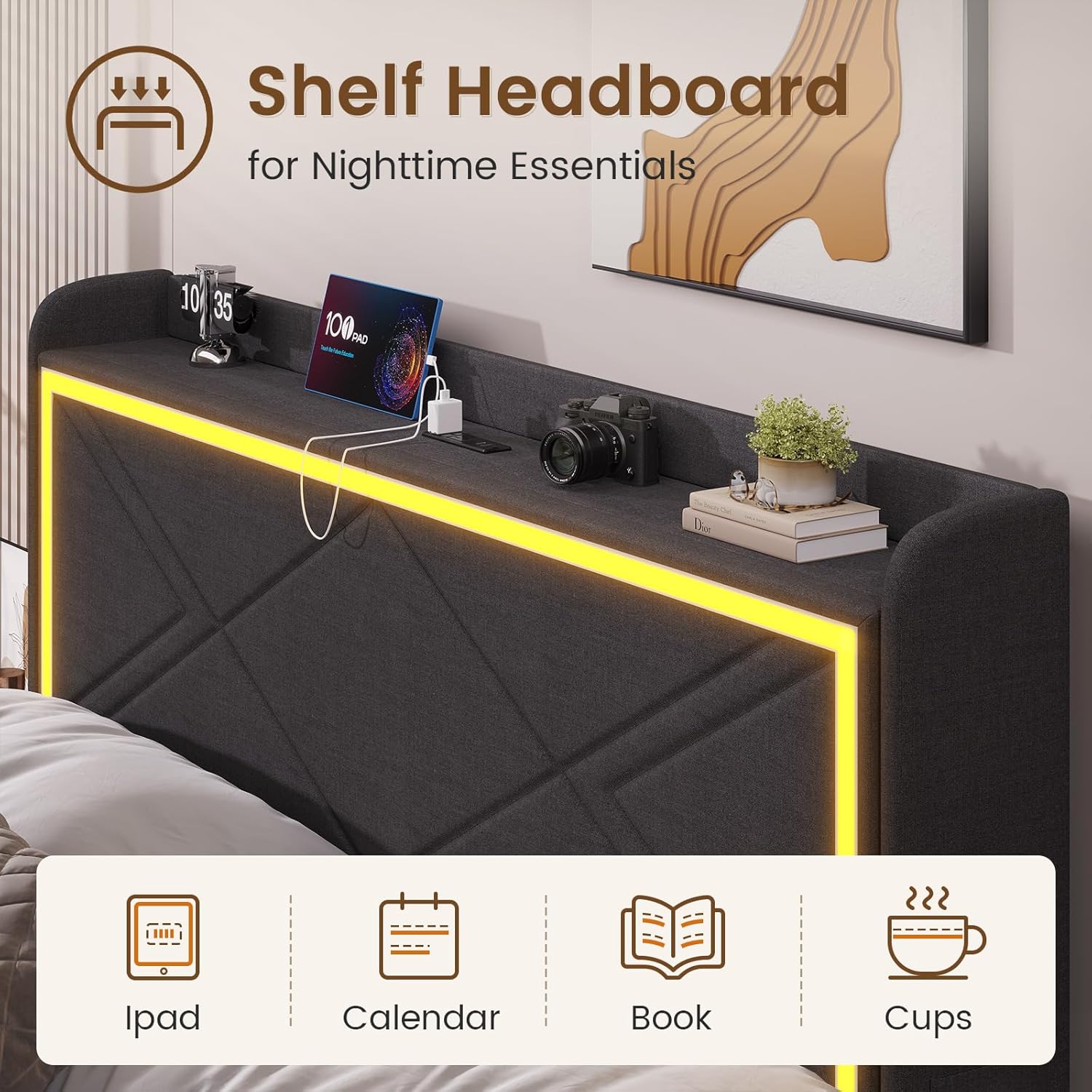
Image 5.2: The 4-in-1 power combo for fast charging.
5.3 Storage Features
The bed frame includes an open shelf on the headboard for easy access to nighttime essentials and four hidden storage drawers under the bed that run smoothly on carpeted surfaces. Additionally, two side bags are provided for convenient storage of remotes or phones.

Image 5.3: Shelf headboard for nighttime essentials.

Image 5.4: Hidden underbed storage drawers.

Image 5.5: Side bags for remote and phone.
5.4 Official Product Video
Watch the official product video for a visual guide on the features of the BTHFST RGB Bed Frame with USB Charging Station.
Video 5.6: BTHFST RGB Bed Frame with USB Charging Station. This video demonstrates the bed frame's features, including the RGB lights, charging station, and storage.
6. Maintenance
To maintain the appearance and longevity of your bed frame, follow these simple care instructions:
- Wipe the bed frame surfaces with a damp cloth to remove dust and dirt.
- Avoid using harsh chemicals or abrasive cleaners, as these may damage the finish or upholstery.
- Regularly check and tighten any loose screws or bolts to ensure stability.
- Keep the electrical components dry and free from dust.
7. Troubleshooting
If you encounter any issues with your BTHFST Queen Bed Frame, refer to the following common troubleshooting tips:
| Problem | Possible Cause | Solution |
|---|---|---|
| Squeaking noises | Loose connections or slats | Tighten all screws and bolts. Ensure slats are properly seated and velcro is secure. |
| LED lights not working | Power connection issue, remote battery dead | Check if the power cable is securely plugged in. Replace remote control batteries. Ensure the light kit is properly connected. |
| Charging station not working | Power connection issue, device compatibility | Verify the bed frame is plugged into a live outlet. Ensure your device is compatible with USB-A/USB-C charging. |
| Drawers not sliding smoothly | Obstruction, uneven surface | Check for any items obstructing the drawer path. Ensure the bed frame is on a level surface. |
8. Specifications
| Feature | Detail |
|---|---|
| Size | Queen |
| Product Dimensions | 87.6"L x 62.4"W x 41.3"H |
| Special Feature | Squeak Resistant |
| Color | Dark Grey |
| Finish Type | Powder Coated |
| Included Components | Light kit included |
| Compatible Mattress Size | Queen |
| Brand | BTHFST |
| Assembly Required | Yes |
| Manufacturer | BTHFST |
| Date First Available | September 6, 2023 |
9. Warranty and Support
For warranty information or technical support, please refer to the documentation included with your purchase or contact BTHFST customer service directly. Keep your purchase receipt as proof of purchase for any warranty claims.