
1. Introduction
The Lively Jitterbug Smart4 is a smartphone designed with simplicity and ease of use in mind, particularly for seniors. It features a large 6.7-inch screen, an easy-to-navigate menu, and essential functions for staying connected. This manual provides detailed instructions to help you get the most out of your device.
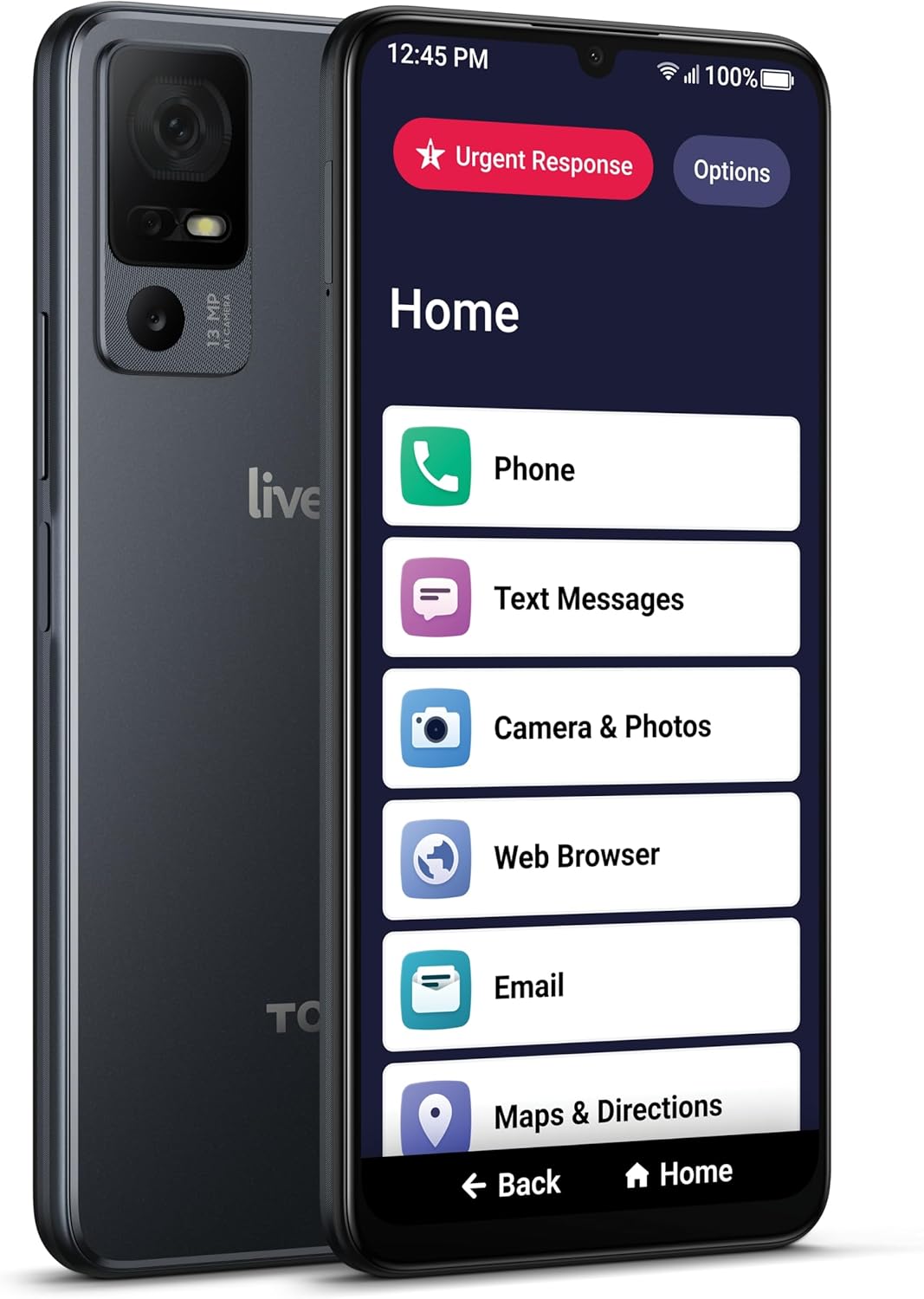
Figure 1: The Lively Jitterbug Smart4 with its simplified home screen interface.
2. Setup and Activation
To begin using your Jitterbug Smart4, follow these simple activation steps. Please note that the Jitterbug Smart4 is exclusively compatible with Lively phone service.
2.1 Online Activation
Upon receiving your phone, activate it online for easy setup. For any additional questions regarding your service and phone, you can contact Lively customer service agents.
- Purchase Phone: Ensure you have your Jitterbug Smart4 device.
- Activate with Lively: Visit the Lively website or contact a Lively agent to select your preferred talk, text, and data plan, along with any desired Health & Safety Packages.
- Choose Your Plan: Select a plan that best fits your communication and safety needs.
- Call for Help Anytime: Once activated, you can utilize the phone's features, including access to Lively's caring team.

Figure 2: Easy setup process for the Jitterbug Smart4.
3. Key Features
The Jitterbug Smart4 is designed to be intuitive and helpful, offering features that enhance connectivity and safety.
- Large 6.7" Screen: Provides clear visibility and easy interaction with the simplified menu.
- Powerful Dual Speakers: Ensures clear and loud audio for calls and media.
- Longer-lasting Battery: Offers extended usage with fast charging capabilities.
- Voice Typing and Video Chat: Facilitates effortless communication through voice-to-text and face-to-face conversations.
- Higher-Quality Camera: Capture moments with a capable camera.
- New Call Captioning: Real-time speech-to-text for improved accessibility during calls.
- Urgent Response Button: Provides 24/7 access to help in emergencies.

Figure 3: Overview of the Jitterbug Smart4's main features.

Figure 4: The prominent Urgent Response button for immediate assistance.
4. Operating Your Jitterbug Smart4
The Jitterbug Smart4 features a simplified interface with large, easy-to-read icons and a list-based menu, making navigation straightforward.
4.1 Home Screen Navigation
The home screen provides direct access to core functions:
- Phone: Make and receive calls.
- Text Messages: Send and read text messages.
- Contacts: Access your saved contacts.
- Camera & Photos: Take pictures and view your photo gallery.
- Web Browser: Access the internet.
- Email: Manage your emails.
- Maps & Directions: Get navigation assistance.
Video: An overview of the Lively Jitterbug Smart4 Smartphone for Seniors, demonstrating its user-friendly interface and key features.
4.2 Making Calls
Tap the 'Phone' icon on the home screen. You can then use the large dial pad to enter a number or select a contact from your 'Contacts' list.
4.3 Sending Text Messages
Tap the 'Text Messages' icon. Select an existing conversation or start a new one. The large keyboard makes typing easy, and voice typing is also available.
4.4 Using the Camera
Tap 'Camera & Photos'. You can choose to take a new picture or view existing photos and videos. The camera is designed for straightforward use.
5. Maintenance
5.1 Battery and Charging
The Jitterbug Smart4 is equipped with a 4850 mAh Lithium Ion battery, providing up to 24 hours of talk time. A full charge takes approximately 2.5 hours. Use the provided charger for optimal performance.
5.2 Cleaning
To clean your phone, gently wipe the screen and body with a soft, lint-free cloth. Avoid using harsh chemicals or abrasive materials.
6. Troubleshooting
If you encounter any issues with your Jitterbug Smart4, try the following common solutions:
- Phone Not Responding: If the phone becomes unresponsive, press and hold the power button until the device restarts.
- Call Quality Issues: Ensure you are in an area with good cellular signal. If issues persist, try restarting the phone.
- Activation Problems: If you face difficulties during online activation, contact Lively customer service for assistance. They can guide you through the process.
- Screen Readability: The phone offers options for large text and simplified menus. Adjust these in the settings if needed.
For more complex issues, refer to the "How-To Guides" available directly on your phone or contact Lively customer support.
7. Specifications
| Feature | Detail |
|---|---|
| Product Dimensions | 6.25 x 2.94 x 0.35 inches |
| Item Weight | 6.7 ounces |
| Item Model Number | PN035089 |
| Operating System | Android 14, Android 13.0 |
| RAM | 4 GB |
| Memory Storage Capacity | 32 GB |
| Screen Size | 6.75 Inches |
| Resolution | 1280 x 720 |
| Battery Power Rating | 4850 mAh |
| Phone Talk Time | 24 Hours |
| Charging Time | 2.5 Hours |
| Wireless Carrier | MVNO (Lively Phone Service) |
| Cellular Technology | 4G |
| Color | Black |
| Manufacturer | Lively |
8. Warranty and Support
Lively is committed to providing excellent support for your Jitterbug Smart4.
8.1 Customer Support
Lively offers 24/7 access to their caring team and customer service agents. They are available to answer questions about your device, assist with service inquiries, and even help with scheduling rides.
8.2 Lively Health & Safety Services
Beyond standard phone features, Lively offers additional services through their Health & Safety Packages, which may include:
- Urgent Response: Connects you to Certified Agents 24/7 for help in emergencies.
- Nurse On-Call: Speak to registered nurses and board-certified doctors from the comfort of your home.
- Lively Link: An app that keeps loved ones updated on your health and safety by sending alerts if you call Urgent Response.
For specific warranty details, please refer to the documentation included with your purchase or contact Lively customer service directly.