
PULITUO f0deded8-bc58-4c3d-9111-cafca9d415dd
PULITUO 20V Electric Power Drill User Manual
Model: f0deded8-bc58-4c3d-9111-cafca9d415dd
Introduction
Thank you for choosing the PULITUO 20V Electric Power Drill. This powerful and versatile tool is designed for a wide range of drilling and driving applications, offering excellent performance for both DIY enthusiasts and professional users. This manual provides essential information for safe operation, proper maintenance, and effective use of your new drill.

Image: The PULITUO 20V Electric Power Drill, its battery, charger, and a comprehensive set of drill bits and screws.
Safety Information
Always observe basic safety precautions to reduce the risk of fire, electric shock, and personal injury. Read all instructions before operating this tool.
- Wear appropriate personal protective equipment, including safety glasses, hearing protection, and gloves.
- Ensure the work area is well-lit and clear of obstructions.
- Keep children and bystanders away while operating the drill.
- Do not operate power tools in explosive atmospheres, such as in the presence of flammable liquids, gases, or dust.
- Use the correct drill bit for the material being worked on.
- Secure the workpiece firmly before drilling or driving.
- Always disconnect the battery pack before making any adjustments, changing accessories, or storing the tool.
- Do not expose the drill or battery to rain or wet conditions.
Product Overview
Familiarize yourself with the components of your PULITUO 20V Electric Power Drill:

Image: Labeled diagram of the drill's main components.
- 3/8" Keyless Chuck: For quick and easy bit changes.
- LED Light: Illuminates the work area for better visibility.
- Stepless Speed Trigger: Allows for variable speed control based on pressure.
- 20V Li-ion Battery: Provides cordless power.
- 21+1 Adjustment Torque Clutch: Controls the amount of torque for different applications, preventing over-driving screws.
- Variable Speed Switch: Selects between high and low-speed ranges.
- Forward/Reverse Switch: Changes the rotation direction for driving or removing screws.
- Soft Grip Handle: Ergonomically designed for comfortable and secure handling.
The drill also comes with a versatile accessory kit:

Image: Included accessories such as the flexible shaft, charger, various drill bits, and screw kit.
- Flexible Extension Shaft: For reaching tight or awkward spaces.
- Charger: For recharging the 20V Li-ion battery.
- Metal Drill Bits: For drilling into metal surfaces.
- Wood Drill Bits: For drilling into wood surfaces.
- Screwdriver Bits: A variety of bits for different screw types.
- Screw Anchor Set: For various fastening applications.
Setup
Battery Charging
Before first use, fully charge the battery. Insert the battery pack into the charger, ensuring it clicks into place. The charger indicator light will show the charging status. Once fully charged, remove the battery from the charger.

Image: The 20V MAX Lithium-Ion Battery, highlighting its protective features.
Installing/Removing Drill Bits
To install a drill bit or screwdriver bit:
- Ensure the drill is off and the battery is removed.
- Rotate the chuck counter-clockwise to open the jaws.
- Insert the desired bit into the chuck, ensuring it is centered and fully seated.
- Rotate the chuck clockwise to tighten the jaws securely around the bit. Hand-tighten firmly.
To remove a bit, reverse the process.

Image: Step-by-step guide for installing and setting up a drill bit.
Operating Instructions
Speed Selection
The drill features two speed modes for optimal performance:
- Low Speed (0-400 RPM): Recommended for driving screws and applications requiring higher torque.
- High Speed (0-1500 RPM): Recommended for drilling and applications requiring faster rotation.
Use the variable speed switch located on top of the drill to select the desired speed range.
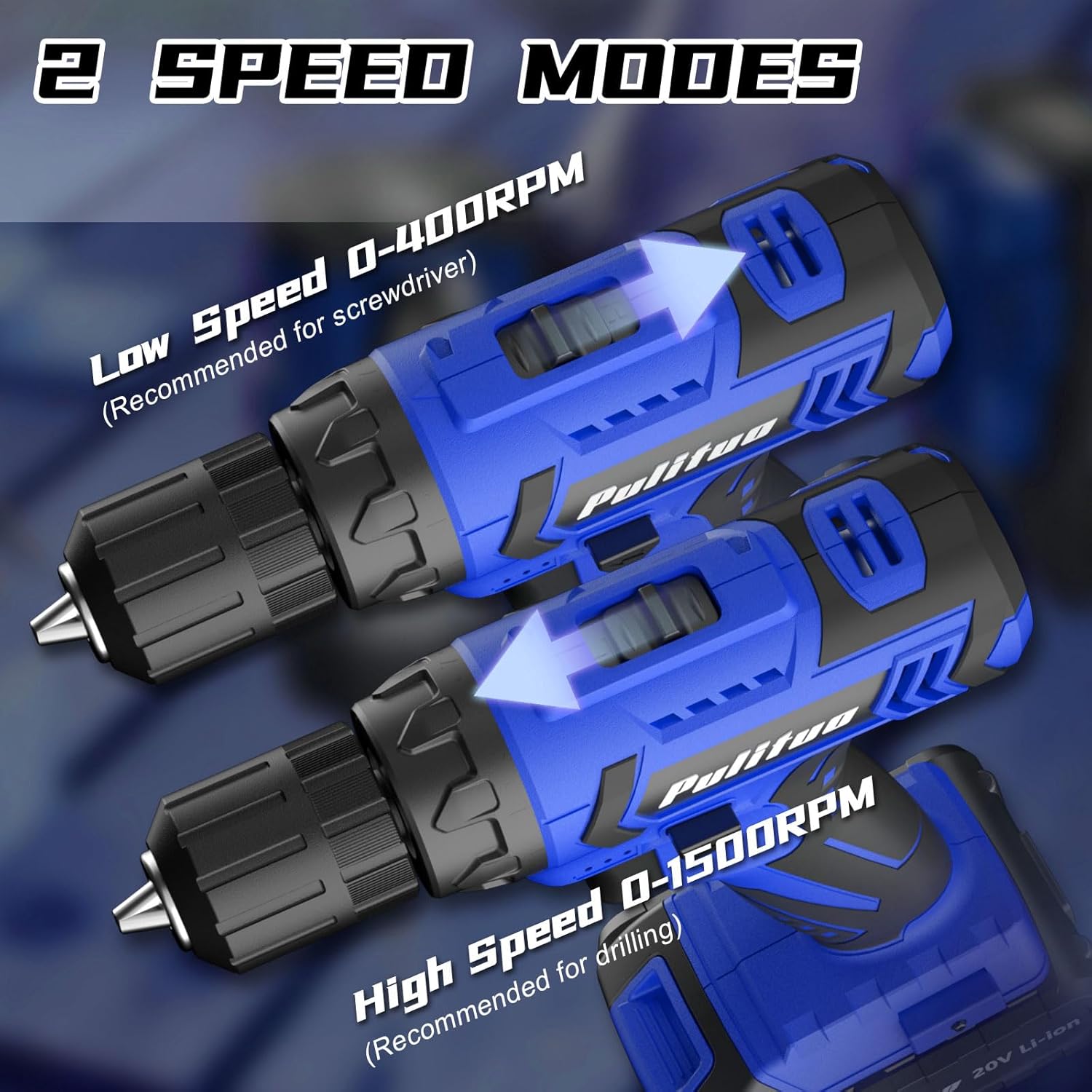
Image: Visual representation of the drill's two speed modes.
Torque Adjustment (21+1 Settings)
The torque adjustment ring allows you to set the amount of rotational force the drill applies. This is crucial for preventing damage to screws or workpieces, especially when driving screws into soft materials. The '1' setting provides the least torque, while '21' provides the most. The '+1' setting is for drilling, providing maximum torque without clutch slippage.

Image: Torque adjustment ring and examples of its use in screw driving, wood drilling, and metal drilling.
Forward/Reverse Operation
The forward/reverse switch, located above the trigger, controls the direction of rotation. Push it to the left for forward (clockwise) rotation, used for drilling and driving screws. Push it to the right for reverse (counter-clockwise) rotation, used for removing screws or backing out drill bits.

Image: Illustration of the forward and reverse switch functionality.
Using the LED Light
The built-in LED light automatically illuminates when the trigger is pressed, providing visibility in dimly lit work areas.

Image: The drill's built-in LED light in operation.
Applications
Your PULITUO drill is suitable for various tasks:
- Screw Driving: Use appropriate screwdriver bits and adjust torque for precise fastening.
- Drilling Wood: Select wood drill bits and high speed for clean holes.
- Drilling Metal: Use metal drill bits and high speed. Apply steady pressure.
- Using the Flexible Shaft: Attach the flexible shaft for access to screws or drilling locations in confined spaces.

Image: Examples of the drill's versatility in screw driving, metal drilling, flexible shaft use, and wood drilling.
Maintenance
Regular maintenance ensures the longevity and optimal performance of your drill.
- Cleaning: Keep the ventilation openings clear and clean. Use a soft, damp cloth to wipe down the tool. Do not use harsh chemicals or abrasive cleaners.
- Chuck Care: Periodically clean the chuck jaws to ensure proper gripping of bits.
- Battery Storage: Store batteries in a cool, dry place away from direct sunlight and extreme temperatures. For long-term storage, charge the battery to about 50% capacity.
- General Storage: Store the drill and accessories in a dry, secure location, out of reach of children.
Troubleshooting
| Problem | Possible Cause | Solution |
|---|---|---|
| Drill does not start | Battery not charged or not properly inserted. | Charge battery fully. Ensure battery is securely inserted. |
| Loss of power during operation | Battery low or overloaded. | Recharge battery. Reduce pressure or use appropriate speed/torque setting. |
| Bit slips in chuck | Chuck not tightened sufficiently or bit shank is dirty/damaged. | Tighten chuck firmly. Clean or replace bit. |
| Overheating | Prolonged heavy use or blocked ventilation. | Allow tool to cool down. Clear ventilation openings. |
Specifications
- Brand: PULITUO
- Model: f0deded8-bc58-4c3d-9111-cafca9d415dd
- Voltage: 20 Volts
- Amperage: 2 Amps
- Maximum Torque: 30 N.m
- Number of Speeds: 2 (0-400 RPM / 0-1500 RPM)
- Torque Settings: 21+1
- Chuck Size: 3/8 inch Keyless
- Drilling Capacity (Metal): 0.4 Inches
- Item Weight: 3.89 pounds
- Power Source: Battery Powered (1 Lithium Ion battery included)
- Product Dimensions: 11"L x 4"W x 13"H
Warranty and Support
For warranty information and customer support, please refer to the documentation included with your product packaging or contact PULITUO customer service directly. Keep your purchase receipt as proof of purchase.
Ask a question about this manual
Ask about setup, troubleshooting, compatibility, parts, safety, or missing instructions. Manuals+ will review the question and use this page’s manual context to help answer it.