
1. Introduction
The Redragon M914 Wireless Gaming Mouse is designed for versatile performance, offering three connectivity modes and advanced customization options. This manual provides essential information for setting up, operating, and maintaining your mouse.

Figure 1: Front view of the Redragon M914 Wireless Gaming Mouse.
2. Package Contents
Please verify that all items are present in your package:
- Redragon M914 Wireless Gaming Mouse
- USB-A to USB-C Charging/Data Cable
- Nano 2.4G USB Receiver (stored inside the mouse)
- User Manual
- Redragon Stickers
3. Setup
3.1 Wired Connection (USB-C)
- Connect the USB-C end of the provided cable to the mouse.
- Connect the USB-A end of the cable to an available USB port on your computer.
- The mouse will automatically connect and begin charging.
3.2 2.4G Wireless Connection
- Locate the Nano 2.4G USB receiver stored in the compartment on the underside of the mouse.
- Remove the receiver and plug it into an available USB-A port on your computer.
- On the underside of the mouse, slide the switch to the '2.4G' position.
- The mouse should automatically connect to your computer.
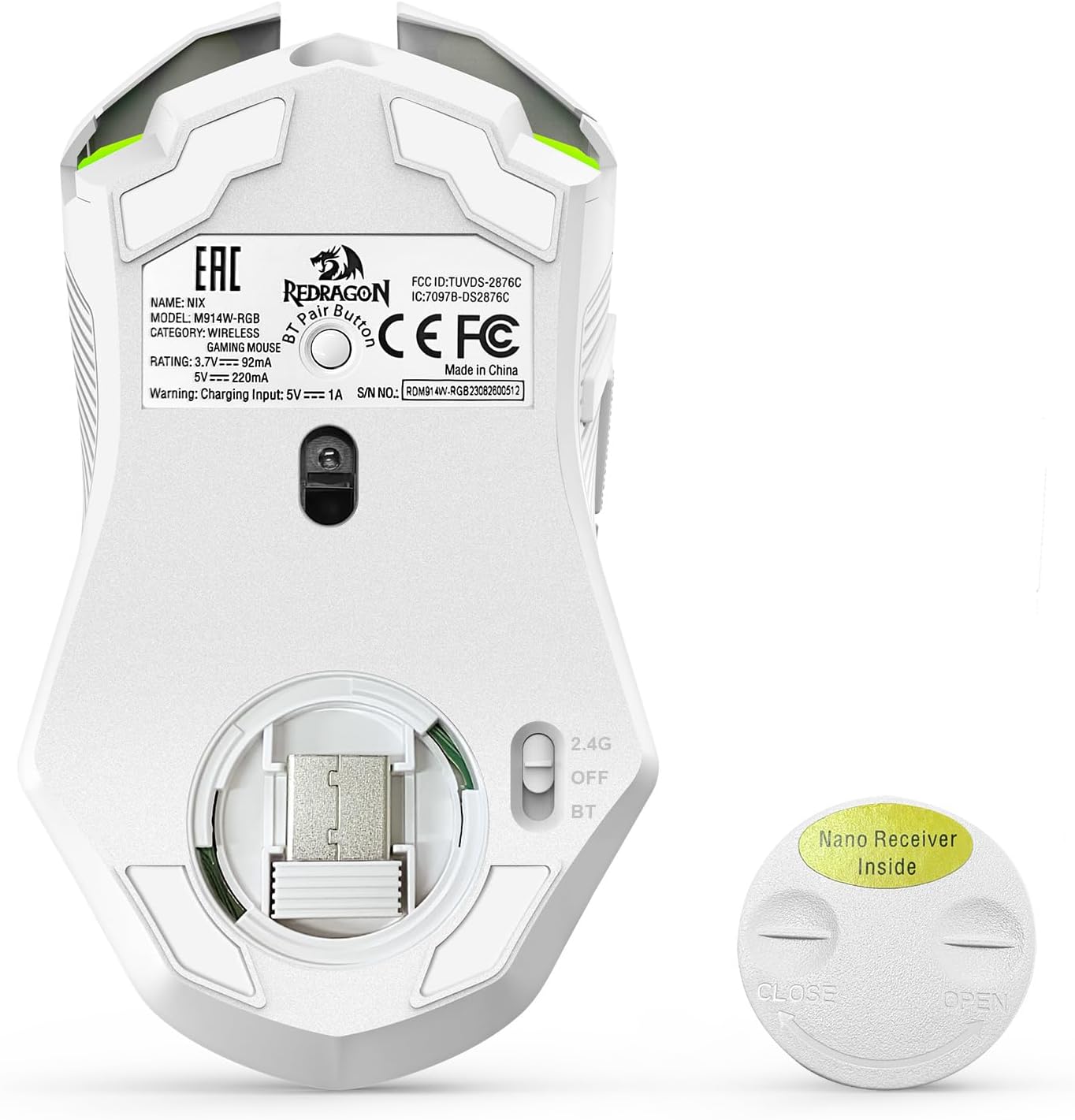
Figure 2: Underside of the mouse with the Nano Receiver compartment and mode switch.
3.3 Bluetooth Connection
- On the underside of the mouse, slide the switch to the 'BT' (Bluetooth) position.
- On your computer or device, enable Bluetooth and search for new devices.
- Select 'Redragon M914' from the list of available devices to pair.
- The mouse's indicator light will confirm successful pairing.

Figure 3: The Redragon M914 supports USB-C, Bluetooth, and 2.4GHz wireless connectivity for various devices.
4. Operating Instructions
4.1 DPI Adjustment
The mouse features a dedicated DPI button located behind the scroll wheel, allowing for on-the-fly sensitivity adjustment. The PAW3395 sensor supports up to 12000 DPI. Press the DPI button to cycle through preset DPI levels (e.g., 500, 1000, 2000, 3000, 4000, up to 12000 DPI).

Figure 4: Visual representation of DPI adjustment levels on the Redragon M914 mouse.
4.2 Programmable Buttons
The M914 mouse is equipped with 9 programmable buttons. These buttons can be remapped and assigned complex macro functions using the Redragon driver software. The driver software is compatible with Windows systems only.

Figure 5: The Redragon M914 features 9 programmable buttons for enhanced control.
4.3 RGB Illumination
Personalize your gaming setup with the mouse's cool RGB illumination. It offers 6 preset RGB backlight effects and customization from nearly 16.8 million colors through the Redragon driver. You can also toggle RGB lighting on/off via a switch on the mouse's underside to conserve battery.

Figure 6: The mouse offers 9 customizable RGB backlight modes to suit your preference.
4.4 Fire Button
The dedicated 'Fire Button' (often located on the side) provides a rapid triple-click function with a single press, enhancing efficiency in certain applications or games.

Figure 7: The Rapid Fire Button allows for quick, multiple clicks with a single press.
5. Charging and Battery Life
The Redragon M914 features a built-in 700mAh rechargeable battery. It offers a battery life of up to 70 hours with RGB lighting off (in 2.4G mode). With RGB lighting on, the battery life is approximately 13 hours. The mouse can be used as a wired gaming mouse while it is charging.
To save power, the mouse will automatically enter sleep mode after 8 minutes of inactivity.
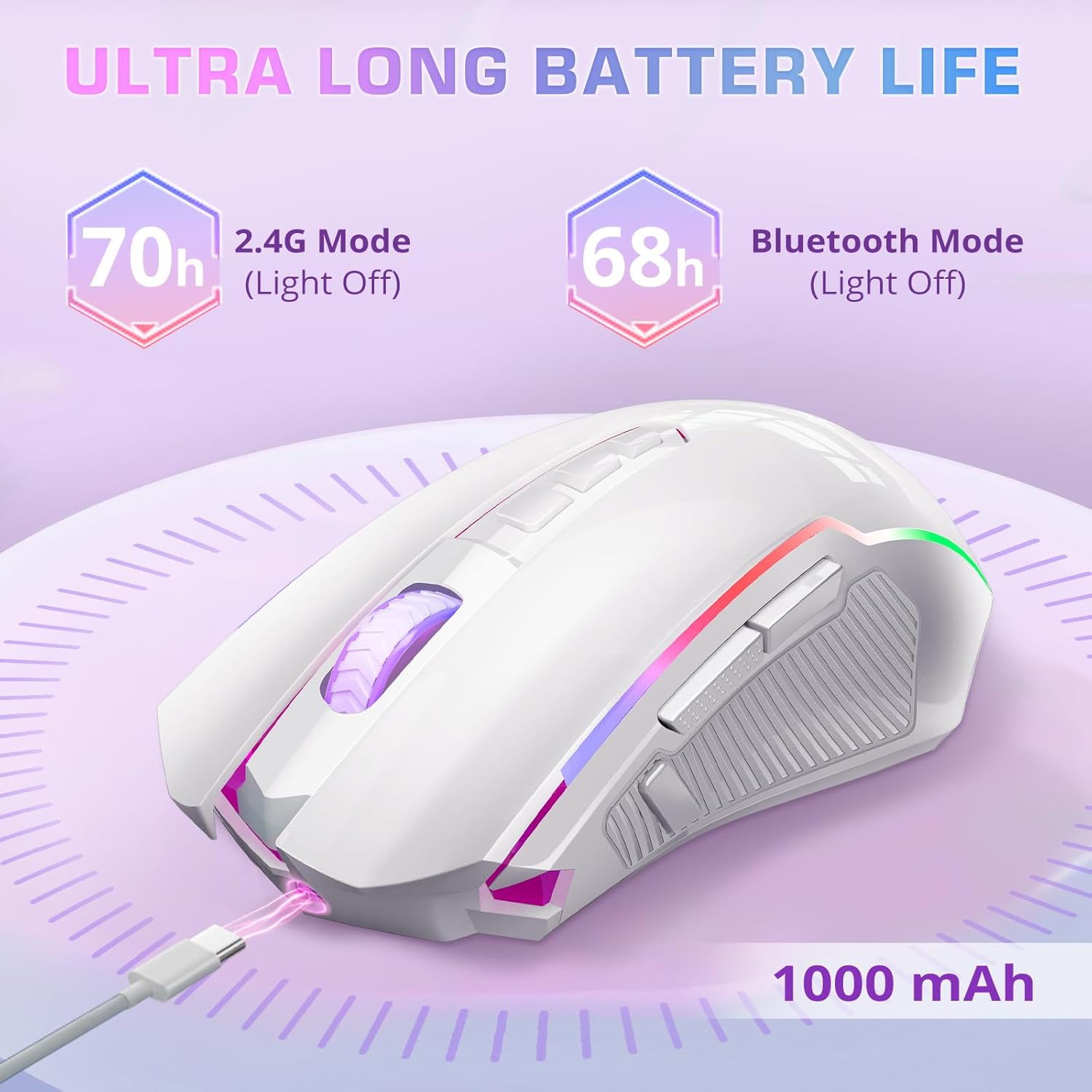
Figure 8: The mouse offers extended battery life, up to 70 hours with RGB off.
6. Maintenance
To ensure the longevity and optimal performance of your Redragon M914 mouse, follow these maintenance guidelines:
- Cleaning: Use a soft, dry cloth to wipe down the mouse regularly. For stubborn dirt, slightly dampen the cloth with water or a mild cleaning solution. Avoid harsh chemicals or abrasive materials.
- Storage: When not in use, store the mouse in a clean, dry environment away from extreme temperatures and direct sunlight.
- Cable Care: Avoid sharp bends or kinks in the USB-C cable to prevent internal damage.
- Receiver Storage: Always store the Nano 2.4G USB receiver in its designated compartment on the underside of the mouse when transporting to prevent loss.
7. Troubleshooting
If you encounter issues with your Redragon M914 mouse, try the following solutions:
| Problem | Possible Solution |
|---|---|
| Mouse not responding (Wireless) | Ensure the 2.4G Nano receiver is securely plugged into a USB port. Check if the mouse is switched to the correct 2.4G or BT mode. Ensure the mouse battery is charged. |
| Mouse not responding (Wired) | Ensure the USB-C cable is securely connected to both the mouse and the computer. Try a different USB port. |
| RGB lighting not working | Check the switch on the underside of the mouse to ensure RGB is enabled (not in Eco mode). Ensure the mouse battery is charged. |
| DPI adjustment not working | Ensure the mouse is powered on. Press the DPI button firmly. If using custom settings, ensure the Redragon driver is installed and configured correctly. |
| Buttons not programmable | Ensure the Redragon driver software is installed on a Windows system. The driver does not support macOS. |
8. Specifications
| Feature | Detail |
|---|---|
| Brand | Redragon |
| Model Number | M914 |
| Connectivity Technology | Bluetooth / 2.4G Wireless / Wired (USB-C) |
| Movement Detection Technology | Optical (PAW3395 Sensor) |
| DPI | Up to 12000 DPI (Switchable) |
| Programmable Buttons | 9 |
| Battery | 1 Lithium Polymer (700mAh) |
| Battery Life (RGB Off, 2.4G) | Up to 70 hours |
| Battery Life (RGB On) | Approx. 13 hours |
| Click Life | 20 Million Clicks |
| Special Features | Tri-Mode, Rapid Fire, RGB Backlit, Macro, Customize Key |
| Item Weight | 8.4 ounces |
| Color | White |
| Operating System Compatibility | Windows 7/8/10/11, macOS (basic functionality) |
9. Warranty and Support
Redragon products are designed for reliability and performance. For warranty information, technical support, or any inquiries regarding your Redragon M914 Wireless Gaming Mouse, please refer to the official Redragon website or contact their customer support directly. Keep your purchase receipt for warranty claims.


