
1. Important Safety Instructions
Please read this manual carefully before installing, operating, or performing maintenance on your oven. Keep this manual for future reference.
- Electrical Safety: Ensure the oven is correctly earthed and connected to a suitable power supply. Do not use adapters or extension cords.
- Children and Vulnerable Persons: This appliance can be used by children aged 8 years and above and persons with reduced physical, sensory or mental capabilities or lack of experience and knowledge if they have been given supervision or instruction concerning use of the appliance in a safe way and understand the hazards involved. Children shall not play with the appliance. Cleaning and user maintenance shall not be made by children without supervision.
- Hot Surfaces: The oven becomes very hot during operation. Avoid touching heating elements inside the oven. Use oven mitts when handling hot dishes.
- Pyrolytic Cleaning: During pyrolytic cleaning, the oven reaches very high temperatures. Ensure the kitchen is well-ventilated. Remove all accessories and large food residues before starting the cycle. The oven door remains locked during this process.
- Cool-Touch Door: The oven features a 4-pane cool-touch door to minimize external surface temperature, enhancing safety, especially for households with children. However, caution is still advised.
- Installation: Installation must be carried out by a qualified technician in accordance with local regulations.
2. Product Overview
The ROSIERES RFC5M594PN is a 70-liter built-in pyrolytic oven designed for efficient and versatile cooking. It features advanced functions and smart connectivity.
2.1 Key Features
- Capacity: 70 Liters, providing ample space for various dishes.
- Cooking Functions: 7 functions including Fan-assisted heat, Natural Convection, Bottom heat with fan, Defrost, Grill, and Pulsed heat for even temperature distribution and odor prevention.
- Pyrolytic Self-Cleaning: High-temperature cleaning system that carbonizes food residues, making them easy to wipe away.
- Cool-Touch Door: Equipped with 4 panes of glass to keep the external door temperature low during operation.
- Soft-Close Door: Ensures gentle and silent closing of the oven door.
- hOn Connectivity: Smart control via the hOn app, offering remote operation, over 300 automatic recipes, and maintenance tips.
2.2 Components
Familiarize yourself with the main parts of your oven:
- Control Panel (Knobs and Digital Display)
- Oven Cavity
- Oven Door (with 4 glass panes)
- Oven Lamp
- Wire Rack
- Baking Tray
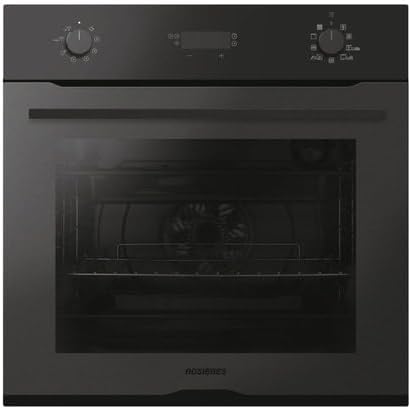
Figure 1: Front view of the ROSIERES RFC5M594PN built-in oven, showing the control panel with two rotary knobs and a central digital display, and the oven door.

Figure 2: Close-up of the oven's black control panel, featuring two rotary knobs for function and temperature selection, and a central digital display for settings and time.
3. Setup and Installation
Proper installation is crucial for the safe and efficient operation of your oven. It must be installed by a qualified professional.
- Unpacking: Carefully remove all packaging materials. Inspect the oven for any damage. Report any damage to your retailer immediately.
- Cabinet Preparation: Ensure the cabinet opening dimensions comply with the installation requirements. Provide adequate ventilation around the oven.
- Electrical Connection: Connect the oven to a dedicated, earthed electrical supply as per local wiring regulations. The voltage and frequency must match the specifications on the rating plate.
- Securing the Oven: Secure the oven into the cabinet using the provided screws to prevent tipping.
- First Use: Before first use, clean the oven interior with a damp cloth. Heat the empty oven at maximum temperature for approximately 30 minutes to burn off any manufacturing residues. Ensure good ventilation during this process.
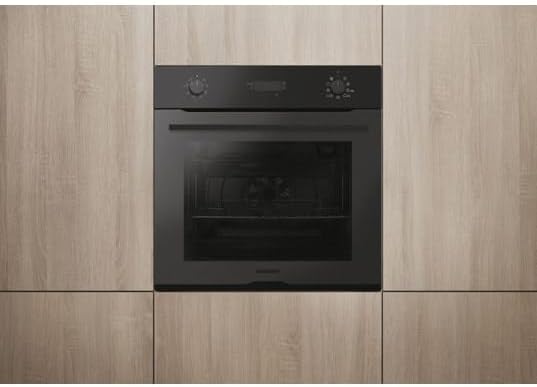
Figure 3: The ROSIERES built-in oven seamlessly integrated into light wooden kitchen cabinetry, with its door closed, showcasing its sleek black finish.
4. Operating Instructions
This section details how to use your ROSIERES RFC5M594PN oven for various cooking tasks and its special functions.
4.1 Basic Operation
- Turn On: Rotate the function selector knob (left knob) to choose a desired cooking function.
- Set Temperature: Rotate the temperature selector knob (right knob) to set the desired temperature. The digital display will show the selected temperature.
- Preheating: Allow the oven to preheat to the set temperature. An indicator light or display icon will typically show when the oven has reached temperature.
- Cooking: Place food inside the oven using appropriate bakeware.
- Turn Off: Once cooking is complete, turn both knobs to the "OFF" position.
4.2 Cooking Functions
The oven offers 7 cooking functions:
- Natural Convection: Ideal for traditional baking and roasting.
- Fan-assisted Heat: Circulates hot air for even cooking, suitable for multiple dishes simultaneously.
- Pulsed Heat: Ensures perfect temperature homogeneity without mixing odors.
- Bottom Heat with Fan: For dishes requiring more heat from the bottom.
- Grill: For grilling and browning.
- Defrost: Gently thaws frozen food.
- Refer to the full manual for specific temperature and time recommendations for each function.

Figure 4: An open view of the ROSIERES oven interior, showing a wire rack and a baking tray positioned on different levels, ready for cooking.
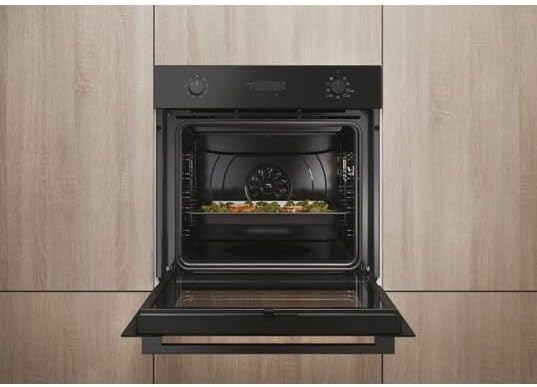
Figure 5: The ROSIERES built-in oven with its door open, revealing a dish being cooked on a rack inside the oven cavity, integrated into light wooden kitchen cabinetry.
4.3 Pyrolytic Cleaning Cycle
The pyrolytic cleaning function uses high temperatures to burn off food residues.
- Preparation: Remove all accessories (racks, trays, side supports) from the oven cavity. Wipe away any large food spills.
- Start Cycle: Select the pyrolytic cleaning function using the function knob. The oven door will automatically lock.
- Ventilation: Ensure the kitchen is well-ventilated during the cycle.
- Completion: Once the cycle is complete and the oven has cooled down, the door will unlock. Wipe away the fine ash residue with a damp cloth.
4.4 hOn App Connectivity
Your oven is equipped with hOn connectivity, allowing you to control and monitor it remotely.
- Download App: Download the hOn app from your smartphone's app store.
- Pairing: Follow the in-app instructions to pair your oven with your smartphone via Wi-Fi.
- Features:
- Remote control of cooking functions and temperature.
- Access to over 300 automatic recipes.
- Receive maintenance tips and notifications.
5. Maintenance and Cleaning
Regular cleaning and maintenance will ensure the longevity and optimal performance of your oven.
- Exterior Cleaning: Clean the exterior surfaces with a soft cloth and mild detergent. Avoid abrasive cleaners or scourers.
- Interior Cleaning: For general cleaning, wipe the interior with a damp cloth and mild detergent after each use, once the oven has cooled. For heavy soiling, use the pyrolytic cleaning function (see Section 4.3).
- Door Glass: The inner glass panes of the oven door can be removed for thorough cleaning. Refer to the detailed instructions in the full manual for this procedure.
- Replacing the Oven Lamp: Ensure the oven is disconnected from the power supply before attempting to replace the lamp. Use a high-temperature resistant bulb suitable for ovens.
6. Troubleshooting
Before contacting customer service, please refer to the following common issues and solutions:
| Problem | Possible Cause | Solution |
|---|---|---|
| Oven does not turn on. | No power supply; door not closed properly; control knobs not set. | Check power connection and circuit breaker. Ensure door is fully closed. Set function and temperature knobs. |
| Oven not heating correctly. | Incorrect temperature setting; faulty heating element. | Verify temperature setting. If problem persists, contact qualified service personnel. |
| Pyrolytic cycle not starting. | Oven door not fully closed and locked; oven too hot from previous use. | Ensure door is securely closed. Allow oven to cool down if recently used. |
| hOn app connectivity issues. | Wi-Fi signal weak; incorrect pairing procedure; app outdated. | Check Wi-Fi signal strength. Re-attempt pairing. Update hOn app. Refer to app's help section. |
7. Specifications
Technical details for the ROSIERES RFC5M594PN Built-in Pyrolytic Oven.
| Brand: | ROSIERES |
| Model Number: | RFC5M594PN |
| Capacity: | 70 Liters |
| Cooking Method: | Convection, Electric |
| Fuel Type: | Electric |
| Cleaning Type: | Pyrolytic |
| Door Type: | Cool-Touch (4 glass panes), Soft-Close |
| Connectivity: | Wi-Fi (hOn App) |
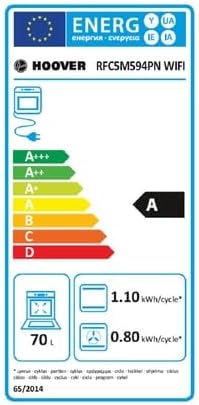
Figure 6: Energy efficiency label for the ROSIERES RFC5M594PN oven, indicating an energy class of A, a capacity of 70 liters, and energy consumption values per cycle.
8. Warranty and Support
For warranty information, technical support, or to order spare parts, please contact your retailer or the ROSIERES customer service department.
- Warranty: The warranty period and conditions are subject to the terms provided at the time of purchase and local regulations. Please retain your proof of purchase.
- Spare Parts: Information regarding the availability of spare parts may be obtained from your retailer or the manufacturer's official website.
- Customer Service: For assistance, please visit the official ROSIERES website or refer to the contact details provided with your purchase documentation.


