
1. Introduction
This manual provides detailed instructions for the setup, operation, and maintenance of your boAt Aavante Bar 490 Bluetooth Soundbar. Please read this manual thoroughly before using the product to ensure proper functionality and to maximize your audio experience.

Image 1.1: The boAt Aavante Bar 490 Bluetooth Soundbar in Classic Black.
2. Package Contents
Verify that all items listed below are included in your package:
- boAt Aavante Bar 490 Soundbar
- Charging Cable
- User Manual (this document)
- Warranty Card
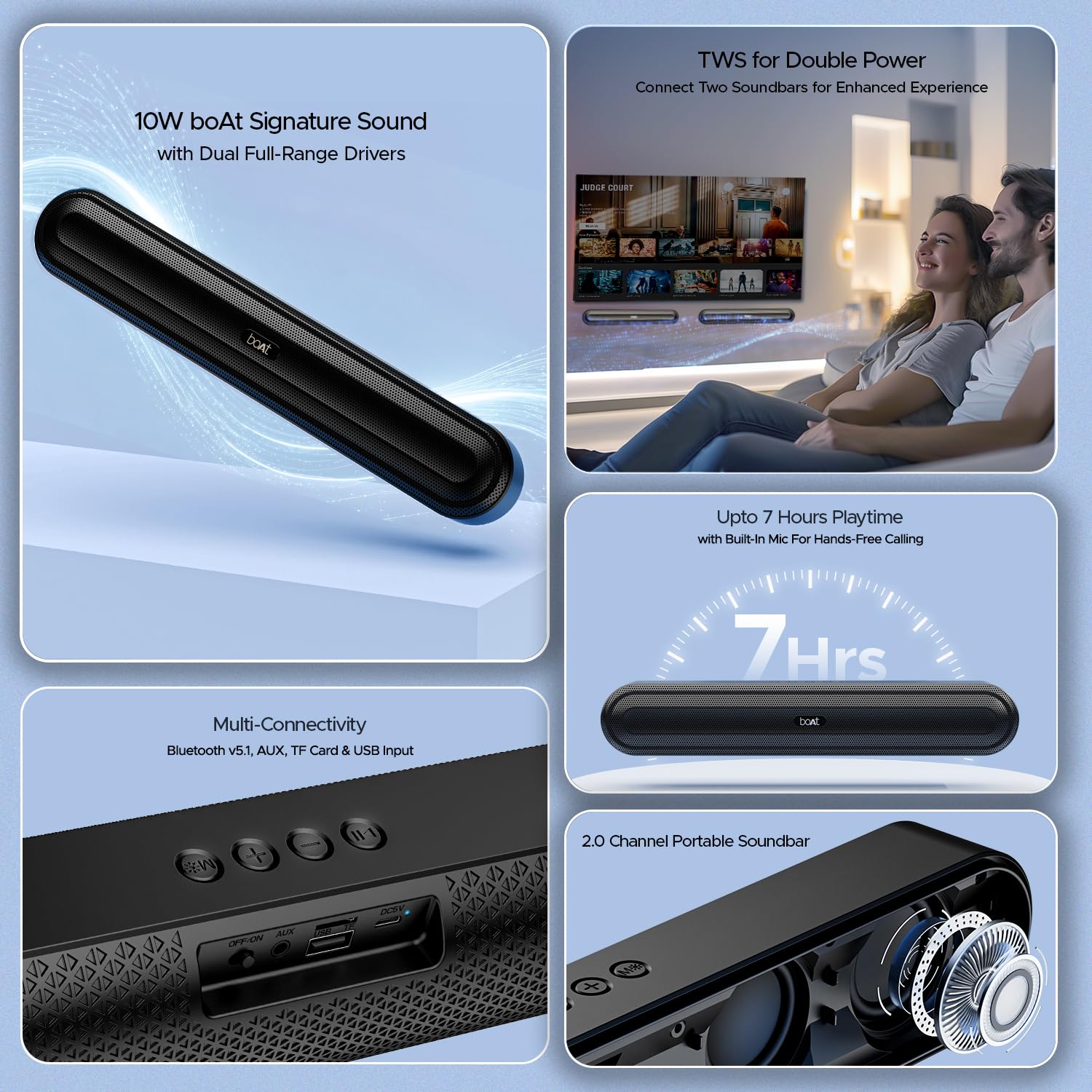
Image 2.1: Overview of the boAt Aavante Bar 490 and its key features, including package contents.
3. Product Overview
3.1. Controls and Ports
Familiarize yourself with the control buttons and connectivity ports on your Aavante Bar 490.

Image 3.1: Close-up view of the control buttons and multi-connectivity ports (Bluetooth v5.1, AUX, TF Card, USB Input) on the soundbar.
- Power Button: Press and hold to power on/off. Short press to switch modes.
- Volume Down (-): Decrease volume.
- Volume Up (+): Increase volume.
- Play/Pause Button: Play or pause music. Answer/end calls.
- Mode Button (M): Switch between input modes (Bluetooth, AUX, USB, TF Card).
- OFF/ON Switch: Main power switch.
- AUX Port: For wired audio connection.
- USB Port: For USB drive playback.
- TF Card Slot: For TF card playback.
- DC5V Port: For charging the device.
4. Setup
4.1. Charging the Soundbar
Before first use, fully charge the soundbar. Connect the provided charging cable to the DC5V port on the soundbar and the other end to a compatible USB power adapter (not included). The LED indicator will show charging status and turn off when fully charged. A full charge provides up to 7 hours of playback.

Image 4.1: The boAt Aavante Bar 490 highlighting its up to 7 hours of playtime on a single charge.
4.2. Power On/Off
- Ensure the OFF/ON switch at the back is in the "ON" position.
- Press and hold the Power button on the top panel for 3 seconds to power on the soundbar.
- To power off, press and hold the Power button again for 3 seconds.
4.3. Bluetooth Pairing
- Power on the soundbar. It will automatically enter Bluetooth pairing mode (indicated by a flashing LED).
- On your device (smartphone, tablet, etc.), enable Bluetooth and search for available devices.
- Select "Aavante Bar 490" from the list.
- Once paired, the LED indicator will turn solid blue, and you will hear a confirmation tone.
The soundbar supports Bluetooth v5.1 for stable and efficient wireless connection up to 10 meters.
4.4. TWS (True Wireless Stereo) Pairing
For an enhanced stereo experience, you can pair two Aavante Bar 490 soundbars together.
- Ensure both Aavante Bar 490 units are powered on and in Bluetooth pairing mode (not yet connected to any device).
- On one of the soundbars, double-press the Mode button (M). It will search for the other unit.
- Once successfully paired, you will hear a confirmation tone, and the LED indicators on both units will synchronize.
- Now, connect your device to one of the paired soundbars via Bluetooth as described in Section 4.3. Both soundbars will play audio in stereo.

Image 4.2: Illustration of two boAt Aavante Bar 490 soundbars connected via TWS for an enhanced audio experience.
4.5. Other Connectivity Modes
Press the Mode button (M) to cycle through the following input options:
- AUX Mode: Connect an audio device using a 3.5mm AUX cable to the AUX port.
- USB Mode: Insert a USB flash drive into the USB port. The soundbar will automatically play audio files.
- TF Card Mode: Insert a TF (microSD) card into the TF card slot. The soundbar will automatically play audio files.
5. Operating Instructions
5.1. Music Playback
- Play/Pause: Short press the Play/Pause button.
- Volume Adjustment: Short press the Volume Up (+) or Volume Down (-) buttons.
- Next Track: Long press the Volume Up (+) button.
- Previous Track: Long press the Volume Down (-) button.
5.2. Hands-Free Calling
When connected via Bluetooth, the built-in microphone allows for hands-free calls.
- Answer Call: Short press the Play/Pause button.
- End Call: Short press the Play/Pause button during a call.
- Reject Call: Long press the Play/Pause button.
6. Maintenance
- Keep the soundbar away from water, moisture, and extreme temperatures.
- Clean the device with a soft, dry cloth. Do not use abrasive cleaners or solvents.
- Avoid dropping or subjecting the soundbar to strong impacts.
- Store in a cool, dry place when not in use for extended periods.
7. Troubleshooting
| Problem | Possible Cause | Solution |
|---|---|---|
| Soundbar does not power on. | Low battery; OFF/ON switch is off. | Charge the soundbar; ensure OFF/ON switch is in the "ON" position. |
| Cannot pair via Bluetooth. | Soundbar not in pairing mode; device Bluetooth is off; too far from device. | Ensure soundbar is in pairing mode; enable Bluetooth on your device; move closer to the soundbar (within 10m). |
| No sound. | Volume too low; incorrect input mode; cable not connected properly. | Increase volume; switch to correct input mode (Bluetooth, AUX, USB, TF); check cable connections. |
| TWS pairing fails. | One or both units already connected to a device; units too far apart. | Disconnect both units from any Bluetooth devices; ensure they are close to each other during TWS pairing. |
8. Specifications
- Model Name: Aavante Bar 490
- Speaker Type: Soundbar
- Audio Output: 2.0 Channel
- Output Power: 10W RMS
- Drivers: Dual Full-Range Drivers
- Bluetooth Version: v5.1
- Bluetooth Range: Up to 10 meters
- Connectivity: Bluetooth, AUX, USB, TF Card
- Battery Life: Up to 7 hours
- Battery Type: Lithium Polymer (1 x 12V included)
- Built-in Microphone: Yes (for hands-free calling)
- Control Method: Touch buttons
- Product Dimensions: 38.7D x 6.5W x 5.5H Centimeters
- Item Weight: 650 Grams

Image 8.1: Dimensions of the boAt Aavante Bar 490 soundbar.
9. Warranty and Support
The boAt Aavante Bar 490 comes with a standard 1-year limited warranty from the date of purchase. Please refer to the included Warranty Card for detailed terms and conditions.
For technical support, service, or warranty claims, please contact boAt customer service:
- Email: info@imaginemarketingindia.com
- Manufacturer: Imagine Marketing Limited
- Address: Unit no. 204 & 205, 2nd floor, D-wing & E-wing, Corporate Avenue, Andheri Ghatkopar Link Road, Mumbai, Maharashtra-400093, India
You can also download the boAt Hearables App for additional features and user guides. Scan the QR code below:

Image 9.1: QR code to download the boAt Hearables App for additional features and support.
10. Product Videos
Video 10.1: A short preview showcasing the boAt Aavante Bar 490 Bluetooth Soundbar's features, including 10W RMS sound, dual full-range drivers, 7 hours playback, multi-connectivity, and hands-free calling. This video is provided by the seller.
Video 10.2: A brief overview of the boAt Aavante Bar 490, highlighting its 10W RMS Signature Sound, dual drivers, and Bluetooth 5.1 connectivity. This video is provided by the seller.


