
Introduction
The BURG sPin-Lock 100 is a mechanical combination lock designed for use with both wooden and metal furniture. This lock features a 3-dial combination mechanism, allowing users to set their own personal code. This manual provides detailed instructions for installation, operation, code setting, and code recovery to ensure proper and secure use of your sPin-Lock 100.
Safety Information
- Read all instructions carefully before installation and use.
- Ensure the lock is installed securely to prevent unauthorized removal.
- Keep the provided pin for code setting and recovery in a safe place.
- Do not force the lock mechanism. If it does not operate smoothly, recheck the code or installation.
Package Contents
Please verify that all components are present before beginning installation:
- 1x BURG sPin-Lock 100 Mechanical Combination Lock
- 1x M16 Nut
- 1x Fixing Screw
- 1x Pin for code setting/recovery
Setup and Installation
The sPin-Lock 100 is designed for quick installation. Follow these steps:
- Prepare the Mounting Hole: Ensure your furniture has a mounting hole with dimensions of 16 mm x 19 mm. Refer to the diagram below for the correct shape and size.
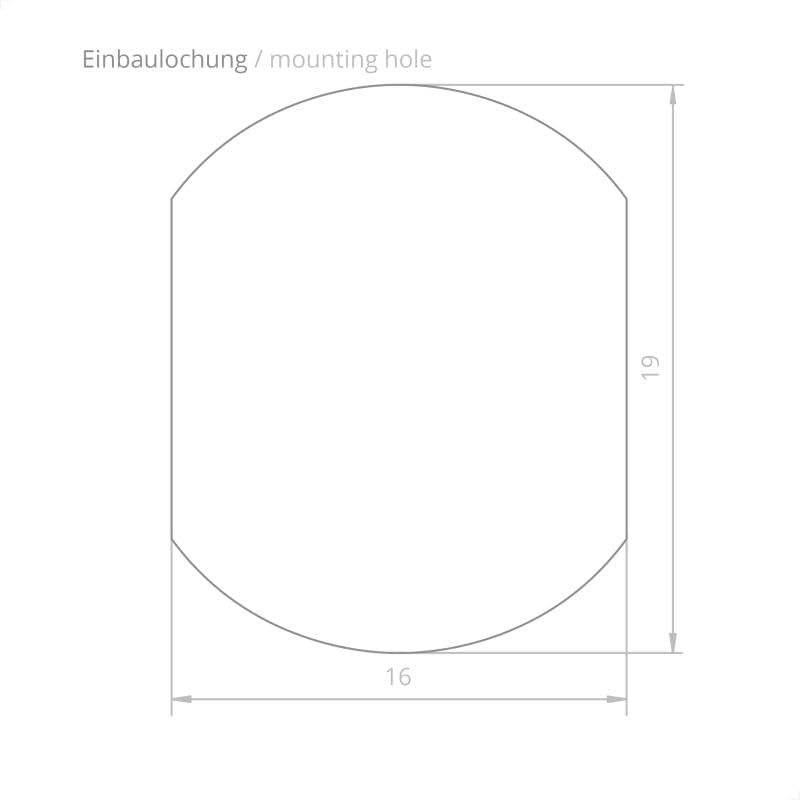
Image: Diagram showing the required 16mm x 19mm mounting hole for the BURG sPin-Lock 100.
- Insert the Lock: Insert the lock body into the prepared mounting hole from the front of the furniture.

Image: Front view of the BURG sPin-Lock 100, showing its appearance when installed on a cabinet door.
- Secure the Lock: From the rear of the furniture, place the M16 nut onto the threaded shaft of the lock and tighten it securely. Use the provided fixing screw if applicable to further stabilize the lock.

Image: Rear view of the BURG sPin-Lock 100, illustrating the threaded shaft and the M16 nut used for securing the lock from the inside of the furniture.
- Attach the Latch/Bolt: Mount the appropriate latch or bolt mechanism to the rear of the lock, ensuring it aligns correctly with the furniture's locking point.
Refer to the dimension diagrams for precise measurements:

Image: Front view diagram of the lock, indicating a diameter of 46 mm.
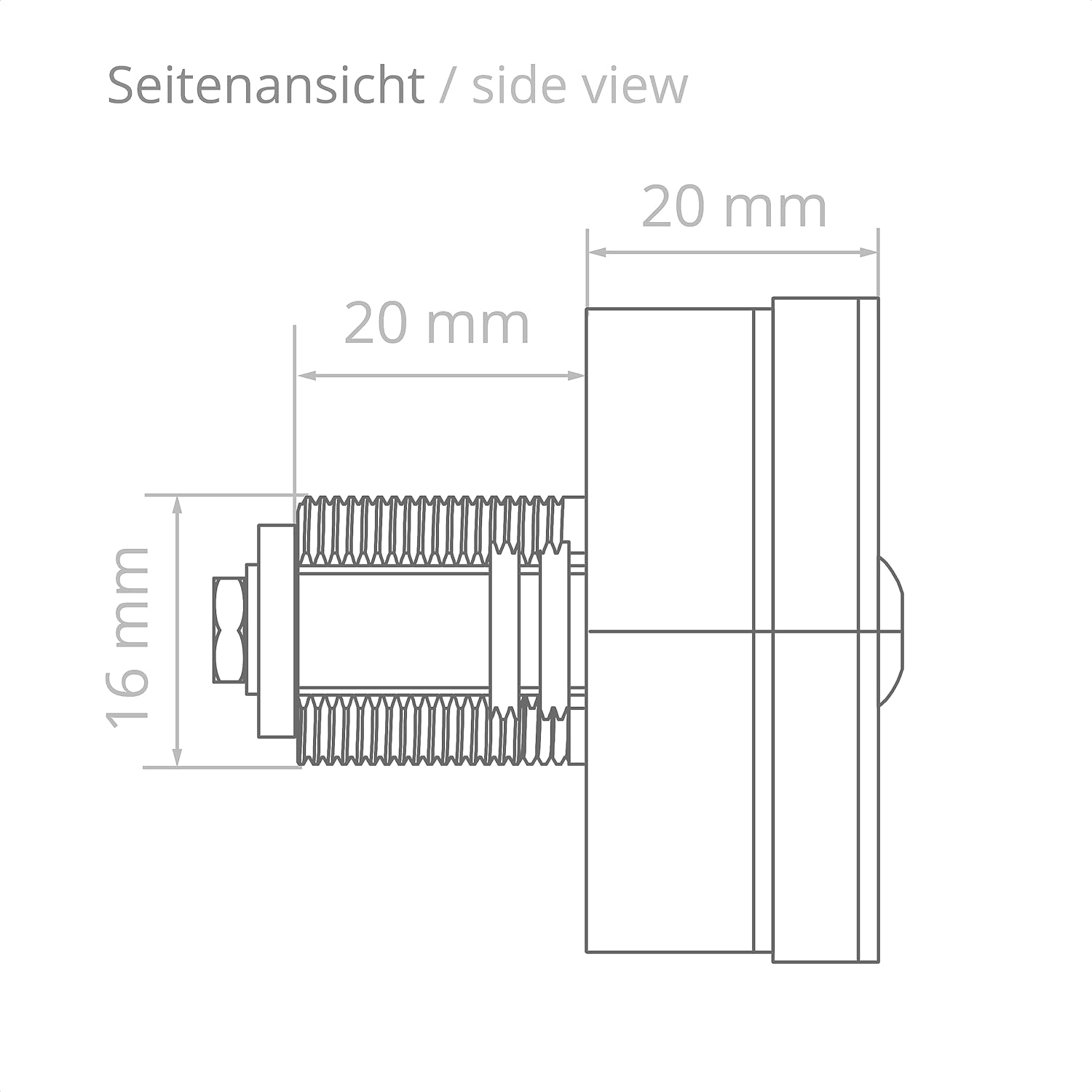
Image: Side view diagram of the lock, showing a depth of 20 mm and a shaft length of 20 mm with a 16 mm diameter.
Operating Instructions
To operate the lock:
- To Unlock: Rotate the three dials to the correct 3-digit PIN code.
- Once the correct code is set, the lock mechanism (and the attached latch/bolt) can be rotated 90 degrees to the open position.
- To Lock: Rotate the lock mechanism back to the closed position.
- Scramble the numbers on the dials to secure the lock.
Setting Your Personal PIN Code
The lock comes with a default code (usually 0-0-0). To set your personal PIN code:
- Ensure the lock is in the unlocked position (mechanism rotated 90 degrees).
- Insert the provided pin into the small hole on the side of the lock body.
- While holding the pin in place, rotate the three dials to your desired 3-digit PIN code.
- Once your new code is set, remove the pin. Your new PIN code is now active.
- Test the new code by scrambling the dials, then entering your new code to unlock.
Important: Remember your new PIN code. Store it in a safe, memorable place.
Code Recovery Function
If you forget your set PIN code, the sPin-Lock 100 features a code recovery function:
- Locate the metal plate (or similar tool) provided or a thin, flat object.
- Press the edges of the dials with the metal plate.
- Slowly turn each dial one by one. You will feel a slight click or resistance when the dial reaches its correct number for the forgotten code.
- Continue this process for all three dials. Once all dials are set to their respective "click" positions, the forgotten PIN code will be displayed.
This function allows you to easily determine the currently set code if it has been forgotten.
Maintenance
The BURG sPin-Lock 100 requires minimal maintenance:
- Keep the lock clean and free from dust and debris. Wipe with a soft, dry cloth.
- Do not use abrasive cleaners or solvents, as these may damage the plastic material.
- Periodically check the mounting nut for tightness to ensure the lock remains securely installed.
Troubleshooting
If you encounter issues with your sPin-Lock 100, consider the following:
- Lock not opening: Double-check that the correct PIN code is entered. Ensure each dial is precisely aligned with its number.
- Difficulty turning dials: Check for any foreign objects or debris obstructing the dials. Clean the lock surface.
- Lock feels loose: Re-tighten the M16 nut from the rear of the furniture.
- Forgotten code: Use the code recovery function as described in the "Code Recovery Function" section.
Specifications
| Feature | Detail |
|---|---|
| Model Name | sPin-Lock 100 |
| Brand | BURG |
| Type of Lock | Combination Lock |
| Material | Plastic |
| Color | Black |
| Weight | 160 grams |
| Control Method | Tactile (Dial) |
| Special Feature | Unlock by access code, Code search function for forgotten PIN |
| Recommended Uses | Interior furniture (wood and metal) |
| Mounting Hole Dimensions | 16 mm x 19 mm |
| Number of Pieces | 1 (lock unit) |
| Batteries Required | No |
Warranty Information
Warranty information for the BURG sPin-Lock 100 is not available in the provided product details. Please refer to the manufacturer's official website or contact your retailer for specific warranty terms and conditions.
Support
Support contact information for the BURG sPin-Lock 100 is not available in the provided product details. For technical assistance or further inquiries, please visit the official BURG website or contact the seller directly.


