
1. Introduction
Thank you for choosing the iWALK MAG-X Magnetic Wireless Power Bank. This portable charger is designed to provide convenient and efficient power for your iPhone and Apple Watch, featuring strong magnetic attachment and fast charging capabilities. This manual will guide you through the setup, operation, and maintenance of your device.
2. Product Overview
The iWALK MAG-X is a versatile 10000mAh power bank that supports simultaneous wireless charging for both iPhone and Apple Watch. Its compact design and robust magnetic connection ensure secure and reliable charging on the go.

The iWALK MAG-X Magnetic Wireless Power Bank securely attached to an iPhone, with an Apple Watch positioned on its dedicated charging pad.

The power bank allows for wireless charging of both your iPhone and Apple Watch at the same time, providing convenience for multiple devices.

This device is designed to power your Apple ecosystem, including iPhones, Apple Watches, and AirPods, offering versatile charging solutions.
Package Contents:
- iWALK 10,000mAh Magnetic Wireless Power Bank x 1
- USB-C to USB-C cable x 1
- User Manual x 1
3. Setup
Charging the Power Bank:
Before first use, fully charge your iWALK MAG-X power bank. Connect the provided USB-C to USB-C cable to the power bank's USB-C port and a compatible USB-C power adapter (not included). The LED display will show the charging progress. A full charge may take several hours.

The USB-C port on the power bank supports 18W PD fast charging for both input (charging the power bank) and output (charging other devices).
4. Operating Instructions
Charging Your Devices:
- For iPhone (Magnetic Wireless Charging): Align your iPhone (12 series and newer, or with a MagSafe compatible case) with the magnetic charging area on the power bank. The powerful magnet will ensure proper alignment for efficient wireless charging.
- For Apple Watch (Wireless Charging): Place your Apple Watch on the dedicated charging pad on the power bank. Ensure the watch is centered for optimal charging.
- For Other Devices (USB-C Output): Use the USB-C to USB-C cable (or your device's compatible cable) to connect the power bank's USB-C port to your device for wired fast charging.

The strong magnetic attachment ensures the power bank securely snaps onto your iPhone for stable wireless charging.
Button Functions:

Illustration of the power bank's side button and LED display, explaining how to operate the device.
- Turn On: Click the side button once to activate the power bank and begin charging.
- Turn Off: Double-click the side button to stop charging and turn off the power bank.
- Low-Power Mode (for AirPods): Press and hold the side button for three seconds to enter low-current discharge mode, suitable for charging low-power devices like AirPods.
5. Compatibility
The iWALK MAG-X power bank is designed for broad compatibility within the Apple ecosystem.
The power bank is compatible with various Apple devices, including recent iPhone models, Apple Watch series, and AirPods.
Compatible Devices:
- iPhone: iPhone 15, iPhone 14, iPhone 13, iPhone 12 series (and compatible MagSafe cases).
- Apple Watch: Apple Watch Ultra, Series 8, Series 7, Series 6, Series 5, Series 4, Series 3, Series 2, SE (all 38/40/42/44mm sizes).
- AirPods: AirPods 2, AirPods 3, AirPods Pro, AirPods Pro 2 (requires wireless charging case).

The power bank offers wide compatibility with various Apple Watch models and sizes.
6. Charging Capacity
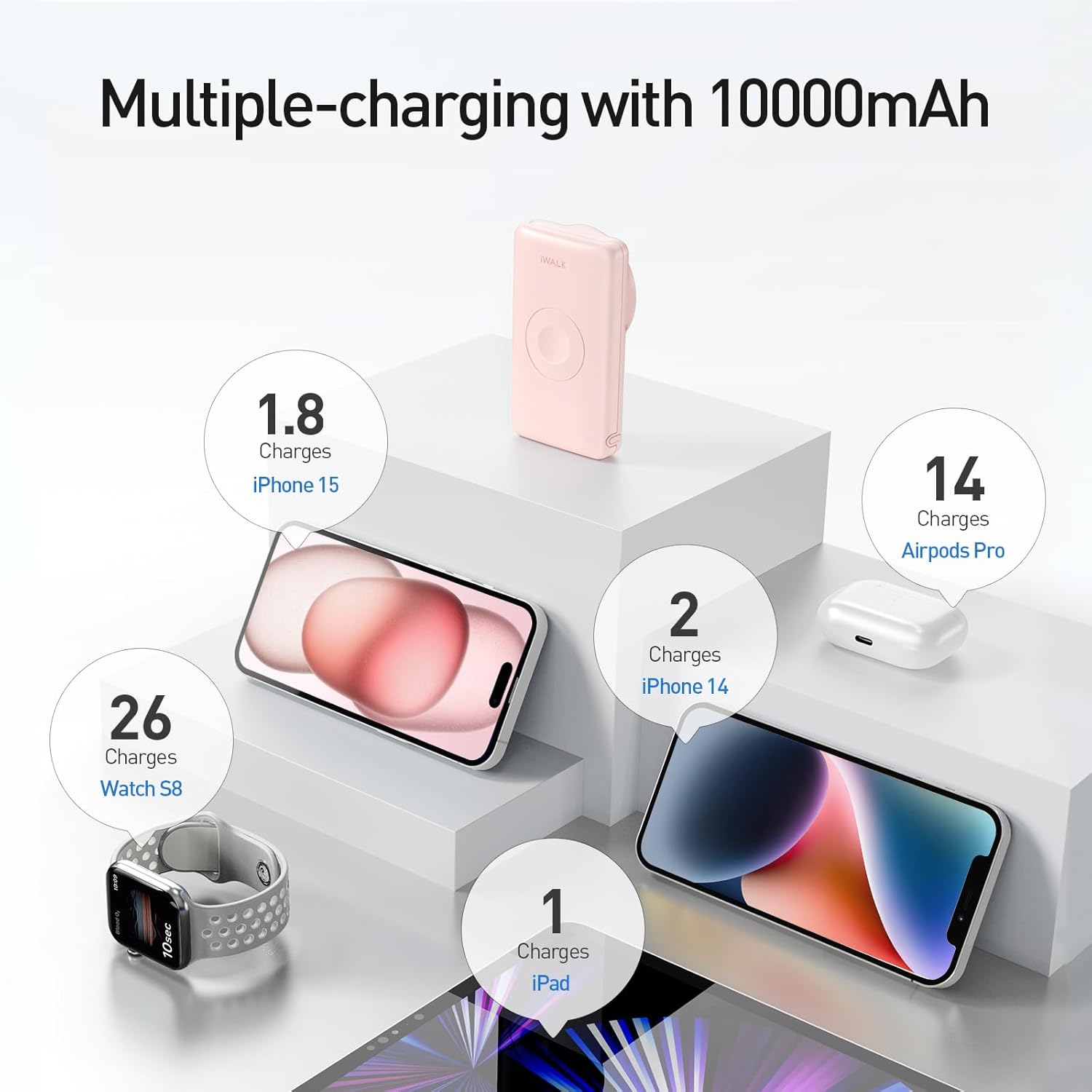
With a 10,000mAh high capacity, the iWALK MAG-X provides substantial power for multiple charges.

The 10,000mAh capacity allows for multiple recharges of your devices.
Estimated Charges:
- Fully recharge Apple Watch up to 22 times.
- Fully recharge AirPods up to 26 times.
- Recharge iPhone 14 approximately 2 times, providing an additional 34 hours of video playback.
- Recharge iPhone 15 approximately 1.8 times.
7. Maintenance
- Keep the power bank away from extreme temperatures, direct sunlight, and moisture.
- Do not disassemble or attempt to repair the device yourself.
- Clean the surface with a soft, dry cloth. Avoid using harsh chemicals or abrasive materials.
- Store the power bank in a cool, dry place when not in use for extended periods.
8. Troubleshooting
Common Issues and Solutions:
- Device not charging:
- Ensure the power bank is sufficiently charged.
- Press the side button once to turn on the power bank.
- Verify proper alignment of your device on the charging pad or magnetic area.
- Check if the charging cable (for wired charging) is securely connected and undamaged.
- If charging AirPods, ensure low-power mode is activated (press and hold button for 3 seconds).
- Slow charging:
- Ensure you are using a compatible fast-charging adapter (for charging the power bank itself).
- Check if your device supports fast wireless charging.
- Avoid using your device heavily while charging, as this can slow down the process.
- Power bank automatically turns off:
- This may occur if the power bank detects an unstable connection or overheating. Ensure proper alignment and clear any obstructions.
- If the issue persists, contact customer support.
- Magnetic attachment not strong enough:
- Ensure your iPhone is a 12 series or newer, or that you are using a MagSafe compatible case.
- Remove any non-MagSafe cases that might interfere with the magnetic connection.
9. Specifications
| Feature | Detail |
|---|---|
| Model Number | MXB001 |
| Battery Capacity | 10000 Milliamp Hours |
| Product Dimensions | 1 x 1 x 1 inches |
| Item Weight | 12 ounces |
| Connectivity Technologies | USB, Wireless Charging |
| Special Features | Wireless Charging |
| Color | Pink |
| Manufacturer | U2O GLOBAL CO.,LTD. |
10. Warranty and Support
Your iWALK MAG-X Magnetic Wireless Power Bank comes with an 18-month warranty service from the date of purchase. For any issues or inquiries, please contact iWALK customer support through the official website or your retailer's support channels. Please retain your proof of purchase for warranty claims.


