ExBrite LED Lighted Bathroom Medicine Cabinet
Instruction Manual
Brand: ExBrite | Model: 11FXMC4832V4DX
Product Overview
The ExBrite LED Lighted Bathroom Medicine Cabinet (48 x 32 Inch) is designed to enhance your bathroom with both functionality and modern aesthetics. It features integrated LED lighting with customizable brightness and color temperature, an efficient defogging system, and convenient internal power outlets. This cabinet offers flexible installation options and ample storage, making it a practical addition to any contemporary bathroom space.
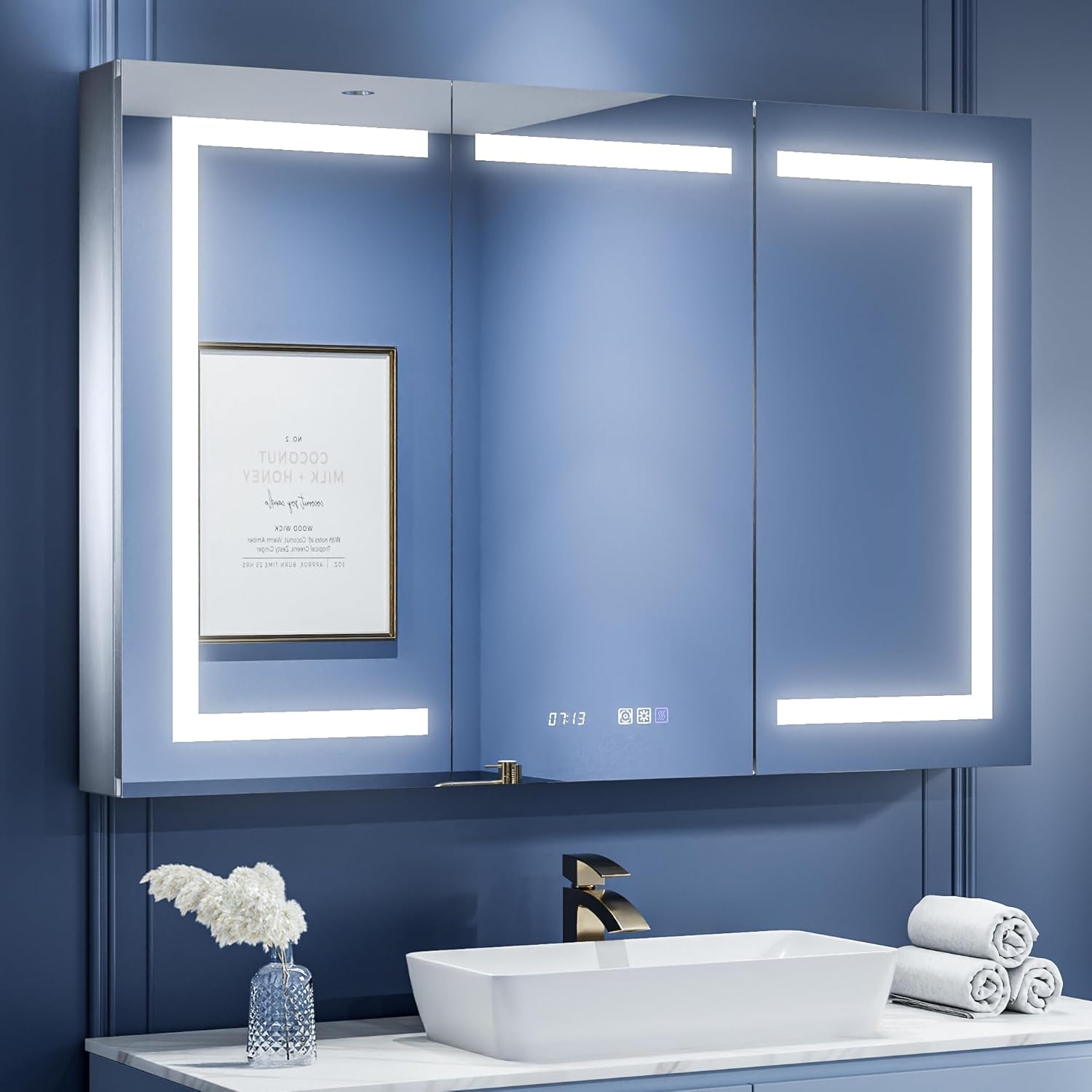
Figure 1: ExBrite LED Lighted Bathroom Medicine Cabinet (48x32 Inch)
- Stepless Adjustable & Interior LED Lighting: Adjust brightness from 10% to 100% and color temperature from 3000K-6400K. Interior lighting provides ample light for finding items.
- Enhanced Defogging & Display: Mirror surface heats to approximately 40°C for fast, safe defogging. Defogging automatically turns off when the light is off. Features a digital clock and room temperature display.
- Upgraded Design: Improved packaging for transit safety and upgraded 120° soft-close hinges for better mirror support.
- Mirrored Glass Shelves: Three 5mm thick adjustable shelves, each bearing up to 11 pounds, provide worry-free storage. Built-in 2 Amp dual outlet and 2 USB ports are suitable for charging shavers or electric toothbrushes.
- Installation Versatility: Supports both recessed installation (1-inch protrusion for easy opening) and direct surface mounting.
- ETL Certified: Complies with safety standards, ensuring reliability and safety.
Installation Guide
This medicine cabinet can be installed either recessed into the wall or surface-mounted. Professional installation by a licensed electrician is recommended due to electrical components. Always ensure power is off before installation.
1. Pre-Installation Checks
- Verify all components are present and undamaged.
- Ensure the installation area is dry and free from moisture.
- Confirm wall structure can support the cabinet's weight (81.8 lbs).
- For recessed installation, ensure wall depth is sufficient (minimum 5.25 inches).

Figure 2: Cabinet and Cutout Dimensions (48x32 Inch model)
2. Recessed Installation
For a flush appearance, the cabinet can be embedded into the wall. This requires creating a cutout in the wall according to the specified dimensions (46 inches width for the frame, 48 inches total width, 32 inches height, 5.25 inches depth). The electrical wiring should be routed to the top of the cabinet for proper connection within standard wall depths.

Figure 3: Recessed Installation (top) and Surface Mounting (bottom)
Steps:
- Mark and cut the wall opening according to the cutout dimensions.
- Install the mounting bar securely within the wall studs.
- Route electrical wiring (120Vac) to the top of the cabinet's intended location.
- Carefully insert the cabinet into the opening, ensuring it is level.
- Secure the cabinet to the mounting bar and wall studs using appropriate fasteners.
- Connect the electrical wiring (black to live, white to neutral, green/bare to ground) inside the cabinet's junction box.
3. Surface Mounting
For direct wall mounting, the cabinet will protrude from the wall. Ensure the wall is flat and capable of supporting the cabinet's weight.
Steps:
- Mark the desired mounting height and location on the wall.
- Secure the mounting bar to the wall using appropriate anchors and screws.
- Hang the cabinet onto the mounting bar, ensuring it is stable and level.
- Connect the electrical wiring (black to live, white to neutral, green/bare to ground) inside the cabinet's junction box.
Important Electrical Safety Information
Caution: This product contains electrical components and should be installed by a licensed electrician. Do not use in wet or damp conditions. Keep away from heat sources and open flames. Always unplug the product before cleaning. Do not use if damaged or broken. Keep out of reach of children and pets. Always follow the manufacturer's instructions for safe use and maintenance.
Operating Instructions
1. Light Controls (Brightness and Color Temperature)
The cabinet features touch-sensitive controls on the mirror surface for easy operation of the integrated LED lighting.

Figure 4: Adjustable Brightness and Triple Color Temperatures
- Power On/Off: Tap the power icon to turn the lights on or off.
- Brightness Adjustment: Press and hold the brightness adjustment button (often represented by a sun icon) to smoothly dim the light from 10% to 100%.
- Color Temperature Change: Tap the color temperature button (often represented by a circular arrow or color spectrum icon) to cycle through three preset color temperatures: 3000K (Warm White), 4500K (Natural White), and 6000K (Cool White).
2. Defogging Function
The defogging function quickly clears condensation from the mirror surface, ensuring a clear reflection even after hot showers.

Figure 5: Enhanced Anti-Fog Functionality
- Activate Defogger: Tap the defogging icon (often represented by steam waves) to turn on the anti-fog function.
- Automatic Shut-off: The defogging function will automatically turn off after 60 minutes of continuous operation.
3. Clock and Temperature Display
The mirror surface displays the current time and room temperature for convenience.

Figure 6: Clock and Temperature Display Controls
- Setting Time: When the power is on, long press the defogging button to turn off the lights of the three touch buttons. Long press again to turn them on. When the brightness adjustment button shows blue light, long press it to change the time and temperature units. When the color temperature button shows blue light, long press it to calibrate the time.
- Temperature Display: The cabinet displays the room temperature.
4. Internal Outlets and USB Ports
The cabinet includes internal 2 Amp dual outlets and 2 USB ports for charging small electronic devices, such as electric toothbrushes or shavers.

Figure 7: Internal Dual Outlet & Dual USB Ports
- Usage: Plug in devices directly into the outlets or USB ports located inside the cabinet.
- Capacity: The outlets are rated for 120Vac, 2A Max. Do not exceed the maximum current rating.
- Note: These outlets are designed for low-power devices like electric toothbrushes or shavers. Do not use for high-power appliances such as hair dryers.
Maintenance and Care
Proper maintenance ensures the longevity and optimal performance of your ExBrite medicine cabinet.
1. Cleaning Instructions
- Mirror Surface: Use a soft, lint-free cloth and a non-abrasive glass cleaner. Spray cleaner onto the cloth, not directly onto the mirror, to prevent liquid from seeping into electrical components.
- Cabinet Frame: Wipe the aluminum frame with a damp cloth and mild soap, then dry thoroughly. Avoid harsh chemicals or abrasive cleaners.
- Glass Shelves: Remove shelves for cleaning. Wash with mild soap and water, rinse, and dry completely before placing them back in the cabinet.
- Before Cleaning: Always ensure the power supply to the cabinet is disconnected before cleaning any part of the unit.
2. Material Durability
The ExBrite medicine cabinet is constructed with high-quality materials for durability and reliability.
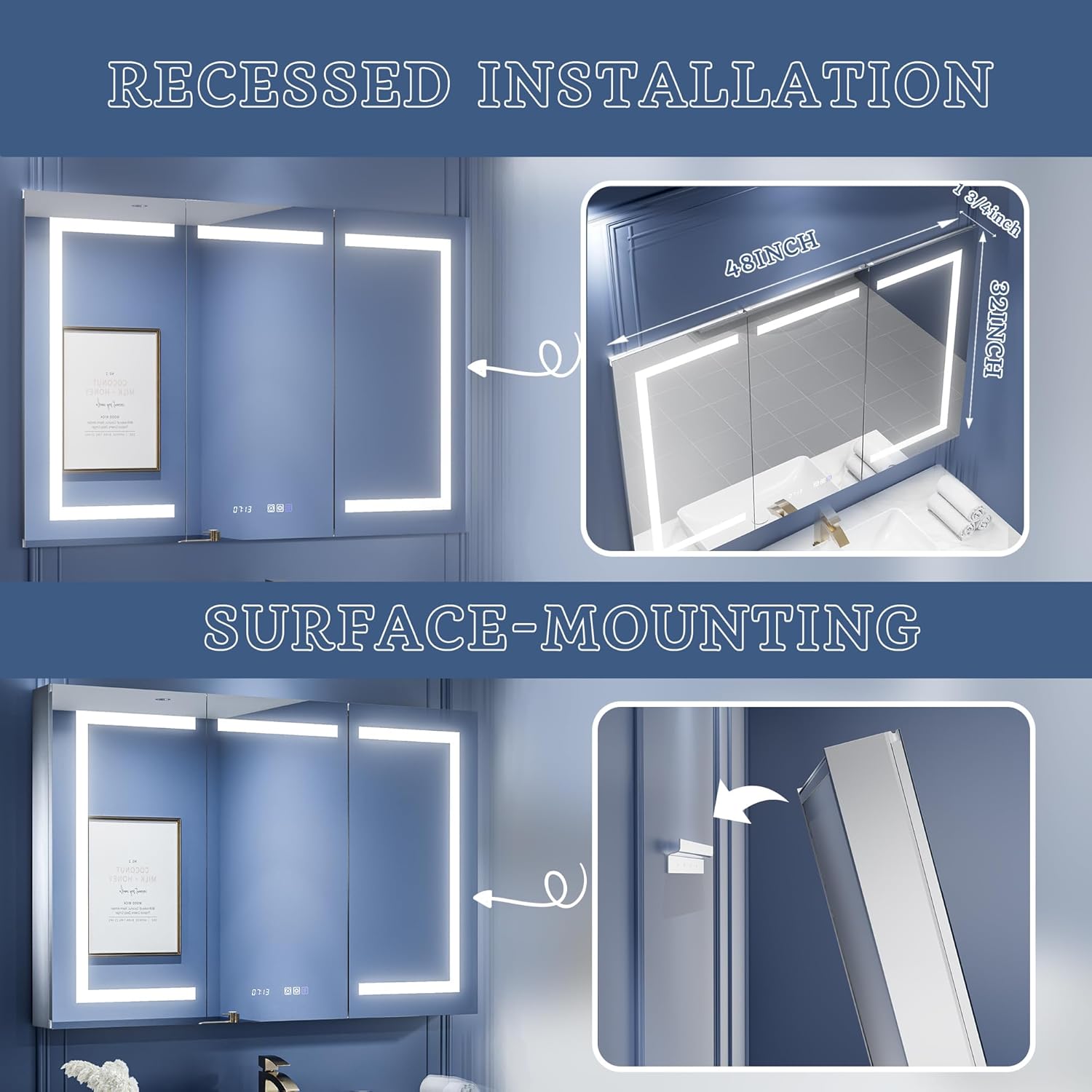
Figure 8: Safety Tempered Glass Mirror
- Tempered Glass: The mirror and shelves are made from safety tempered glass, which is durable and designed to be non-fragmenting if broken, reducing injury risk.
- Aluminum Frame: The double-layer aluminum profile frame provides excellent corrosion resistance, durability, and stability, making it less susceptible to moisture and warping compared to other materials.
- Hinges: Utilizes DTC cushioned hinges for easy installation, smooth operation, and long-lasting durability.
Troubleshooting Common Issues
This section addresses common concerns and provides solutions for optimal cabinet performance.
1. Electrical Wiring for Recessed Installation
Issue: The 120V power line exits from the back of the unit, which may not be compatible with standard 3.5-inch wall depths in the US for a flush installation.
Solution: For a flush installation, it may be necessary to re-drill the aluminum frame to allow the power line to exit from the top of the cabinet. This modification should only be performed by a qualified electrician to ensure safety and proper functionality. Ensure the power cord is long enough to reach the junction box.
2. LED Time/Temperature Display Malfunction
Issue: The LED display for time and temperature may show incorrect segments or become haywire after some time.
Solution: This often indicates an issue with the internal controller rather than individual LED segments. First, try resetting the cabinet by turning off the power at the circuit breaker for a few minutes, then restoring power. If the issue persists, contact ExBrite customer support for further assistance or potential replacement of the control unit.
3. Difficulty Setting the Clock
Issue: Users may find it difficult to set the time on the integrated clock display.
Solution: Refer to the 'Operating Instructions' section, specifically 'Clock and Temperature Display'. The general procedure involves long-pressing the defogging button to activate the setting mode, then using the brightness adjustment and color temperature buttons to adjust and calibrate the time. If the instructions are unclear or the process does not work, ensure the cabinet is receiving stable power and contact customer support if the problem continues.
Product Specifications
| Feature | Specification |
|---|---|
| Brand | ExBrite |
| Model Number | 11FXMC4832V4DX |
| Product Dimensions | 5.25"D x 48"W x 32"H |
| Item Weight | 81.8 Pounds |
| Material | Aluminum (Frame), Tempered Glass (Mirror, Shelves) |
| Mounting Type | Wall Mount (Recessed or Surface) |
| Special Feature | Waterproof, Defogger, LED Lighting, Clock, Room Temp Display, Outlets & USBs |
| Light Temperature Range | 3000K-6400K (Stepless Dimming) |
| Number of Shelves | 3 (Adjustable) |
| Shelf Weight Limit | 11 Pounds per shelf |
| Electrical Outlets | 2 Amp Dual Outlet & 2 USB Ports (120Vac, 2A Max) |
| Certifications | ETL Certified |
Warranty and Customer Support
ExBrite is committed to providing high-quality products and excellent customer service.
- Warranty: This product typically comes with a 1-year warranty from the date of purchase. Please refer to your purchase documentation for specific warranty terms and conditions.
- Returns: Enjoy a 30-day easy return policy.
- Customer Support: For any questions, technical assistance, or warranty claims, please contact ExBrite customer service. Inquiries are typically replied to by email within 24 hours.
- ETL Certification: This product is ETL certified, ensuring it meets rigorous electrical safety standards for your peace of mind.


