
OPT7 FBA-AURA-24-KEY-REMOTE-B
OPT7 Aura Original 24 Key Remote B Instruction Manual
Model: FBA-AURA-24-KEY-REMOTE-B
Introduction
This manual provides instructions for the OPT7 Aura Original 24 Key Remote B, a replacement remote control designed for specific OPT7 Aura LED Lighting Kits. It covers compatibility, setup, operation, and troubleshooting to ensure proper functionality with your existing lighting system.

Image: Front and back view of the OPT7 Aura Original 24 Key Remote B. The front shows 24 buttons for color and mode selection, while the back displays a 'B' indicating its type.
Compatibility
The Aura Original 24 Key Remote B is specifically designed for use with certain OPT7 Aura LED Lighting Kits. It is crucial to verify compatibility before use.
Verifying Compatibility:
Locate the letter on the sticker on the back of your existing remote or control box. This remote is compatible only if that letter is 'B'.

Image: A visual guide demonstrating where to find the compatibility letter 'B' on the back of an OPT7 control box or remote control. This letter ensures the correct remote type is used.
Important Note:
- This Aura Original Remote is NOT compatible with the Aura Pro Bluetooth Control Box.
- Aura Remotes use a specific frequency. If you are unsure about your kit's frequency, contact OPT7 customer support for assistance.

Image: An illustration highlighting that the Aura Original 24 Key Remote B is not compatible with app-controlled lighting kits, such as those using the OPT7 Connect app.
Compatible Aura LED Lighting Kits:
- Aura LED Lighting Kit for Motorcycle Cruiser (B00SUNH7GY)
- Aura LED Lighting Kit for Sportbike (B01K3T1CK4 / B092CRV1CQ)
- Aura LED Lighting Kit for Golf Cart (B07M5YZPX6 / B00ZJ6TOZC)
- Aura LED Lighting Kit for ATV/UTV (B00ZJ6TH4U)
- Aura LED Lighting Kit for Snowmobile (B00ZJ6TKVU / B07MDB2VPL)
Setup and Initial Use
This remote is designed as a direct replacement. No complex pairing is typically required if your existing control box is compatible (Type B). Simply insert the battery (if not pre-installed) and begin operation.
Battery Installation:
- Locate the battery compartment on the back of the remote.
- Open the compartment cover.
- Insert the appropriate battery, ensuring correct polarity.
- Close the compartment cover securely.
Operating Instructions
The OPT7 Aura Original 24 Key Remote B provides comprehensive control over your Aura LED lighting kit. Familiarize yourself with the button layout for optimal use.

Image: A user's hand holding the remote, demonstrating its compact size and ease of use. The background shows a snowmobile illuminated by various LED colors, illustrating the remote's capabilities. Key functions are listed alongside.
Button Functions:
| Button | Function |
|---|---|
| ON / OFF | Turns the LED lighting kit on or off. |
| Brightness Up / Down | Adjusts the intensity of the LED lights. |
| R, G, B, W | Directly selects Red, Green, Blue, or White colors. |
| Color Selection Buttons (16 circles) | Selects from 16 vivid pre-set colors. |
| COLOR STROBE | Activates a strobing effect with the current color. |
| COLOR FADE | Initiates a gradual fading transition between colors. |
| COLOR CYCLE | Cycles through all available colors. |
| BEAT | Activates a sound-activated mode, where lights respond to audio (if supported by the control box). |
The remote allows for personalization with endless color selections, brightness dimmer selections, Color-Strobe, Color-Cycle, and Color-Fade Modes.
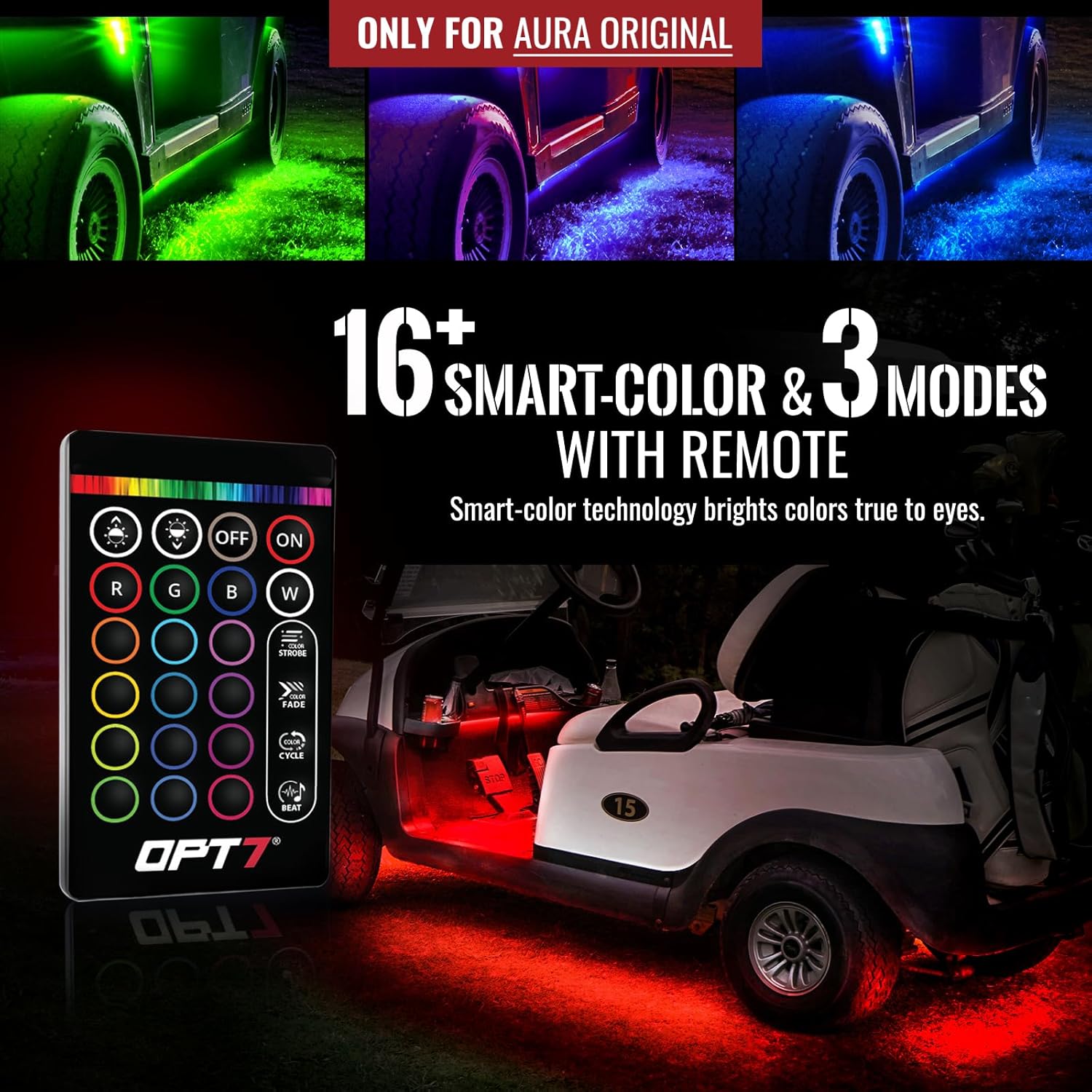
Image: Golf cart showcasing red LED underglow, controlled by the remote.

Image: Motorcycle showcasing blue LED underglow, controlled by the remote.

Image: ATV/UTV showcasing red LED underglow, controlled by the remote.
Maintenance
To ensure the longevity and proper functioning of your remote control, follow these maintenance guidelines:
- Cleaning: Wipe the remote with a soft, dry cloth. Avoid using harsh chemicals or abrasive cleaners.
- Battery Replacement: If the remote's range decreases or buttons become unresponsive, replace the battery. Refer to the "Battery Installation" section for instructions.
- Storage: Store the remote in a dry place, away from extreme temperatures and direct sunlight.
- Avoid Moisture: Do not expose the remote to water or excessive humidity, as this can damage internal components.
Troubleshooting
If you encounter issues with your OPT7 Aura Original 24 Key Remote B, refer to the following common problems and solutions:
- Remote Not Responding:
- Check the battery. Ensure it is correctly installed and has sufficient charge. Replace if necessary.
- Verify compatibility. Ensure your lighting kit's control box is a 'Type B' system. This remote is not compatible with Aura Pro Bluetooth control boxes.
- Ensure there are no obstructions between the remote and the control box.
- Limited Range:
- Replace the battery with a fresh one.
- Ensure you are within reasonable operating distance of the control box.
- Lights Not Changing Colors/Modes:
- Confirm the remote is compatible with your specific Aura kit (Type B).
- Check if the control box is receiving power and functioning correctly.
If problems persist after attempting these troubleshooting steps, please contact OPT7 customer support for further assistance.
Specifications
| Feature | Detail |
|---|---|
| Brand | OPT7 |
| Model | FBA-AURA-24-KEY-REMOTE-B |
| Item Weight | 0.634 ounces |
| Product Dimensions | 3.5 x 2 x 0.25 inches |
| Special Feature | Ergonomic |
| Max Number of Supported Devices | 1 |
| Number of Buttons | 24 |
Warranty and Support
This product includes a 30-day warranty, starting from the order date. For any questions or concerns regarding your OPT7 Aura Original 24 Key Remote B, please contact the US-based OPT7 customer support team. They are available to assist with compatibility inquiries, troubleshooting, and warranty claims.
Contact Information: Refer to the official OPT7 website or your purchase documentation for the most current customer support contact details.
Related documentsFBA-AURA-24-KEY-REMOTE-B


Ask a question about this manual
Ask about setup, troubleshooting, compatibility, parts, safety, or missing instructions. Manuals+ will review the question and use this page’s manual context to help answer it.