
1. Introduction
The Veise Smart Deadbolt VE33A offers advanced security and convenience for your home. This 6-in-1 keyless entry door lock features app control, multiple user PIN codes, auto-lock functionality, and a durable, waterproof design. This manual provides detailed instructions for installation, operation, maintenance, and troubleshooting to ensure optimal performance of your smart deadbolt.

Image: The Veise Smart Deadbolt VE33A shown alongside a smartphone displaying its control application. The lock features a circular keypad with numbers 0-9 and a central button, all in a matte black finish.
2. Parts List
Before beginning installation, verify that all components are present in your package:
- Exterior Assembly
- Interior Assembly
- Mounting Plate
- Latch
- Strike Plate
- Reinforcement Plate (optional)
- Drive-In Collar (optional)
- 2 Backup Keys
- Mounting Plate Screws
- Interior Assembly Screws
- Exterior Assembly Screw (optional)
- Latch Screws
- Strike Plate Screws
- Reset Tool

Image: An illustration detailing the various components included with the Veise Smart Deadbolt VE33A, such as the exterior and interior assemblies, mounting plate, latch, strike plate, backup keys, and various screws.
3. Installation
The Veise Smart Deadbolt is designed for easy installation, typically requiring only a screwdriver. Follow these steps carefully.
Video: Official installation guide for the Veise Smart Deadbolt VE33A. This video demonstrates the step-by-step process of installing the lock on a door, including preparing the door, installing the latch, and assembling the interior and exterior components.
3.1 Prepare the Door and Check Dimensions
Ensure your door meets the following specifications for proper installation:
- Door Thickness: 1-3/8" to 2" (35mm-50mm)
- Hole Diameter: 1-1/2" (38mm) or 2-1/8" (54mm)
- Backset: 2-3/8" or 2-3/4" (60mm or 70mm)
- Latch Hole: Compatible with both chiseled and not chiseled latch holes.
- Door Compatibility: Suitable for single cylinder deadbolts. Not compatible with mortise/integrated locks.
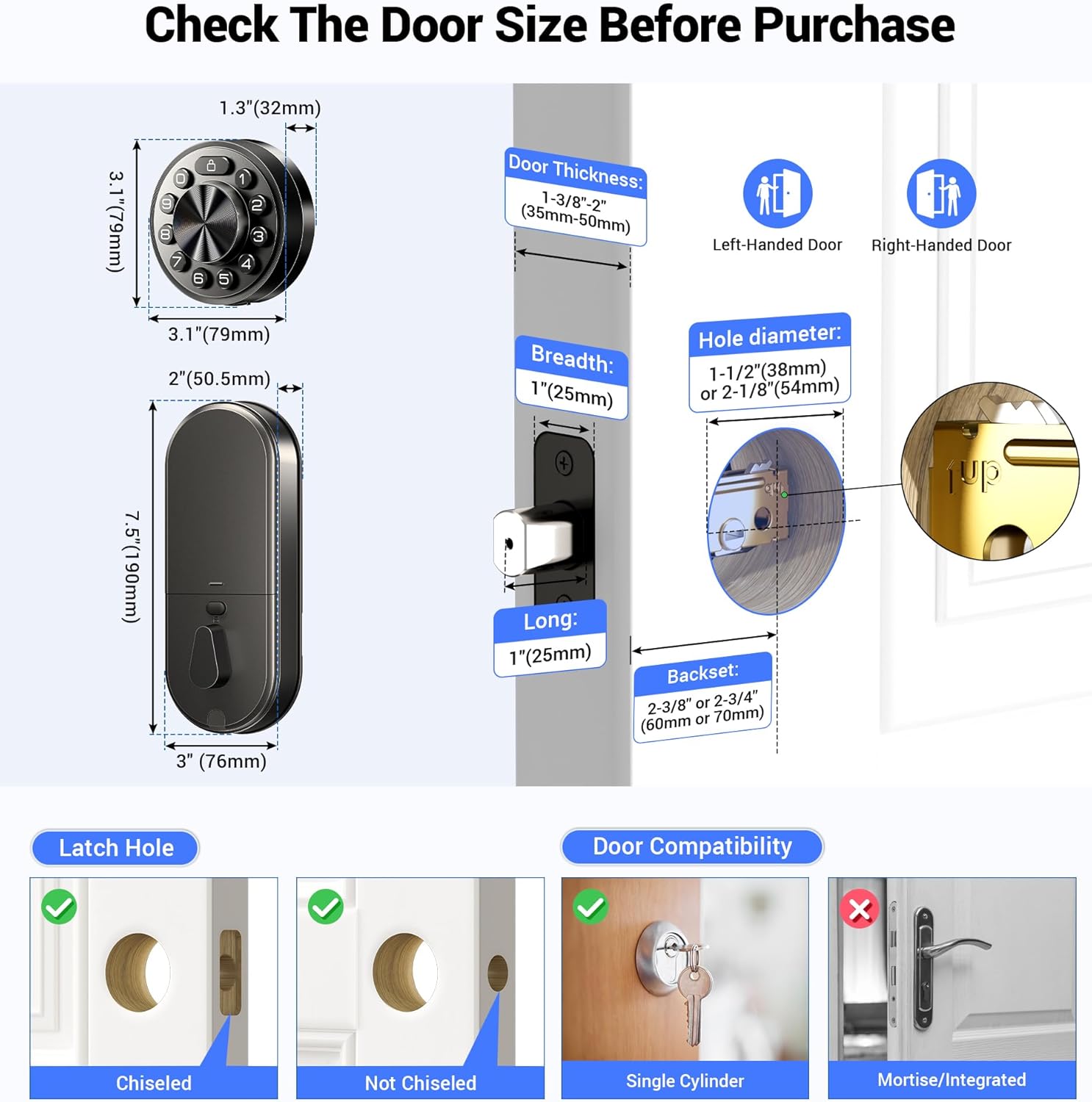
Image: A detailed diagram illustrating the required door dimensions, including thickness, hole diameter, and backset. It also shows compatibility with different latch hole types (chiseled and not chiseled) and clarifies that the lock is for single cylinder deadbolts.
3.2 Install the Latch and Strike
Install the latch into the door edge. Ensure the latch face is flush with the edge of the door. Secure it with the provided latch screws. Install the strike plate on the door frame, aligning it with the latch bolt.
3.3 Install Exterior Assembly
Route the cable from the exterior assembly through the door hole, ensuring the latch is fully retracted. Secure the mounting plate to the door, making sure it is perpendicular to the floor and parallel to the door. Do not overtighten the screws.
3.4 Install Interior Assembly
Keep the thumb turn in the vertical position. Connect the cable from the exterior assembly to the socket on the interior assembly. Carefully tuck the cable into the designated channel. Attach the interior assembly to the mounting plate and tighten the three screws.
3.5 Door Handing
After installing the interior assembly, install four new AA alkaline batteries. Use the Reset Tool to press and hold the Reset Button for more than 5 seconds until you hear a long "BEEP". If the reset is successful, the latch bolt will extend on its own to learn the handing orientation of the door (left-handed or right-handed).
4. Operating Instructions
4.1 App Control (KK Home App)
Manage your Veise Smart Deadbolt effortlessly using the KK Home App. Download the app, create an account, and pair your lock via Bluetooth. Keep your phone within 2 meters of the lock during pairing.
Video: This video demonstrates the process of pairing the Veise Smart Deadbolt VE33A with the KK Home App. It covers downloading the app, creating an account, turning on Bluetooth, and connecting the device.
With the app, you can:
- Set and send passcodes.
- Manage access rights and view access logs in real-time.
- Share access with family, visitors, or tenants.
- Receive low battery alerts.
- Control the lock remotely when paired with a G1 WiFi gateway (sold separately).
- Integrate with Alexa and Google Assistant for voice control (G1 Gateway required).

Image: A smartphone screen displaying the KK Home App interface, highlighting features such as sharing access, managing users, local event history, low battery alerts, compatibility with Alexa, and the ability to grant access without an internet connection.
4.2 Multiple User PIN Codes
The keyless entry system supports up to 20 users with four types of PIN codes:
- Permanent PIN Code: For long-term access.
- Duration PIN Code: Valid for a specific time period.
- One-Time PIN Code: For single use by visitors.
- Recurring PIN Code: For regular access, e.g., cleaners.
Unwanted passcodes can be deleted via the app with a single tap.
4.3 Auto Lock & One-Tap Lock
The deadbolt offers an auto-lock feature with an adjustable time delay from 10 to 180 seconds via the app. For immediate locking, press any button on the keypad for 2 seconds to activate the one-tap lock function.

Image: The Veise Smart Deadbolt installed on a door, with an arrow indicating the automatic locking mechanism engaging. This illustrates the auto-lock feature of the deadbolt.
4.4 Physical Key Usage
The lock includes two backup physical keys for emergency access, such as when batteries are depleted or in case of technical failure. The keyhole is discreetly hidden within the exterior assembly.
Video: This video demonstrates how to use the physical backup key for the Veise Smart Deadbolt VE33A. It shows how to access the hidden keyhole and manually unlock the deadbolt.
5. Maintenance
5.1 Battery Replacement
The Veise Smart Deadbolt requires four AA alkaline batteries (not included). The app will provide low battery alerts. To replace batteries, remove the interior assembly cover, replace the old batteries with new ones, and reattach the cover.
5.2 General Care
Clean the lock's exterior with a soft, damp cloth. Avoid using abrasive cleaners or solvents that could damage the finish or electronic components. Ensure the keypad remains free of debris for optimal performance.
6. Troubleshooting
Refer to the following table for common issues and their solutions:
| Problem | Solution |
|---|---|
| The latch does not operate correctly after installation. |
|
| Lock does not smoothly lock or unlock while using the thumb turn. | Confirm the proper mounting screws are installed. |
| Lock setup failed. |
|
| Keypad not responding. |
|
| Master PIN Code cannot be changed. | Refer to the Quick Start Guide to reset the lock and reprogram all PIN Codes. |
| I forgot my Master PIN Code. | Perform a factory reset to clear all PIN codes. Once the reset is complete, all PIN Codes will be deleted and the Master PIN Code will be reset to the default Master PIN Code of 12345678. |
| Auto Lock is not working. | If the battery indicator blinks continuously, the batteries are weak. Replace them with four new batteries to get the best performance (alkaline batteries only). Refer to the Quick Set Up to activate the Auto Lock function. |
Video: This video provides instructions on how to reset the Veise Smart Deadbolt VE33A. It details the steps to perform a factory reset, which can resolve various operational issues.
7. Specifications
- Brand: Veise
- Model Name: Veise Smart Deadbolt (VE33A)
- Lock Type: Deadbolt, Keypad
- Material: Aluminum, Metal
- Color: Matte Black
- Product Dimensions: 9 x 2.2 x 3.8 inches
- Item Weight: 2.86 pounds
- Connectivity Protocol: Bluetooth, WiFi (Veise G1 WiFi Gateway Required)
- Controller Type: App Control
- Power Source: 4 AA Batteries (not included)
- Special Features: APP Remote Control, Easy to Install, Keyless Entry Smart Lock, Multiple Passwords, Work with Alexa and Google (G1 Gateway Required)
- Recommended Uses: Front Door, Back Door, Side Door, Bedroom Door, Inside, Short-term Rental Room, Apartment, Garage Door, Laundry Door, Outside

Image: The Veise Smart Deadbolt with a blue shield graphic, emphasizing its triple robust protection features: Data Encryption (Bank-level 128-bit AES encryption), Subzero Survivors (withstands temperatures from -31°F to 158°F), and ANSI/BHMA Grade 3 (aluminum & alloy body, strength up to 4000N).
8. Warranty and Support
Veise offers a minimum 1-year warranty for the Smart Deadbolt VE33A. For any product issues or questions, please contact Veise customer support:
- Online Phone Support: Monday to Friday, 9 AM to 5 PM PST (Lifetime support)
- After-Sales Email Service: 24/7
It is recommended to contact customer support first if you encounter any issues not covered in this manual.


