
Introduction
Thank you for choosing the Ajazz AK871 Wireless Mechanical Keyboard. This keyboard is designed to provide a superior typing and gaming experience with its compact 75% layout, dual-mode connectivity, and hot-swappable switches. This manual will guide you through the setup, operation, and maintenance of your new keyboard to ensure optimal performance.
Package Contents
- Ajazz AK871 Wireless Mechanical Keyboard
- USB Cable (for wired connection/charging, though this model uses AAA batteries, the cable is for data transfer if applicable or for other devices)
- 2.4GHz USB Receiver (dongle)
- Keycap Puller
- Switch Puller
- Extra Switches (typically 2-4)
Product Overview
Key Features
- Compact TKL 75% Layout: 87-key design saves desktop space while retaining essential keys.
- Magnetic Adsorption Upper Cover: Detachable cover allows for two different aesthetic styles and helps protect against dust.
- 3-Pin Hot-Swappable Mechanical Switches: Compatible with 95% of market's 3-pin mechanical switches for easy customization and replacement.
- Ergonomic OEM Profile Keycaps: Designed for comfortable typing during extended use.
- Multi-Device Wireless Connectivity: Supports stable Bluetooth 5.0 and 2.4G wireless dongle connections, connecting up to three devices simultaneously.
Keyboard Layout and Components
The Ajazz AK871 features an 87-key layout, providing a balance between compactness and functionality. Key components include:
- Keys: Standard alphanumeric keys, function row (F1-F12), navigation cluster, and arrow keys.
- Function (Fn) Key: Used in combination with other keys to access multimedia controls, system switching, and other special functions.
- Battery Compartment: Located on the underside for two AAA batteries.
- 2.4GHz USB Receiver Slot: Integrated storage for the wireless dongle.
- Adjustable Feet: For ergonomic typing angles.

Overall view of the Ajazz AK871 Wireless Mechanical Keyboard, showcasing its 75% layout with 87 keys, including the function row, navigation cluster, and arrow keys.

Close-up view demonstrating the hot-swappable switch feature of the Ajazz AK871 keyboard, showing switches being removed and inserted.
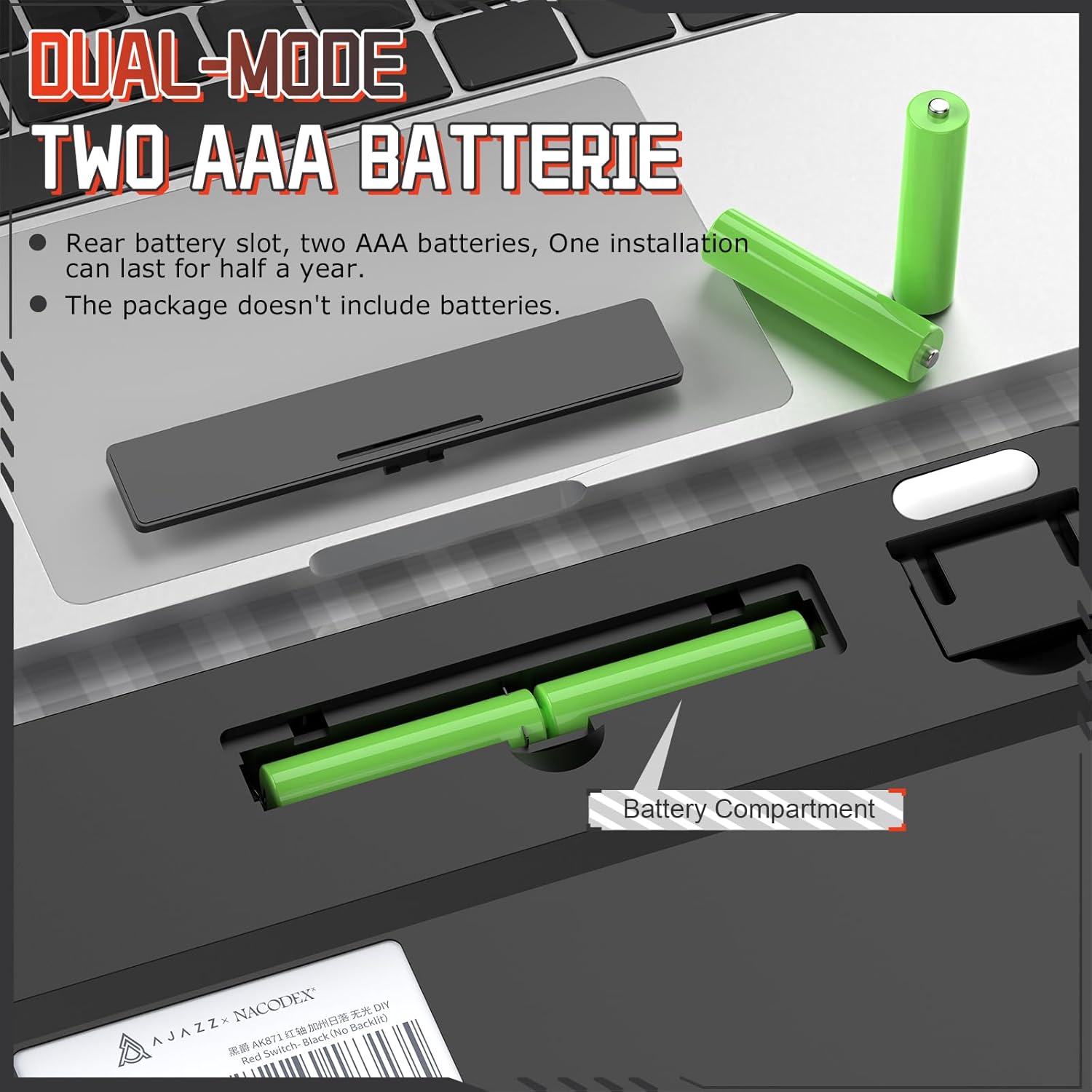
Image illustrating the detachable magnetic upper cover of the Ajazz AK871, highlighting how it can be removed to change the keyboard's style.

Diagram showing the ergonomic design and adjustable keyboard feet of the Ajazz AK871, with dimensions indicating its compact size.
Setup
Battery Installation
The Ajazz AK871 keyboard is powered by two AAA batteries (not included). To install the batteries:
- Locate the battery compartment on the underside of the keyboard.
- Slide open the battery compartment cover.
- Insert two AAA batteries, ensuring correct polarity (+/-).
- Close the battery compartment cover securely.
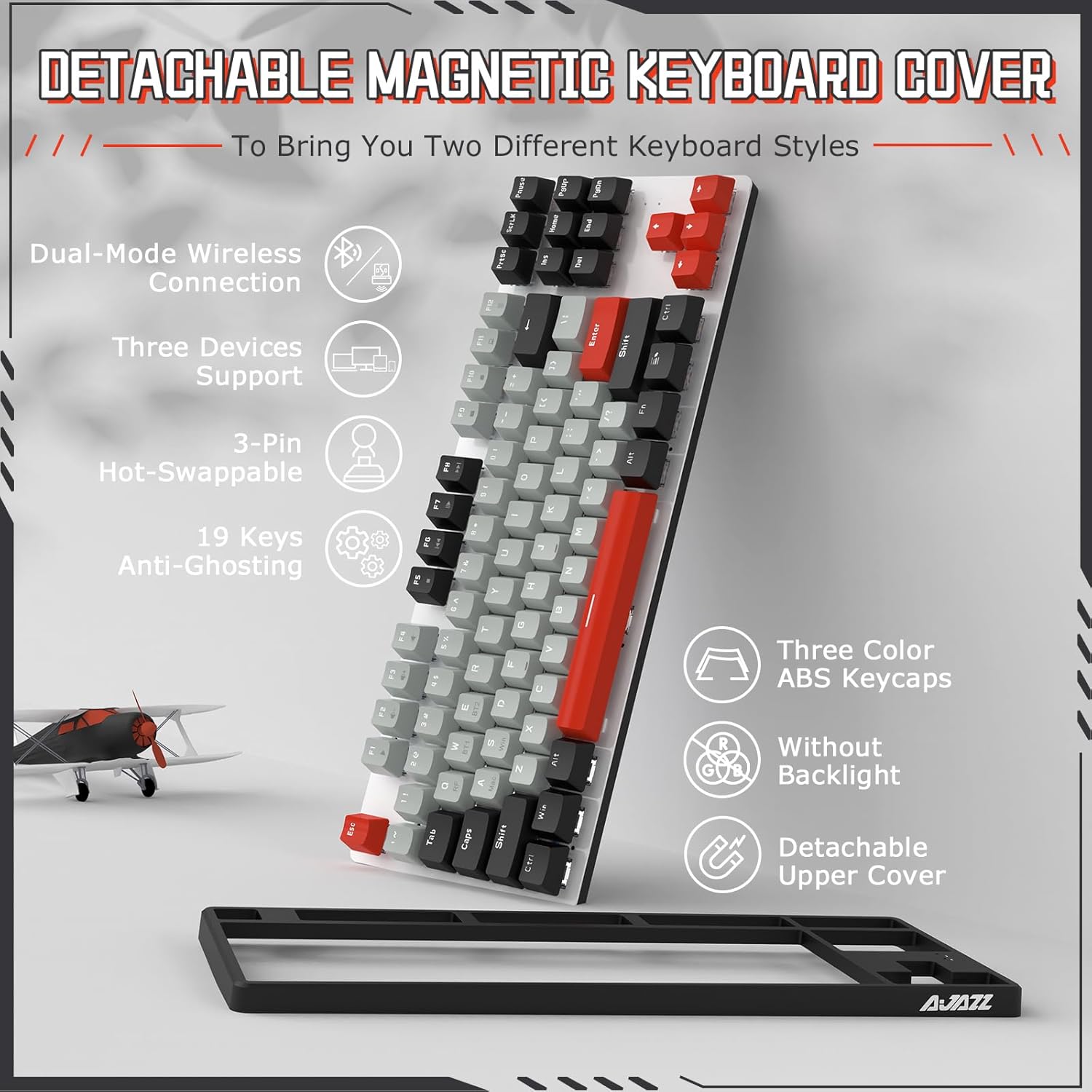
Illustration of the battery compartment on the underside of the Ajazz AK871 keyboard, showing where to insert two AAA batteries.
Connectivity Modes
The keyboard supports two wireless connection modes: 2.4GHz via USB dongle and Bluetooth 5.0.

Diagram showing the Ajazz AK871's ability to connect to up to three devices simultaneously via 2.4GHz wireless and Bluetooth.
2.4GHz Wireless Connection
- Locate the 2.4GHz USB receiver (dongle) stored in its slot on the keyboard's underside.
- Plug the USB receiver into an available USB port on your computer.
- Turn on the keyboard using the power switch (usually on the side or back).
- Press Fn + Q to switch to 2.4GHz mode. The indicator light will confirm the connection.
Bluetooth 5.0 Connection
The keyboard supports up to two Bluetooth devices (BT1 and BT2).
- Turn on the keyboard using the power switch.
- Press Fn + W (for BT1) or Fn + E (for BT2) to select a Bluetooth channel.
- Hold Fn + W or Fn + E for 3-5 seconds until the indicator light flashes rapidly, indicating pairing mode.
- On your device (PC, Mac, tablet, smartphone), enable Bluetooth and search for new devices.
- Select "Ajazz AK871" from the list of available devices to pair.
- Once paired, the indicator light will stop flashing and remain solid.
Operating Instructions
Switching Between Devices/Systems
- Switching Wireless Modes:
Fn + Q: Switch to 2.4GHz wireless mode.
Fn + W: Switch to Bluetooth device 1.
Fn + E: Switch to Bluetooth device 2. - Switching Operating Systems:
Fn + A: Switch to Mac system layout.
Fn + S: Switch to Windows system layout.

Image showing the Ajazz AK871 keyboard in a desktop setup, illustrating its wide compatibility with Windows and Mac systems.
Key Functions and Combinations
The function keys (F1-F12) and other keys have secondary functions accessible via the Fn key:
| Combination | Function |
|---|---|
| Fn + F1 | Media Player |
| Fn + F2 | Volume Down |
| Fn + F3 | Volume Up |
| Fn + F4 | Mute |
| Fn + F5 | Stop |
| Fn + F6 | Previous Track |
| Fn + F7 | Play/Pause |
| Fn + F8 | Next Track |
| Fn + F9 | |
| Fn + F10 | Web Browser |
| Fn + F11 | My Computer |
| Fn + F12 | Calculator |
| Fn + Win | Lock/Unlock Windows Key |
Maintenance
Cleaning the Keyboard
Regular cleaning helps maintain the keyboard's appearance and functionality:
- Disconnect the keyboard from your device or turn it off.
- Use a soft, lint-free cloth slightly dampened with water or a mild cleaning solution to wipe the keycaps and chassis.
- For dust and debris between keys, use compressed air.
- Avoid spraying liquids directly onto the keyboard.
Replacing Switches and Keycaps
The AK871's hot-swappable design allows for easy replacement of switches and keycaps:
- Removing Keycaps: Use the provided keycap puller to gently pull keycaps straight up.
- Removing Switches: Use the provided switch puller. Align the prongs with the clips on the top and bottom of the switch, squeeze gently, and pull the switch straight up.
- Installing Switches: Align the two metal pins of the new 3-pin switch with the holes on the PCB. Press the switch firmly until it clicks into place. Ensure the pins are straight to avoid bending.
- Installing Keycaps: Align the keycap with the switch stem and press down firmly until it is seated.
Troubleshooting
If you encounter issues with your Ajazz AK871 keyboard, refer to the following common solutions:
- Keyboard not responding:
- Ensure the keyboard is turned on.
- Check battery levels and replace AAA batteries if necessary.
- For 2.4GHz mode, ensure the USB receiver is securely plugged in.
- For Bluetooth mode, ensure Bluetooth is enabled on your device and the keyboard is paired. Try re-pairing if necessary.
- Ensure the correct connectivity mode (Fn+Q, Fn+W, Fn+E) is selected. - Keys not working or double-typing:
- This could indicate a faulty switch. Use the switch puller to remove the problematic switch and replace it with one of the spare switches provided, or a compatible 3-pin switch. - Connectivity issues (lag, disconnections):
- Ensure there are no strong wireless interference sources nearby (e.g., other 2.4GHz devices, large metal objects).
- Move the keyboard closer to the USB receiver or Bluetooth device.
- For Bluetooth, try forgetting the device on your computer and re-pairing. - Incorrect key output (e.g., @ instead of "):
- Ensure the correct operating system layout is selected (Fn+A for Mac, Fn+S for Windows).
If the issue persists after trying these steps, please contact customer support.
Specifications
| Feature | Specification |
|---|---|
| Model | AK871 |
| Layout | 75% (87 Keys) |
| Connectivity | 2.4GHz Wireless, Bluetooth 5.0 |
| Switch Type | Hot-swappable 3-pin Mechanical Switches |
| Keycap Profile | OEM Profile |
| Power Source | 2 x AAA Batteries |
| Compatible Devices | PC (Windows 7/8/10/11), Mac |
| Item Weight | 1.12 pounds (approx. 0.51 kg) |
| Package Dimensions | 15.35 x 7.24 x 2.28 inches (approx. 39 x 18.4 x 5.8 cm) |
Warranty and Support
Ajazz products are manufactured to high quality standards. For warranty information and customer support, please refer to the documentation included with your purchase or visit the official Ajazz website. If you purchased the product from a retailer, please contact their customer service for assistance regarding returns or warranty claims.
For technical support or inquiries, please reach out to the manufacturer's customer service channels.


