
Introduction
This user manual provides comprehensive instructions for the Quican Smartwatch IDW208 Plus. It covers setup, operation, fitness tracking, health monitoring, and troubleshooting. Please read this manual thoroughly to ensure proper use and to maximize your experience with the device.
Package Contents
Upon opening your Quican Smartwatch package, please verify that all the following items are included:
- Quican Smartwatch IDW208 Plus x 1
- Charging Cable x 1
- User Manual x 1

Image: The Quican Smartwatch IDW208 Plus, its charging cable, and the user manual, as typically found in the product packaging.
Setup Guide
1. Charging the Smartwatch
Before initial use, fully charge your smartwatch. Connect the magnetic charging cable to the charging contacts on the back of the watch and plug the USB end into a power adapter (not included) or a computer's USB port. A full charge takes approximately 2.5 hours.

Image: The smartwatch connected to its magnetic charging cable, illustrating the charging process.
2. Downloading the "Veryfit" App
The Quican Smartwatch requires the "Veryfit" app for full functionality and data synchronization. Download the app from your smartphone's app store (App Store for iOS or Google Play Store for Android).
- Open your smartphone's app store.
- Search for "Veryfit".
- Download and install the app.
3. Pairing with Your Smartphone
Follow these steps to pair your smartwatch with the "Veryfit" app via Bluetooth:
- Ensure your smartwatch is charged and powered on.
- Enable Bluetooth on your smartphone.
- Open the "Veryfit" app on your smartphone.
- In the app, navigate to the "Device" section and select "Add Device".
- The app will search for nearby devices. Select "IDW208 Plus" from the list. You may need to scan a QR code displayed on the smartwatch screen to initiate pairing.
- Confirm the pairing request on both your smartphone and the smartwatch.

Image: Visual guide for downloading the "Veryfit" app and connecting the smartwatch via Bluetooth, showing phone screens and watch display during the pairing process.
4. Initial App Configuration
After successful pairing, the "Veryfit" app will guide you through initial settings, such as personal profile (age, height, weight), notification preferences, and health monitoring settings. Ensure you grant necessary permissions for the app to function correctly.
Operating the Smartwatch
Basic Navigation
The Quican Smartwatch features a 1.8-inch HD touchscreen and a side button for navigation:
- Touchscreen: Swipe up, down, left, or right to navigate through menus and screens. Tap to select an option.
- Side Button: Press to return to the home screen or wake the device. Long press for power options.

Image: The smartwatch display, highlighting its 1.8-inch size and showing typical information like time, steps, and heart rate. Also includes wrist size compatibility.
Communication Features
- Making/Answering Calls: Once paired, you can make and answer Bluetooth calls directly from your smartwatch. Access the call interface from the main menu.
- Notifications: Receive SMS, social media (e.g., Instagram, Facebook), and other app notifications directly on your watch. (Note: Messaging or text responses are not supported directly from the watch).

Image: Smartwatch screens showing an incoming call from "Selena" and a Facebook message notification, demonstrating its communication features.
Smart Features
- Alexa Integration: Built-in Alexa allows you to use voice commands for weather forecasts, setting alarms, controlling smart home devices, and more. Simply activate Alexa on your watch and speak your command.
- Music Control: Control music playback on your smartphone (play, pause, skip tracks) directly from your smartwatch.
- Camera Remote: Use your smartwatch as a remote shutter for your smartphone's camera.
- Find Phone: If your phone is within Bluetooth range, use this feature to make your phone ring, helping you locate it.
- Watch Faces Customization: Choose from over 110 customizable watch faces via the "Veryfit" app, or set your favorite photo as the watch face.

Image: A user interacting with the smartwatch, demonstrating the Alexa voice assistant feature by asking about the weather.

Image: Two smartwatch screens illustrating the camera remote function and music playback controls.
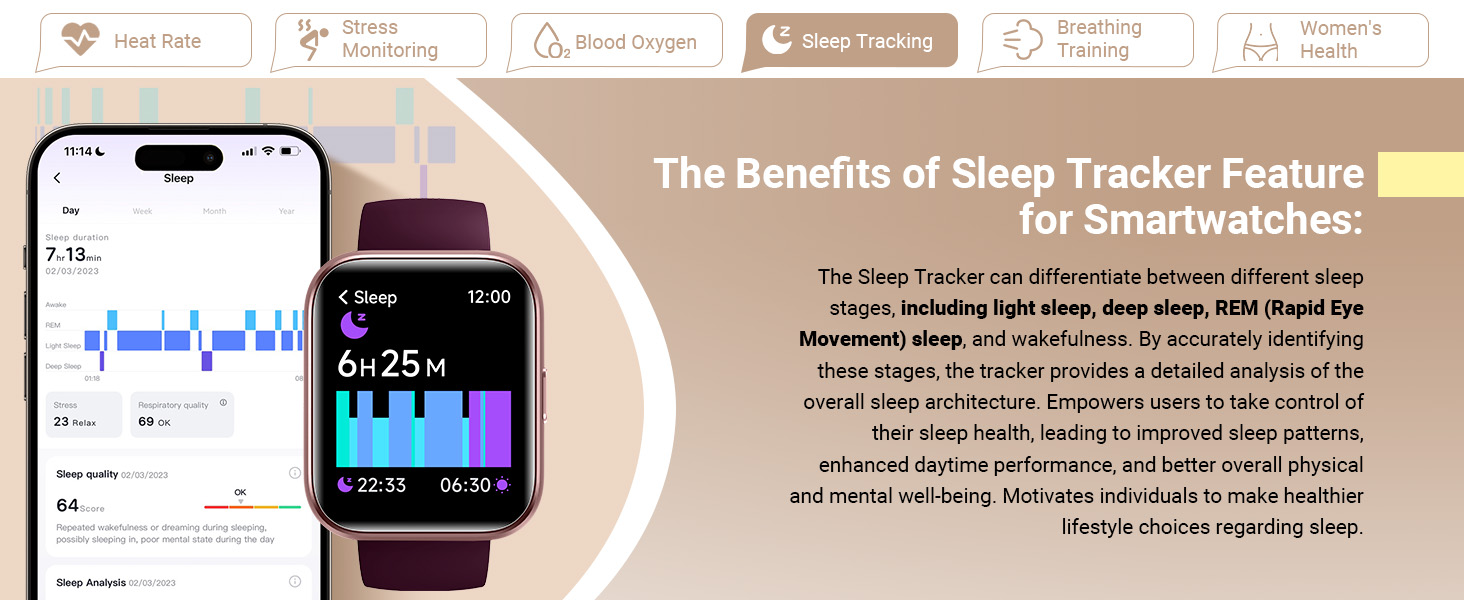
Image: A collage of smartwatch screens showing various smart features: weather forecast, alarm clock, drinking reminder, and the 'Find Your Phone' function.
Fitness Tracking
The Quican Smartwatch is equipped with advanced sensors to track your physical activity and support your fitness goals.
- 120 Sports Modes: The watch supports over 120 sports modes, including running, walking, hiking, yoga, and more. Select your activity to accurately monitor exercise time, steps, distance, and calories burned.
- Activity Tracking: Automatically tracks daily steps, distance covered, and calories burned, providing a comprehensive overview of your activity levels.
- IP68 Waterproof: The smartwatch is IP68 rated, meaning it is resistant to dust and can withstand immersion in water up to 1.5 meters for 30 minutes. It is suitable for daily use, including hand washing and rain exposure, but not recommended for swimming or diving.

Image: A man running, with an overlay of the smartwatch displaying activity tracking metrics like calories, distance, and laps, alongside icons representing various sports modes.

Image: The smartwatch shown in different outdoor scenarios (running, cycling, hiking), emphasizing its IP68 waterproof and dust-resistant capabilities.
Health Monitoring
The Quican Smartwatch provides comprehensive health monitoring features to help you stay informed about your well-being.
- Heart Rate Monitor: Continuously monitors your heart rate throughout the day. This data helps you understand your cardiovascular health and optimize exercise intensity.
- Stress Monitoring: Tracks your stress levels, providing insights into your body's response to different stressors.
- Blood Oxygen (SpO2) Monitor: Measures your blood oxygen saturation levels, an important indicator of respiratory health.
- Sleep Tracking: Analyzes your sleep patterns, including light sleep, deep sleep, and REM sleep, to help you improve sleep quality.
- Breathing Training: Guided breathing exercises to help manage stress and promote relaxation.
- Female Menstrual Cycle Tracking: Allows women to record and track their menstrual periods, predict future cycles, and manage their health accordingly.

Image: The smartwatch showing real-time heart rate data, accompanied by text explaining the benefits of 24/7 heart rate monitoring for health and exercise optimization.

Image: The smartwatch displaying stress level data, with text detailing how stress monitoring can improve resilience and coping mechanisms.

Image: The smartwatch displaying blood oxygen saturation (SpO2) levels, with accompanying text explaining the importance of these measurements.

Image: The smartwatch displaying sleep tracking data, with text describing how it helps identify sleep stages and improve overall well-being.

Image: The smartwatch showing a breathing exercise interface, with text explaining how breathing training activates relaxation and manages stress.

Image: The smartwatch displaying a menstrual cycle tracking calendar, with text explaining how it helps women record and predict their cycles.
Battery Life & Charging
The Quican Smartwatch IDW208 Plus is designed for extended use:
- Battery Life: Up to 7 days of typical usage, and up to 30 days in standby mode.
- Charging Time: Approximately 2.5 hours for a full charge.

Image: A diagram of the smartwatch emphasizing its 7-day battery life, 2.5D glass technology, advanced optical sensors, and replaceable silicone strap.
Specifications
| Feature | Detail |
|---|---|
| Model Number | IDW208 Plus |
| Display Size | 1.8 Inches |
| Connectivity | Bluetooth 5.3 |
| Battery Capacity | 300 mAh Lithium Polymer |
| Battery Life | Up to 7 days (typical usage), 30 days (standby) |
| Charging Time | Approx. 2.5 hours |
| Water Resistance | IP68 |
| Compatibility | iOS 9.0+ / Android 6.0+ |
| Item Weight | 1.38 ounces (39 grams) |
| Dimensions | 10.7 x 3.5 x 0.7 inches |
| Special Features | Built-in Alexa, Bluetooth Call Make/Answer, Heart Rate/SpO2/Sleep/Stress Monitor, 120 Sports Modes, Customizable Dials, Music/Camera Control |
Troubleshooting
If you encounter any issues with your Quican Smartwatch, please refer to the following common solutions:
- Watch not turning on: Ensure the watch is fully charged. Connect it to the charging cable and a power source for at least 30 minutes.
- Unable to pair with phone:
- Make sure Bluetooth is enabled on your phone and the watch is within range.
- Restart both your phone and the smartwatch.
- Ensure the "Veryfit" app is updated to the latest version.
- Forget the device in your phone's Bluetooth settings and try pairing again through the app.
- Notifications not appearing:
- Check notification permissions for the "Veryfit" app in your phone's settings.
- Ensure the watch is connected via Bluetooth.
- Verify that notification alerts are enabled within the "Veryfit" app for specific applications.
- Inaccurate health data:
- Ensure the watch is worn snugly on your wrist, about one finger's width above the wrist bone.
- Clean the sensor on the back of the watch.
- Note that health data is for reference only and should not be used for medical diagnosis.
- Short battery life:
- Reduce screen brightness.
- Limit continuous heart rate monitoring or frequent use of power-intensive features.
- Ensure the watch is fully charged each time.
Warranty and Support
Quican provides a 5-year warranty for your smartwatch. If you experience any issues or require assistance, please contact Quican customer support. Refer to the contact information provided on the product packaging or the official Quican website for the most up-to-date support channels.
For additional resources, you may also refer to the official user guide PDF available online: Quican Smartwatch User Guide (PDF)


