
charmast W1115
Charmast Portable Charger W1115 User Manual
Model: W1115 | Brand: Charmast
1. Product Overview
The Charmast W1115 Portable Charger is a versatile 10000mAh power bank designed for convenience and portability. It features built-in charging cables and a foldable AC wall plug, making it an ideal travel companion for various devices including iPhones, Samsung phones, and iPads.

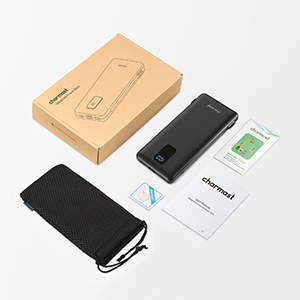
The Charmast W1115 Portable Charger, showcasing its compact design and integrated cables.
What's in the Box:
- Portable charger with built-in cables
- User manual
- Mesh pouch
2. Key Features
 3 Cables + Plug Built-In: Zero accessory design with integrated USB-C/Micro/Lightning cables and a foldable AC plug. No separate cables or adapters are needed.
 Pocket-Sized Freedom: Slim design (5.95x2.76x0.72 inches, 228g) fits easily into pockets, offering 40% less bulk compared to standard power banks with external cables.
 Digital LED Display: Features a clear digital screen on the front that shows the remaining charge level of the power bank, ensuring you always know its status.
 Multiple Safety Protection: Built-in safeguards provide over-discharge, short-circuit, over-current, and over-voltage protection for safe and reliable charging.
 TSA-Compliant Efficiency: The folded plug and lack of loose wires make it globally approved for carry-on luggage, ensuring hassle-free security checks.
3. Setup
Initial Charging of the Power Bank:
- Locate the foldable AC wall plug on the side of the power bank.
- Fold out the AC plug.
- Insert the power bank directly into a standard wall outlet.
- The digital LED display will show the charging progress. The power bank is fully charged when the display reads "100".

The power bank can be recharged directly via its built-in wall plug or a 5V-2.6A USB charger.
Connecting Your Device:
The power bank comes with built-in USB-C, Micro-USB, and Lightning cables for direct connection to most smartphones and tablets. It also includes USB-A and USB-C output ports for additional devices.
- Identify the correct built-in cable for your device (USB-C, Micro-USB, or Lightning).
- Gently pull out the desired cable from its storage slot.
- Connect the cable to your device's charging port.
- Alternatively, use your own USB-A or USB-C cable with the available output ports.
4. Operating Instructions
Charging Devices:
Once connected, the power bank will automatically begin charging your device. The digital display will indicate the power bank's remaining charge.
- The power bank provides a stable 15W universal output (5V/3A) for safe charging.
- It can charge multiple devices simultaneously using its various outputs.

Utilize the Smart Overnight Sync feature: Plug the power bank into a wall outlet and connect your phone to the power bank. Both devices will charge simultaneously, ensuring they are fully charged by morning.
5. Maintenance
- Keep the power bank away from extreme temperatures, direct sunlight, and liquids.
- Avoid dropping or subjecting the device to strong impacts.
- Clean the exterior with a soft, dry cloth. Do not use harsh chemicals or abrasive materials.
- Store the power bank in a cool, dry place when not in use.
- Periodically recharge the power bank if it's not used for extended periods to maintain battery health.
- The built-in cables are engineered for durability, but avoid excessive bending or pulling at the joints to prolong their lifespan.
6. Troubleshooting
If you encounter issues with your Charmast Portable Charger, please refer to the following common solutions:
Device Not Charging:
- Check Power Bank Charge: Ensure the power bank itself is sufficiently charged by checking the digital LED display. Recharge if necessary.
- Verify Cable Connection: Make sure the built-in cable or your external USB cable is securely connected to both the power bank and your device.
- Try Different Cable/Port: If using an external cable, try a different cable or one of the other output ports on the power bank (USB-A or USB-C).
- Restart Device: Sometimes, simply restarting the device you are trying to charge can resolve connection issues.
Power Bank Not Recharging:
- Check Wall Outlet: Ensure the wall outlet is functional by testing it with another device.
- Verify Plug Connection: Make sure the foldable AC plug is fully extended and securely inserted into the wall outlet.
- Inspect Plug: Check the AC plug for any visible damage.
Slow Charging:
- Check Device Compatibility: While the power bank offers universal output, some devices may have specific charging requirements.
- Avoid Simultaneous Charging: If charging multiple devices, the output power is shared. Disconnect other devices to prioritize faster charging for one.
- Cable Quality: Ensure you are using high-quality cables, especially if using external ones, as poor cables can limit charging speed.
If the issue persists after trying these steps, please contact Charmast customer support for further assistance.
7. Specifications
| Model Number | W1115 |
| Battery Capacity | 10000 Milliamp Hours (mAh) |
| Product Dimensions | 2.76 x 5.95 x 0.72 inches |
| Item Weight | 8 ounces |
| Input (AC Plug) | 5V/3A (via wall plug) |
| Output (Built-in Cables) | 5V/3A (USB-C/Micro/Lightning) |
| Output (Ports) | USB-A, USB-C (5V/3A total) |
| Special Features | Built-in Cables, Built-in Wall Plug, Fast Charging, Slim, Travel Essentials |
| Manufacturer | Dong guan Utopia-Originality Technology Co., Ltd |
8. Warranty and Support
Charmast offers a 2-year warranty for this product, covering manufacturing defects and malfunctions under normal use.
Additionally, lifetime after-sales technical support is provided to ensure your peace of mind and assist with any product-related inquiries or issues.
For warranty claims or technical assistance, please contact Charmast customer service through the retailer's platform or the official Charmast website.
Related documentsW1115


Ask a question about this manual
Ask about setup, troubleshooting, compatibility, parts, safety, or missing instructions. Manuals+ will review the question and use this page’s manual context to help answer it.