
1. Introduction
Thank you for purchasing the BLOW 4625FHD DVB-T2 H.265 Digital Terrestrial TV Tuner. This device allows you to receive digital terrestrial television broadcasts (DVB-T2) with H.265 (HEVC) compression, offering high-definition video quality. This manual provides essential information for the safe and efficient setup, operation, and maintenance of your new tuner. Please read it thoroughly before use and retain it for future reference.
2. Safety Information
- Electrical Safety: To prevent electric shock, do not open the casing. Refer all servicing to qualified personnel.
- Power Source: Use only the specified power adapter. Ensure the voltage matches the requirements of the device.
- Ventilation: Do not block ventilation openings. Ensure adequate airflow around the device to prevent overheating.
- Moisture: Keep the device away from water, rain, and excessive humidity.
- Cleaning: Disconnect the power before cleaning. Use a soft, dry cloth. Do not use liquid cleaners or aerosols.
- Placement: Place the device on a stable, flat surface. Avoid placing it near heat sources or in direct sunlight.
3. Package Contents
Upon opening the package, please verify that all components are present and in good condition:
- BLOW 4625FHD DVB-T2 Tuner Unit
- Remote Control
- Power Adapter (integrated cable)
- User Manual (this document)

Image 3.1: Retail packaging of the BLOW 4625FHD DVB-T2 Tuner, showing the tuner unit and remote control.
4. Product Overview
4.1. Front Panel
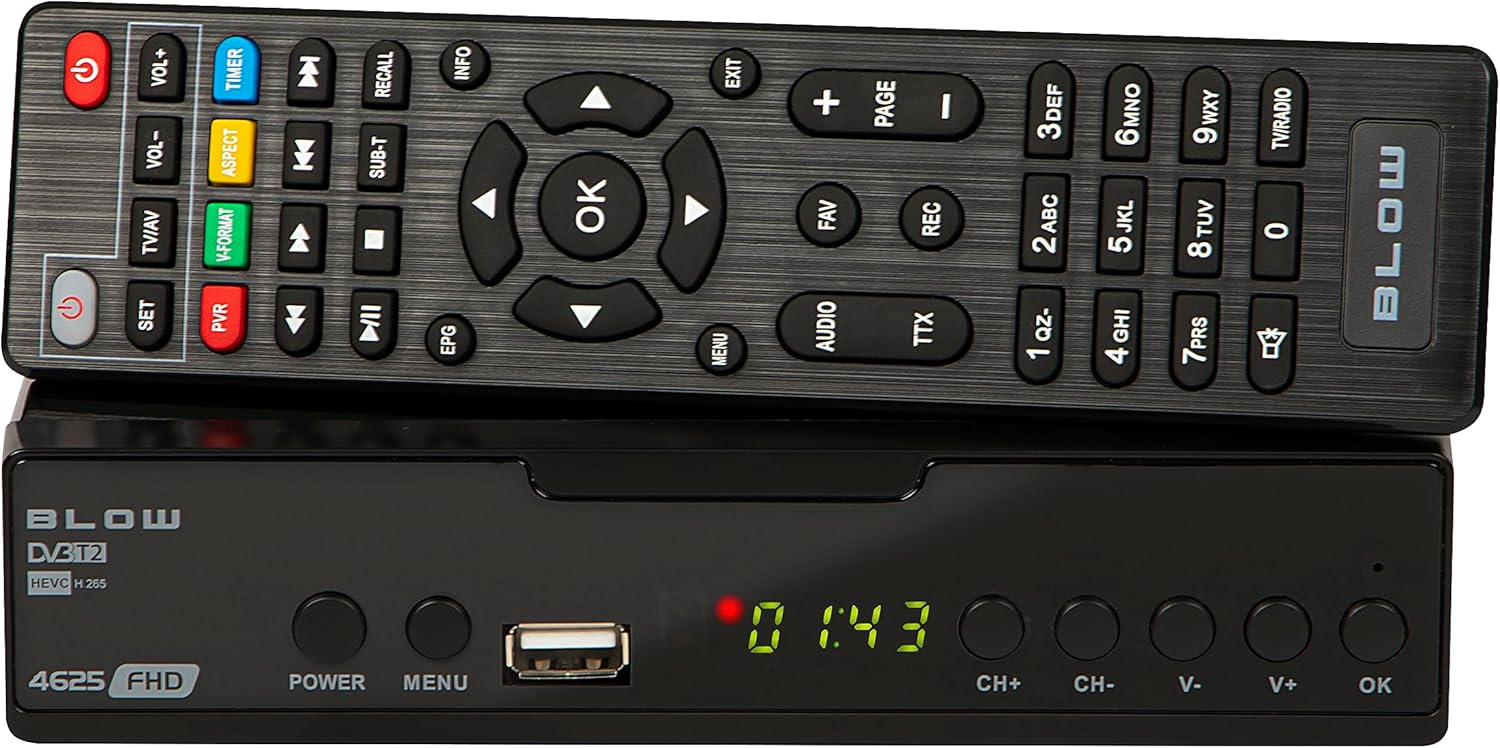
Image 4.1: Front view of the BLOW 4625FHD DVB-T2 Tuner with its remote control.
The front panel features a digital display, a USB port for media playback and PVR functions, and essential control buttons:
- Display: Shows channel number, time, or menu information.
- POWER: Turns the device on or off (standby).
- MENU: Accesses the main menu.
- USB Port: For connecting USB storage devices.
- CH+/CH-: Changes channels up or down.
- V+/V-: Adjusts volume up or down.
- OK: Confirms selections in the menu.
4.2. Rear Panel

Image 4.2: Rear panel of the BLOW 4625FHD DVB-T2 Tuner, showing various input and output ports.
The rear panel provides all necessary connection ports:
- RF IN: Connects to your terrestrial antenna.
- RF OUT: For looping the antenna signal to another device (e.g., another TV or tuner).
- COAXIAL: Digital audio output.
- HDMI: High-Definition Multimedia Interface output for connecting to modern TVs.
- SCART: Analog video and audio output for connecting to older TVs.
- AC IN: Power input for the device.
4.3. Remote Control
The remote control provides full functionality for operating the tuner. Familiarize yourself with its buttons for easy navigation and control.
- POWER: Turns the tuner on/off.
- VOL+/VOL-: Adjusts volume.
- CH+/CH-: Changes channels.
- OK: Confirms selections.
- Navigation Buttons (Up/Down/Left/Right): Navigates menus.
- MENU: Opens the main menu.
- EXIT: Exits current menu or screen.
- EPG: Displays the Electronic Program Guide.
- PVR: Accesses Personal Video Recorder functions.
- REC: Starts recording the current program.
- FAV: Accesses favorite channel list.
- TV/AV: Switches between TV and AV input modes on the tuner.
- V-FORMAT: Changes video output format.
- AUDIO: Selects audio track (if available).
- TTX: Teletext function.
- Number Buttons (0-9): Direct channel selection.
5. Setup
5.1. Connecting the Tuner
- Antenna Connection: Connect your terrestrial antenna cable to the RF IN port on the rear panel of the tuner.
- TV Connection (HDMI): For best picture quality, connect an HDMI cable from the HDMI port on the tuner to an available HDMI input on your television.
- TV Connection (SCART): If your TV does not have an HDMI input, connect a SCART cable from the SCART port on the tuner to the SCART input on your television.
- Power Connection: Connect the power adapter to the AC IN port on the tuner, then plug the adapter into a wall outlet.
5.2. First Time Installation and Channel Scan
- Turn on your television and select the correct input source (HDMI or SCART) corresponding to where you connected the tuner.
- Press the POWER button on the tuner or remote control to turn on the device.
- The first time you power on the tuner, a "First Time Installation" wizard will appear. Follow the on-screen prompts.
- Select your preferred language, country, and other initial settings.
- Initiate the "Auto Scan" or "Channel Search" function. The tuner will automatically search for available DVB-T2 channels in your area. This process may take several minutes.
- Once the scan is complete, the tuner will save the channels and display the first available channel.
6. Operating
6.1. Basic TV Viewing
- Changing Channels: Use the CH+/CH- buttons on the remote or front panel, or enter the channel number directly using the number buttons.
- Adjusting Volume: Use the VOL+/VOL- buttons on the remote.
- Mute: Press the Mute button on the remote to mute/unmute audio.
- Information Bar: Press the INFO button on the remote to display current program information.
6.2. Electronic Program Guide (EPG)
Press the EPG button on the remote control to access the Electronic Program Guide. This displays program schedules for all available channels. Use the navigation buttons to browse through channels and programs. Press OK to view details or set a reminder/recording.
6.3. Media Playback (USB)
The BLOW 4625FHD supports media playback from a USB storage device. Insert a USB drive into the front USB port. Navigate to the "Multimedia" or "USB" section in the main menu to browse and play supported audio (MP3, WMA) and video files.
6.4. Personal Video Recorder (PVR)
To use the PVR function, connect a USB storage device (e.g., USB flash drive or external hard drive) to the USB port. The device must be formatted correctly (usually FAT32 or NTFS). You can record live TV programs by pressing the REC button on the remote. Scheduled recordings can be set via the EPG or the PVR menu.
- Instant Recording: While watching a program, press REC to start recording. Press STOP to end.
- Scheduled Recording: In the EPG, select a program and press OK, then choose the option to schedule a recording.
- Playback Recordings: Access recorded content through the PVR or Multimedia menu.
7. Maintenance
- Cleaning: Ensure the device is unplugged before cleaning. Use a soft, dry, lint-free cloth to wipe the exterior. Do not use abrasive cleaners, waxes, or solvents.
- Ventilation: Regularly check that the ventilation slots are not obstructed by dust or debris.
- Software Updates: Periodically check the manufacturer's website for any available software updates. Follow the instructions provided with the update carefully.
8. Troubleshooting
| Problem | Possible Cause / Solution |
|---|---|
| No picture or sound |
|
| "No Signal" message |
|
| Remote control not working |
|
| Picture freezes or pixelates |
|
9. Specifications
| Model | BLOW 4625FHD (77-048) |
| Dimensions (L x W x H) | 9D x 9B x 2.5H cm |
| Weight | 428 Grams |
| Connectivity | HDMI, USB, SCART, Coaxial, RF IN/OUT |
| Video Output Resolution | 1080p |
| Supported Standards | DVB-T2, H.265 (HEVC), H.264 |
| Frequency Range | VHF: 170-230MHz, UHF: 470-860MHz |
| Audio Formats | MP3, WMA |
| Audio Output Mode | Stereo, Surround |
| Power Supply | 12 Volt, 43 Milliampere (Operating) |
| Standby Power Consumption | <0.5W |
| Recommended Use | Digital terrestrial TV viewing and recording |
| Manufacturer | Blow |
10. Warranty
The BLOW 4625FHD DVB-T2 H.265 Digital Terrestrial TV Tuner comes with a 2-year manufacturer warranty from the date of purchase. This warranty covers defects in materials and workmanship under normal use. It does not cover damage caused by misuse, accident, unauthorized modification, or external causes. Please retain your proof of purchase for warranty claims.
11. Support
If you encounter any issues that cannot be resolved using the troubleshooting guide, or if you require further assistance, please contact your retailer or the manufacturer's customer support. Refer to the product packaging or the manufacturer's official website for contact details.