
Introduction
Welcome to the user manual for your IQOS ILUMA ONE Kit. This device is designed to heat tobacco sticks, providing an alternative to traditional smoking. The IQOS ILUMA ONE features the innovative SMARTCORE INDUCTION SYSTEM, offering a bladeless heated tobacco experience with no ash, no smoke, and no cigarette-smoke smell. This manual provides essential information on setting up, operating, and maintaining your device.
What's in the Box
Upon unboxing your IQOS ILUMA ONE Kit, you should find the following components:
- IQOS ILUMA ONE Device (Pebble Beige)
- UK Power Adaptor
- USB-C Charging Cable
Note: This kit does not include tobacco sticks. TEREA tobacco sticks must be purchased separately.

Image: The IQOS ILUMA ONE device in Pebble Beige.
Setup: Charging Your Device
Before first use, ensure your IQOS ILUMA ONE is fully charged.
- Connect the Charger: Plug the USB-C charging cable into the charging port on your IQOS ILUMA ONE device and connect the other end to the UK Power Adaptor. Plug the adaptor into a power outlet.

Image: The IQOS ILUMA ONE device highlighting its all-in-one design, capacity for 20 consecutive uses, and no-cleaning feature.
- Initial Charge: For the first use, charge the device fully. A full charge takes approximately 90 minutes.
- Check Battery Status: Tap the button on the device to check the battery status. The indicator lights will show the current charge level.
The IQOS ILUMA ONE is designed to deliver up to 20 consecutive uses on a single full charge.
Operating Instructions: Using TEREA Sticks
The IQOS ILUMA ONE is exclusively compatible with TEREA tobacco sticks. Do not use TEREA sticks with previous IQOS generations, as this may cause damage to your device.
- Insert TEREA Stick: Slide the cap open on your IQOS ILUMA ONE device. Gently insert a TEREA tobacco stick into the device, ensuring it is fully seated.
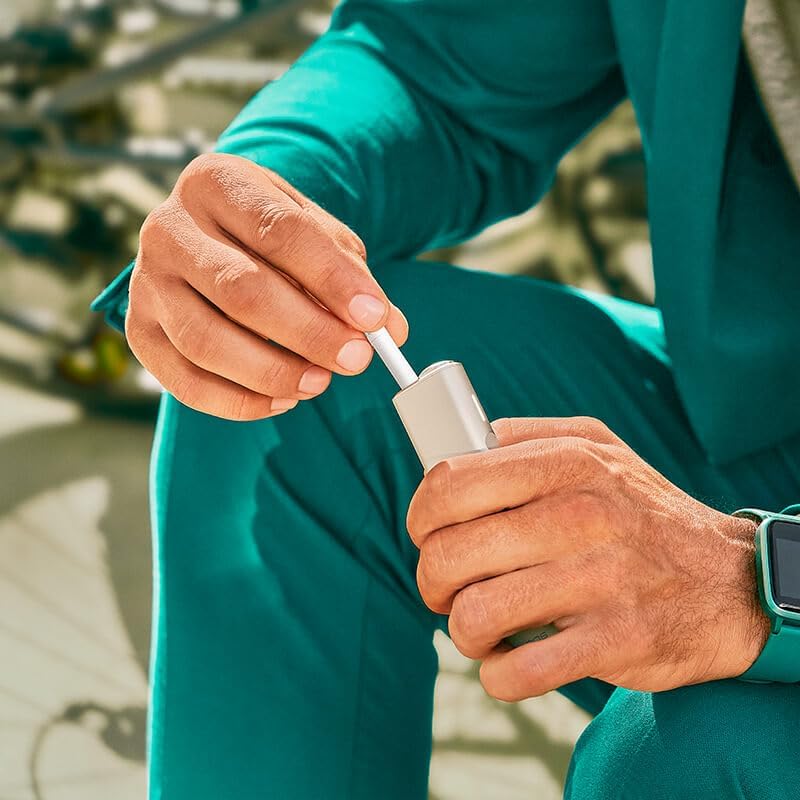
Image: A hand demonstrating the insertion of a TEREA tobacco stick into the IQOS ILUMA ONE.
- Start Heating: Press and hold the button on the device for 4 seconds to turn it on and begin the pre-heating process. The device will vibrate once to indicate pre-heating has started.
- Ready to Use: After approximately 20 seconds, the device will vibrate a second time, indicating it is ready for use. The lights will remain solid.

Image: The IQOS ILUMA ONE device with a TEREA stick inserted, ready for use.
- End of Experience: The device will vibrate again when approximately 2 puffs or 30 seconds of use remain. Once the experience is complete, the lights will turn off.
- Remove Used Stick: Slide the cap closed to remove the used TEREA stick. Dispose of the used stick responsibly.
Official Product Video: How to use IQOS ILUMA One
Video: A step-by-step guide on how to use the IQOS ILUMA ONE device, covering charging, TEREA stick insertion, and usage indicators.
Battery Status Indicators
The lights on your IQOS ILUMA ONE indicate the remaining battery charge:
- 4 lights: 100% charged
- 3 lights: Approximately 75% charged
- 2 lights: Approximately 50% charged
- 1 light: Approximately 25% charged (time to recharge soon)
Maintenance
One of the key advantages of the IQOS ILUMA ONE is its bladeless heating system, which means no cleaning is ever required. This simplifies maintenance and ensures a consistent experience.
Troubleshooting
If you encounter any issues with your IQOS ILUMA ONE device, consider the following general troubleshooting steps:
- Ensure the device is fully charged.
- Verify that the TEREA stick is inserted correctly and completely.
- If the device is unresponsive, try pressing and holding the button for 10 seconds to perform a soft reset.
- Refer to the official IQOS website for more detailed troubleshooting guides and FAQs.
Specifications
| Feature | Detail |
|---|---|
| Brand | IQOS |
| Model Number | DK003308 |
| Colour | Pebble Beige |
| Dimensions (L x W x H) | 15.1 x 8.6 x 7.1 cm |
| Weight | 377 g |
| Battery Type | Lithium Ion (included) |
| Charging Time | Approx. 90 minutes |
| Consecutive Uses per Charge | Up to 20 |
| Manufacturer | Philip Morris Products S.A. |
| Country of Origin | China |
Important Safety Information
Please read and understand the following safety information before using your IQOS ILUMA ONE device:
- Adult Use Only: This product is not risk-free and provides nicotine, which is an addictive substance. It is intended for use by adults only.
- TEREA Stick Compatibility: IQOS ILUMA™ is designed to be used only with TEREA™ sticks. Do not use IQOS ILUMA™ and TEREA™ sticks with previous IQOS™ generations, as this may cause damage to your device.
- TEREA Stick Handling: Do not ingest or disassemble TEREA™ sticks. This product contains a sharp metal part which can cause serious injury if swallowed. Keep out of reach of children.
For more information, please visit iqos.com.
Warranty and Support
For product support, warranty information, or to contact the manufacturer, please use the following details:
- Manufacturer: Philip Morris Products S.A.
- Email Support: Contact.uk@iqos.com
- Seller: IQOS UK (via Amazon.co.uk)
- Return Policy: 30-day refund/replacement policy (as per Amazon purchase terms).


