
VGR V 669
VGR V-669 Professional Hair Clipper User Manual
Model: V-669 | Brand: VGR
1. Introduction
Thank you for choosing the VGR V-669 Premium Metal Housing Salon Series Pro Li Outliner Cordless Hair Clipper. This manual provides essential information for the safe and effective use, maintenance, and troubleshooting of your new hair clipper. Please read it thoroughly before first use and keep it for future reference.

Image 1.1: VGR V-669 Hair Clipper with included accessories and packaging.
2. Safety Information
To reduce the risk of electric shock, injury, or fire, always follow these basic safety precautions:
- Do not immerse the clipper in water or other liquids.
- Keep the appliance away from water sources when charging or in use.
- Do not use the clipper if it has a damaged cord or plug, or if it is not working properly.
- This appliance is not intended for use by persons with reduced physical, sensory, or mental capabilities, or lack of experience and knowledge, unless they have been given supervision or instruction.
- Keep out of reach of children.
- Only use the charger supplied with the appliance.
- Unplug the clipper from the power outlet immediately after charging and before cleaning.
3. Package Contents
Verify that all items are present in the package:
- VGR V-669 Hair Clipper
- 5 Attachment Combs (1.5mm, 3mm, 6mm, 9mm, 12mm)
- USB Charging Cable
- Cleaning Brush
- Lubricating Oil
- User Manual
4. Setup
4.1 Initial Charging
Before first use, fully charge the clipper for approximately 3 hours. The LED indicator will show charging status.
- Connect the USB charging cable to the clipper's charging port.
- Plug the other end of the USB cable into a suitable USB power adapter (not included) or a USB port.
- The LED strip indicator will illuminate to show the power status (100-80-60-40-20%).
- Once fully charged, the clipper provides up to 200 minutes of cordless operation.
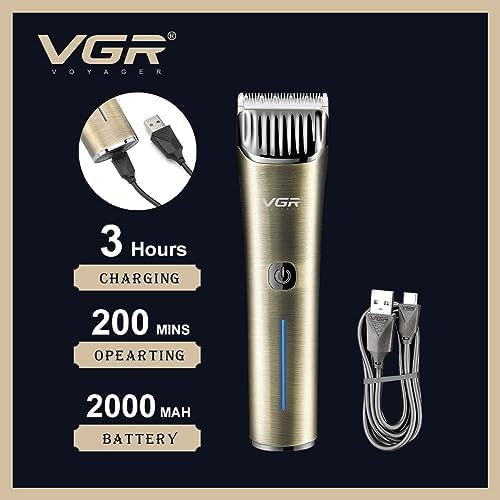
Image 4.1: Illustration of the charging process and battery life indicators.
4.2 Attaching and Removing Combs
The clipper comes with 5 attachment combs for various cutting lengths.
- To attach: Align the comb with the clipper blade and push it firmly until it clicks into place.
- To remove: Gently pull the comb upwards from the clipper blade.
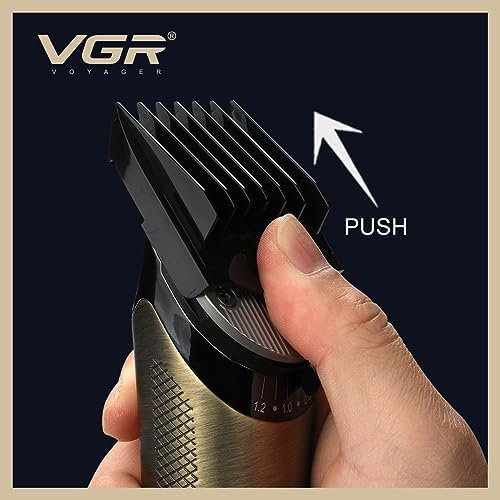
Image 4.2: Demonstrates how to attach and adjust the cutting comb.
5. Operating Instructions
5.1 Power On/Off
Press the power button located on the front of the clipper to turn it on or off.
5.2 Adjusting Cutting Length
The clipper offers a trimming range from 0.8mm to 1.2mm without an attachment comb. Use the provided attachment combs for longer lengths (1.5mm, 3mm, 6mm, 9mm, 12mm).
5.3 Turbo Power Function
The VGR V-669 features a dual motor with a Turbo function. Press the power button again while the clipper is on to activate the Turbo mode for extra power when needed, especially for thicker hair.
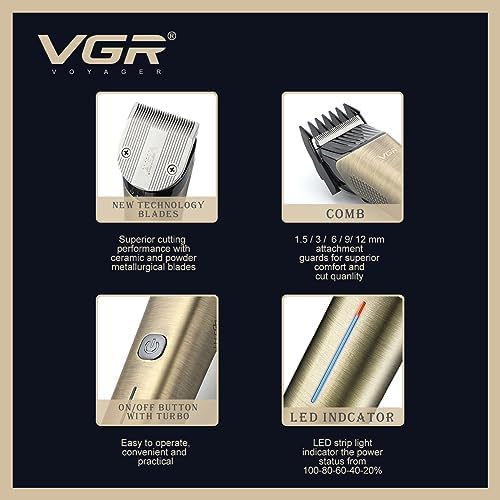
Image 5.1: Overview of key features including new technology blades, comb attachments, on/off button with turbo, and LED indicator.
6. Maintenance
6.1 Cleaning the Blades
Regular cleaning ensures optimal performance and hygiene.
- Turn off the clipper and remove any attachment combs.
- Use the provided cleaning brush to remove hair clippings from the blades.
- For a more thorough clean, the blades can be carefully detached (refer to specific instructions if provided with the product for blade removal).
- Do not rinse the entire clipper under water. The blades are designed for dry cleaning.
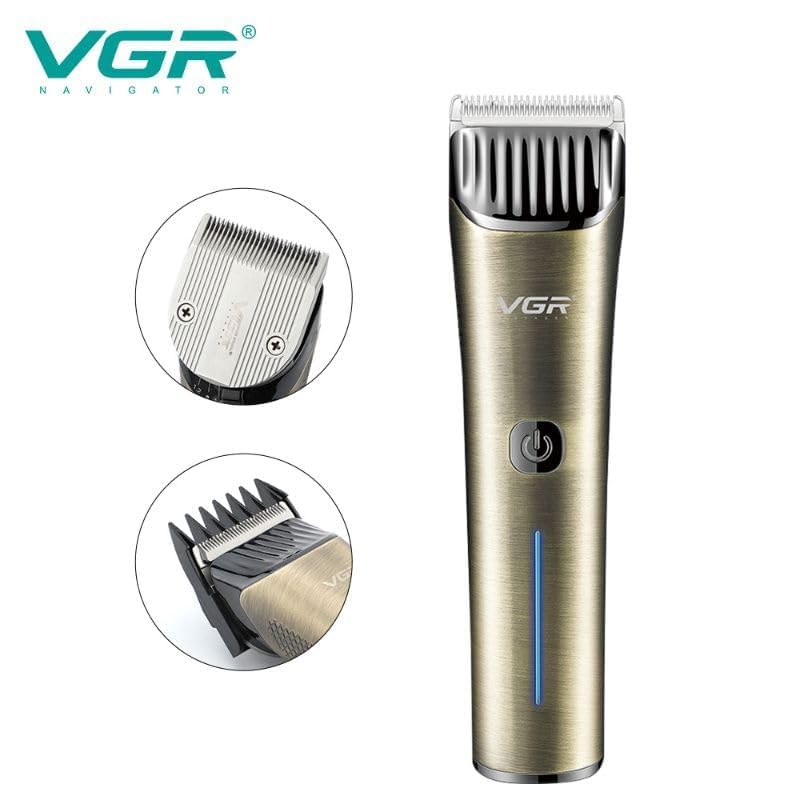
Image 6.1: Close-up view of the ceramic and powder metallurgical blades.
6.2 Oiling the Blades
To maintain cutting performance and blade longevity, oil the blades regularly.
- After cleaning, apply a few drops of the provided lubricating oil onto the blades.
- Turn on the clipper for a few seconds to distribute the oil evenly.
- Wipe off any excess oil with a soft cloth.
6.3 Storage
Store the clipper in a cool, dry place, away from direct sunlight and moisture. Ensure it is turned off and unplugged before storing.
7. Troubleshooting
| Problem | Possible Cause | Solution |
|---|---|---|
| Clipper does not turn on. | Battery is low or depleted. | Charge the clipper fully. |
| Clipper runs slowly or pulls hair. | Blades are dirty or not oiled. | Clean and oil the blades. |
| Clipper is making unusual noise. | Blades may be misaligned or damaged. | Check blade alignment. If damaged, contact customer support. |
| Battery life is shorter than expected. | Battery not fully charged or aging. | Ensure full charge cycle. Battery performance may degrade over time. |
If the problem persists after trying the above solutions, please contact VGR customer support.
8. Specifications
- Model: V-669
- Blade Material: Stainless Steel (Ceramic & Powder Metallurgical Blades)
- Power Source: Battery Powered (Cordless/Corded operation)
- Battery Type: 2000 mAh Li-ion Battery
- Charging Time: Approximately 3 hours
- Operating Time: Up to 200 minutes (cordless)
- Cutting Lengths: 0.8mm - 1.2mm (without comb), 1.5mm, 3mm, 6mm, 9mm, 12mm (with combs)
- Special Features: Dual Motor with Turbo Function, Charge Indicator Light, Rechargeable, USB Charging
- Item Weight: 770 Grams
- Dimensions (LxWxH): 23.5 x 13.6 x 7.1 Centimeters
- Color: Gold
- Manufacturer: Ningbo VGR Electric Appliance Co., Ltd., Yiwu Gemei Electric Appliance Co. Ltd
- Country of Origin: China
9. Warranty and Support
VGR offers a 12-month quality warranty for this product. If you encounter any issues or are not satisfied with the product, please contact VGR customer service. Our customer service team aims to respond within 24 hours and provide a satisfactory resolution.
For support, please refer to the contact information provided on the product packaging or the official VGR website.
VGR INDIA MUMBAI - 401104 INDIA
Related documentsV 669

Ask a question about this manual
Ask about setup, troubleshooting, compatibility, parts, safety, or missing instructions. Manuals+ will review the question and use this page’s manual context to help answer it.