
roborock WD2H2A
Roborock Dyad Air Wet Dry Vacuum Cleaner User Manual
Model: WD2H2A
Introduction
Welcome to the user manual for your new Roborock Dyad Air Wet Dry Vacuum Cleaner. This appliance is designed to provide efficient and thorough cleaning for your hard floors by combining vacuuming and mopping functions. With features like 17000Pa power suction, long battery life, exceptional edge cleaning, and an innovative self-cleaning and drying system, the Dyad Air simplifies your cleaning routine. Please read this manual carefully before use to ensure proper operation, maintenance, and to maximize the lifespan of your device.
Product Overview

The Roborock Dyad Air Wet Dry Vacuum Cleaner, shown with its charging dock and a smartphone displaying the companion app.

Illustration of the Dyad Air simultaneously vacuuming and mopping a floor, demonstrating its 17000 Pa suction power on wet and dry messes.
Key Features:
- Ultimate Mess Master: Designed to tackle both wet and dry messes, delivering spotless floors.
- Exceptional Edge Cleaning: Cleans hard-to-reach areas and along room edges, ensuring a thorough finish.
- Adaptive Cleaning with DirTect Smart Sensor: Intelligently detects dirt levels and adjusts cleaning patterns for optimal results.
- Innovative Self-Cleaning & Drying System: Automatically cleans and hot-air dries the brush to prevent odors.
- Extreme Suction Power: Features 17,000 Pa suction for effective removal of dirt and debris.
- Easy-to-Use App Control: Customize cleaning schedules, set preferences, and monitor progress via smartphone (2.4G WiFi only).
- Long Battery Life: Up to 50 minutes runtime on a single charge.
- Large Capacity Tanks: 900 ml clean water tank for extended cleaning sessions.
Setup and Assembly
Unpacking:
Carefully remove all components from the packaging. Ensure all parts listed in the packing list are present and undamaged. Keep the packaging for future storage or transport.
Component Identification:
- Main Unit (with handle and cleaning head)
- Charging Dock
- Roller Set (pre-installed or separate)
- Washable Filter (pre-installed or separate)
- Clean Water Tank
- Dirty Water Tank
- Power Adapter
- Cleaning Brush
Initial Assembly:
- Attach the Handle: Insert the handle into the main unit until it clicks securely into place.
- Install Water Tanks: Ensure the clean water tank and dirty water tank are correctly seated in their respective compartments.
- Place on Charging Dock: Position the charging dock on a flat surface near a power outlet. Place the Dyad Air onto the charging dock.
- Connect Power: Plug the power adapter into the charging dock and then into a wall outlet. The device will begin charging.
First Use Preparation:
- Charge Fully: For optimal performance, fully charge the device before its first use. The display will indicate charging status.
- Fill Clean Water Tank: Remove the clean water tank, open the cap, and fill it with clean tap water. You may add a small amount of Roborock-approved cleaning solution if desired. Do not overfill. Securely close the cap and reinsert the tank.

A user filling the clean water tank of the Roborock Dyad Air, demonstrating the ease of access and refill.

The Roborock Dyad Air on its charging dock, with a smartphone showing the app interface and voice alert bubbles for "Auto", "Empty the dirty water tank", and "Cleaning rollers".
Operating Instructions
Powering On/Off:
- To power on, press the Power button on the handle.
- To power off, press and hold the Power button until the device shuts down.
Cleaning Modes:
The Dyad Air offers multiple cleaning modes to suit different cleaning needs:
- Eco Mode: For light cleaning and extended battery life.
- Max Mode: Provides maximum suction and water flow for heavily soiled areas.
- Auto Mode: Utilizes the DirTect Smart Sensor to automatically adjust cleaning power based on detected dirt levels.
- Spot Mode: For concentrated cleaning of specific spills or stains.
Switch between modes using the mode selection button on the handle or via the Roborock app.

The DirTect Smart Sensor display on the Dyad Air, showing how it detects and delivers precise power for deeper cleaning, indicated by color changes from blue to red for dirt levels.

The agile cleaning head of the Dyad Air demonstrating its 80-degree horizontal swivel for easy maneuverability around furniture and obstacles.
Cleaning Process:
- Ensure the clean water tank is filled and the dirty water tank is empty.
- Select your desired cleaning mode.
- Tilt the device back to engage the cleaning head and begin moving it across the floor.
- The Dyad Air will vacuum and mop simultaneously. For best results, move the device slowly and steadily.
- Pay attention to the DirTect Smart Sensor indicator; it will change color to show areas with higher dirt concentration, prompting you to clean them more thoroughly.
- Utilize the exceptional edge cleaning feature by positioning the right side of the cleaning head close to walls or baseboards.
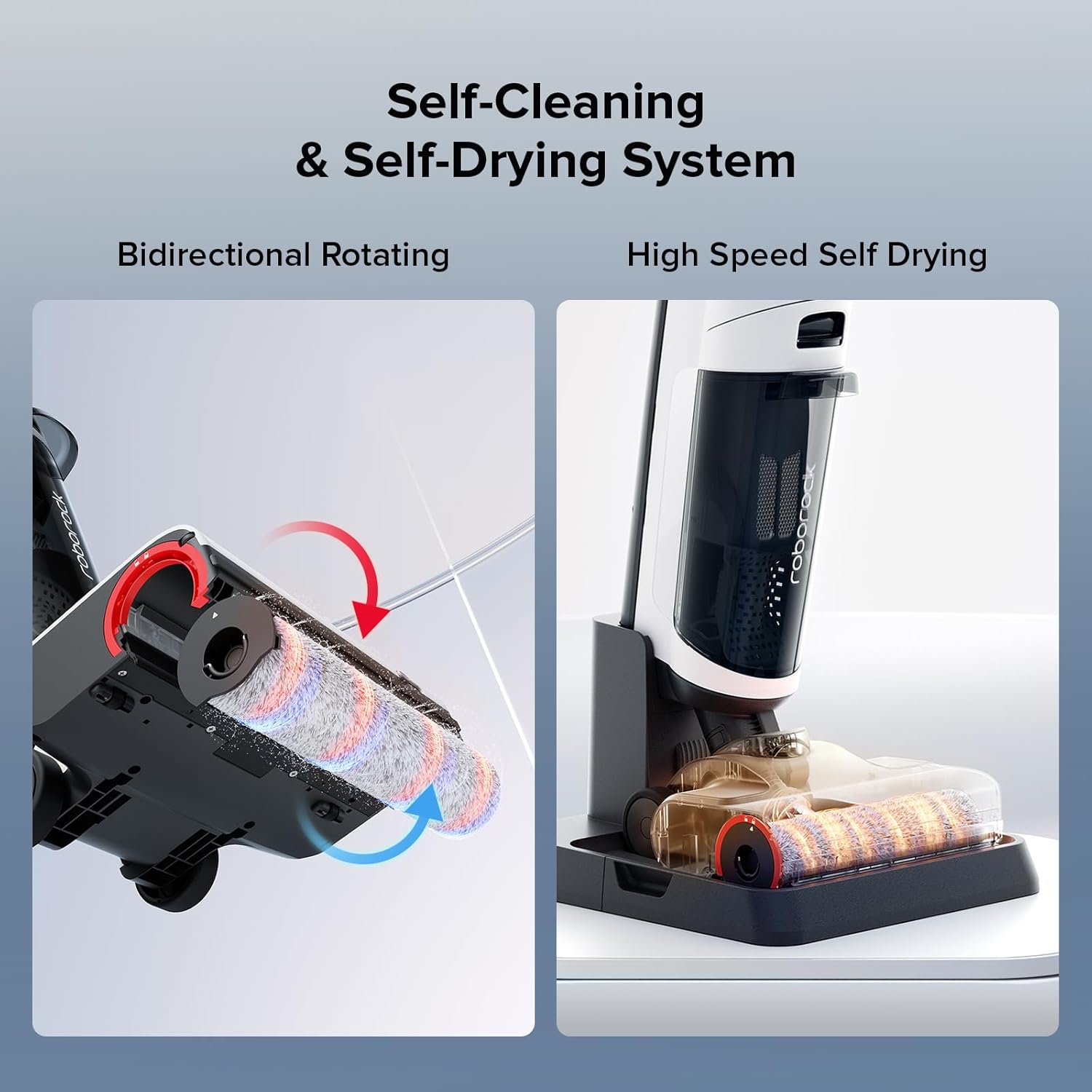
A split image showing the bidirectional rotating brush for self-cleaning and the high-speed self-drying process of the Roborock Dyad Air's roller.

The Dyad Air demonstrating its exceptional edge cleaning capability, reaching within 3mm of walls and baseboards.
Maintenance
Regular maintenance ensures optimal performance and extends the life of your Dyad Air.
After Each Use:
- Initiate Self-Cleaning: Place the device on the charging dock. Press the self-clean button (or activate via app). The device will automatically clean the roller brush and internal pathways.
- Empty Dirty Water Tank: After self-cleaning, remove the dirty water tank. Carefully empty the contents and rinse the tank thoroughly with clean water. Allow it to air dry before reinserting.
- Clean Filter: Remove the washable filter from the dirty water tank. Rinse it under running water until clean. Allow it to air dry completely (at least 24 hours) before reinserting. Do not use the device with a wet filter.
- Check Roller Brush: After self-drying, inspect the roller brush for any tangled hair or debris. Use the provided cleaning brush to remove any stubborn residue.

An illustration showing the self-cleaning process of the Dyad Air's roller brush, with bi-directional alternating scrubbing removing 99% of dirt.

The self-drying system of the Dyad Air, where the roller is automatically dried by hot air to prevent odors.
Regular Maintenance (Monthly/As Needed):
- Clean Charging Dock: Wipe down the charging contacts and surrounding area with a dry cloth.
- Deep Clean Roller Compartment: If necessary, remove the roller brush and clean the compartment thoroughly with a damp cloth.
- Check Air Ducts: Ensure air ducts are free from obstructions.
Troubleshooting
| Problem | Possible Cause | Solution |
|---|---|---|
| Device not powering on. | Low battery; Power adapter not connected; Device malfunction. | Charge the device fully; Ensure power adapter is securely connected; Contact customer support if issue persists. |
| Poor suction or cleaning performance. | Dirty water tank full; Clean water tank empty; Clogged filter; Roller brush tangled or worn. | Empty and clean dirty water tank; Refill clean water tank; Clean or replace filter; Clean or replace roller brush. |
| Unpleasant odor from device. | Dirty water tank not cleaned; Roller brush not dried properly. | Thoroughly clean dirty water tank; Ensure self-drying cycle completes and roller brush is dry. |
| "Unblock cleaning head" error. | Obstruction in cleaning head or dirty water path. | Remove roller brush and inspect for blockages. Clear any debris from the suction inlet and dirty water path. |
| App connectivity issues. | Incorrect Wi-Fi password; Not connected to 2.4Ghz Wi-Fi; Router issues. | Verify Wi-Fi password; Ensure connection to 2.4Ghz network; Restart router and device. |
Specifications
| Feature | Detail |
|---|---|
| Brand | roborock |
| Model Name | Dyad Air (WD2H2A) |
| Suction Power | 17,000 Pa |
| Battery Type | Lithium-Ion |
| Runtime | Up to 50 minutes |
| Clean Water Tank Capacity | 900 Milliliters |
| Wattage | 700 watts |
| Noise Level | 82 dB |
| Product Dimensions | 14.2"L x 12.7"W x 45.7"H |
| Item Weight | 13 pounds |
| Connectivity | App Control (2.4G WiFi) |
| Special Features | Adaptive Cleaning with DirTect Smart Sensor, Exceptional Edge Cleaning, RevoBrush Self-Cleaning & Drying System |
Warranty and Support
Your Roborock Dyad Air Wet Dry Vacuum Cleaner comes with a manufacturer's warranty. Please refer to the warranty card included in your product packaging for specific terms and conditions, including warranty period and coverage details.
For technical support, troubleshooting assistance, or to inquire about replacement parts, please visit the official Roborock website or contact their customer service directly. Keep your purchase receipt and product serial number handy when contacting support.
Online Resources:
- Official Roborock Website: us.roborock.com
- Roborock Store on Amazon: Roborock Amazon Store
Related documentsWD2H2A


Ask a question about this manual
Ask about setup, troubleshooting, compatibility, parts, safety, or missing instructions. Manuals+ will review the question and use this page’s manual context to help answer it.