
Introduction
This manual provides essential information for the safe and proper installation, operation, and maintenance of your Veepeak 30 Amp Flanged Outlet NEMA L14-30R Locking Receptacle. Please read all instructions carefully before installation and use. Retain this manual for future reference.
Safety Information
WARNING: Electrical shock hazard. Improper installation or use can result in serious injury or death. Always follow local electrical codes and consult a qualified electrician if you are unsure about any part of the installation process.
- Always disconnect power at the circuit breaker or fuse box before installing or servicing this device.
- Ensure all wiring connections are secure and correct according to the wiring diagram and local codes.
- Do not exceed the specified electrical ratings of the device.
- This product is designed for use with NEMA L14-30P compatible plugs only.
- Keep the weatherproof cap closed when the outlet is not in use to protect against moisture and dust.
Package Contents
- 1 x Veepeak 30 Amp NEMA L14-30R Flanged Outlet
- Installation Screws
Specifications
| Specification | Value |
|---|---|
| Amperage | 30 Amps |
| Voltage | 125/250 Volts AC |
| NEMA Configuration | L14-30R |
| Poles / Wires | 3 Pole, 4 Wire Grounding |
| Max Load | 7500 Watts |
| Recommended Wire Gauge | 10 AWG/4C |
| Material | Polyvinyl Chloride (PVC) |
| Certifications | ETL Listed (Conforms to UL & CSA standards) |
| Required Hole Size | 2.5 inches |
Setup and Installation
Tools Required: Screwdriver, wire strippers, drill (for mounting hole), appropriate drill bit.
- Prepare Mounting Location: Choose a suitable, dry location for installation. Drill a 2.5-inch diameter hole for the receptacle body. Ensure there is enough space behind the mounting surface for wiring connections.
- Wiring Connections:
Refer to the wiring diagram below and the color-coded terminals on the back of the receptacle. Strip approximately 1/2 inch of insulation from each wire. Insert the wires into the corresponding terminals and tighten the screws securely. Ensure no bare wire strands are exposed outside the terminals.

Image: Rear view of the L14-30R outlet, displaying the four color-coded terminals for wiring connections (Green for Ground, White for Neutral, Red and Black for Hot).

Image: NEMA L14-30R configuration diagram. 'X' and 'Y' are hot lines (125V each to neutral, 250V between them), 'W' is neutral, and 'G' is ground.
- Green (G): Ground wire.
- White (W): Neutral wire.
- Black (X): Hot wire (Line 1).
- Red (Y): Hot wire (Line 2).
- Mount the Receptacle: Insert the receptacle body into the drilled hole. Secure the flanged outlet to the mounting surface using the provided screws. Ensure it is flush and stable.
- Restore Power: Once installation is complete and all connections are verified, restore power at the circuit breaker.
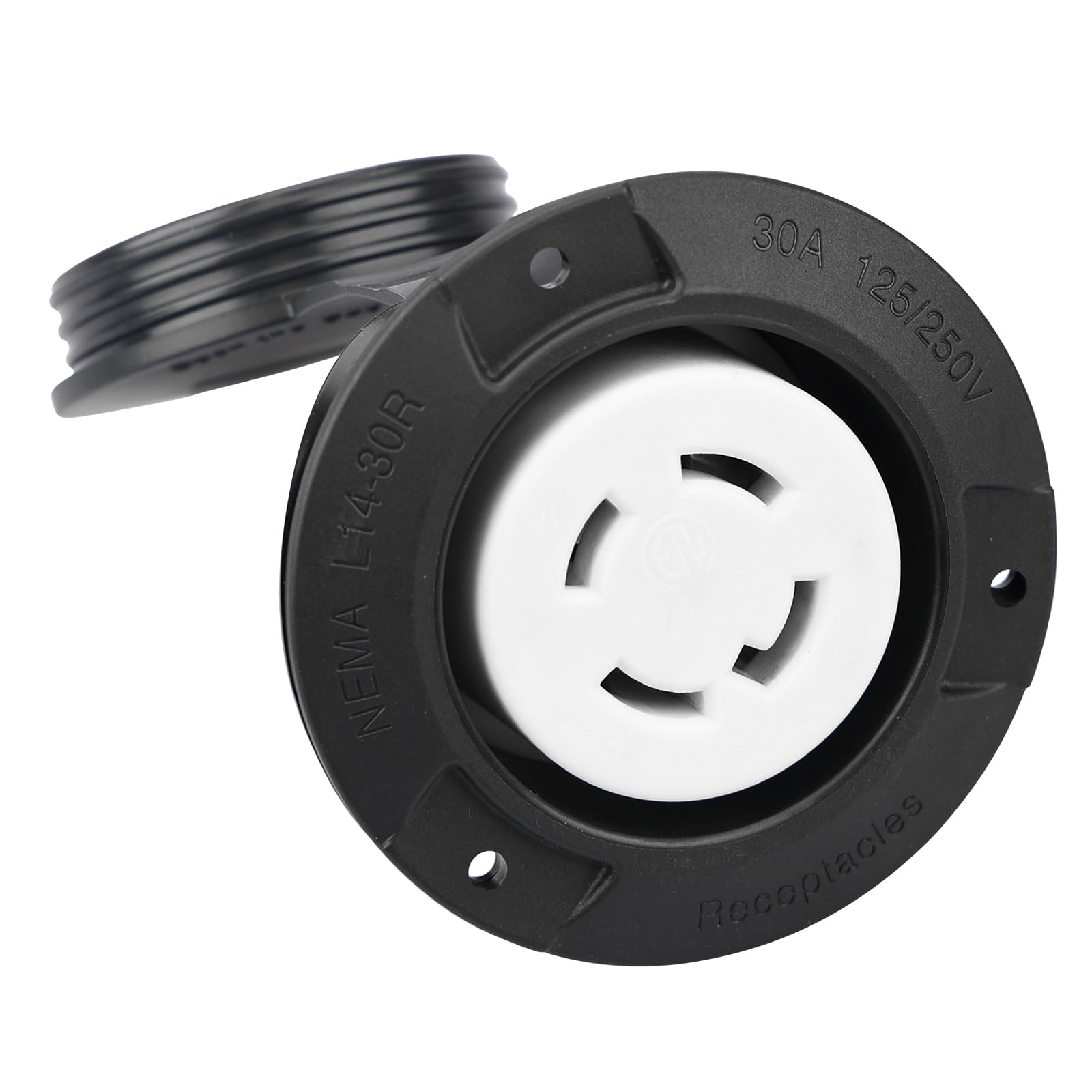
Image: Front view of the Veepeak L14-30R flanged outlet with its weatherproof cap open, revealing the NEMA L14-30R locking receptacle.
Operating Instructions
- Opening the Cap: Lift the weatherproof cap to access the receptacle.
- Connecting a Plug: Align the NEMA L14-30P plug with the receptacle. Insert the plug and twist clockwise to lock it into place. Ensure the plug is fully seated and locked.
- Disconnecting a Plug: Twist the plug counter-clockwise to unlock, then pull it straight out from the receptacle.
- Closing the Cap: When the outlet is not in use, ensure the weatherproof cap is securely closed over the receptacle to protect it from environmental elements like rain, snow, and dust.

Image: Front view of the Veepeak L14-30R flanged outlet with its weatherproof cap securely closed, providing protection.
Maintenance
Regular maintenance ensures optimal performance and safety.
- Cleaning: Periodically clean the exterior of the outlet with a damp cloth. Do not use abrasive cleaners or solvents. Ensure the cap is closed during cleaning.
- Inspection: Regularly inspect the outlet for any signs of damage, wear, or corrosion. Check the weatherproof cap for proper sealing.
- Connection Check: Annually, or if issues arise, disconnect power and check the wiring connections for tightness. Loose connections can cause overheating.
Troubleshooting
- No Power:
- Check the circuit breaker or fuse for the circuit. Reset if tripped.
- Verify that the power source is active.
- Ensure the plug is fully inserted and locked into the receptacle.
- Loose Connection:
- If the plug feels loose or power is intermittent, disconnect power and inspect the wiring connections at the back of the receptacle for tightness.
- Inspect the plug on the appliance for damage.
- Damage to Outlet:
- If the outlet housing or terminals show signs of damage, cracking, or burning, discontinue use immediately and replace the unit.
If troubleshooting steps do not resolve the issue, consult a qualified electrician.
Warranty and Support
Veepeak provides a one-year hassle-free replacement warranty for this product. For warranty claims or customer service inquiries, please contact Veepeak customer support through the retailer where the product was purchased or visit the official Veepeak website.