
1. Product Overview
The iClever Kids Headphones HS26 are wired over-ear headphones specifically designed for children, prioritizing hearing safety with an 85dBA safe volume limit. They feature stereo sound, a foldable and adjustable design for comfort and portability, and a standard 3.5mm audio jack for broad compatibility with various devices. These headphones are built with durable, kid-friendly, and BPA-free materials.

Image: The iClever HS26 headphones, highlighting their comfortable over-ear design and the included 3.5mm audio jack.
2. Package Contents
Please check the package carefully to ensure all items are present and in good condition.
- 1x iClever HS26 Kids Headphones Wired
- 1x User Manual

Image: The iClever HS26 headphones displayed next to their retail packaging, indicating what is included in the box.
3. Key Features
- 85dBA Safe Volume Limit: Designed with 2nd generation 85dBA safe volume limit technology, meeting CDC recommendations to prevent hearing loss. Allows up to 8 hours of listening without exceeding daily noise levels.
- High Definition Stereo Sound: Equipped with a built-in 40mm drive unit, delivering clear stereo sound with rich bass and crisp highs for an immersive audio experience.
- Comfortable and Compact Design: Features soft head pads and 90° swivel ear cups for a snug fit, ideal for extended wear. The adjustable headband accommodates various head sizes. Weighing only 5.47oz, the ultralight design ensures comfort.
- Durable and Kid-Friendly: Constructed from reinforced, BPA-free materials to withstand drops and bends, ensuring safety and longevity.
- Foldable Design: Allows for easy storage and portability, making them convenient for travel and school.
- Universal Compatibility: Equipped with a standard 3.5mm jack, compatible with a wide range of devices including smartphones, tablets, laptops, Chromebooks, and Kindle Fire.
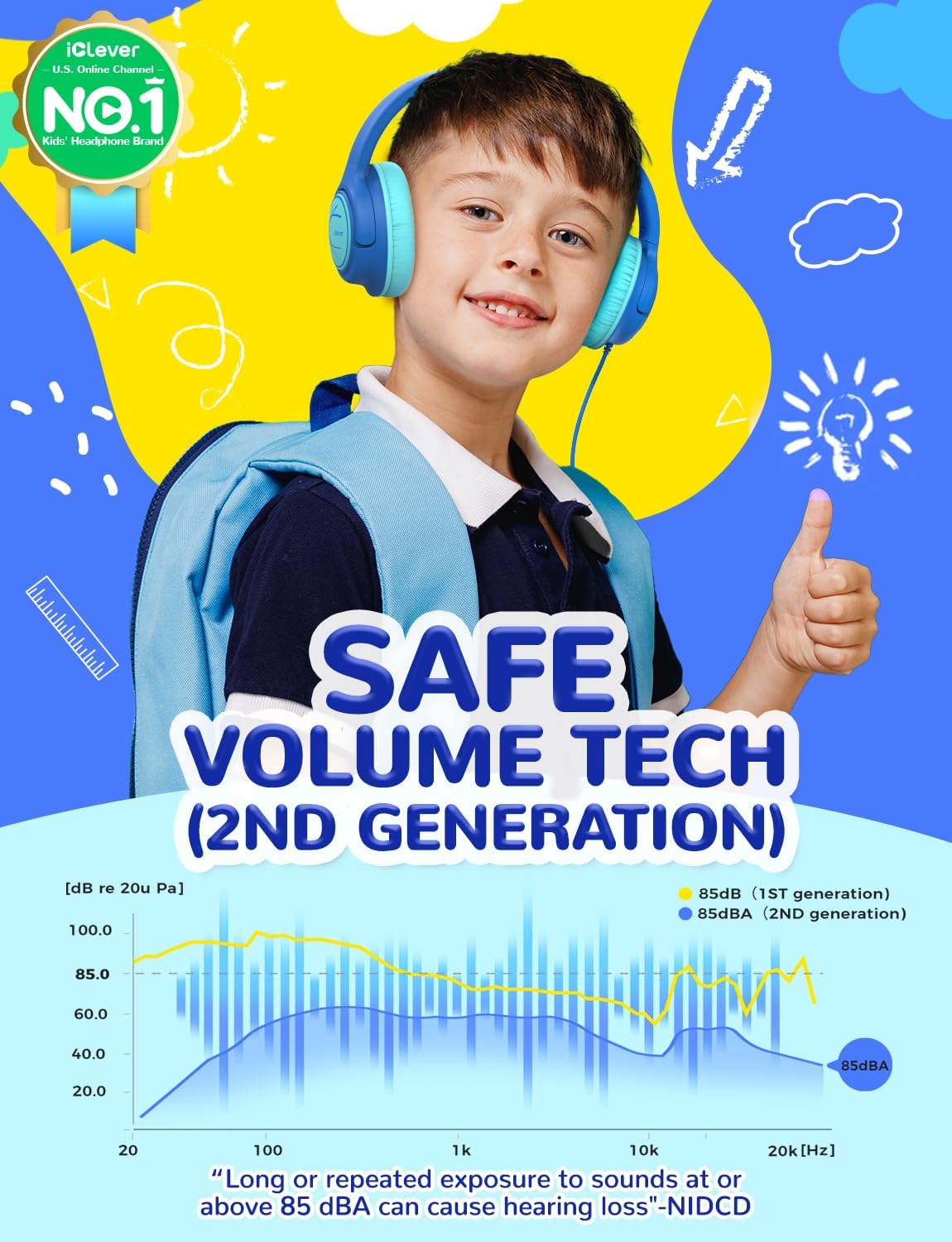
Image: A child wearing the headphones, illustrating the safe volume technology with a graph comparing 1st and 2nd generation 85dBA limits.

Image: An artistic representation emphasizing the premium stereo sound quality of the headphones.

Image: A young girl wearing the headphones, highlighting their ultralight design for comfortable long-term use.

Image: A detailed view of the headphones, pointing out features like 90° swivel ear cups, adjustable headband, comfortable earmuffs, and a tangle-free cable.

Image: A child wearing the headphones, emphasizing their BPA-free and kid-friendly construction.

Image: The headphones folded, demonstrating their compact design for easy storage and transport.

Image: The headphones with illustrations of various compatible devices, highlighting their wide compatibility via the 3.5mm jack.
4. Setup and Connection
The iClever HS26 headphones are designed for simple plug-and-play operation.
- Identify the Audio Port: Locate the 3.5mm audio jack on your device (e.g., smartphone, tablet, laptop, PC, Chromebook, Kindle Fire). This port is typically marked with a headphone icon.
- Connect the Headphones: Insert the 3.5mm audio plug of the iClever HS26 headphones firmly into the audio jack of your device.
- Verify Connection: Once connected, audio from your device should automatically route through the headphones. If not, check your device's audio settings to ensure the correct output device is selected.
Note: These headphones are not compatible with Type-C devices unless an appropriate 3.5mm adapter (not included) is used.
5. Usage Instructions
To ensure optimal comfort and sound experience, follow these usage guidelines:
- Adjust the Headband: Gently slide the headband up or down on both sides to fit comfortably over the user's head. The headband is adjustable to accommodate various head sizes, from toddlers to teenagers.
- Position the Ear Cups: Ensure the soft ear cups fully cover the ears. The 90° swivel ear cups allow for a flexible fit.
- Volume Control: The headphones feature an 85dBA safe volume limit. For further volume adjustment, use the volume controls on your connected device.
- Folding for Storage: When not in use, the headphones can be folded inward to a compact size for easy storage and transport.
6. Care and Maintenance
Proper care will extend the lifespan of your iClever Kids Headphones HS26.
- Cleaning: Use a soft, dry cloth to wipe the headphones. Do not use abrasive cleaners or immerse the headphones in water.
- Storage: Store the headphones in a cool, dry place when not in use. Utilize the foldable design to minimize space and protect them from damage.
- Cable Care: The improved braided audio cable is designed to be tangle-free and durable. Avoid sharp bends or excessive pulling on the cable to prevent damage.
- Handling: While designed to be durable, avoid dropping the headphones from significant heights or applying excessive force to the ear cups or headband.
7. Troubleshooting
If you encounter any issues with your iClever Kids Headphones HS26, please refer to the following common solutions:
| Problem | Possible Cause | Solution |
|---|---|---|
| No sound or low volume |
|
|
| Uncomfortable fit |
|
|
| Sound distortion or crackling |
|
|
8. Product Specifications
Detailed technical specifications for the iClever Kids Headphones HS26:
| Model Name | HS26 |
| Connectivity Technology | Wired |
| Headphones Jack | 3.5 mm Jack |
| Ear Placement | Over Ear |
| Audio Driver Size | 40 Millimeters |
| Frequency Range | 20Hz-20kHz |
| Item Weight | 5.6 ounces (158.7 grams) |
| Product Dimensions | 5.82 x 2.95 x 5.11 inches |
| Material | Plastic |
| Age Range (Description) | Kid |
| Special Features | 85dBA Safe Volume Tech, Foldable, Adjustable, Tangle-Free Cord, Durable, Comfortable, HD Stereo Sound |

Image: The back of the product packaging, detailing key specifications and warnings.
9. Warranty and Support
For warranty information, technical support, or further assistance, please refer to the official iClever website or contact their customer service directly. The included User Manual also contains important information regarding product registration and support.

Image: A view of the included user manual, which provides additional product information and support details.
You can also visit the official iClever store for more information: iClever Brand Store
Note: No official product videos from the seller were available for embedding based on the provided data.


