
Mibro XPAW015
Mibro Watch A2 User Manual
Model: XPAW015
1. Product Overview
The Mibro Watch A2 is a versatile smartwatch designed to enhance your daily life with advanced features and robust performance. It integrates a dual-core 2-in-1 Bluetooth chip for seamless connectivity, allowing for direct Bluetooth calls from your wrist. Featuring a vibrant 1.39-inch HD display, it offers clear visuals and intuitive navigation. The watch is equipped with an updated 4 PD heart rate monitor for comprehensive health tracking, including SpO2 measurement and sleep monitoring. With 70 dedicated sport modes and 2 ATM water resistance, it is suitable for various activities. The long-lasting battery provides up to 10 days of usage on a single charge.
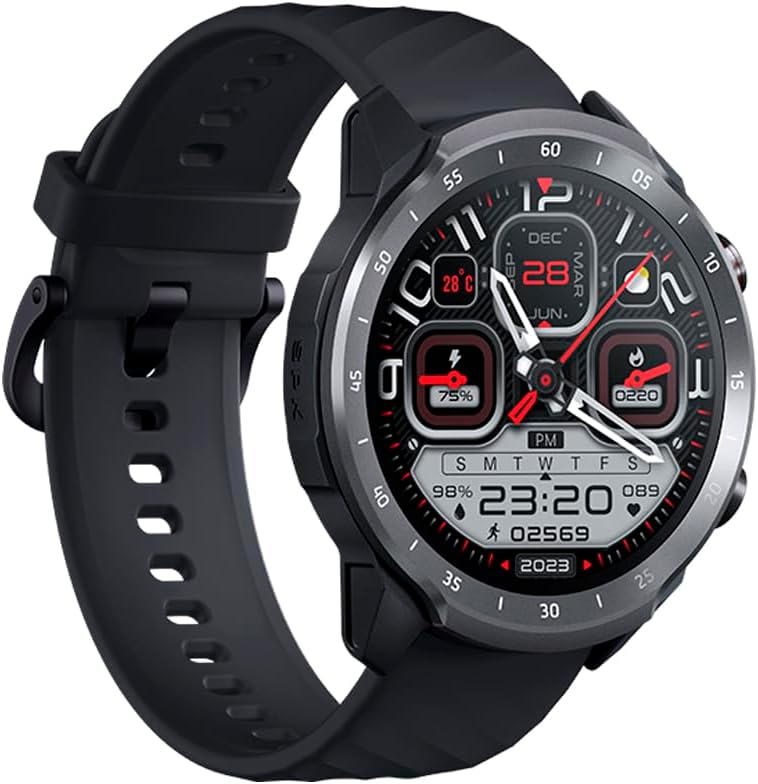
Figure 1.1: Mibro Watch A2, showcasing its design and strap.
2. Safety Information
- Do not attempt to disassemble, repair, or modify the device. This may cause damage, fire, or electric shock.
- Keep the device away from extreme temperatures (hot or cold), direct sunlight, and moisture.
- Avoid exposing the device to strong impacts or vibrations.
- Use only the provided charging cable and adapter. Using unauthorized accessories may damage the device or pose safety risks.
- Consult a medical professional before starting any new exercise regimen or if you have pre-existing health conditions, especially if relying on the watch for health monitoring.
- The device is 2 ATM water-resistant, suitable for splashes and brief immersion. Do not use it for diving, hot showers, or high-speed water sports.
3. Package Contents
Please check the package contents upon unboxing:
- Mibro Watch A2 Smartwatch
- Magnetic Charging Cable
- User Manual
4. Product Layout and Components
Familiarize yourself with the main components of your Mibro Watch A2:

Figure 4.1: Front view of the Mibro Watch A2 display and physical buttons.
- Display: 1.39-inch HD touchscreen for interaction and information display.
- Side Buttons: Typically used for power on/off, screen wake-up, and navigating menus.
- Heart Rate Sensor: Located on the back of the watch, used for heart rate and SpO2 monitoring.
- Charging Contacts: Magnetic contacts on the back for connecting the charging cable.
- Strap: Adjustable and replaceable strap for comfortable wear.
5. Setup Guide
5.1. Charging the Device
Before first use, fully charge your Mibro Watch A2.
- Connect the magnetic charging cable to the charging contacts on the back of the watch. Ensure the cable is securely attached.
- Plug the USB end of the charging cable into a standard USB power adapter (5V/1A recommended) or a computer's USB port.
- The watch display will show the charging progress. A full charge typically takes approximately 2 hours.
5.2. App Installation and Pairing
To unlock the full potential of your Mibro Watch A2, download and install the official Mibro Fit application on your smartphone.
- Download the App: Search for "Mibro Fit" in the Apple App Store (for iOS) or Google Play Store (for Android) and install it.
- Register/Log In: Open the Mibro Fit app and follow the on-screen instructions to register a new account or log in if you already have one.
- Enable Bluetooth: Ensure Bluetooth is enabled on your smartphone.
- Pair the Device: In the Mibro Fit app, navigate to the "Device" or "Add Device" section. Select "Mibro Watch A2" from the list of available devices.
- Confirm Pairing: A pairing request will appear on both your watch and smartphone. Confirm the pairing on both devices.
- Complete Setup: Follow any remaining prompts in the app to complete the initial setup, including personal information and notification permissions.
6. Operating Instructions
6.1. Basic Navigation
- Wake Screen: Press the side button or raise your wrist.
- Swipe Up/Down: Scroll through menus and notifications.
- Swipe Left/Right: Access quick functions or different data screens (e.g., heart rate, weather).
- Tap: Select an item or confirm an action.
- Press Side Button: Return to the watch face or access the app list.
6.2. Bluetooth Calling
The Mibro Watch A2 supports Bluetooth calling directly from your wrist.

Figure 6.1: Using the Mibro Watch A2 for Bluetooth calls.
- Ensure your watch is successfully paired with your smartphone via Bluetooth.
- Making Calls: Access the dial pad or contact list on your watch to initiate a call.
- Receiving Calls: When a call comes in, you can answer or reject it directly from the watch screen.
6.3. Health Monitoring
The watch provides continuous health monitoring features.
- Heart Rate: Swipe to the heart rate interface or select the heart rate app to view your current heart rate. The watch supports 24/7 heart rate monitoring.
- SpO2 (Blood Oxygen): Access the SpO2 measurement function to check your blood oxygen saturation. Ensure the watch is snug on your wrist for accurate readings.
- Sleep Monitoring: Wear the watch to bed, and it will automatically track your sleep patterns, including deep sleep, light sleep, and awake times. View detailed sleep data in the Mibro Fit app.

Figure 6.2: Blood oxygen measurement in progress on the Mibro Watch A2.
6.4. Sport Modes
The Mibro Watch A2 offers 70 sport modes to track your workouts.
- From the watch face, navigate to the "Workout" or "Sport" app.
- Select your desired sport mode (e.g., Running, Cycling, Walking).
- Tap to start the activity. The watch will begin recording data such as duration, calories burned, and heart rate.
- To pause or end an activity, swipe or press the side button as prompted on the screen.

Figure 6.3: Mibro Watch A2 tracking an outdoor activity.
6.5. Notifications and Other Features
- Smart Notifications: Receive call, message, and app notifications directly on your watch. Configure notification settings in the Mibro Fit app.
- Watch Faces: Customize your watch face from a variety of options available in the Mibro Fit app or directly on the watch.
- Music Control: Control music playback on your smartphone from your watch.
- Weather: View real-time weather updates.
- Alarms & Timers: Set alarms and use timer/stopwatch functions.
7. Maintenance
- Cleaning: Wipe the watch and strap regularly with a soft, damp cloth. Avoid using harsh chemicals or abrasive materials.
- Water Resistance: The Mibro Watch A2 is 2 ATM water-resistant. This means it can withstand splashes, rain, and brief immersion in shallow water. It is not suitable for swimming, diving, hot showers, or saunas. Always dry the watch thoroughly after exposure to water.
- Battery Care: To prolong battery life, avoid fully discharging the battery frequently. Charge the watch when the battery level is low. Store the watch in a cool, dry place if not used for extended periods.
- Software Updates: Regularly check for and install software updates via the Mibro Fit app to ensure optimal performance and access to new features.
8. Troubleshooting
| Problem | Possible Cause / Solution |
|---|---|
| Watch does not turn on. | Battery might be depleted. Connect the watch to the charger and allow it to charge for at least 10 minutes before attempting to turn it on. |
| Unable to pair with smartphone. |
|
| Inaccurate heart rate/SpO2 readings. |
|
| Notifications not appearing. |
|
9. Specifications
| Feature | Description |
|---|---|
| Model Name | Mibro Watch A2 |
| Model Number | XPAW015 |
| Brand | Mibro |
| Display Size | 1.39 Inches |
| Connectivity | Bluetooth |
| Special Features | Software available in 26 languages, Bluetooth Calling, Heart Rate Monitoring, SpO2 Measurement, Sleep Tracking, 70 Sport Modes |
| Compatible Devices | Bluetooth-enabled smartphones, tablets, PCs, laptops |
| Battery Composition | Lithium-ion |
| Battery Life | Up to 10 days (typical usage) |
| Water Resistance | 2 ATM |
| GPS | GPS via smartphone |
| Memory Storage Capacity | 1 GB |
10. Warranty and Support
Mibro products typically come with a limited warranty. Please refer to the warranty card included in your product packaging or visit the official Mibro website for detailed warranty terms and conditions specific to your region.
For technical support, troubleshooting assistance, or service inquiries, please contact Mibro customer support through their official website or the contact information provided in the Mibro Fit application.
Official Mibro Store: Visit Mibro Store on Amazon
Related documentsXPAW015


Ask a question about this manual
Ask about setup, troubleshooting, compatibility, parts, safety, or missing instructions. Manuals+ will review the question and use this page’s manual context to help answer it.