
Introduction
This manual provides detailed instructions for the safe and effective operation of your Tolifo X-180 RGB LED Video Light. The X-180RGB is a 180W RGB COB continuous output lighting solution designed for photography and video recording, featuring a Bowens Mount, 2.4G wireless control, and smartphone application control. It offers a wide color temperature range from 2700K to 6500K, with high color rendering (CRI 97+) and television lighting consistency (TLCI 98+).

Image: The Tolifo X-180 RGB LED Video Light in use, demonstrating its lighting capabilities.
Package Contents
Verify that all items listed below are included in your package:
- 1 x X-180RGB Video Light Unit
- 1 x Reflector
- 1 x Protective Cover
- 1 x Power Cord

Image: All components included in the Tolifo X-180 RGB LED Video Light package.
Key Features
- Durable Construction: The Tolifo X-180RGB is built with a robust blend of aluminum alloy and high-strength engineering plastic, ensuring durability and a sleek design.
- High Output & Quality: Delivers an illuminance of up to 22,766Lx@1m (without reflector) and features five-color COB LEDs with a CRI exceeding 97 and TLCI exceeding 98.
- Versatile Color Modes:
- HSI Mode: Allows fine-tuning of color hue (0-360 degrees) and saturation (0%-100%).
- CCT Mode: Adjust color temperature from 2700K to 6500K and brightness from 0%-100%.
- 20 Scene Effects: Offers 20 pre-programmed lighting effects to create various atmospheric environments.
- Multiple Control Methods: Supports 2.4G wireless remote control (up to 30m range), smartphone app control via the Linklite app, and DMX512.
- Bowens Mount: Standard Bowens Mount allows for easy attachment of various accessories like reflector umbrellas, softboxes, and reflector boards.
- Efficient Heat Dissipation: Features a built-in silent fan for effective heat management, extending the light's lifespan.
- User-Friendly Design: Includes a handle and a U-shaped stand for easy light direction adjustment and portability.

Image: The flexible U-bracket for adjusting the light's angle.

Image: Illustration of the efficient heat dissipation system.

Image: Detail of the fish scale reflector for light shaping.
Setup Instructions
- Mounting: Attach the X-180RGB light unit to a compatible light stand using its U-shaped bracket. Secure it firmly.
- Reflector/Accessory Attachment: Align the included reflector or any Bowens Mount compatible accessory with the light's mouth. Twist clockwise until it locks into place.
- Power Connection: Connect the power cord to the light unit's power input and then to a suitable AC power outlet (AC 100-240V).
- Protective Cover: When not in use, ensure the protective cover is placed over the COB LED to prevent damage.
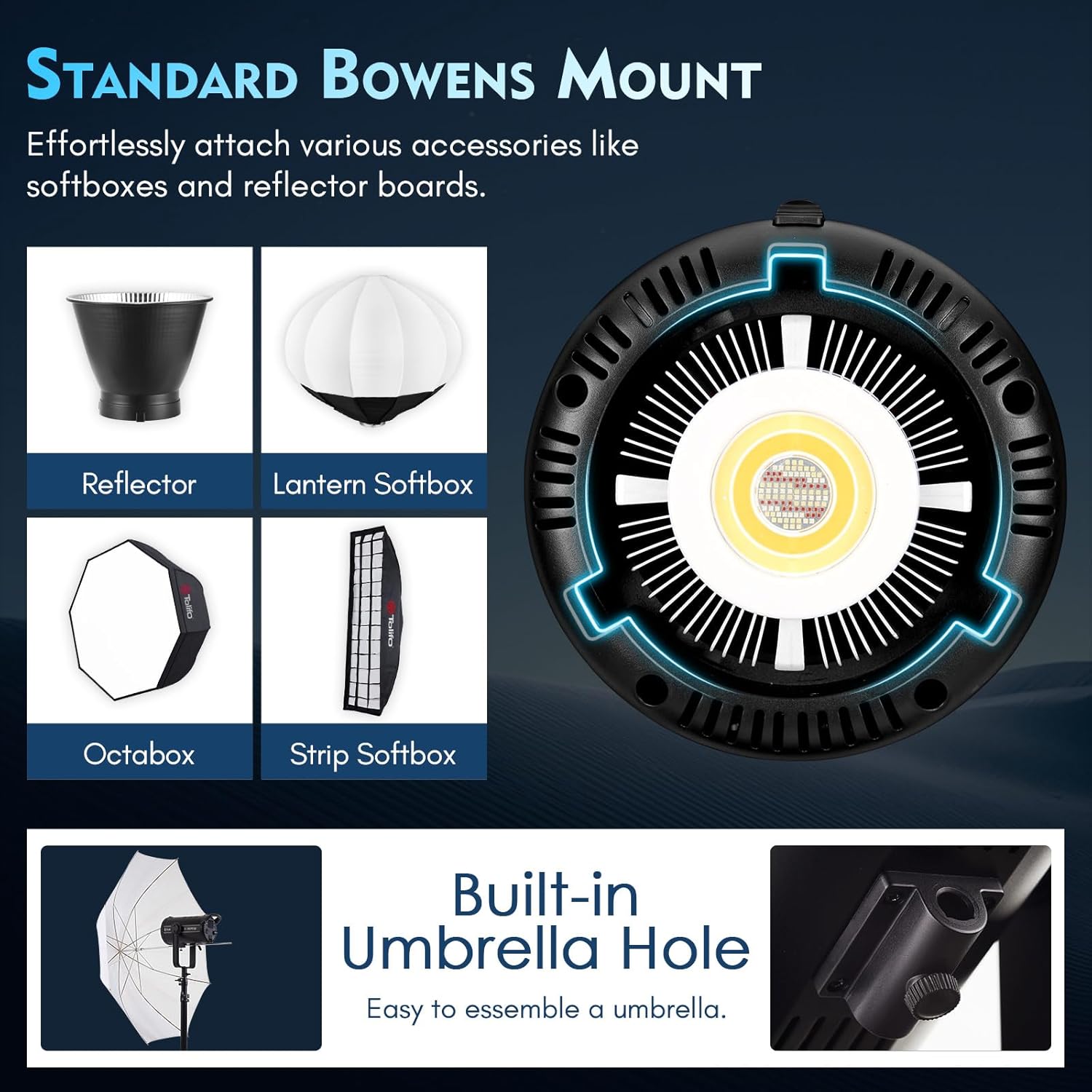
Image: The Bowens Mount for attaching various light modifiers.
Operating Instructions
The Tolifo X-180RGB can be controlled via its onboard panel, 2.4G remote, or the Linklite smartphone app.
1. Onboard Control Panel
- Power On/Off: Press the 'Power' button to turn the light on or off.
- Mode Selection: Use the 'CCT/HSI' button to switch between CCT (Color Temperature) mode and HSI (Hue, Saturation, Intensity) mode.
- Parameter Adjustment: Use the rotary knob and 'SET' button to adjust parameters such as color temperature, brightness, hue, and saturation.
- FX Mode: Press the 'FX' button to access the 20 special scene effects. Use the rotary knob to select an effect.

Image: The control panel with buttons and rotary knob for manual adjustments.
2. CCT Mode (Color Temperature)
In CCT mode, you can adjust the white light output:
- Color Temperature: Adjust from 2700K (warm white) to 6500K (cool white).
- Brightness: Adjust the light intensity from 0% to 100%.

Image: Visual representation of color temperature and brightness adjustments.
3. HSI Mode (Hue, Saturation, Intensity)
In HSI mode, you can access the full RGB color spectrum:
- Hue: Select any color from 0 to 360 degrees on the color wheel.
- Saturation: Adjust the purity or intensity of the selected color from 0% to 100%.
- Intensity: Control the overall brightness of the colored light.

Image: Controls for adjusting hue and saturation in HSI mode.
4. 20 Scene Effects
The light offers 20 built-in scene effects to simulate various lighting scenarios. These can be accessed via the 'FX' button on the control panel or through the app.

Image: Overview of the 20 special scene effects.
5. Intelligent App Control (Linklite App)
Download the Linklite app on your smartphone or tablet to control the light remotely. The app provides comprehensive control over all lighting parameters, including CCT, HSI, and scene effects.
- Download: Search for 'Linklite' in the iOS App Store or Google Play Store.
- Connection: Follow the app's instructions to pair your device with the X-180RGB via Bluetooth.
- Remote Control: Adjust hue, saturation, intensity, color temperature, and activate scene effects directly from your device.

Image: The Linklite app interface for intelligent control.
6. Official Product Video: App Control Demonstration
Video: This official Tolifo video demonstrates the various control methods, including the intelligent app control, for the X-180RGB LED Video Light.
Maintenance
- Cleaning: Use a soft, dry cloth to clean the light unit. Do not use abrasive cleaners or solvents.
- Storage: Store the light in a cool, dry place away from direct sunlight and moisture. Always attach the protective cover when storing.
- Ventilation: Ensure the fan vents are clear of obstructions during operation to maintain proper heat dissipation.
Troubleshooting
| Problem | Possible Cause | Solution |
|---|---|---|
| Light does not power on. | Power cord not connected properly; Power outlet malfunction. | Check power cord connection; Try a different power outlet. |
| Light output is inconsistent or flickering. | Loose connection; Overheating; Faulty unit. | Check all connections; Ensure proper ventilation; Contact customer service if problem persists. |
| App control not working. | Bluetooth not enabled; App not paired; Out of range. | Ensure Bluetooth is on; Re-pair the device in the app; Move closer to the light unit. |
| Light stuck on one color/setting. | Software glitch; Control panel issue. | Try restarting the light; Reset settings if available; Contact customer service. |
Specifications
- Model Number: X-180RGB
- Power Output: 180W
- Color Temperature: 2700K-6500K
- Color Rendering Index (CRI): 97+
- Television Lighting Consistency Index (TLCI): 98+
- Illuminance: 22,766Lx@1m (without reflector)
- Hue Angle: 0-360 degrees
- Brightness Adjustment: 0%-100%
- Control Methods: Onboard Panel, 2.4G Wireless Remote, Linklite App, DMX512
- Mount Type: Bowens Mount
- Product Dimensions: 7.09 x 7.09 x 7.09 inches
- Item Weight: 8.23 pounds
- Hardware Interface: Bluetooth 2.0
Warranty and Support
The Tolifo X-180 RGB LED Video Light comes with a one-year warranty from the date of purchase. For any inquiries, technical assistance, or warranty claims, please contact our customer service team. Refer to your purchase documentation for specific contact details.


