
GLAKER 6026+1019
GLAKER Hair Clippers & Trimmer Kit User Manual
Model: 6026+1019
1. Introduction
Thank you for choosing the GLAKER Hair Clippers & Trimmer Kit. This professional-grade grooming set is designed to provide precise and efficient hair cutting and trimming for both home and professional use. Please read this manual thoroughly before first use to ensure safe and optimal operation.

Image: The complete GLAKER Hair Clippers and Trimmer Kit, including the main clipper, detail trimmer, multiple guide combs, and a storage case.
2. Safety Information
To ensure safe operation and prevent injury or damage, please adhere to the following safety guidelines:
- Always unplug the device before cleaning or replacing parts.
- Keep blades and other sharp parts out of reach of children.
- Avoid contact with eyes and face.
- Do not ingest or inhale small parts.
- Always supervise children when using the product.
- Use only a 5V/1A adapter (not included) for charging. Input voltage exceeding 5V/1A may trigger Over Voltage Protection, preventing the clippers from charging.
3. Package Contents
Your GLAKER Hair Clippers & Trimmer Kit includes the following items:
- 1 x Cordless Hair Clipper
- 1 x T-blade Hair Trimmer
- 12 x Hair Clipper Guard Attachments (1.5mm, 3mm, 4.5mm, 6mm, 10mm, 13mm, 16mm, 19mm, 22mm, 25mm, left and right ear taper)
- 3 x Hair Trimmer Guards (1.5mm, 3mm, 4.5mm)
- 1 x Storage Bag
- 1 x Barber Cape
- 1 x Comb
- 1 x Cleaning Brush
- 2 x USB Cables (for charging)
- 1 x User Manual (this document)
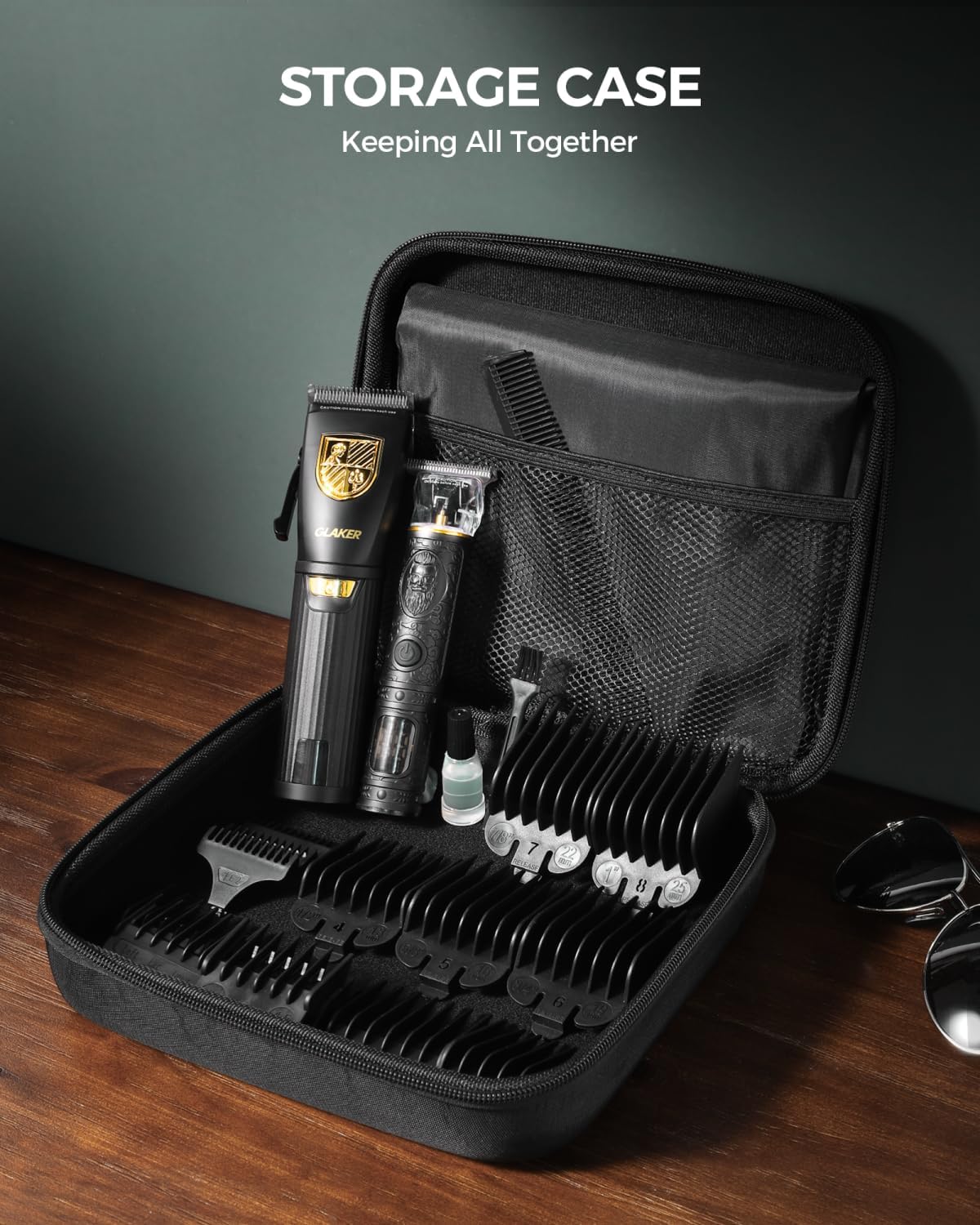
Image: All components of the GLAKER kit neatly arranged, highlighting the storage case and numerous guide combs.
4. Product Overview
The GLAKER Hair Clippers and Trimmer Kit is designed for versatility and performance. Both devices feature powerful motors and sharp, durable blades for a smooth cutting experience.
Key Features:
- Powerful Motor: Equipped with a heavy-duty 6500RPM motor for efficient cutting without snagging or pulling.
- Sharp, Safe Blades: Stainless steel blades provide an effective and precise haircut.
- Adjustable Fade Lever: The main clipper features a lever (0.5-1mm) for seamless fading and blending.
- Extensive Guide Combs: 12 clipper guards and 3 trimmer guards for a wide range of lengths and styles.
- Long Battery Life: Up to 150 minutes of run time on a single charge for both corded and cordless use.
- LED Display: Clearly shows remaining power, charge status, and lubrication reminders.
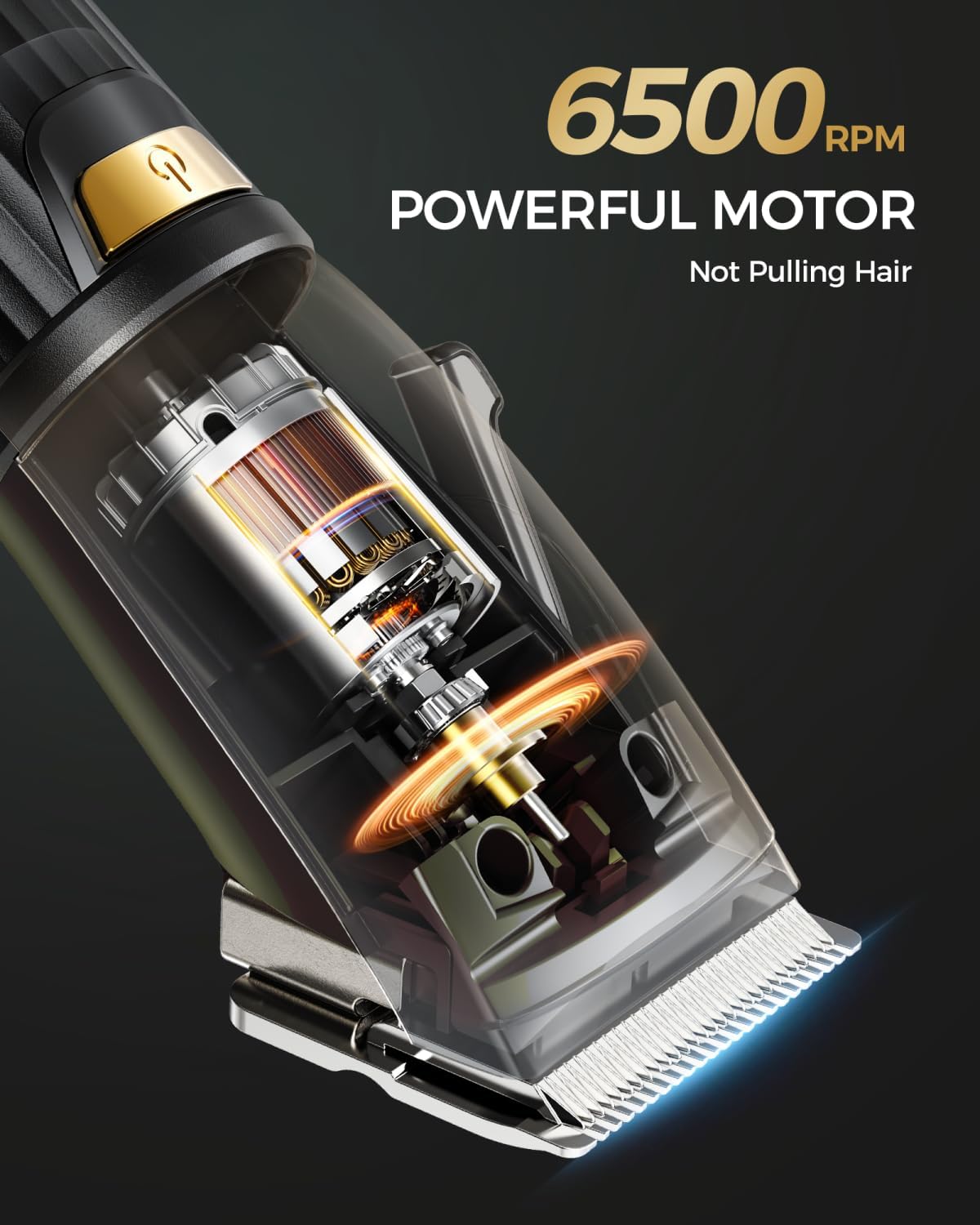
Image: Detailed view of the GLAKER clipper's powerful 6500 RPM motor, emphasizing its cutting capability.

Image: A close-up shot of the sharp, high-performance blades of the GLAKER hair clipper.
5. Setup
Initial Charge:
- Before first use, fully charge both the hair clipper and the detail trimmer.
- Connect the provided USB cable to the charging port on the device and to a 5V/1A USB power adapter (not included).
- The LED display will indicate charging status. A full charge takes approximately 3 hours and provides up to 150 minutes of run time.
Attaching Guide Combs:
- Ensure the clipper/trimmer is turned off.
- Select the desired guide comb length.
- Align the comb with the blade and push firmly until it clicks into place.
- To remove, gently pull the comb away from the blade.
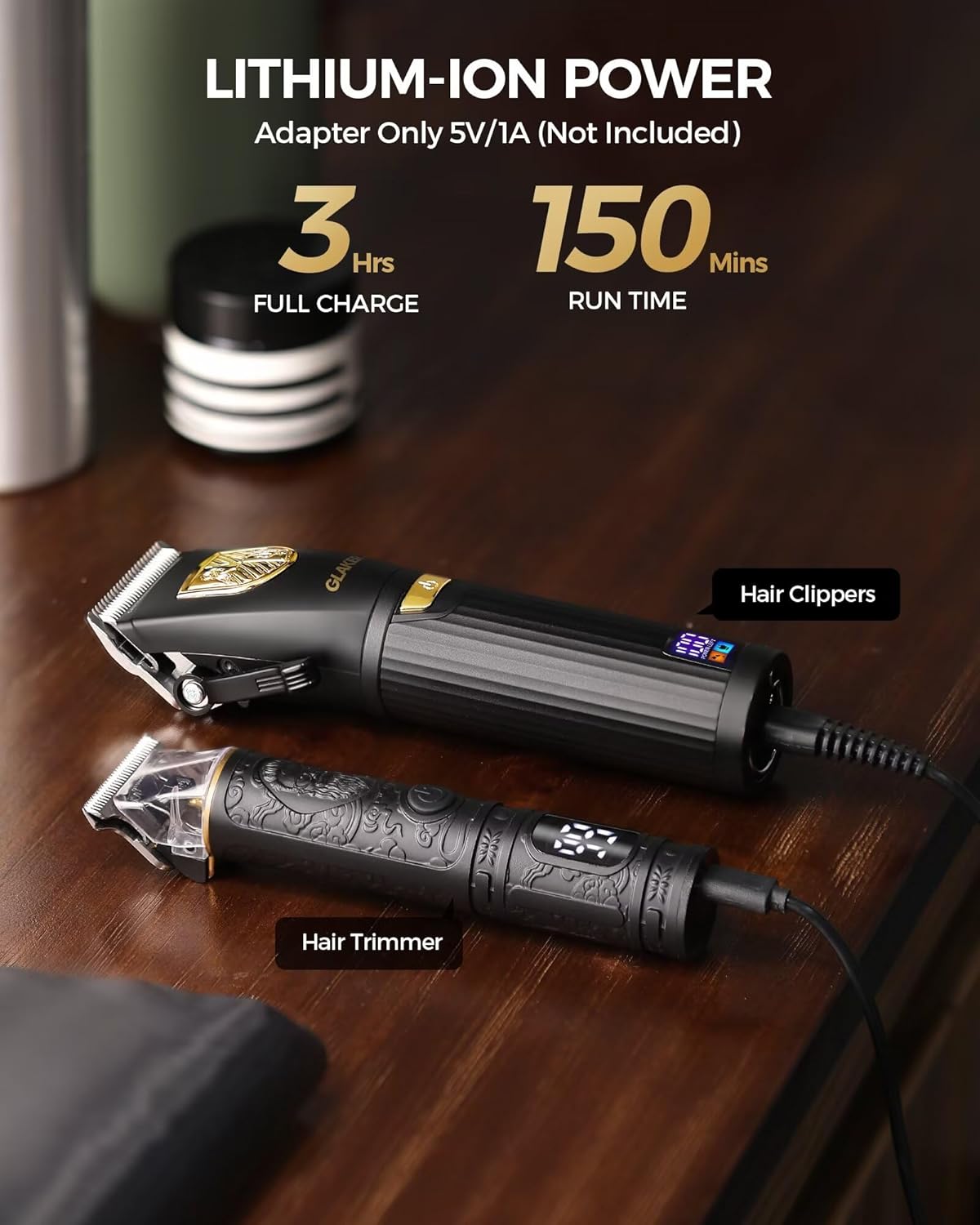
Image: The GLAKER hair clipper and trimmer connected to USB charging cables, illustrating the charging process and LED display.
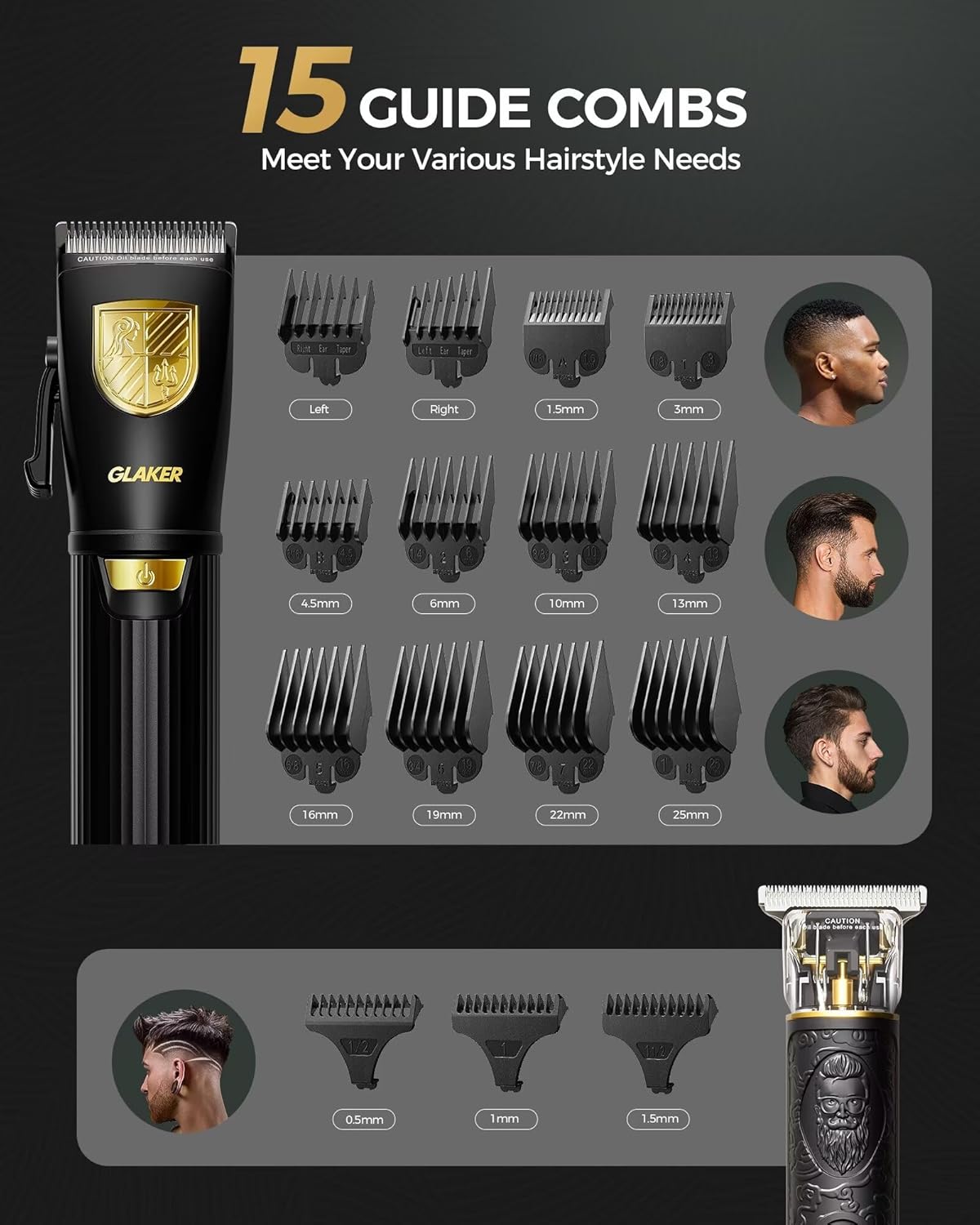
Image: A visual guide to the 15 included guide combs for both the main clipper and the detail trimmer, demonstrating their various lengths.
6. Operating Instructions
Follow these steps for effective hair cutting and trimming:
- Prepare: Ensure hair is clean and dry. Drape the barber cape around the user's neck to catch cut hair.
- Select Comb: Choose the appropriate guide comb for the desired hair length. For first-time users, start with a longer comb and gradually reduce the length if needed.
- Power On: Press the power button to turn on the clipper or trimmer.
- Cut Hair: Hold the device with the blades facing away from you. Begin cutting against the direction of hair growth, using smooth, even strokes.
- Adjust Length (Clipper): Use the adjustable fade lever on the main clipper to fine-tune cutting length between 0.5mm and 1mm for blending and fading.
- Detailing (Trimmer): Use the T-blade trimmer for precise edging, outlining, and detailing around the neckline, ears, and beard.
- Clean During Use: Periodically brush away accumulated hair from the blades to maintain performance.
- Power Off: Once finished, turn off the device and unplug it if it was used corded.

Image: A professional barber using the GLAKER hair clipper to style a client's hair, showcasing its ergonomic design and precision.

Image: A man demonstrating self-haircutting with the GLAKER hair clipper, highlighting its ease of use for personal grooming.
7. Maintenance
Proper maintenance ensures the longevity and performance of your GLAKER grooming kit.
Cleaning the Blades:
- After each use, turn off and unplug the device.
- Use the provided cleaning brush to remove any loose hairs from the blades and the area around them.
- For a more thorough cleaning, the blades can be rinsed under running water. Ensure the device is completely dry before reassembling or storing.
Lubrication:
- Regularly oil the blades to maintain their sharpness and smooth operation. The LED display will provide lubrication reminders.
- Apply a few drops of clipper oil (included) to the teeth of the blades while the device is running.
- Wipe off any excess oil with a clean cloth.
Storage:
- Store the clippers and all accessories in the provided storage bag to protect them from dust and damage.
- Keep the kit in a cool, dry place, away from direct sunlight and moisture.
Image: The GLAKER grooming kit components organized within its dedicated storage case, emphasizing portability and protection.
8. Troubleshooting
If you encounter any issues with your GLAKER Hair Clippers & Trimmer Kit, please refer to the following common problems and solutions:
| Problem | Possible Cause | Solution |
|---|---|---|
| Device not turning on. | Low battery; device not charged. | Charge the device fully using a 5V/1A adapter. |
| Blades pulling hair or cutting poorly. | Blades are dull, dirty, or not lubricated. | Clean the blades thoroughly and apply clipper oil. If problem persists, blades may need replacement. |
| Device not charging. | Incorrect adapter used (not 5V/1A); cable damaged; charging port dirty. | Ensure you are using a 5V/1A adapter. Try a different USB cable. Clean the charging port. |
| Excessive noise or vibration. | Blades are loose or need lubrication. | Check if blades are securely attached. Lubricate the blades. |
9. Specifications
| Feature | Detail |
|---|---|
| Product Dimensions | 1.8 x 2 x 6.6 inches (Clipper); 2.31 Pounds (Total Kit Weight) |
| Model Number | 6026+1019 |
| Manufacturer | GLAKER |
| Country of Origin | China |
| Charging Time | 150 minutes (approx. 3 hours) |
| Run Time | Up to 150 minutes |
| Battery Type | Lithium-Ion |
| Motor Speed | 6500 RPM |
10. Warranty & Support
GLAKER stands behind the quality of its products. Your GLAKER Hair Clippers & Trimmer Kit comes with a 1-Year Warranty from the date of purchase.
This warranty covers manufacturing defects and issues arising from normal use. It does not cover damage caused by misuse, accidents, unauthorized repairs, or failure to follow the instructions in this manual.
For warranty claims, technical support, or any questions regarding your product, please contact GLAKER customer service through the retailer where you purchased the product or visit the official GLAKER store online.
Official GLAKER Store: GLAKER Amazon Store
11. Official Product Videos
Currently, there are no official seller-created product videos available for direct embedding. Please refer to the product page for any available video content from other creators.
Related documents6026+1019

Ask a question about this manual
Ask about setup, troubleshooting, compatibility, parts, safety, or missing instructions. Manuals+ will review the question and use this page’s manual context to help answer it.