
Behringer 0722-ABF
Behringer Pro VS Mini Portable 5-Voice Hybrid Synthesizer
User Manual - Model: 0722-ABF
Introduction
The Behringer Pro VS Mini is a compact and powerful 5-voice hybrid synthesizer designed for musicians and sound designers. It features 4 vector morphing oscillators per voice, an analog low-pass filter, a 16-step sequencer, and an arpeggiator, offering extensive sound creation possibilities in a portable form factor.

Figure 1: Front view of the Behringer Pro VS Mini, showcasing its compact design and control layout.
Key Features:
- 4-voice Hybrid Synthesizer Module with 16 Vector Oscillators
- Analog Low-pass Filter, 16-Step Sequencer, and Arpeggiator
- Dedicated Filter, Amplifier, and Oscillator Envelopes
- Advanced Wavetable Synthesis Capabilities
- Sync In for external clock synchronization
Setup Guide
Follow these steps to set up your Behringer Pro VS Mini for the first time.
1. Power Connection
The Pro VS Mini can be powered via its USB-C port. Connect a standard USB-C cable to the device and to a compatible USB power adapter (not included) or a powered USB hub. The unit can also be powered by a power bank for portable use.
2. Audio Output
Connect headphones to the 2.5mm headphones output jack for monitoring. For connecting to an external mixer or audio interface, use an appropriate adapter if necessary.
3. MIDI Connectivity
The Pro VS Mini features a full-size MIDI DIN input for connecting to external MIDI controllers, sequencers, or other MIDI devices. This allows for control over notes, parameters, and synchronization.
For synchronization with other gear, utilize the dedicated Sync In port.
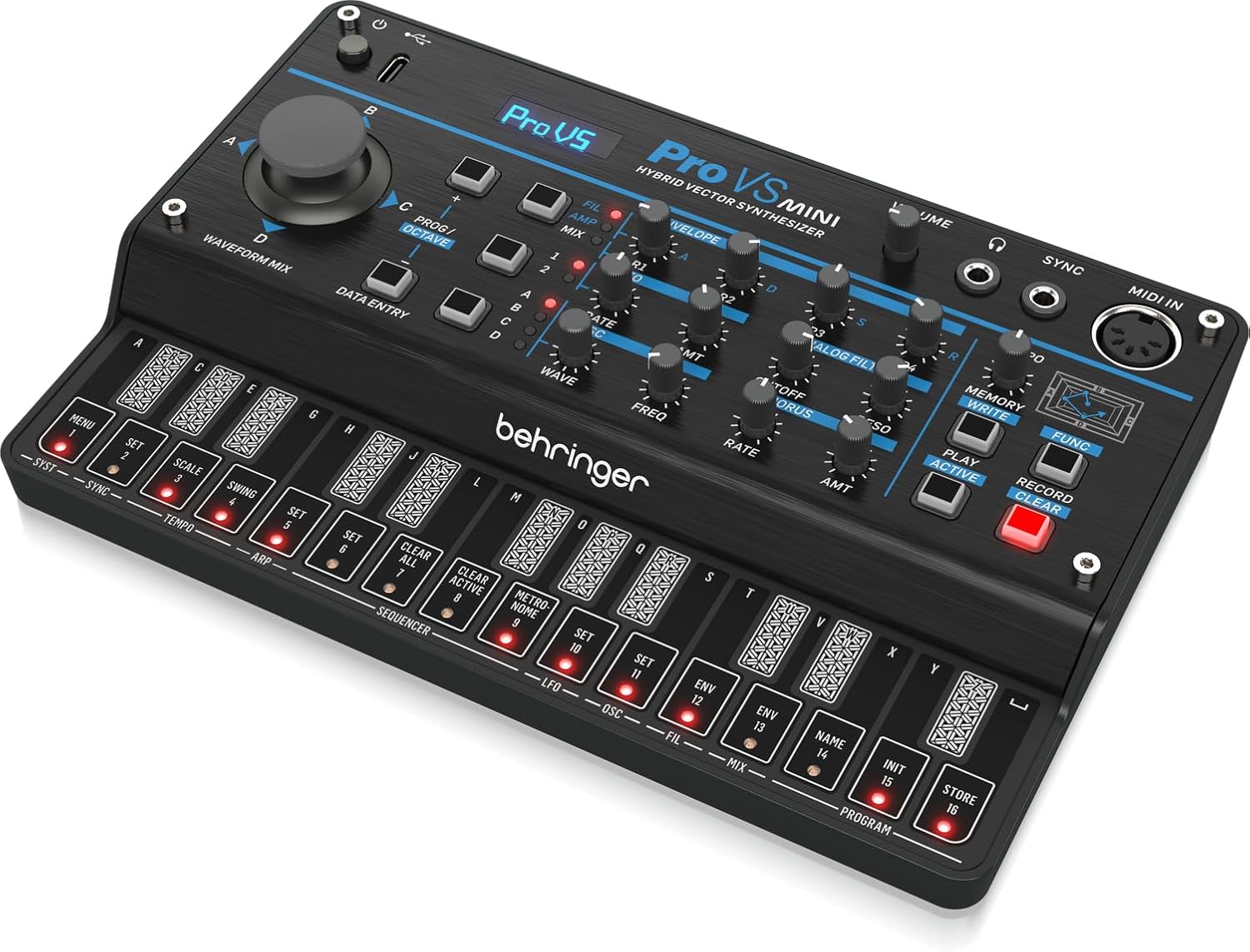
Figure 2: Rear view of the Behringer Pro VS Mini, showing the USB-C power input, MIDI IN, and Sync ports.
4. Initial Power-On
Once all connections are made, power on the unit. The display will illuminate, and the device will be ready for operation.
Operating Instructions
This section covers the basic operation and sound design capabilities of your Pro VS Mini.

Figure 3: Detailed front view of the Behringer Pro VS Mini, highlighting the main controls and display.
1. User Interface Overview
The Pro VS Mini features a clear OLED display and a matrix of knobs and buttons for intuitive control. The main joystick allows for real-time vector morphing between the four oscillators (A, B, C, D).
- Waveform Mix Joystick: Controls the blend of the four oscillators (A, B, C, D).
- Data Entry Knobs: Used for navigating menus and adjusting parameters.
- Prog/Octave Buttons: For program selection and octave shifting.
- Volume Knob: Adjusts the overall output volume.
2. Sound Synthesis Parameters
The synthesizer offers comprehensive control over its sound engine:
- Envelope Section: Dedicated ADSR envelopes for Filter, Amplifier, and Oscillators.
- Analog Filter: Control Cutoff and Resonance for the analog low-pass filter.
- LFO Section: Modulate various parameters with the Low-Frequency Oscillator.
- Wavetable Synthesis: Explore a wide range of wavetables for unique sonic textures.
3. Sequencer and Arpeggiator
The built-in 16-step sequencer allows for pattern creation, while the arpeggiator generates rhythmic melodic patterns from held notes. Use the dedicated buttons for Play, Record, and Clear functions.
4. Presets and Memory
The Pro VS Mini allows you to store and recall your custom sounds. Use the MEMORY and WRITE buttons to manage your presets. The device has a capacity for 32 user presets.
Maintenance
Proper care and maintenance will ensure the longevity and optimal performance of your Behringer Pro VS Mini.
1. Cleaning
Regularly wipe the unit with a soft, dry, lint-free cloth. Do not use abrasive cleaners, waxes, or solvents. Avoid spraying liquids directly onto the unit.
2. Storage
When not in use, store the synthesizer in a cool, dry place away from direct sunlight, extreme temperatures, and excessive humidity. Protect it from dust and physical impact.
3. Firmware Updates
Behringer periodically releases firmware updates to improve performance, add features, or fix bugs. Check the official Behringer website for the latest firmware and instructions on how to update your device.
Troubleshooting
If you encounter issues with your Pro VS Mini, refer to the following common problems and solutions.
No Power / Unit Not Turning On
- Ensure the USB-C cable is securely connected to both the Pro VS Mini and the power source.
- Verify that the USB power adapter or hub is providing sufficient power. Try a different power source if available.
No Sound Output
- Check the VOLUME knob and ensure it is turned up.
- Verify that headphones are properly connected to the 2.5mm output.
- Ensure a patch is loaded and active. Try loading a factory preset.
- Check the filter cutoff and envelope settings; they might be set to block sound.
MIDI Not Responding
- Confirm that the MIDI cable is correctly connected to the MIDI IN port.
- Check the MIDI channel settings on both the Pro VS Mini and your external MIDI controller to ensure they match.
- Verify that the external MIDI controller is sending MIDI data.
Unexpected Behavior / Freezing
- Try restarting the unit by disconnecting and reconnecting the power.
- Consider performing a factory reset (refer to the full online manual for specific instructions, as this can erase user data).
- Ensure your firmware is up to date.
For more detailed troubleshooting or issues not covered here, please visit the official Behringer support website or contact their customer service.
Specifications
| Feature | Detail |
|---|---|
| Model Name | Behringer Pro VS Mini |
| Item Model Number | 0722-ABF |
| Dimensions (L x W x H) | 8.45 x 5.45 x 2.35 inches |
| Item Weight | 1.15 pounds |
| Power Source | USB-C (Battery or USB Powered) |
| Connectivity Technology | USB-C, MIDI DIN |
| Headphones Jack | 2.5mm output |
| Number of Voices | 5 (after firmware update 2.0.2) |
| Number of Keys | 27 (touch keys) |
| Material Type | Plastic |
| Color | Black |
| UPC | 644216666300 |
Warranty and Support
Behringer products are designed for reliability and performance. For detailed warranty information, please refer to the warranty card included with your product or visit the official Behringer website.
Customer Support
If you require technical assistance, have questions about your product, or need to arrange for service, please contact Behringer customer support through their official website. You can find FAQs, software downloads, and contact information there.
Official Behringer Website: www.behringer.com
Related documents0722-ABF


Ask a question about this manual
Ask about setup, troubleshooting, compatibility, parts, safety, or missing instructions. Manuals+ will review the question and use this page’s manual context to help answer it.