
Della 048-TL-W8KWD
DELLA 8000 BTU Energy Saving Window Air Conditioner
User Manual
Model: 048-TL-W8KWD | Brand: Della
Important Safety Information
Please read all instructions carefully before installing and operating your air conditioner. Keep this manual for future reference. Your safety and the safety of others are very important.
- Always follow basic safety precautions to reduce the risk of fire, electric shock, or injury to persons.
- This appliance must be properly grounded. Do not modify the power cord or plug.
- Do not operate the air conditioner with a damaged power cord or plug.
- Ensure the unit is installed according to local electrical codes and regulations.
- Do not block air openings.
- Unplug the unit before cleaning or servicing.
Electrical Requirements
This unit requires a 115V/60Hz grounded outlet. Do not use extension cords or adapter plugs with this unit.
Product Overview
The DELLA 8000 BTU Window Air Conditioner is designed to provide efficient cooling and dehumidification for your living space. It features smart controls, a remote, and a reusable filter for convenience and energy saving.

Image: Front view of the DELLA 8000 BTU Window Air Conditioner, showing the control panel, air vents, and included remote control and smartphone app interface.
Key Components
- Control Panel: Digital display for temperature, mode, and timer settings.
- Air Filter: Reusable and washable filter for improved air quality.
- Remote Control: Full function remote for convenient operation.
- Side Panels: Expandable panels for secure window installation.
- Power Cord: 115V/60Hz grounded plug.
Installation
The DELLA window air conditioner features a T-design for simplified installation, saving significant time compared to traditional units. Ensure your window meets the specified dimensions before beginning.
Window Requirements
- Window Width: 23 to 36 inches
- Minimum Window Height: 14.5 inches
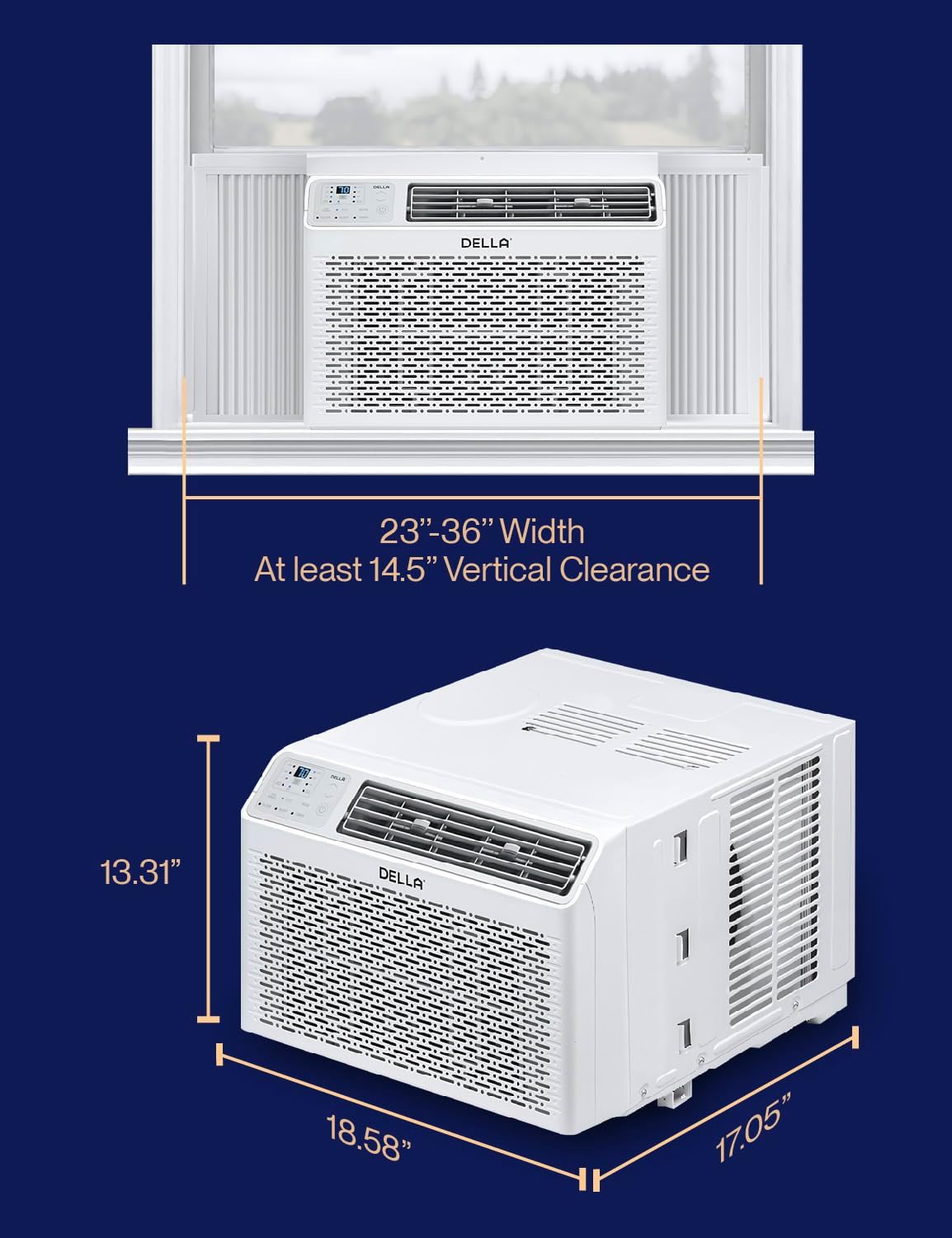
Image: Diagram illustrating the required window width (23-36 inches) and minimum vertical clearance (14.5 inches) for proper installation of the air conditioner.
Installation Steps
- Prepare the Window: Open the window and clean the sill area.
- Install Top Mounting Rail: Attach the top mounting rail to the top of the air conditioner unit.
- Secure into Window Frame: Carefully place the air conditioner into the window opening, ensuring it is centered and level.
- Mount with Screws: Secure the unit to the window frame using the provided screws.
- Extend Side Panels: Extend the accordion side panels to fill the window opening completely, then secure them.
- Install Sash Lock and Foam Seal: Install the window sash lock to prevent the window from being opened from the outside. Apply the foam seal to prevent air leaks.

Image: Visual guide showing three simplified steps for installing the DELLA window air conditioner: securing into the window frame, mounting with screws, and extending side panels.
Included Installation Kit Components

Image: An illustration detailing the components of the installation kit, including filler panels, insulation strips, lock frame & sash lock, screws, window sash seal, and top mounting rail.
Operating Instructions
Your DELLA air conditioner offers multiple modes and smart features for optimal comfort and convenience.
Control Panel and Remote Control
The unit can be controlled via the intuitive LED control panel on the unit or the included remote control. The temperature setting range is 61°F-88°F.

Image: Close-up of the sleek black remote control for the DELLA air conditioner, showing various function buttons and a digital display.
Operating Modes and Features
- Cool Mode: Provides powerful cooling to reach your desired temperature.
- Fan Mode: Circulates air without cooling. Features 3 fan speeds (Low, Mid, High).
- Dry Mode (Dehumidifier): Reduces humidity in the room.
- Auto Mode: Automatically selects cooling or fan mode based on the room temperature.
- Sleep Mode: Adjusts temperature gradually overnight for comfortable sleep and energy saving.
- Eco Energy Saving Mode: Optimizes operation to reduce energy consumption.
- 24-Hour Timer: Program the unit to turn on or off automatically.

Image: Infographic displaying the various features of the DELLA AC, including 4 wind speeds (Auto, Low, Mid, High), 5 modes (Cool, Auto, Dehumidify, Fan Only, ECO), reusable filter, and 24h auto on/off timer.
Smart Control with Della+ App
Control your air conditioner from anywhere using the Della+ app on your smartphone. The app allows for remote control, scheduling, and access to advanced features like GEO Location.

Image: Three smartphones displaying the Della+ app interface, showing options for custom unit naming, timer settings, and various control modes like Cool and ECO.
The unit also works with Alexa and Google Assistant for voice control integration.

Image: A person driving a car with a smartphone displaying the Della+ app's Geo Location feature, indicating the AC can automatically turn on as you approach home.
Maintenance
Regular maintenance ensures optimal performance and longevity of your air conditioner.
Cleaning the Air Filter
The reusable air filter should be cleaned regularly, typically every two weeks, or more often depending on usage and air quality.
- Turn Off and Unplug: Always turn off the unit and unplug it from the power outlet before cleaning.
- Remove Filter: Open the front panel and carefully slide out the air filter.
- Clean Filter: Wash the filter with warm, soapy water. Rinse thoroughly. For heavy dust, a vacuum cleaner can be used first.
- Dry Filter: Allow the filter to air dry completely before reinserting. Do not use direct heat to dry.
- Reinstall Filter: Slide the dry filter back into its position and close the front panel.

Image: A close-up view of the DELLA air conditioner with its front panel open, showing the reusable air filter being removed for cleaning, emphasizing the "Breathe Clean, Stay Green" aspect.
General Cleaning
- Wipe the cabinet with a soft, damp cloth. Do not use harsh chemicals or abrasives.
- Ensure the drainage area is clear of debris.
Troubleshooting
Refer to this section for common issues and their solutions. If the problem persists, contact customer support.
| Problem | Possible Cause | Solution |
|---|---|---|
| Unit does not turn on. | No power, tripped circuit breaker, power cord issue. | Check power connection, reset circuit breaker, inspect power cord for damage. |
| Unit not cooling effectively. | Dirty air filter, blocked air vents, room too large, open doors/windows. | Clean air filter, clear obstructions, ensure room size is within capacity, close doors/windows. |
| Excessive noise. | Loose installation, fan obstruction, normal operating sounds. | Ensure unit is securely installed. Check for foreign objects near fan. Some noise is normal. |
| Water leaking from unit. | Blocked drain, improper tilt. | Check and clear drain hose. Ensure unit is slightly tilted outwards for proper drainage. |
| Remote control not working. | Dead batteries, obstruction, too far from unit. | Replace batteries. Remove obstructions. Operate within range. |
Specifications
Detailed technical specifications for the DELLA 8000 BTU Window Air Conditioner.
| Specification | Value |
|---|---|
| Brand | Della |
| Model Number | 048-TL-W8KWD |
| Cooling Capacity | 8000 BTU |
| Coverage Area | Up to 350 sq. ft. |
| Power Supply | 115V / 60Hz |
| Combined Energy Efficiency Rate (CEER) | 10.9 |
| Noise Level | 54 dB |
| Product Dimensions (D x W x H) | 17.05 x 18.58 x 13.31 inches |
| Item Weight | 44.8 pounds |
| Refrigerant | R-32 |
| Special Features | Dehumidifier, Fast Cooling, WiFi Enabled |
| Included Components | Window Air Conditioner, Installation Kit |
Energy Guide

Image: The official U.S. Government EnergyGuide label for the DELLA 8000 BTU Room Air Conditioner, showing an estimated yearly energy cost of $72 and a Combined Energy Efficiency Ratio (CEER) of 10.9.
Warranty and Support
Della is committed to providing quality products and excellent customer service.
Product Warranty
This DELLA air conditioner comes with a 1-Year Warranty from the date of purchase, covering defects in materials and workmanship under normal use.

Image: A graphic indicating "Our Warranty" with text "24/7 Customer Support" and "1 Year Warranty."
Customer Support
For technical assistance, troubleshooting, or warranty claims, please contact Della customer support. Our team is available to assist you.
- Availability: 24/7 Support
- Contact: Refer to the contact information provided on the Della official website or your purchase documentation.

Image: A graphic representing customer support with a headset icon and text "Customer Support You Can Count On," indicating 24/7 availability.
Related documents048-TL-W8KWD


Ask a question about this manual
Ask about setup, troubleshooting, compatibility, parts, safety, or missing instructions. Manuals+ will review the question and use this page’s manual context to help answer it.