
Tapo Tapo C520WS/A
Tapo C520WS/A Outdoor Pan/Tilt Security Wi-Fi Camera User Manual
Model: Tapo C520WS/A | Brand: Tapo
Introduction
This manual provides detailed instructions for the installation, operation, and maintenance of your Tapo C520WS/A Outdoor Pan/Tilt Security Wi-Fi Camera. This camera is designed to provide comprehensive surveillance with its 2K QHD resolution, 360° pan/tilt coverage, advanced starlight night vision, and intelligent AI detection capabilities. Its IP66 weather resistance ensures reliable performance in various outdoor conditions. Please read this manual thoroughly before using the product to ensure proper setup and functionality.
Product Features

The Tapo C520WS/A camera, shown from a front-side angle, highlighting its pan/tilt design and dual antennas.
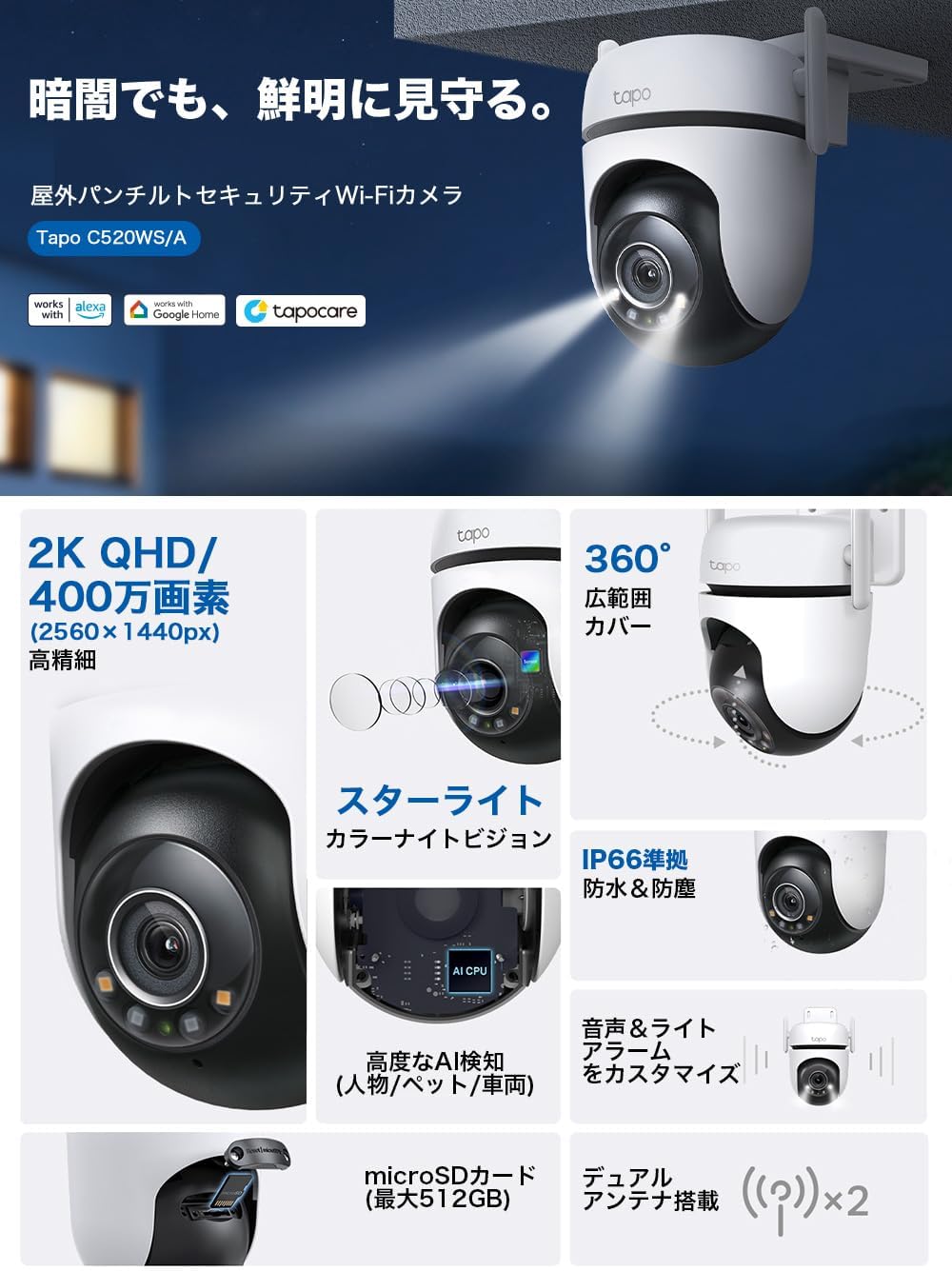
An infographic showcasing the camera's main features: 2K QHD resolution, 360° coverage, starlight night vision, IP66 weather resistance, AI detection, microSD card support (up to 512GB), and dual antennas.
Key Capabilities:
- 2K QHD Resolution: Captures high-definition video at 2560 x 1440 pixels, providing clear and detailed images.
- 360° Pan/Tilt Coverage: Offers a wide field of view with 360° horizontal and 130° vertical rotation, allowing for comprehensive monitoring of your property.
- Starlight Night Vision: Equipped with a starlight sensor for enhanced low-light performance, delivering full-color video even in dim conditions.
- Smart AI Detection: Utilizes advanced AI algorithms to accurately detect and differentiate between humans, vehicles, and pets, reducing false alarms.
- IP66 Weatherproof: Designed to withstand harsh outdoor elements, providing reliable operation in rain, dust, and extreme temperatures.
- Two-Way Audio: Allows for real-time communication through the camera, enabling you to speak with visitors or deter intruders.
- Flexible Connectivity: Supports both wireless (Wi-Fi) and wired (Ethernet) connections for versatile installation options.
- Local and Cloud Storage: Supports local storage via microSD card (up to 512GB) and offers optional cloud storage services.
- Customizable Sound and Light Alarm: Configure the camera to trigger a siren and flashing lights upon detection to deter unwanted visitors.
- Privacy Mode: Physically blocks the camera lens for enhanced privacy when needed.
Visual Demonstrations:

Demonstration of 2K QHD resolution with motion tracking, showing clear identification of moving subjects in a garden setting.

Comparison of starlight night vision (full color) versus standard monochrome night vision, illustrating improved clarity and color in low light.

An image demonstrating the effectiveness of the starlight sensor in night vision, showing a clear, colored view of a scene compared to a dark, monochrome view without it.
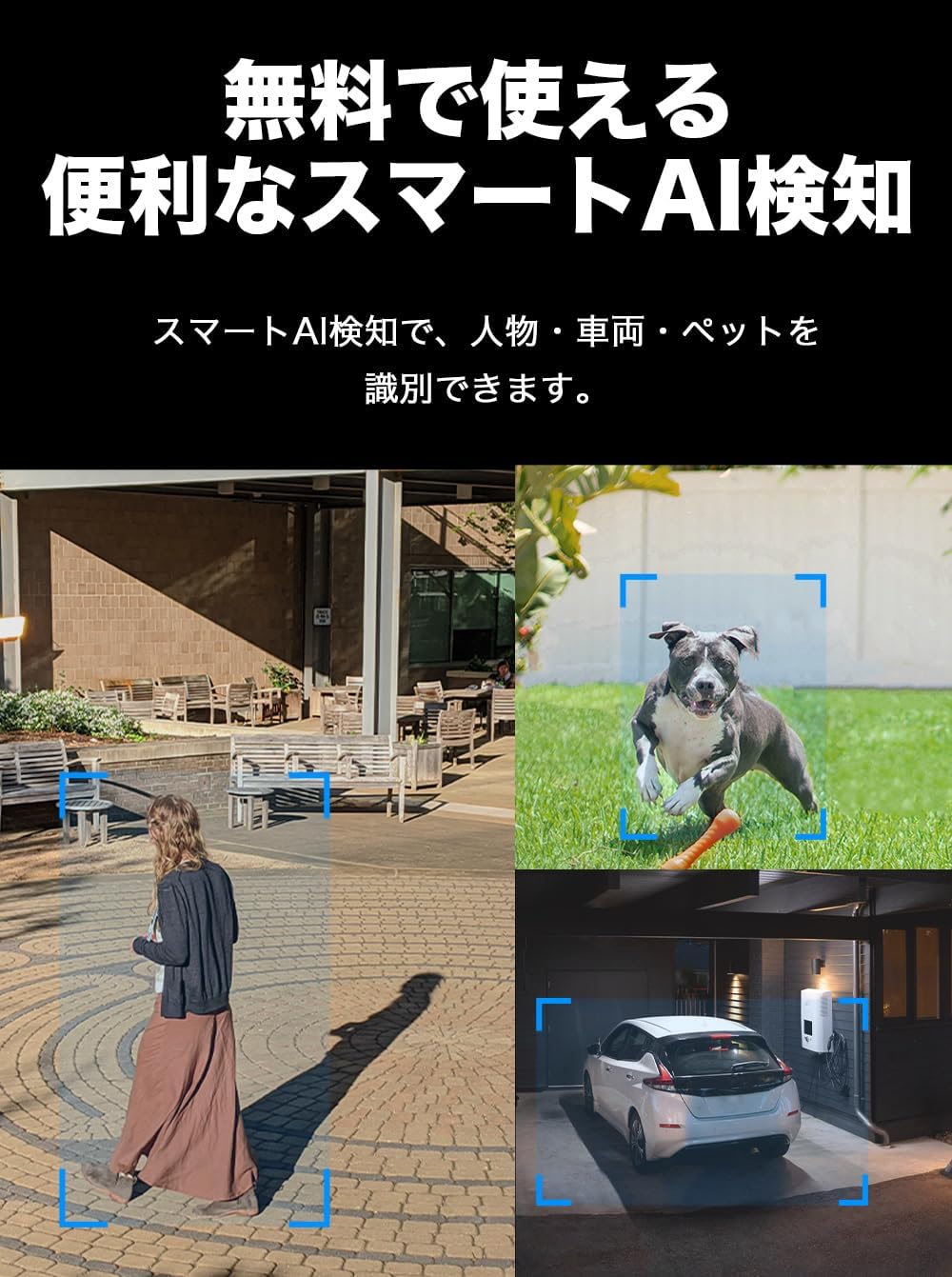
Examples of smart AI detection identifying a person, a pet, and a vehicle within the camera's view.

An illustration showing the camera's alarm function, with lights and sound deterring an intruder.

A smartphone screen displaying a motion detection notification from the Tapo app, showing a timestamped alert.

An image illustrating the camera's dual connectivity options: wired via Ethernet cable and wireless via Wi-Fi.

A screenshot of the Tapo app interface, showing live view, playback, and various control options for the camera.

An image demonstrating the privacy mode, where the camera lens is physically covered for enhanced privacy.

Illustrations showing various mounting options for the camera, including wall, pole, and ceiling installations.

A close-up image of the camera with water droplets, signifying its IP66 waterproof rating.

An image depicting a person interacting with a delivery driver via the camera's two-way audio feature.

A scene showing a user interacting with the camera using voice commands through a smart assistant like Alexa or Google Home.
Setup Guide
- Download the Tapo App: Search for "Tapo" in the Apple App Store or Google Play Store and download the official Tapo app.
- Power On the Camera: Connect the camera to a power outlet using the provided power adapter. Wait for the status LED to blink red and green, indicating it's ready for setup.
- Add Camera in App: Open the Tapo app, log in or create a TP-Link ID. Tap the "+" icon in the top right corner to add a new device. Select your camera model (Tapo C520WS/A) and follow the on-screen instructions.
- Connect to Network:
- Wireless Connection (Wi-Fi): The app will guide you to connect the camera to your home Wi-Fi network. Ensure your Wi-Fi signal is strong at the installation location.
- Wired Connection (Ethernet): If preferred, connect an Ethernet cable from your router to the camera's Ethernet port. The app will detect the wired connection automatically.
- Mount the Camera:
The Tapo C520WS/A supports wall mounting. Use the provided mounting template and screws to securely attach the camera to a suitable surface. Ensure the mounting location provides a clear view and is within range of your network.
Various mounting positions for the Tapo C520WS/A camera, including wall and ceiling.
- Final Adjustments: Once mounted, use the Tapo app to adjust the camera's pan and tilt angles to achieve the desired viewing area.
Operating Instructions
Using the Tapo App:
The Tapo app is the primary interface for controlling and managing your camera.
A view of the Tapo app's live feed and control options.
- Live View: Access real-time video feed from your camera.
- Pan & Tilt Control: Use the directional controls in the app to remotely adjust the camera's viewing angle (360° horizontal, 130° vertical).
- Two-Way Audio: Tap the microphone icon to speak through the camera's speaker, and listen to audio from the camera's microphone.
- Motion Detection & Alerts:
- Configure detection zones and sensitivity levels.
- Enable specific detection types: Human Detection, Vehicle Detection, and Pet Detection.
- Receive instant notifications on your smartphone when motion is detected.
- Recording & Playback:
- Record video continuously or based on motion detection.
- Access recorded footage from the microSD card or cloud storage (if subscribed) via the app's playback feature.
- Privacy Mode: Activate privacy mode through the app to physically cover the camera lens, ensuring complete privacy when desired.
- Alarm Settings: Customize the sound and light alarm to activate upon detection, serving as a deterrent.
- Voice Control: Integrate your camera with Amazon Alexa or Google Assistant for hands-free control. For example, "Alexa, show me the backyard camera."
Maintenance
- Cleaning: Regularly wipe the camera lens and body with a soft, damp cloth to remove dust and dirt. Do not use harsh chemicals or abrasive cleaners.
- Firmware Updates: Keep your camera's firmware updated through the Tapo app. Firmware updates often include performance improvements, new features, and security enhancements.
- Environmental Conditions: While the camera is IP66 weatherproof, ensure it is installed in a location that minimizes direct exposure to extreme weather conditions (e.g., direct heavy rain, prolonged direct sunlight) to maximize its lifespan.
- Power Supply: Ensure the power adapter and cable are not damaged. Use only the original power adapter provided with the camera.
Troubleshooting
| Problem | Possible Solution |
|---|---|
| Camera is offline or cannot connect to Wi-Fi. |
|
| Poor video quality. |
|
| Frequent false motion alerts. |
|
| Two-way audio not working. |
|
Specifications
| Feature | Detail |
|---|---|
| Brand | Tapo |
| Model Name | Tapo C520WS |
| Product Model Number | Tapo C520WS |
| Color | White |
| Product Dimensions (LxWxH) | 12.4 x 12.3 x 9 cm |
| Item Weight | 780 g |
| Water Resistance Level | Waterproof (IP66) |
| Connectivity Technology | Wireless (Wi-Fi) |
| Video Capture Resolution | 1440p (2K QHD) |
| Mounting Type | Wall Mount |
| Recommended Uses | Night Vision, Home Security |
| Compatible Devices | Smartphone |
| Included Components | Tapo C520WS/A(JP) |
Warranty and Support
Your Tapo C520WS/A camera comes with a standard manufacturer's warranty. For detailed warranty information, technical support, or to access frequently asked questions, please visit the official Tapo support website or contact their customer service.
Official Tapo Store: Visit Tapo Store on Amazon.co.jp
Related documentsTapo C520WS/A


Ask a question about this manual
Ask about setup, troubleshooting, compatibility, parts, safety, or missing instructions. Manuals+ will review the question and use this page’s manual context to help answer it.