
1. Introduction
The ICECO VL35 ProS is a versatile and robust portable refrigerator designed for both home and vehicle use. Featuring a multi-directional lid, dual power input (DC 12/24V and AC 110-240V), and a high-efficiency SECOP compressor, it offers reliable cooling and freezing capabilities for various applications, from camping trips to daily use. This manual provides essential information for the safe and efficient operation and maintenance of your ICECO VL35 ProS.
2. Safety Information
- Ensure proper ventilation around the unit to prevent overheating.
- Do not block the air vents.
- Avoid placing the unit in direct sunlight or near heat sources.
- Use only the provided power cables and adapters.
- Keep liquids away from electrical connections.
- Do not operate the unit if the power cord is damaged.
- Keep out of reach of children.
3. Product Overview
Key Features:
- Multi-opening Lid Design: Change the lid's opening direction without assembly for easy access in tight spaces.
- Convenient Plugs: 12/24V DC ports on both sides, 2 USB outlets for mobile devices (DC power only), and built-in AC transformer (110-240V).
- Humanized Design: Features drain hole, waterproof baffle, LED lights, and removable handles. Includes removable basket, replacement handles, corner protectors, and drain plugs.
- SECOP Compressor: Cooling range from 0°F to 50°F (-18℃ to 10℃) with MAX mode for fast cooling and ECO mode for energy saving. Stable operation up to 40° tilt.
Components and Dimensions:
The ICECO VL35 ProS is designed for portability and efficiency. Below are its key components and dimensions:

Figure 3.1: ICECO VL35 ProS Portable Refrigerator

Figure 3.2: Dimensions and Capacity Overview
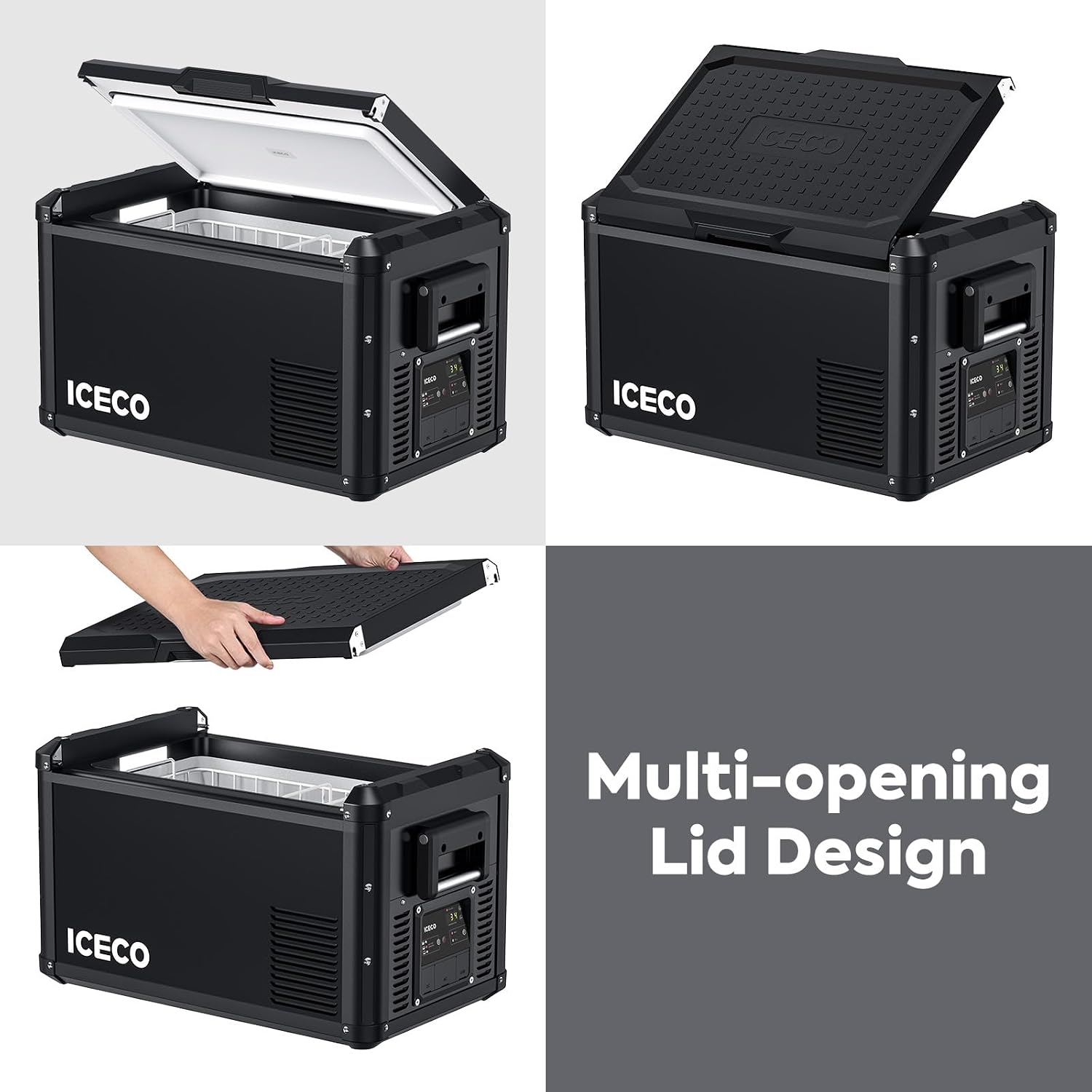
Figure 3.3: Multi-opening Lid Design

Figure 3.4: Convenient Power Ports
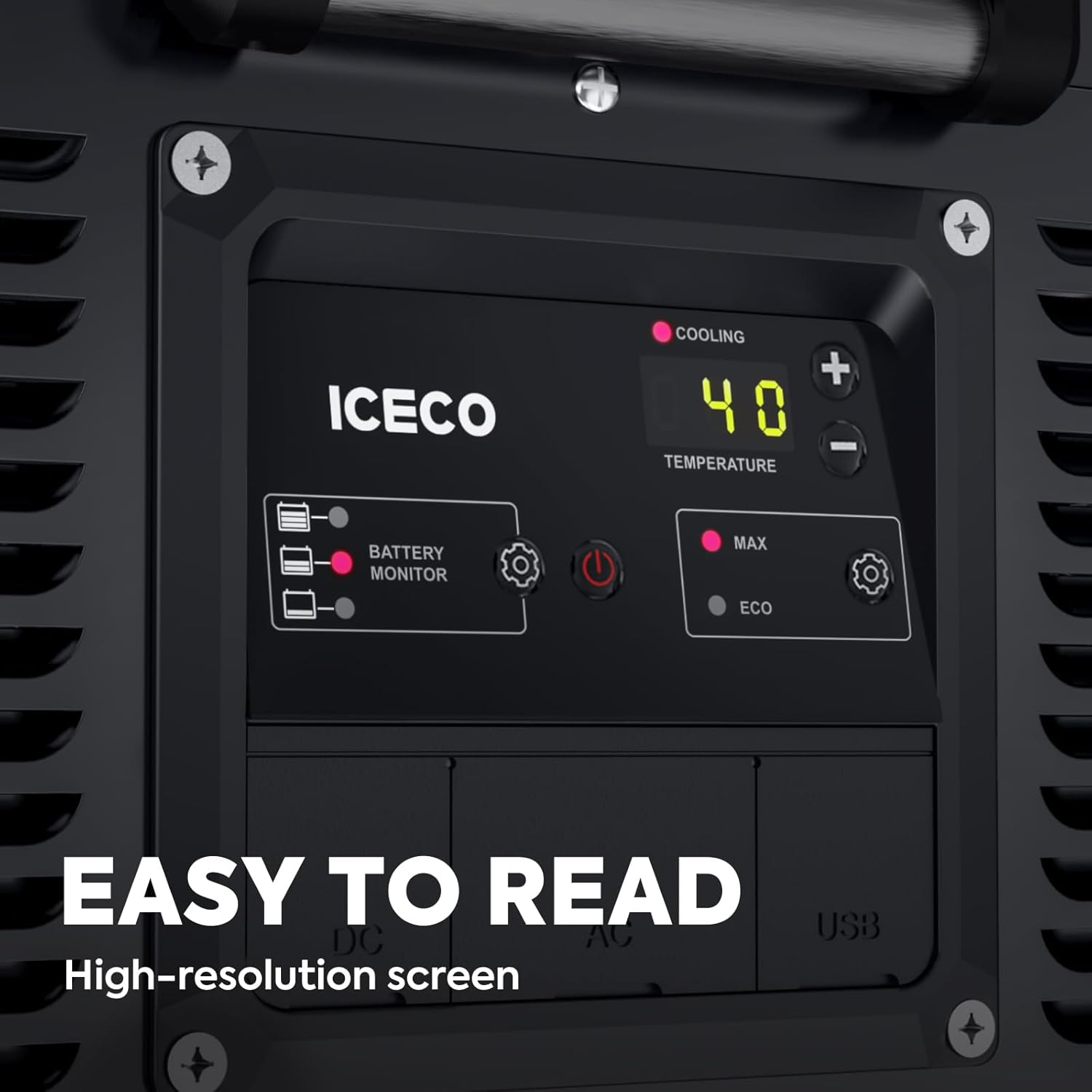
Figure 3.5: Easy-to-Read Control Panel

Figure 3.6: Interior LED Light

Figure 3.7: Removable Basket

Figure 3.8: Drain Hole and Plug
4. Setup
- Unpacking: Carefully remove the refrigerator from its packaging. Inspect for any shipping damage.
- Initial Cleaning: Before first use, clean the interior and exterior with a damp cloth and mild detergent. Ensure the unit is completely dry before plugging it in.
- Handle Installation: Attach the removable handles if not already installed, using the provided hardware.
- Power Connection: Connect the appropriate power cable (AC for home use, DC for car use) to the corresponding port on the refrigerator.
- Initial Power-On: Press the power button on the control panel. The display will light up, showing the current internal temperature.
- Pre-cooling: For optimal performance, it is recommended to pre-cool the refrigerator for at least 30 minutes before loading items.
5. Operating Instructions
Temperature Control:
The ICECO VL35 ProS allows precise temperature control from 0°F to 50°F (-18℃ to 10℃). Use the '+' and '-' buttons on the control panel to adjust the desired temperature. The digital display will show the set temperature.
Operating Modes (MAX/ECO):
The unit features two operating modes:
- MAX Mode: Provides maximum cooling power for rapid temperature reduction. Ideal for initial cooling or when quick chilling is needed.
- ECO Mode: Optimizes energy consumption for extended battery life. Suitable for maintaining temperature once the desired level is reached.
Switch between modes using the gear icon button next to the MAX/ECO indicators on the control panel.
Battery Protection:
The unit includes a 3-level battery protection system to prevent excessive discharge of your vehicle's battery. The battery monitor on the control panel indicates the current battery level. Adjust the protection level via the settings menu if needed.
Multi-directional Lid:
The lid can be opened from the front or back, or completely removed for full access. This flexibility is particularly useful in confined spaces or for thorough cleaning.
USB Charging:
Two USB outlets are available on the control panel for charging mobile devices. These outlets are active only when the refrigerator is powered by DC (12/24V) input.
Official Product Videos:
Video 5.1: ICECO VL35ProS 12V Fridge Freezer with Reversible Lid. This video demonstrates the reversible lid feature and overall design.
Video 5.2: Camp with VL35 ProS. This video showcases the refrigerator's use in a camping environment.
Video 5.3: Review & Thoughts - ICECO VL35 ProS Portable Refrigerator. A detailed review of the product's features and performance.
Video 5.4: ICECO VL35 ProS Multi-directional Lid Portable Refrigerator. Another demonstration of the versatile lid and portability.
6. Maintenance
- Regular Cleaning: Clean the interior regularly with a damp cloth and mild detergent. Use the drain hole for easy water removal during cleaning.
- Exterior Cleaning: Wipe down the exterior with a soft, dry cloth. Avoid abrasive cleaners.
- Ventilation: Periodically check that the air vents are clear of dust and debris to ensure efficient operation of the compressor.
- Storage: When storing the unit for extended periods, ensure it is clean, dry, and unplugged. Leave the lid slightly ajar to prevent odors.
7. Troubleshooting
| Problem | Possible Cause | Solution |
|---|---|---|
| Unit not powering on | No power supply; Damaged cable; Blown fuse | Check power connection; Replace cable; Check vehicle fuse or unit fuse |
| Not cooling sufficiently | Temperature setting too high; Poor ventilation; Overloaded; Lid not sealed | Adjust temperature; Clear vents; Reduce contents; Ensure lid is closed properly |
| Error code on display | Specific internal issue (e.g., sensor fault, low voltage) | Refer to the detailed troubleshooting section in the included manual or contact support. |
| Excessive noise | Unit not level; Fan obstruction; Compressor issue | Place on a flat surface; Clear fan area; Contact technical support if noise persists |
For more detailed troubleshooting steps, please refer to the comprehensive manual included with your product or contact ICECO technical support.
8. Specifications
| Feature | Detail |
|---|---|
| Brand | ICECO |
| Model | VL35 ProS |
| Capacity | 35 Liters |
| Cooling Range | 0°F to 50°F (-18℃ to 10℃) |
| Power Input | DC 12/24V, AC 110-240V |
| Compressor | SECOP |
| Item Weight | 48.4 pounds (22 Kilograms) |
| Product Dimensions | 28.1 x 15.9 x 15.7 inches (71.4 x 40.4 x 39.9 cm) |
| Noise Level | 45 dB |
| Material Type | Steel |
| Defrost System | Automatic |
| Certification | ETL |
9. Warranty and Support
ICECO stands behind the quality of its products. For compressors, ICECO provides 5 years of technical assistance. For accessories, a 1-year support period is provided. ICECO also offers telephonic support and local support after purchase.
For any technical assistance, warranty claims, or support inquiries, please contact ICECO directly. The product is sold by ICECO, ensuring direct access to manufacturer support.
For more information, visit the official ICECO store or contact their customer service.


