
Introduction
Welcome to the user manual for your EarFun Free Pro 3 Noise Cancelling Wireless Earbuds. These earbuds are designed to provide a superior audio experience with advanced features for daily use, gaming, and communication. Please read this manual carefully to ensure proper use and maintenance of your device.

Image: EarFun Free Pro 3 Wireless Earbuds and their charging case.
What's in the Box
Your EarFun Free Pro 3 package includes the following items:
- EarFun Free Pro 3 ANC Earbuds (Left and Right)
- Charging Case
- USB-C Cable
- Eartips (Multiple sizes: XS, S, M, L, XL)
- Ear Hooks (Multiple sizes)
- User Manual
Setup
1. Charging the Earbuds and Case
Before first use, fully charge the earbuds and the charging case. Connect the provided USB-C cable to the charging port on the back of the case and to a power source. The case also supports wireless charging; simply place it on a compatible wireless charging pad.
2. Selecting the Right Fit
For optimal sound quality and noise cancellation, it is crucial to select the correct eartips and ear hooks. Experiment with the different sizes provided (XS, S, M, L, XL eartips and 3 pairs of ear hooks) to find the most comfortable and secure fit for your ears. Insert the earbuds into your ear canal and gently rotate to lock them in place.

Image: Guide for selecting suitable eartips and ear hooks for a secure and comfortable fit.
3. Pairing with Your Device
Open the charging case. The earbuds will automatically enter pairing mode. On your device (smartphone, tablet, laptop), go to Bluetooth settings and select "EarFun Free Pro 3" from the list of available devices. Once connected, you will hear an audible confirmation.

Image: EarFun Free Pro 3 earbuds demonstrating multipoint connection to a smartphone and a laptop.
4. EarFun App Installation
Download the official EarFun App from your device's app store (available for iOS and Android). The app allows for customization of various functions, including EQ settings, touch controls, and noise canceling modes. Ensure the latest firmware is installed via the app for optimal performance.
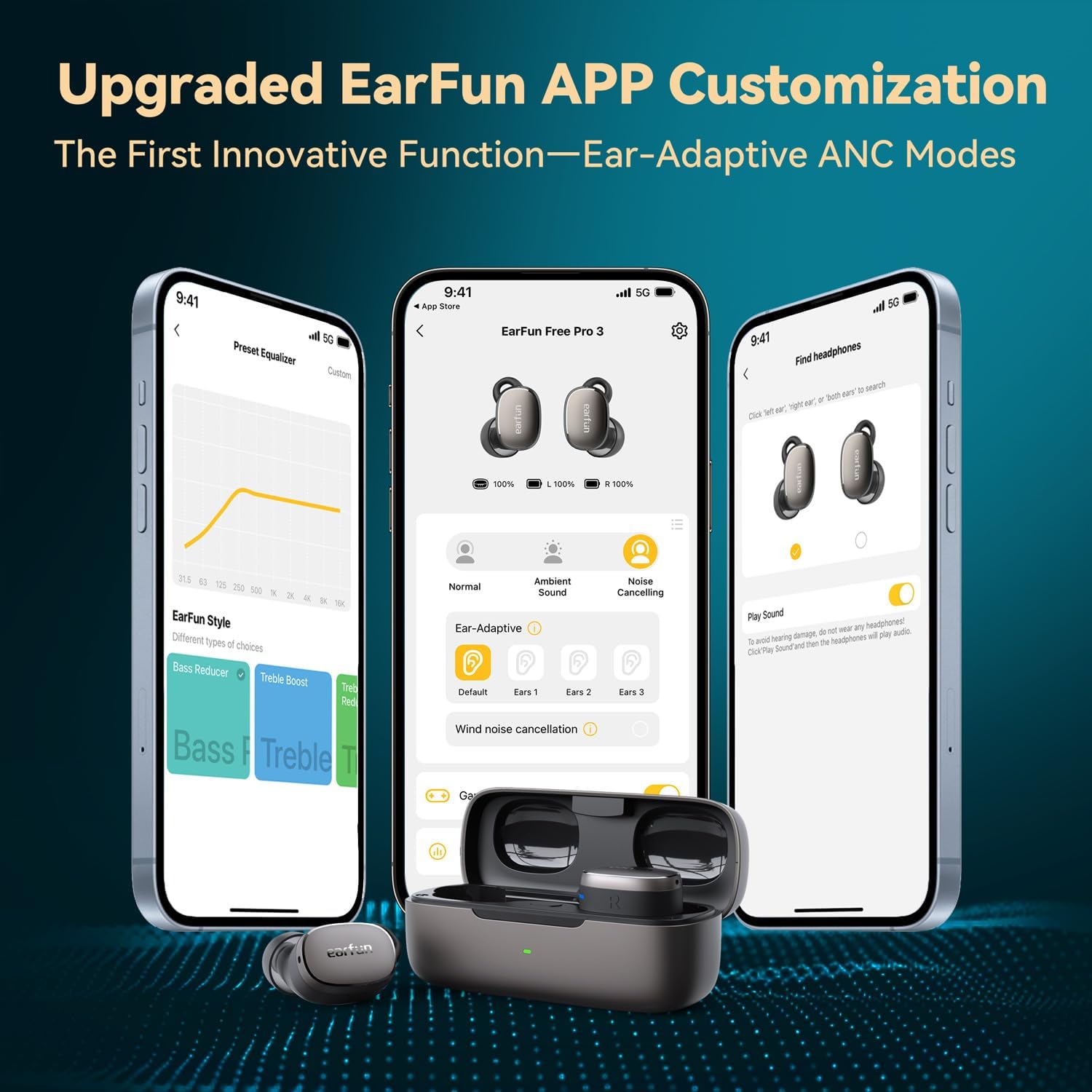
Image: Overview of the EarFun App's customization options, including EQ, battery status, multipoint, firmware updates, ANC modes, touch control settings, and a 'Find Headphones' feature.
Operating the Earbuds
Touch Controls
The EarFun Free Pro 3 earbuds feature intuitive touch controls. These can be customized via the EarFun App. Common functions include:
- Play/Pause music
- Answer/End calls
- Skip tracks
- Activate voice assistant
- Switch Noise Control Modes
Noise Control Modes
The earbuds offer three primary noise control modes, switchable via touch control or the EarFun App:
- Active Noise Cancellation (ANC): Reduces ambient noise by up to 43 dB, ideal for noisy environments. Ensure the latest firmware is updated in the app for Ear-Adaptive ANC modes.
- Ambient Sound Mode: Allows you to hear your surroundings while listening to audio, useful for awareness in public spaces.
- Normal Mode: Standard audio playback without active noise cancellation or ambient sound passthrough.

Image: Illustration of the EarFun Free Pro 3's Active Noise Cancellation reducing noise by 43dB.
Multipoint Connection
The EarFun Free Pro 3 supports multipoint connection, allowing you to connect to two devices simultaneously. This enables seamless switching between audio sources, such as taking a call on your phone while listening to music on your laptop.
Gaming Mode
Activate Gaming Mode via the EarFun App for an ultra-low latency experience (less than 55ms), ensuring synchronized audio and visuals for gaming and streaming.
Call Quality
Equipped with 6 microphones (3 per earbud) and Qualcomm cVc 8.0 Noise Reduction technology, these earbuds are designed to distinguish human voices and reduce environmental sounds for clear calls.

Image: Internal view of an EarFun Free Pro 3 earbud highlighting the three microphones (Feedforward, Feedback, and Talk Mic) for enhanced call clarity.
Maintenance
Battery Life and Charging
The earbuds provide up to 7.5 hours of playtime on a single charge (with ANC off). The charging case extends the total playtime to 33 hours. The case can be charged via USB-C or wirelessly. A quick 10-minute charge of the case can provide significant additional playtime.

Image: Battery life indication for EarFun Free Pro 3, showing 7.5 hours of single playtime (ANC off) and 33 hours total playtime with the charging case, which supports wireless charging.
Water Resistance
The EarFun Free Pro 3 earbuds are rated as Waterproof, making them suitable for workouts and light rain. However, they are not designed for swimming or submersion in water for extended periods.

Image: EarFun Free Pro 3 earbuds shown underwater, highlighting their water resistance capabilities.
Cleaning
Regularly clean the earbuds and charging case with a soft, dry cloth. Remove eartips and clean them separately with mild soap and water if necessary, ensuring they are completely dry before reattaching. Avoid using harsh chemicals or abrasive materials.
Troubleshooting
- No Sound/Connection Issues: Ensure earbuds are charged and within Bluetooth range. Try resetting the earbuds by placing them in the case, closing it, and reopening. Re-pair with your device.
- Poor Sound Quality: Check eartip fit. Ensure earbuds are clean and free of debris. Adjust EQ settings in the EarFun App.
- ANC Not Effective: Ensure eartips provide a good seal. Update firmware via the EarFun App to access Ear-Adaptive ANC modes.
- Charging Problems: Verify the USB-C cable and power source are working. Ensure the charging contacts on the earbuds and case are clean.
- App Issues: Ensure the EarFun App is updated to the latest version. Restart the app or your device.
For more detailed troubleshooting, refer to the EarFun App's help section or the official EarFun support website.
Specifications
| Feature | Specification |
|---|---|
| Model Name | EarFun Free Pro 3 |
| Noise Control | Active Noise Cancellation (up to 43dB) |
| Connectivity Technology | Wireless (Bluetooth 5.3) |
| Audio Driver Type | Dynamic Driver (7mm wool composite) |
| Frequency Response | 20 Hz - 20,000 Hz |
| Battery Life (Earbuds) | 7.5 Hours (ANC off) |
| Total Playtime (with Case) | 33 Hours |
| Charging Time (Case) | 10 minutes (quick charge) |
| Microphones | 6 (3 per earbud) with Qualcomm cVc 8.0 Noise Reduction |
| Low Latency Mode | 55ms (Gaming Mode) |
| Water Resistance Level | Waterproof |
| Control Type | Touch Control |
| Weight (Earbuds) | 4.5g (each) |
| Compatible Devices | Smartphones, Tablets, Laptops, Desktops, Smart Speakers |
Warranty and Support
EarFun products come with a standard warranty. For specific warranty details, please refer to the warranty card included in your product packaging or visit the official EarFun website. For technical support, FAQs, and further assistance, please visit the EarFun support page or contact their customer service directly.
You can also find the official User Manual (PDF) here.


