
1. Introduction
Thank you for choosing the Goolsky WLtoys 124008 High-Speed RC Buggy. This 1/12 scale, 4-wheel drive (4WD) remote control vehicle is equipped with a powerful brushless motor, designed for high-speed performance and off-road capabilities. Please read this manual thoroughly before operating the vehicle to ensure safe and optimal performance.

Image 1.1: Overview of the Goolsky WLtoys 124008 RC Buggy highlighting key features.
2. Safety Information
Operating remote control vehicles requires caution. Failure to operate safely may result in injury or damage to property.
- Adult Supervision: This product is recommended for adults. Children operating the vehicle should always be under direct adult supervision.
- Operating Environment: Operate the RC car in open, private areas free from obstacles, people, and pets. Avoid public roads, crowded places, and areas with water or extreme temperatures.
- Keep Clear: Keep hands, hair, and loose clothing away from moving parts such as wheels and gears.
- Battery Safety:
- Use only the provided charger and battery.
- Do not overcharge or short-circuit batteries.
- Do not expose batteries to fire or extreme heat.
- If the battery becomes hot during charging or use, discontinue use immediately.
- Store batteries in a cool, dry place away from flammable materials.
- Vehicle Inspection: Before each use, inspect the vehicle for any loose parts, damage, or obstructions.
- Avoid Collisions: High-speed collisions can cause significant damage to the vehicle and surroundings. Operate responsibly.
3. Package Contents
Please verify that all items listed below are included in your package:
- 1x Goolsky WLtoys 124008 RC Car
- 1x Remote Control
- 1x Rechargeable Battery (for car)
- 1x Charging Cable
- 1x Cross Wrench

Image 3.1: All components included in the product package.
4. Product Overview
4.1 RC Car Features
- Scale: 1:12
- Drive System: 4-Wheel Drive (4WD) for superior traction and control.
- Motor: High-performance 3S Brushless Motor (3500Kv) for speeds up to 60 KM/H.
- Suspension: Independent suspension system with simulated metal oil pressure shock absorbers for smooth running over varied terrain.
- Gears: Full metal gears for enhanced durability and wear resistance.
- Body Shell: Anti-explosion PVC color printed car shell, designed for anti-collision and anti-fall, adapting to various terrains.
- Battery: Modular battery design for easy installation and high power density.

Image 4.1: Internal view of the RC car chassis, showing the brushless motor and battery compartment.

Image 4.2: Exploded diagram illustrating the internal mechanical structure.
4.2 Remote Control Features
- Frequency: 2.4GHz for stable and interference-free control.
- Control Distance: Up to 100 meters.
- Controls: Steering wheel for direction, trigger for throttle (forward/backward).
- Adjustments: Steering adjustment and throttle tuning for precise control.
- Phone Holder: Integrated portable phone holder for external camera use (if applicable).

Image 4.3: Remote control diagram with labeled functions.
5. Setup
5.1 Charging the Car Battery
- Connect the provided charging cable to the car's battery.
- Plug the USB end of the charging cable into a suitable USB power adapter (not included) or a computer USB port.
- The indicator light on the charger will show the charging status. Refer to the charger's specific instructions for light indications.
- Charging typically takes approximately 3 hours. Do not leave the battery unattended while charging.
- Once fully charged, disconnect the battery from the charger.
5.2 Installing the Car Battery
- Locate the battery compartment on the RC car chassis.
- Carefully insert the charged battery into the compartment.
- Connect the battery connector to the car's power connector, ensuring correct polarity.
- Secure the battery compartment cover.

Image 5.1: Installing the modular battery into the RC car.
5.3 Installing Remote Control Batteries
- Open the battery cover on the back of the remote control (refer to Image 4.3).
- Insert 4x AAA batteries (not included) into the compartment, observing the correct polarity (+/-).
- Close the battery cover securely.
5.4 Pairing the Remote Control with the Car
- Ensure both the RC car battery is installed and the remote control has fresh AAA batteries.
- Turn on the RC car first using its power switch.
- Immediately turn on the remote control using its power switch.
- The remote control's indicator light should blink and then become solid, indicating a successful connection. If not, turn both off and repeat the process.
6. Operating Instructions
6.1 Basic Controls
- Throttle Trigger:
- Pull the trigger towards you to accelerate forward.
- Push the trigger away from you to brake or reverse.
- Steering Wheel:
- Turn the wheel left to steer the car left.
- Turn the wheel right to steer the car right.

Image 6.1: The RC car in action on a paved surface.
6.2 Adjustments
- Steering Adjustment: If the car pulls to one side when the steering wheel is centered, use the steering adjustment knob on the remote control to fine-tune the steering until the car drives straight.
- Throttle Tuning: This adjustment can limit the maximum throttle output, useful for beginners or for operating in smaller spaces.
6.3 Driving Tips
- Start slowly to get accustomed to the controls before attempting high speeds.
- The 4WD system and independent suspension allow for excellent performance on various terrains, including dirt, gravel, and short grass.
- Be mindful of the 100-meter control range to avoid losing signal.
- The car's battery provides approximately 10 minutes of run time, depending on driving style and terrain.

Image 6.2: The RC car demonstrating its off-road capability.
7. Maintenance
Regular maintenance will extend the lifespan and performance of your RC buggy.
- Cleaning: After each use, especially after driving in dirt or dusty conditions, clean the car with a soft brush or compressed air to remove debris. Avoid using water directly on electronic components.
- Inspection: Periodically check for loose screws, damaged parts, or worn tires. Tighten any loose fasteners.
- Gears: The car features full metal gears. Inspect them for wear or damage. Light lubrication with RC-specific grease can help maintain smooth operation.
- Shock Absorbers: Check the simulated metal oil pressure shock absorbers for leaks or damage. Ensure they move freely.
- Battery Care:
- Always fully charge the battery before storage if it will not be used for an extended period.
- Store batteries in a cool, dry place.
- Do not store fully discharged batteries.
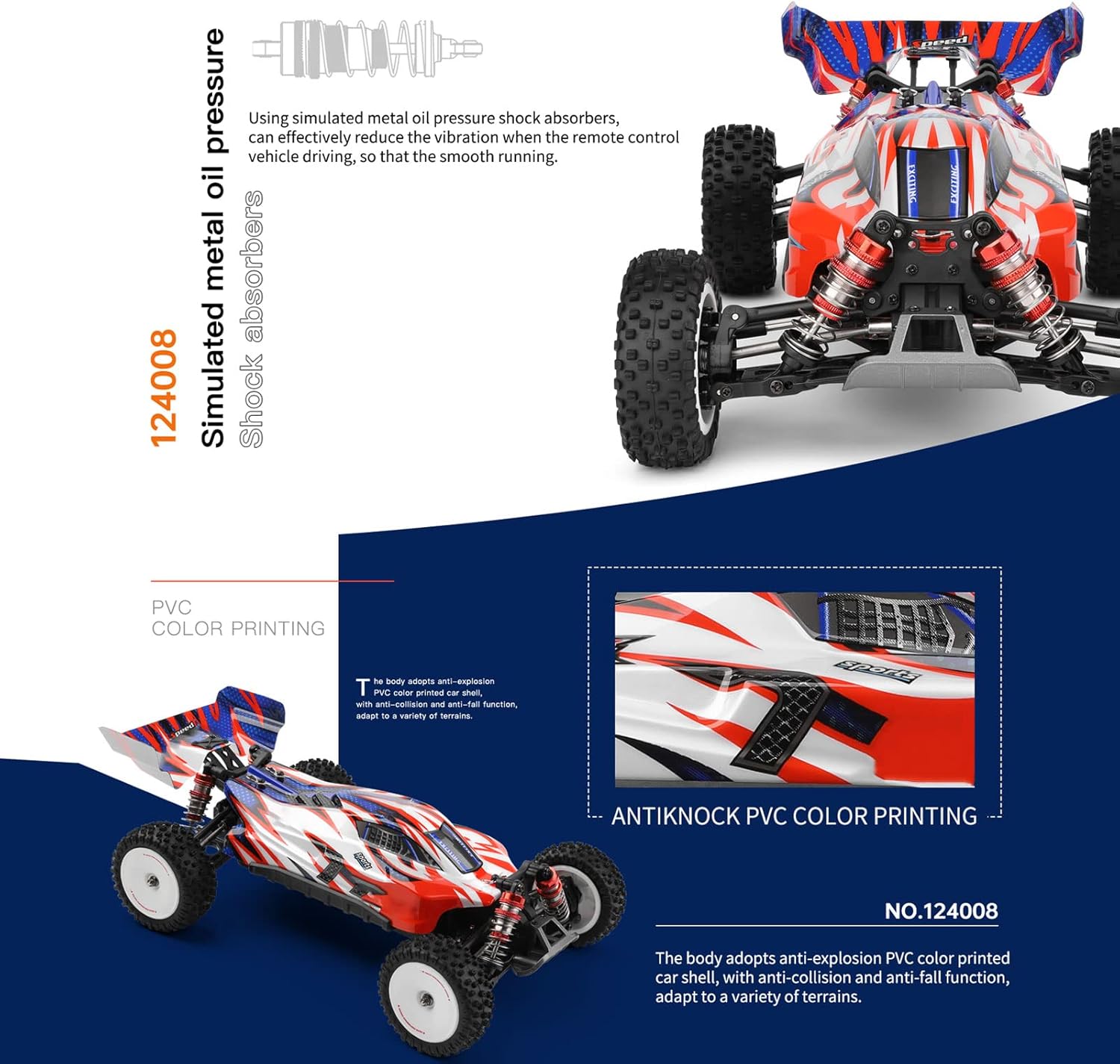
Image 7.1: Detail of the rear suspension and shock absorbers.
8. Troubleshooting
| Problem | Possible Cause | Solution |
|---|---|---|
| Car does not respond to remote. |
|
|
| Short control range or interference. |
|
|
| Car pulls to one side. |
|
|
| Reduced speed or power. |
|
|
9. Specifications
| Feature | Detail |
|---|---|
| Model Name | 124008 |
| Brand | Goolsky |
| Scale | 1:12 |
| Drive System | 4WD |
| Motor Type | 3S Brushless Motor (3500Kv) |
| Max Speed | 60 KM/H |
| Remote Control Frequency | 2.4 GHz |
| Control Distance | Approx. 100 meters |
| Car Battery | 11.1V 1300mAh (3S) |
| Working Time | Approx. 10 minutes |
| Charging Time | Approx. 3 hours |
| Remote Control Batteries | 4x AAA (not included) |
| Product Dimensions (Car) | 34.7 x 21.1 x 12.2 cm |
| Item Weight | 2.07 Kilograms |
| Material | PVC (body shell), Metal (gears) |
| Recommended Age | Adult |

Image 9.1: Product dimensions of the RC car.
10. Warranty and Support
This product is covered by a standard manufacturer's warranty. For specific warranty terms and conditions, please refer to the documentation included with your purchase or contact the retailer.
For technical support, spare parts, or any questions regarding the operation or maintenance of your Goolsky WLtoys 124008 RC Buggy, please contact the seller or manufacturer directly.
You can often find support contact information on the product packaging or the retailer's website.